 VedaWatch
Recovery & Apple Watch
Apple Watch high heart rate notification: causes and what to do
What triggers an Apple Watch high heart rate notification, how to set the threshold, common harmless causes, and the symptoms that mean you should get care now.
By VedaWatch editorial team · · 9 min read
The short answer
An Apple Watch high heart rate notification means your heart rate stayed above the threshold you chose while you seemed to be inactive for about 10 minutes. Caffeine, fever, stress, alcohol, dehydration or a loose band are common causes. Chest pain, fainting, or trouble breathing with it needs emergency care.
What does a high heart rate notification on Apple Watch mean?
It means your Apple Watch saw your heart rate stay above a number you picked, at a time when you didn't seem to be moving much. Apple's guide describes it as a heart rate that "remains above a chosen threshold", checked after you've been inactive for at least 10 minutes. It is not a reading from a single moment, and it isn't meant to go off when you climb stairs or work out.
The notification is a prompt to pay attention, not a diagnosis. The Watch doesn't know why your heart rate is up, and Apple states plainly that Apple Watch cannot detect heart attacks. Most of the time the reason is ordinary: a strong coffee, a fever, a stressful hour, a drink or two, a hot bath, or simply a band that slipped. Sometimes it points to a heart rhythm problem worth checking with a doctor.
For context, doctors usually call a resting heart rate above 100 beats per minute tachycardia. Cleveland Clinic describes it as your heart beating "more than 100 times a minute at rest." The notification is watching for the same kind of thing: a rate that's high for a body at rest.
What triggers the alert, and what doesn't
Three things have to line up. Your heart rate has to be above your threshold, it has to stay there rather than spike for a few seconds, and you have to look inactive to the Watch, based on its motion sensors. If you're mid-run, the Watch expects a high heart rate and stays quiet.
Some settings switch the alert off entirely. Apple notes that with Low Power Mode on you won't get high or low heart rate notifications, or irregular rhythm notifications. The feature also needs an Apple Watch Series 1 or later and is for ages 13 and up.
Things that commonly look like a missed alert: a quick spike that settled in under a few minutes, a heart rate that was high while you were walking around, a threshold set higher than the rate you reached, or a Watch that couldn't get a clean reading. Apple's own support pages note that some readings can be abnormally high or low, and that a loose fit, cold skin, some tattoos and irregular arm movement can all make the optical sensor less reliable.
How to turn on high heart rate notifications and change the threshold
You can turn the notifications on the first time you open the Heart Rate app on your Watch, or at any time later from either device. The options in the list can differ by watchOS version, so pick from what your Watch shows.
- On Apple Watch: open the Settings app, tap Heart, tap High Heart Rate Notifications, then choose a threshold in beats per minute (bpm).
- On iPhone: open the Apple Watch app, tap My Watch, tap Heart, tap High Heart Rate, then choose a threshold.
- While you're there, consider setting Low Heart Rate too. It works the same way in the other direction.
- Check that Low Power Mode is off on the Watch when you want these alerts, since it stops them.
- To see past notifications, open the Health app on iPhone, tap Browse, tap Heart, and look for the high heart rate notifications entry. Tap one to see the time and the heart rate behind it.
Which threshold should you choose?
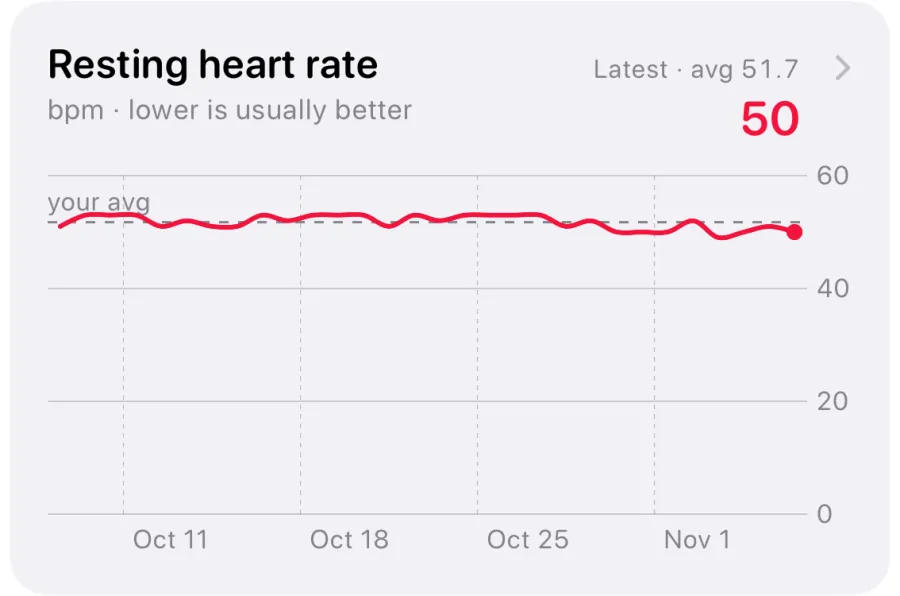
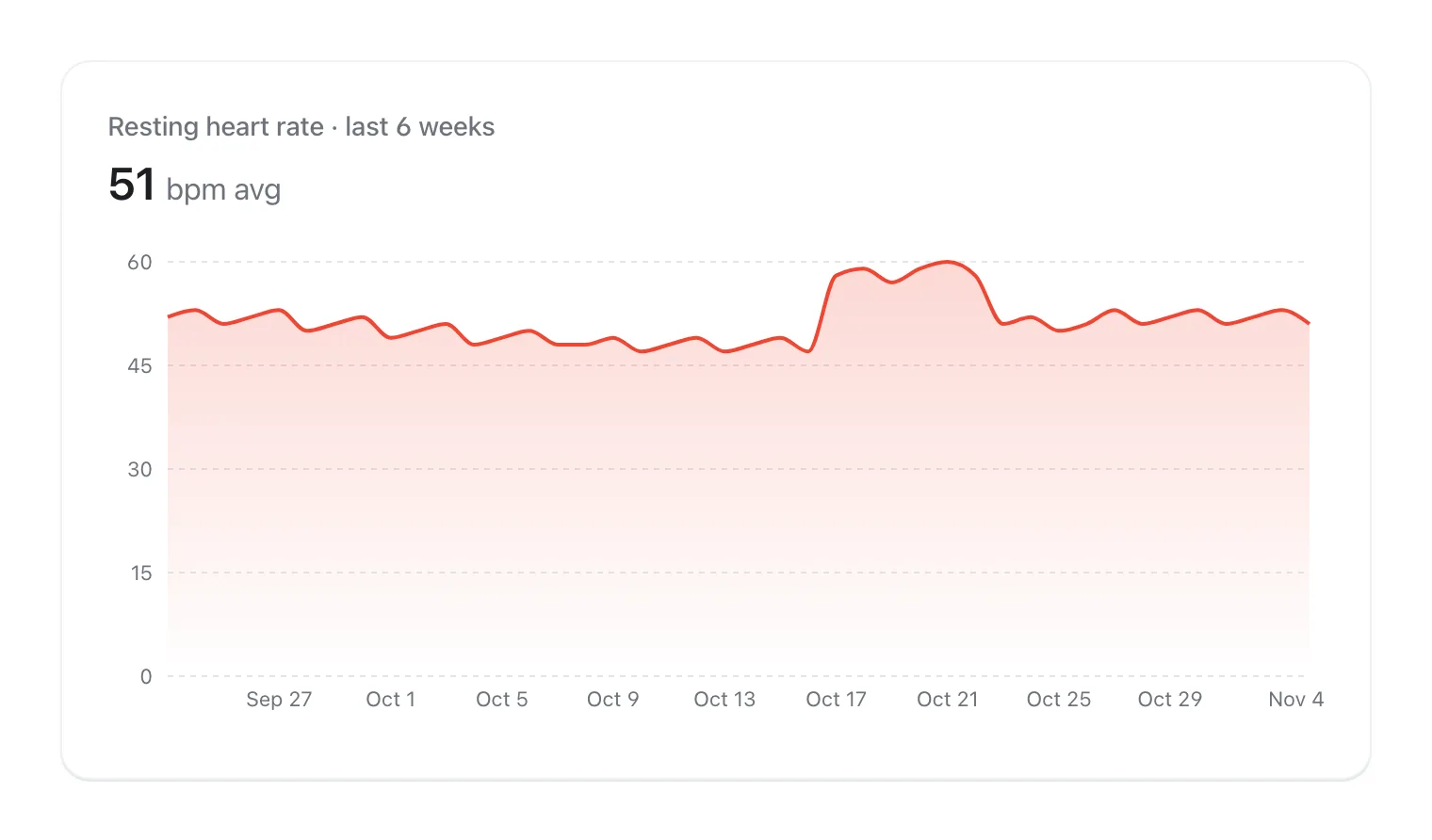
There's no single right number, and if a doctor has given you a specific limit, use theirs. Otherwise, a useful way to think about it is how far the threshold sits above your own normal resting heart rate. Check your resting heart rate trend in the Health app first.
Worked example: if your resting heart rate usually sits around 55 bpm, a threshold of, say, 120 bpm is more than double your resting rate, so an alert means something genuinely unusual for you. If your resting rate normally runs in the high 80s, the same 120 bpm setting could fire after a strong coffee on a stressful afternoon, and you may prefer a higher one so the alerts stay meaningful.
Avoid setting it so high that it can never fire. The point is to catch a heart rate that stays well above your normal while you're sitting still. If you change the threshold to stop alerts that keep coming, mention them to a doctor rather than just silencing them.
Common harmless causes of a high heart rate alert
Most notifications have an everyday explanation. Go through this list before assuming the worst, and note which ones apply. If one clearly fits and you feel fine, the rate usually settles once the cause passes.
Fever and infection. Heart rate rises with body temperature. In a study of 27 young men with fevers, heart rate went up by about 8.5 bpm for every 1°C rise in temperature, and stayed higher even during sleep. A cold or flu coming on can push a normally calm heart over a threshold while you rest on the sofa.
Caffeine, alcohol and nicotine. Cleveland Clinic and the NHS both list them as causes of a fast heart rate or palpitations. A large coffee, an energy drink or pre-workout, or an evening of drinking can all keep your heart rate up for hours.
Stress, anxiety and lack of sleep. A scare, an argument, a deadline or a bad night can all raise heart rate while you're sitting still. The NHS lists stress, anxiety and lack of sleep among the common causes of palpitations.
Dehydration, heat and low blood sugar. Cleveland Clinic lists dehydration and low blood sugar as causes. A hot room, a sauna or hot bath, or a long day without enough fluid can all raise heart rate at rest.
Medicines and other substances. Some medicines can raise heart rate, so check the leaflet. Recreational drugs can too.
Pregnancy, menopause and other conditions. Pregnancy and menopause can both bring a faster heart rate or palpitations. Conditions such as anaemia or an overactive thyroid can as well, which is one reason recurring alerts are worth discussing with a doctor.
Sensor misreads. A loose band, cold hands or wrist, some tattoos, or fidgeting can produce a reading that's simply wrong. If a manual check a minute later shows a normal number and you feel fine, a misread is likely.
What to do when you get a high heart rate notification
Work through these steps calmly. If at any point you have one of the red-flag symptoms in the next section, stop and get emergency help instead.
- Stop and sit down. Notice how you feel: any chest pain or pressure, breathlessness, dizziness or feeling faint?
- Check the fit. Tighten the band so the Watch sits snugly on top of your wrist, then open the Heart Rate app for a fresh reading.
- Take a few slow breaths and recheck after a few minutes of rest. A rate that falls back toward your normal is reassuring.
- Run through the likely causes: caffeine, alcohol, a fever or feeling ill, stress, heat, a missed meal, a new medicine.
- If you have an Apple Watch that supports the ECG app (Series 4 or later and Ultra models, where the feature is available), you can record an ECG to share with a doctor. It classifies the rhythm, but it can't detect a heart attack.
- Look at your notification history in the Health app. One alert on a feverish evening is different from alerts several days a week.
- If alerts keep coming back, last more than a few minutes, or you have a heart condition or a family history of heart problems, book an appointment with your doctor and bring the dates and times.
When a high heart rate needs urgent care
Call emergency services straight away if a fast heart rate comes with chest pain, pressure or tightness, trouble breathing, fainting, or feeling like you might pass out. Apple's own guidance is to call emergency services immediately if you have chest pain or think you're having a heart attack, notification or not. If someone collapses and isn't breathing normally, call for help and start CPR.
Get help urgently, through your doctor or an urgent care line, if a racing or pounding heartbeat won't settle, or if you had palpitations with dizziness or fainting even if they've now stopped.
Book a routine appointment if you feel well but alerts or palpitations keep coming back, happen more often, last longer than a few minutes, or you already have a heart condition or a family history of one. These are the points where the NHS advises seeing a GP.
The reverse matters too. Apple says that if you're not feeling well, you should talk to your doctor even if you don't get a notification. The absence of an alert never rules anything out.
One-off alert or a pattern? Two examples
Example one: you get a single notification at 9 pm while watching TV. You'd had a large coffee at 5 pm, you're coming down with a cold, and your forehead feels warm. A manual reading 15 minutes later is lower, and you feel fine otherwise. This fits a fever and caffeine. Rest, drink fluids, and watch how you feel. If the fever is high or you get worse, contact a doctor as you would for any illness.
Example two: over three weeks, you get notifications on six different days, mostly while sitting at your desk, with no fever, no unusual caffeine and nothing obvious going on. Sometimes you feel a fluttering in your chest. That's a pattern, not a one-off, and it's the kind of history a doctor will want to see. Note the dates, what you were doing and how you felt, and book an appointment.
The difference between the two isn't how high the number was. It's whether there's a clear, passing reason, and whether the alerts repeat.
How VedaWatch helps you keep track of heart rate alerts
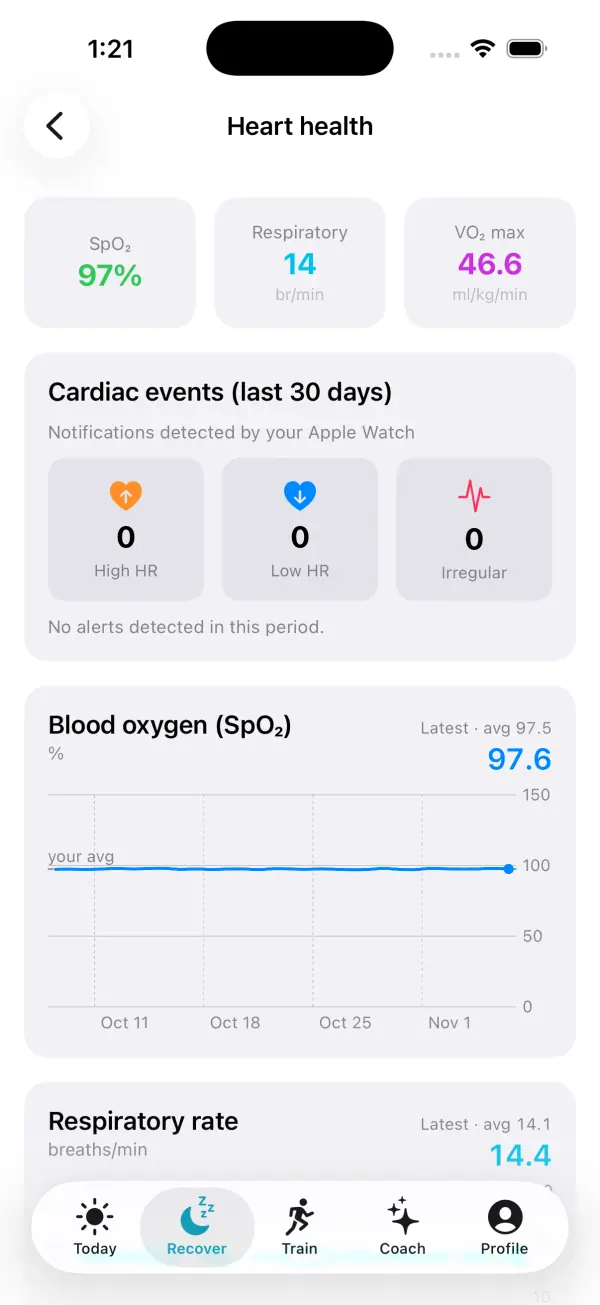
VedaWatch doesn't send its own high heart rate notifications; those come from your Apple Watch. What it does is help you see them in context. On the iPhone app, Recover → Heart health shows a Cardiac events (last 30 days) card that counts the high heart rate, low heart rate and irregular rhythm notifications your Watch recorded in Apple Health. If any appear, it suggests sharing recurring notifications with your clinician.
To work out the cause, log your day in Daily tags. Built-in tags such as Caffeine after 2 pm, Alcohol, Stressful day, Feeling ill, and Sauna or hot bath give you a record of what was going on when an alert fired, which is useful to bring to a doctor. The same Heart health screen also shows blood oxygen, respiratory rate and walking heart rate trends from Health.
For slower changes, VedaWatch's smart alert Resting HR above your normal compares each night with your own median from the previous 4 weeks. By default it tells you when your resting heart rate is 5 bpm or more above your normal for 2 nights in a row. None of this is a diagnosis, and it doesn't replace your doctor or emergency services.
Frequently asked questions
Does the high heart rate notification work during workouts?
It's designed for times when you appear inactive, so a high heart rate during a run or a gym session shouldn't trigger it. The Workout app has its own heart rate settings for exercise.
Why didn't my Apple Watch alert me when my heart rate was over my threshold?
The rate has to stay high while you're inactive, not spike briefly, and Low Power Mode turns the alerts off. Also check that the feature is on in Settings → Heart and that notifications from the Watch aren't silenced.
Can an Apple Watch high heart rate notification be wrong?
Yes. A loose band, cold skin, some tattoos or lots of wrist movement can cause a reading that's too high. If a manual reading with the band snug is normal and you feel well, a misread is likely; if alerts repeat, talk to a doctor.
Is a high heart rate notification the same as an AFib alert?
No. High heart rate notifications only look at how fast your heart is beating. Irregular rhythm notifications are a separate feature that checks for a rhythm that might suggest atrial fibrillation.
Should I show my high heart rate notifications to my doctor?
If they recur or come with symptoms, yes. The dates, times and heart rates in the Health app, plus notes on what you were doing, give your doctor a much clearer picture than memory alone.
Related guides
- Apple Watch low heart rate notification: what it means
- Why is my resting heart rate high? Causes and when to worry
- Resting heart rate on Apple Watch: what's high, low, and why it changes
- Apple Watch AFib History explained: what it does and doesn't do
- Apple Watch health alerts: early illness warning, body strain and other smart alerts in VedaWatch
- HRV when sick: what your Apple Watch shows before symptoms
- What lowers your HRV? Use a tag journal to find out
Sources & further reading
- Apple Support: Heart health notifications on your Apple Watch
- Apple Watch User Guide: Monitor your heart health on Apple Watch
- Apple Support: Monitor your heart rate with Apple Watch
- Apple Support: Get the most accurate measurements using your Apple Watch
- Apple Support: Take an ECG with the ECG app on Apple Watch
- Cleveland Clinic: Tachycardia
- NHS: Heart palpitations
- Karjalainen J, Viitasalo M (1986). Fever and cardiac rhythm. Archives of Internal Medicine 146(6):1169-1171. doi:10.1001/archinte.1986.00360180179026
This guide is educational, not medical advice, and has not been clinically reviewed. VedaWatch is not a medical device. If you have symptoms or concerns about your heart or health, contact a qualified healthcare professional.
Put your trends in perspective.
Explore HRV, sleep, and recovery with VedaWatch on your iPhone.
Download VedaWatch on the App Store →