 VedaWatch
Using VedaWatch
What lowers your HRV? Use a tag journal to find out
Alcohol, late coffee, stress or screens in bed: tag your days in VedaWatch and see how each one goes with your next-morning Apple Watch HRV, compared with your ordinary days.
By VedaWatch editorial team · · 7 min read
The short answer
Tag what happened each day, including ordinary days with "Nothing notable". Once a tag has 5 days with it and 5 without, and your Watch has a month of overnight HRV, VedaWatch shows how next-morning HRV differs after tagged days. It's a pattern in your own data, not proof of cause.
Why your Apple Watch can't tell you what lowered your HRV
Apple Watch records heart rate variability (HRV) while you sleep, so you can see when it dips. What it can't see is why. Health doesn't know you had two glasses of wine, an espresso at 4 pm, a deadline, or an hour of scrolling in bed.
HRV naturally moves from day to day, and many everyday things can nudge it. Research on large groups shows, for example, that alcohol before sleep tends to lower overnight HRV, but how much any one habit matters varies from person to person. A tag journal fills that gap: you note what happened, and VedaWatch lines it up with the HRV your Watch measured the next morning.
What you can tag
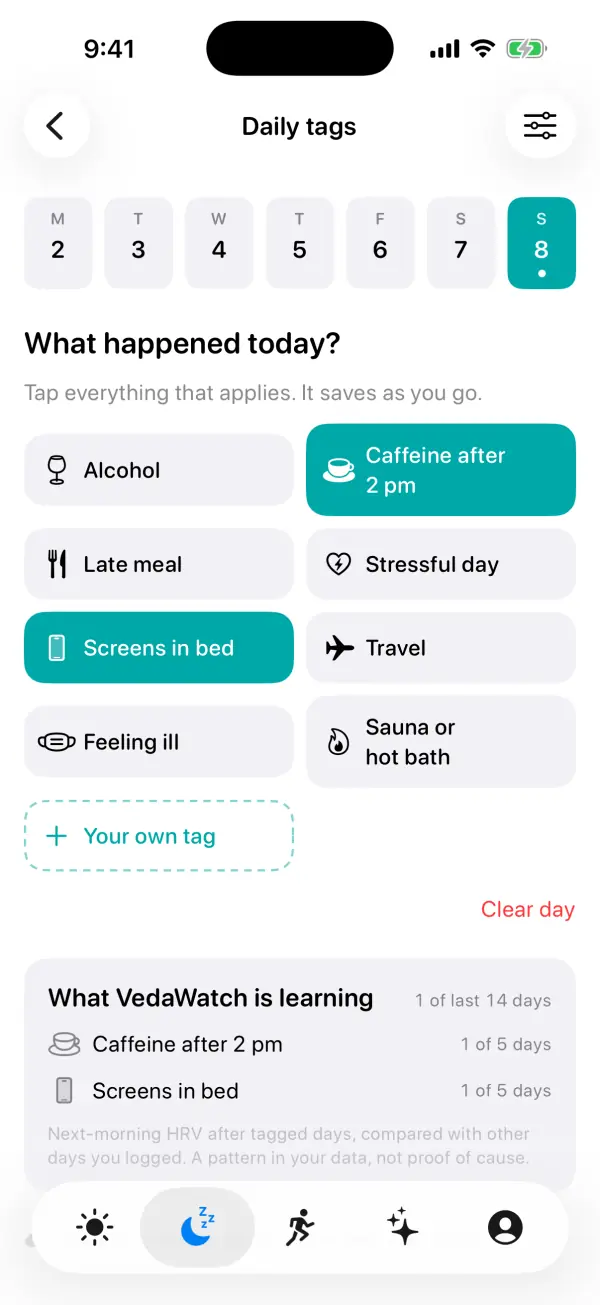
The Daily tags screen starts with eight built-in tags: Alcohol, Caffeine after 2 pm, Late meal, Stressful day, Screens in bed, Travel, Feeling ill, and Sauna or hot bath.
You can add up to 24 of your own with Your own tag, each with a name and a symbol, for things like magnesium, a cold plunge or a busy shift. Built-ins you never use can be hidden in Tag settings. Hidden tags keep their history and still count in patterns.
One answer matters more than it looks: Nothing notable. A day you answer with no tags becomes part of the comparison group. A day you never answer counts for nothing, so VedaWatch never assumes "no alcohol" just because you didn't open the app.
How to log your day on iPhone
Every tap saves straight away, so there's no Save button to remember.
- Open Daily tags from the "How was today?" card on Today (from 7 pm it asks about today; before that, about yesterday), or from Recover → Daily tags.
- Pick the day in the week strip at the top. You can go back up to six days; a small dot marks days you've already logged.
- Under "What happened today?", tap every tag that applies. Tap again to take one off.
- If nothing stood out, tap Nothing notable. That ordinary day is just as useful as a tagged one.
- To add your own tag, tap Your own tag, give it a name and a symbol, and tap Add. It's added to the day you're on.
- Use the sliders button at the top right to open Tag settings, where you can hide built-ins, edit or delete your own tags, and export the journal as a CSV spreadsheet.
Logging from your Apple Watch
The VedaWatch Watch app has a Log page that lists your tags under "Log for today". It follows the tags you have visible on your iPhone, custom tags included. Tap a tag once and a check mark appears; tapping it again the same day doesn't log it twice.
The Watch keeps today's tags itself, so logging works even when your iPhone is out of reach. They reach your iPhone's journal the next time the two connect.
There's also a Log Tag action for Siri and Shortcuts, which you can put on the Action button of an Apple Watch Ultra (it offers the built-in tags). On iPhone, the Log a Tag shortcut lets you choose Today, Yesterday or Automatic for the day.
How "What VedaWatch is learning" works
For each tag, VedaWatch looks at the morning after every day you logged. It takes that morning's HRV as a percentage above or below your normal (the median of the 28 days before) and compares the average after tagged days with the average after logged days without that tag. It uses your logged days from the last 60 days.
Before it says anything, it needs enough data: at least 5 logged days with the tag, at least 5 logged days without it, and 30 mornings of overnight HRV from your Watch. Until then, a tag shows progress such as "3 of 5 days", "2 of 5 days without", or "Waiting on Watch HRV".
A result only appears when the difference is at least 4% and at least twice its statistical uncertainty. Then you'll see something like "−8% HRV" with the number of mornings it's based on. Otherwise the tag shows "No clear effect". For built-in tags such as alcohol, a higher HRV after tagged days is shown as No clear effect rather than as a benefit, because that is far more likely to be chance; Sauna or hot bath and your own tags can show a positive result.
Reading your results sensibly
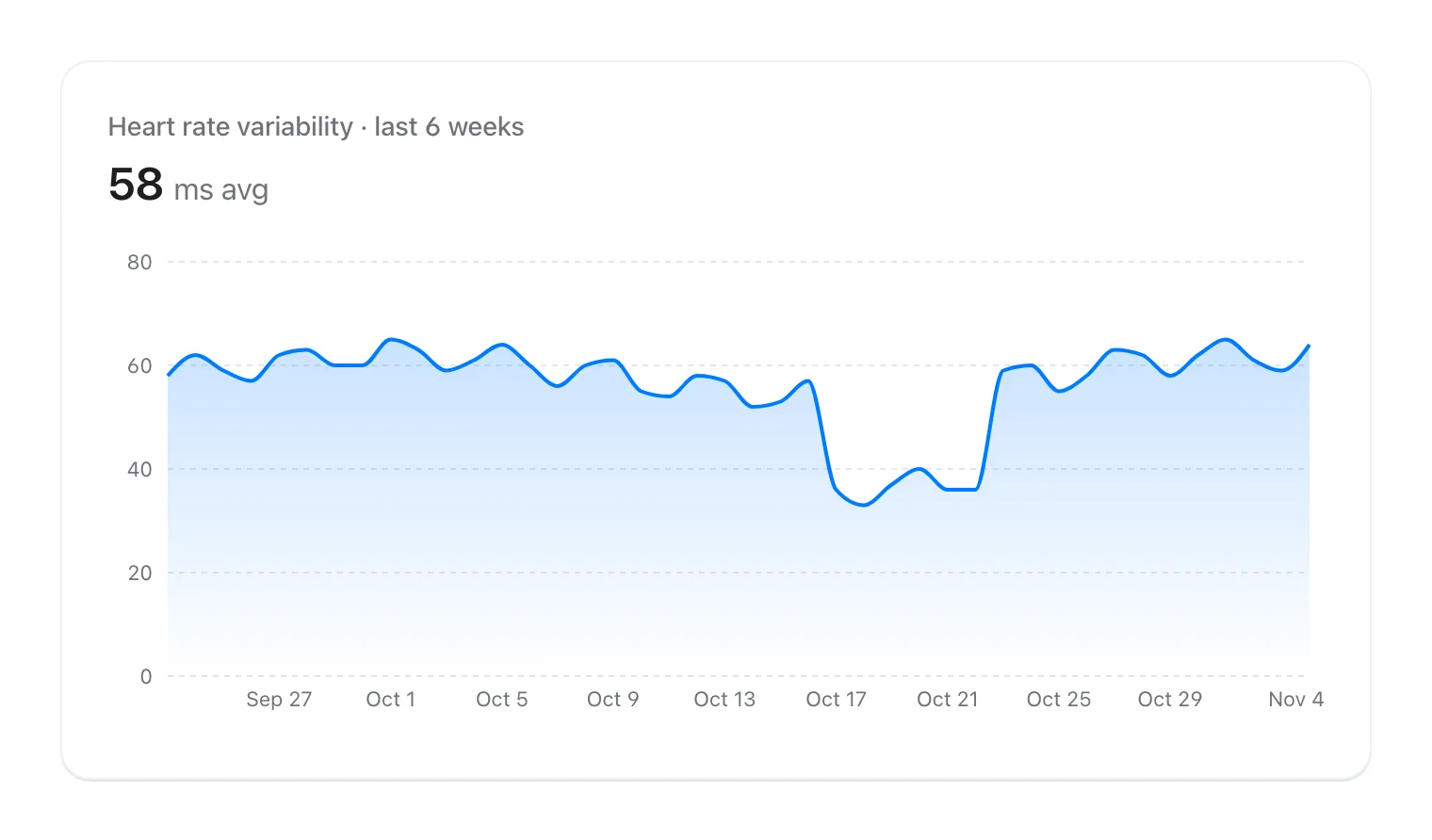
The screen says it plainly: a result is "a pattern in your data, not proof of cause." Tags often travel together. Travel days may also be late-meal, short-sleep days, and a stressful week may come with more coffee, so one tag can pick up the effect of another.
A few habits make your results more trustworthy. Log most days, not just the unusual ones; the header shows how many of the last 14 days you've answered. Be consistent about what counts, such as deciding what "Alcohol" means for you. And give it weeks, not days.
If a pattern shows up, treat it as something to experiment with, not a verdict. HRV is one wellness signal, not a diagnosis, and this feature isn't medical advice. If you feel unwell or your readings worry you, talk to a clinician.
Where your journal is kept
Without an account, your tags stay on your iPhone. After a few logged days, VedaWatch offers a free account so your journal isn't lost with the phone. Signed in, your logged days and tag names are saved privately to your VedaWatch account as well as on the iPhone, so a reinstall or a new iPhone keeps your history. They're included in your data export and deleted with your account.
The patterns themselves are worked out on your iPhone from the Health data already there. The CSV export in Tag settings is made on the iPhone too, with one row per logged day and a column per tag, and only leaves if you share it.
Common questions
Why does a tag say "Waiting on Watch HRV"? You've logged enough days, but there aren't yet 30 mornings of overnight HRV, or there's no HRV reading on the mornings after your logged days. Wear your Watch to bed and it will fill in.
Why doesn't a tag show up in What VedaWatch is learning? A tag appears once it has been logged on at least one day.
What happens if I delete one of my own tags? It comes off every day it was logged on, and those days stay logged. This can't be undone, so hide the tag instead if you want to keep its history.
Can I fill in a day I forgot? Yes, for the last week: pick it in the week strip. Clear day sets a day back to unanswered so it no longer counts either way.
Sources & further reading
- Pietilä J et al. (2018). Acute effect of alcohol intake on cardiovascular autonomic regulation during the first hours of sleep in a large real-world sample of Finnish employees. JMIR Mental Health 5(1):e23. doi:10.2196/mental.9519
- Drake C et al. (2013). Caffeine effects on sleep taken 0, 3, or 6 hours before going to bed. Journal of Clinical Sleep Medicine 9(11):1195-1200. doi:10.5664/jcsm.3170
- Chang AM et al. (2015). Evening use of light-emitting eReaders negatively affects sleep, circadian timing, and next-morning alertness. PNAS 112(4):1232-1237. doi:10.1073/pnas.1418490112
- Shaffer F, Ginsberg JP (2017). An overview of heart rate variability metrics and norms. Frontiers in Public Health 5:258. doi:10.3389/fpubh.2017.00258
This guide is educational, not medical advice, and has not been clinically reviewed. VedaWatch is not a medical device. If you have symptoms or concerns about your heart or health, contact a qualified healthcare professional.
Put your trends in perspective.
Explore HRV, sleep, and recovery with VedaWatch on your iPhone.
Download VedaWatch on the App Store →