 VedaWatch
Recovery & Apple Watch
Apple Watch AFib History explained: what it does and doesn't do
Apple Watch AFib History: who it's for, how the weekly AFib estimate works, how it differs from irregular rhythm alerts, its limits, and when to see a doctor.
By VedaWatch editorial team · · 10 min read
The short answer
AFib History is an FDA-cleared Apple Watch feature for adults 22 and over who already have a doctor's AFib diagnosis. It estimates the share of time your heart showed signs of AFib each week and shows it next to sleep, exercise and alcohol. It doesn't alert you during an episode, diagnose anything, or replace your doctor's monitoring.
What is AFib History on Apple Watch?
AFib History is a feature in the Health app, fed by your Apple Watch, for people who have already been diagnosed with atrial fibrillation (AFib). AFib is an irregular rhythm in the heart's upper chambers. Episodes can come and go or be constant, and the share of time someone spends in AFib is called their AFib burden.
AFib History estimates that burden. While you wear the Watch, it occasionally checks your pulse with the optical heart sensor. Once it has enough readings, it gives you a weekly percentage: roughly how much of your Watch wear time last week showed signs of AFib. Apple's instructions describe it as a retrospective estimate, meaning it looks back over the past week rather than watching you in real time.
The goal is narrow and useful: to help someone living with AFib see whether their burden is drifting up or down over weeks and months, and how it lines up with everyday factors such as sleep, exercise, weight and alcohol. It is a tracking tool, not a diagnostic test and not an alarm.
AFib History vs irregular rhythm notifications vs the ECG app
Apple Watch has three heart rhythm features with similar names, and most confusion comes from mixing them up. They share the same idea of looking for an irregular rhythm, but they're built for different people and answer different questions. Here's how they compare, based on Apple's support pages and instructions for use.
- Irregular rhythm notifications. For: adults 22 and over without an AFib diagnosis. What it does: occasionally checks your pulse in the background, mostly while you're still, and sends an alert if it sees a rhythm suggestive of AFib confirmed on multiple readings. What you get: an occasional alert, and usually nothing at all. Watch: Series 3 or later per Apple's instructions for use.
- AFib History. For: adults 22 and over who have a doctor's AFib diagnosis. What it does: uses the same kind of background pulse checks to estimate your weekly AFib burden. What you get: a weekly percentage, trends, life factors, highlights and a PDF for your doctor. Watch: Series 4 or later with iPhone 8 or later per its instructions for use.
- ECG app. For: adults 22 and over, with or without a diagnosis. What it does: records a single-lead electrocardiogram when you hold a finger on the Digital Crown for 30 seconds. What you get: one classification for that moment, such as sinus rhythm, atrial fibrillation, low or high heart rate, or inconclusive. Watch: Series 4 or later and all Apple Watch Ultra models; not Apple Watch SE.
- The key rule: irregular rhythm notifications and AFib History don't run together. Apple says irregular rhythm notifications turn off automatically when you set up AFib History, because the alert is designed to flag possible undiagnosed AFib, while AFib History assumes the diagnosis already exists.
Who AFib History is for, and who it isn't for
AFib History is meant for adults aged 22 or older with a physician's diagnosis of AFib. During setup, the Health app asks for your date of birth and asks you to confirm that a doctor has diagnosed you. Apple's instructions list the clinical study population as people with paroxysmal (comes and goes) and permanent AFib.
It is not for people who simply want to check whether they might have AFib. If you have no diagnosis, irregular rhythm notifications are the relevant feature, and any concern about your heart rhythm is a conversation for your doctor, not something to settle with a watch.
It may also not suit everyone with an arrhythmia. Apple's instructions say AFib History only measures AFib, not other atrial arrhythmias such as atrial flutter or atrial tachycardia, and that it isn't designed to detect rhythms that are regular in pattern. Because Apple tuned it to be sensitive to irregular rhythms, people with a history of other irregular rhythms may see a higher estimate than expected. If that's you, ask your cardiologist whether the number means anything in your case.
How to set up AFib History
Setup takes a couple of minutes on your iPhone. Update your iPhone and Apple Watch to the latest iOS and watchOS first, and check that the feature is offered in your country or region, because availability varies.
- Make sure Heart Rate and Wrist Detection are on for your Apple Watch.
- On your iPhone, open the Health app and tap Browse, then Heart, then AFib History.
- Tap Set Up, then Get Started, and enter your date of birth.
- Confirm that a doctor has diagnosed you with AFib, then tap Continue.
- Read through how AFib History works and tap Done. Irregular rhythm notifications switch off at this point.
- Wear your Watch at least 12 hours a day, 5 days a week. Apple says that's what it takes to get estimates consistently.
- Avoid leaving Low Power Mode on: it turns off background heart measurements, which can stop estimates.
How to read your weekly AFib History estimate
Once enough readings exist, your Watch shows a notification every Monday with the estimated percentage of time your heart showed signs of AFib the previous week. A lower percentage means less time in AFib relative to the time you wore the Watch; a higher one means more. If the Watch didn't collect enough data in the 7 days, you get a notification that there's no data for that week instead of a number.
The estimate never shows 0%. The lowest value is "2% or less". That's a deliberate floor, not a sign that something is always being found, and it's a reminder that this is an estimate with a margin of error.
After 6 weeks of use, Highlights appear. They show the share of time in AFib by day of the week and by 4-hour segment of the day (12 AM to 4 AM, 4 AM to 8 AM, and so on) over the past 6 weeks. Show Life Factors lets you put exercise minutes, sleep, weight, alcohol and mindful minutes next to your weekly estimates. Exercise, sleep and mindful minutes log automatically if you wear the Watch during them; the rest you log yourself or through another app.
A worked example: say your estimates for four weeks read 2% or less, 3%, 9% and 4%, and the 9% week was also a week of short sleep and a few nights of drinking. That's worth noting and showing your doctor. It doesn't prove the sleep or the alcohol caused the change, and a single week is a small sample. What helps your doctor is the pattern across many weeks, not one number.
Wear time matters too. The percentage is relative to the time you wore the Watch, so a week where you took it off every night may miss episodes that tend to happen during sleep. If Highlights point to a time of day, check that you actually wear the Watch then.
Is AFib History accurate, and is it FDA-cleared?
Yes, it's a regulated medical feature in the US. The FDA's 510(k) database lists Apple's Atrial Fibrillation History Feature (K213971) as cleared on June 3, 2022, in the category of photoplethysmograph analysis software for over-the-counter use. The irregular rhythm notification feature came earlier: the FDA granted its De Novo request (DEN180042) on September 11, 2018. Clearance means the FDA reviewed it for its stated intended use; it doesn't make it a diagnostic test or a continuous monitor.
Apple's instructions for use describe the AFib History study: 413 people aged 22 and older with diagnosed AFib wore an Apple Watch and a reference ECG patch together for up to 13 days. In the 280 people included in the main analysis, the average difference between the Watch's weekly estimate and the ECG patch's weekly burden was 0.67%. For 92.9% of them the two were within 5 percentage points, and for 95.7% within 10. The wider statistical limits of agreement ran from -11.4% to 12.8%, so an individual week can be off by more than a few points.
For irregular rhythm notifications, Apple's instructions report a study of 573 adults who wore a Watch and an ECG patch for up to 13 days. Among people whose patch showed AFib, 88.6% got a notification (sensitivity); among people whose patch showed no AFib, 99.3% got no notification (specificity). In the earlier, much larger Apple Heart Study published in the New England Journal of Medicine, 0.52% of 419,297 participants received an irregular pulse notification, and 34% of those who returned an analyzable ECG patch had AFib on it. Those are study results with specific populations and earlier software, not a guarantee for any one person.
What AFib History and irregular rhythm notifications don't do
Both features check your rhythm only now and then, mostly when you're still. Apple is explicit that they aren't continuous monitors, so they can miss AFib. No notification and a low estimate don't mean your heart is fine.
AFib History does not alert you while you're in AFib. It reports afterwards, once a week. Apple's instructions also say it isn't meant to help change your medication or for your doctor to adjust your treatment, so don't change medication or your AFib plan without talking to your doctor.
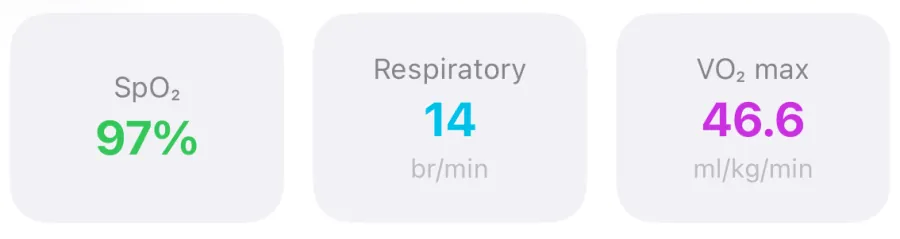
Neither feature can detect a heart attack or stroke. Measurements can also be affected by movement, a loose band, cold skin, dark wrist tattoos and strong electromagnetic fields. The blood oxygen, respiratory rate and VO2 max readings your Watch also records are separate measurements; none of them tells you anything about AFib.
Call emergency services straight away for chest pain, pressure or tightness, fainting, severe shortness of breath, or signs of a stroke. Don't wait for a watch reading.
What to do after an irregular rhythm notification or a rising estimate
If you get an irregular rhythm notification and you've never been diagnosed with AFib, Apple's advice is to talk to your doctor. A notification is a potential finding, not a diagnosis, and it can also reflect an irregular rhythm other than AFib. Apple also says to see your doctor if you feel unwell even without a notification, for example with a racing, pounding or fluttering heartbeat, dizziness or fainting.
If you have AFib and your weekly estimate climbs or stays higher than usual, contact the clinician who manages your AFib rather than adjusting anything yourself. To make that appointment more useful:
- If your Watch supports it and you have symptoms, take a 30-second ECG with the ECG app while you feel them. You can export it as a PDF from Health under Heart, then Electrocardiograms.
- Export your AFib History as a PDF: in AFib History, scroll to Options and tap Export PDF, then share or save it.
- Write down symptoms with dates and times, plus anything unusual that week: illness, poor sleep, alcohol, a missed dose or a new medicine.
- In the US, you can share AFib History automatically with an enrolled healthcare provider from the Health app, and with family through Health sharing.
- Bring the questions you actually want answered, such as whether your burden matters for your treatment plan and what change in the number should prompt a call.
How VedaWatch shows irregular rhythm notifications next to your recovery
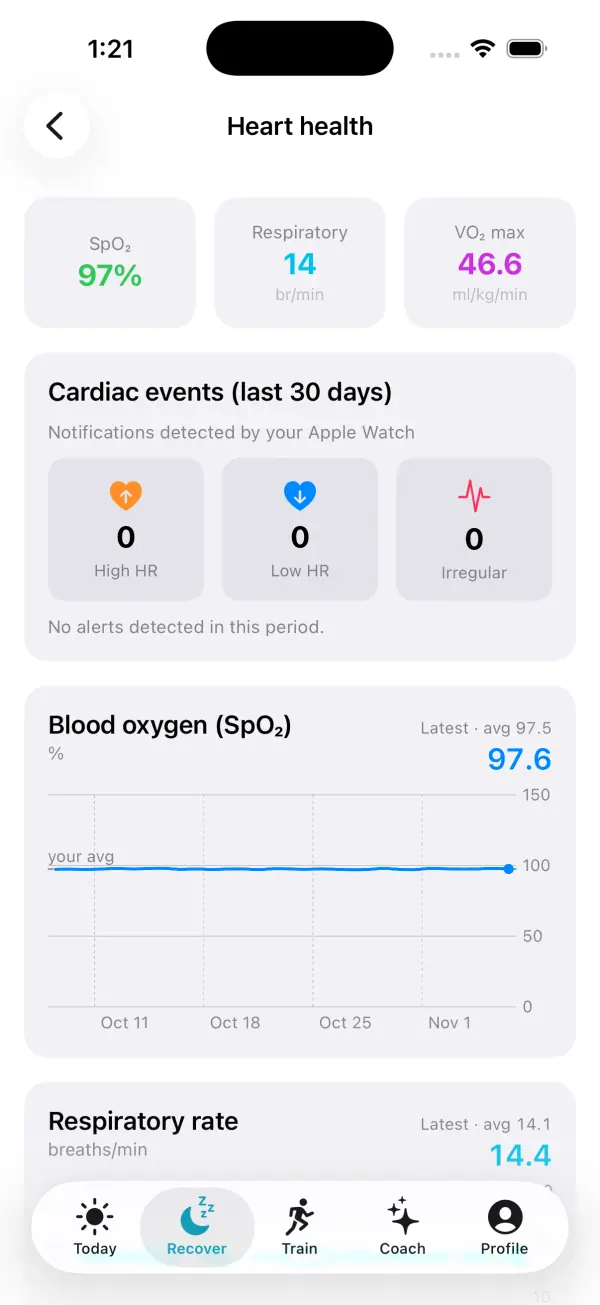
VedaWatch doesn't diagnose AFib and doesn't run its own rhythm checks. It reads what your Apple Watch has already saved to Apple Health. Under Recover, then Heart health, a Cardiac events card counts the high heart rate, low heart rate and irregular rhythm notifications from the last 30 days, and an ECG & AFib History card shows your weekly AFib History estimates as a chart, alongside your ECG recordings and rhythm notifications from the last 90 days. With VedaWatch Pro, a Doctor report puts AFib History, heart notifications and ECG strips into a PDF built on your iPhone, which you can share with your clinician.
The same screen shows blood oxygen, respiratory rate, VO2 max and walking heart rate trends, and the rest of the app puts HRV, resting heart rate, sleep and training load in one place. That makes it easier to have your recent context ready when you talk to your doctor.
If you turn on Health data sync and AI features, the AI Coach's summaries include the count of high, low and irregular rhythm notifications. It is instructed never to make medical claims or diagnoses and to suggest discussing possible health issues, such as irregular rhythm notifications, with a qualified healthcare professional.
Frequently asked questions
Can I use AFib History if I haven't been diagnosed with AFib?
No. Setup asks you to confirm a doctor's AFib diagnosis, and Apple says it is for people with one. Without a diagnosis, irregular rhythm notifications are the relevant feature, and any worry about your rhythm belongs with your doctor.
Why does AFib History say 2% or less instead of 0%?
Apple designed the estimate to never show 0%; its lowest value is "2% or less". It's an estimate with a margin of error, so a floor avoids implying a precision the Watch doesn't have.
Will AFib History tell me when I'm in AFib right now?
No. It sends a weekly estimate looking back over the previous 7 days and doesn't notify you during an episode. If you feel symptoms, use the ECG app if you have it and follow the plan your doctor gave you.
Why did I stop getting irregular rhythm notifications?
They turn off automatically when you set up AFib History, and they don't arrive while Low Power Mode is on. They're also only occasional checks, so long gaps without one are normal.
Can my doctor use my AFib History data?
You can export a PDF from AFib History, and in the US you can share it automatically with an enrolled healthcare provider. Your doctor decides how, or whether, it fits into your care; Apple says the feature isn't meant for adjusting treatment.
Related guides
- How to take an ECG on Apple Watch and what the results mean
- Apple Watch high heart rate notification: causes and what to do
- Resting heart rate on Apple Watch: what's high, low, and why it changes
- Why is my resting heart rate high? Causes and when to worry
- Apple Watch health alerts: early illness warning, body strain and other smart alerts in VedaWatch
- How to get more HRV readings on Apple Watch (and fix gaps)
- Apple Watch Vitals app explained: typical range and outliers
Sources & further reading
- Apple Support: Track your AFib History with Apple Watch
- Apple Support: Heart health notifications on your Apple Watch
- Apple Support: Take an ECG with the ECG app on Apple Watch
- Apple: AFib History Feature, Instructions for Use
- Apple: Irregular Rhythm Notification Feature, Instructions for Use
- FDA 510(k) K213971: Atrial Fibrillation History Feature
- FDA De Novo DEN180042: Irregular Rhythm Notification Feature
- Perez MV et al. Large-Scale Assessment of a Smartwatch to Identify Atrial Fibrillation. N Engl J Med, 2019
This guide is educational, not medical advice, and has not been clinically reviewed. VedaWatch is not a medical device. If you have symptoms or concerns about your heart or health, contact a qualified healthcare professional.
Put your trends in perspective.
Explore HRV, sleep, and recovery with VedaWatch on your iPhone.
Download VedaWatch on the App Store →