 VedaWatch
Using VedaWatch
Apple Watch health alerts: early illness warning, body strain and other smart alerts in VedaWatch
How VedaWatch's smart alerts work: early illness warning, body under strain, resting HR and wrist temperature above your normal, low readiness, sleep debt and training load spikes.
By VedaWatch editorial team · · 8 min read
The short answer
VedaWatch's smart alerts compare your overnight signals, readiness, Sleep Bank, Daily Charge and training load with your own normal, and tap you only when something is worth acting on. Most run on your iPhone. Fixed-number threshold alerts run on VedaWatch's servers and need Health data sync. Alerts describe a pattern in your data. They can't tell you that you're ill.
What VedaWatch's smart alerts are
Your Apple Watch records resting heart rate, HRV, breathing rate and wrist temperature while you sleep, and writes them to Apple Health. Most of the time nobody looks at those numbers until something already feels wrong. Smart alerts watch them for you and send a notification when they move away from your own normal in a way that's worth acting on.
The aim is a few alerts a month, not every day. Each alert compares you with yourself, not with population averages, so a resting heart rate that's normal for someone else can still count as high for you. Alerts are delivered as notifications on your iPhone.
There are two families. Smart alerts (early illness warning, body under strain, resting HR above your normal, wrist temperature up, low readiness, green-light morning, sleep debt building, Daily Charge running low and training load spike) are worked out on your iPhone. Fixed thresholds (resting HR above or below a number, HRV drop, sleep below and steps below) are simple numbers you pick, checked on VedaWatch's servers after each sync.
How the early illness warning works
Early illness warning looks for a fever-like signal, meaning wrist temperature or breathing rate is up, together with resting heart rate or HRV off your normal. It fires when 3 or more signals are off at once, or when the pattern shows up 2 nights running. In the app it's described as "the overnight pattern that often shows up a day or two before a cold or flu."
It tries hard not to cry wolf. Nights after you logged alcohol, sauna or travel in your journal are left out. A long workout (75 minutes or more) the evening before also rules it out unless both wrist temperature and breathing rate are up. In the likely second half of a menstrual cycle, when temperature normally runs higher, it needs a bigger temperature rise before it counts.
The idea comes from research. In a 2020 study, Mishra and colleagues found that changes in smartwatch heart rate and step data often appeared before symptoms of COVID-19 in many of the people who were infected. Population studies of resting heart rate have tracked flu-like illness in the same way. But a late night, a hot room or a hard day can look the same. The alert's own wording says "it describes a pattern; it can't tell you you're ill", and every alert screen ends with a reminder that alerts aren't a diagnosis.
Body signal and readiness alerts
Body under strain compares last night's resting HR, HRV, breathing rate and wrist temperature with your normal from the last 28 nights. It fires when 2 or more are off in the strain direction at once. One signal alone is everyday noise. Several together usually mean illness, stress, alcohol or a hard training block.
Resting HR above your normal compares each night with your median from the 4 weeks before. It fires at +5 bpm by default (you can pick 3 to 12) and, by default, only after 2 nights in a row, so a late meal or a warm room doesn't set it off. Wrist temperature up fires at +0.5°C over your 28-night median by default (0.3 to 1.2°C). In the likely second half of a menstrual cycle it needs an extra 0.3°C.
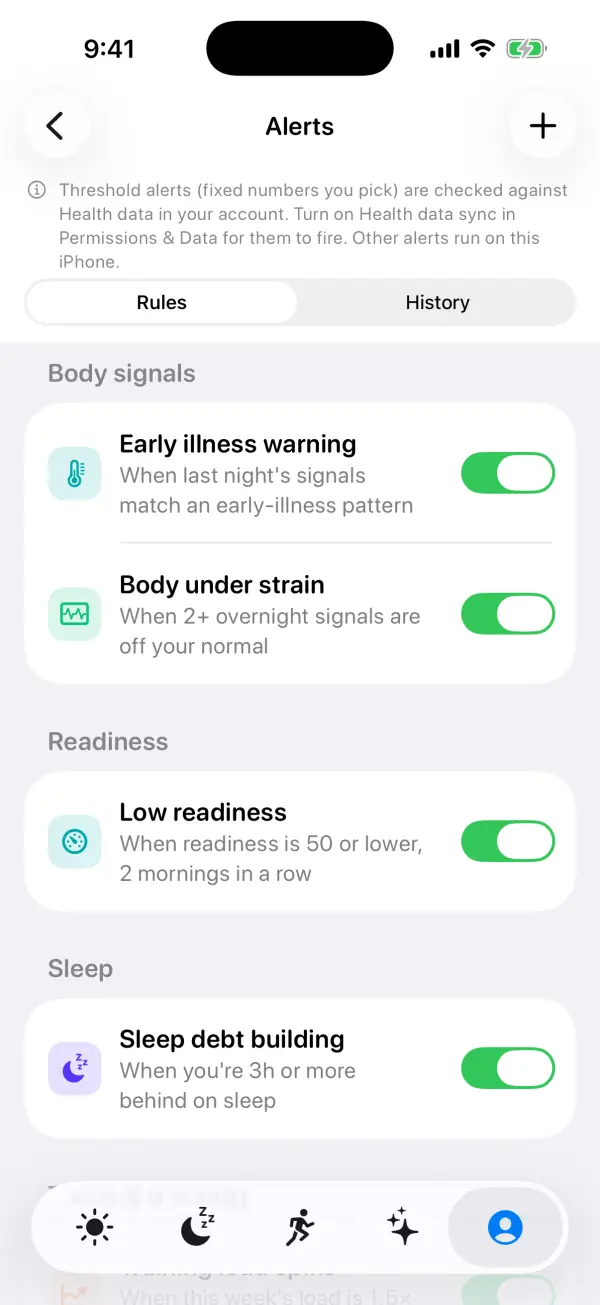
Low readiness uses the same readiness score as Today, once your personal baseline is ready. It fires at 50 or lower by default (30 to 70), and you can ask for 1, 2 or 3 mornings in a row. Green-light morning is the good-news alert. It fires when readiness reaches 80 or more (65 to 95) and the verdict is Push, but only on the first such morning after one that wasn't, so a good week doesn't ping you every day.
Sleep debt, Daily Charge and training load alerts
Sleep debt building uses your Sleep Bank balance: the last 14 nights against your sleep need, with recent nights counting most. It fires when you're 3 hours or more behind by default (1 to 8 hours), and arrives in the early evening with the bedtime that starts paying the debt back.
Daily Charge running low fires when your energy gauge drops to 25 or below by default (10 to 40). It's checked between 10:00 and 20:00, and only on days when the morning value came from real sleep and HRV data rather than an estimate.
Training load spike uses your acute:chronic ratio: the last 7 days of training load against the last 28. It fires at 1.5× your usual by default (1.3 to 2.0). Research on training loads links sudden jumps with a higher risk of injury, though the ratio is a rough guide rather than a precise risk score. It needs at least 6 workout days in the last 28 before it can fire.
Fixed threshold alerts and Health data sync
Fixed thresholds are the simple rules: Resting HR above (70 bpm by default), Resting HR below (45 bpm), HRV drop (20% below your 7-day average, needs 3 earlier days), Sleep below (6 hours, checked after 6:00) and Steps below (5,000 steps, checked between 18:00 and 21:00, while there's still time for a walk).
These run on VedaWatch's servers against the copy of your Health data in your account, so they also work for rules you make on the web. That means they only fire if Health data sync is turned on. If it's off, the Alerts screen says so at the top, and on the free plan it explains that this needs Pro and Health data sync. Every other alert runs on your iPhone and doesn't need sync.
The smart alerts can't be created on the web, because they need your full Health history on the phone. The web Alerts page shows how many smart alerts you have, and what they find shows up in History there too.
How to turn on and edit alerts
The first time you open Alerts you'll see "Alerts that know your normal" with a one-tap recommended set: Early illness warning, Body under strain, Sleep debt building and Training load spike. You can turn those on together or pick your own.
- In the VedaWatch iPhone app, open the Profile tab and tap Alerts under Notifications. You need an account; guests are asked to create one.
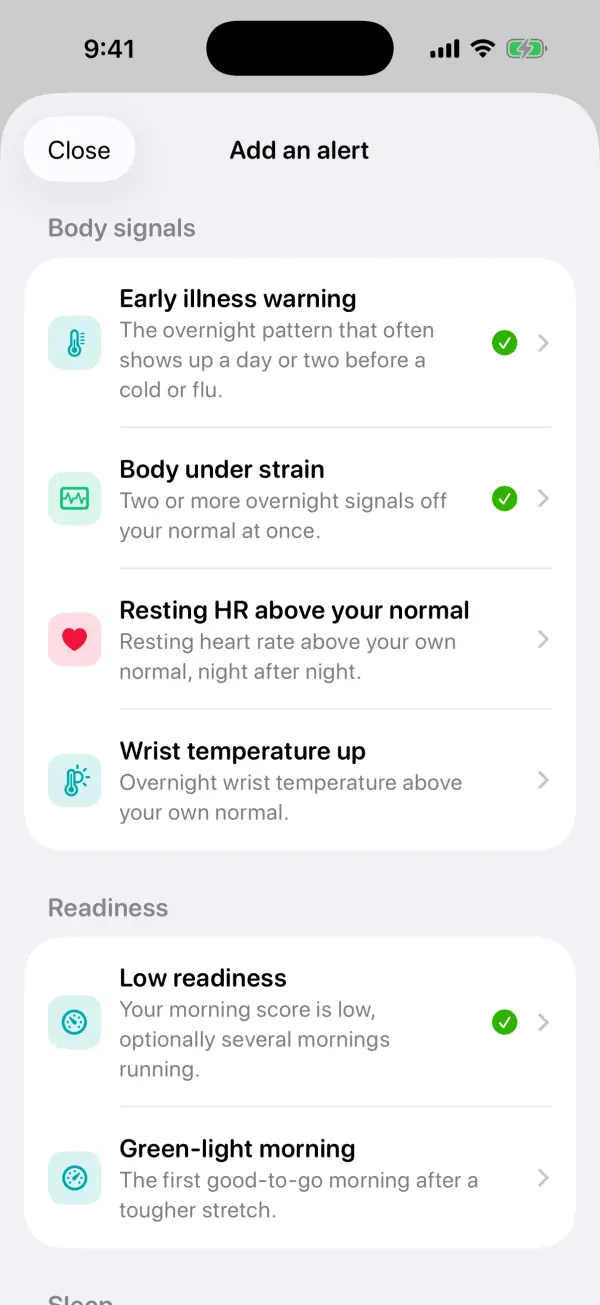
- Tap Turn on recommended alerts, or Choose my own. Later, tap the + button or Add an alert at the bottom of the list.
- Pick an alert from the Add an alert sheet. Ones marked Recommended are a good start.
- In the editor, use the slider under Alert me to set the number, and for Low readiness or Resting HR above your normal, pick how many mornings or nights in a row. The "Right now" line shows today's reading and whether it would alert you.
- Read How it works to see when it's checked, whether it's worked out on this iPhone or on our servers, and how often it can fire. Then tap Add. VedaWatch asks for notification permission with your first alert.
- To change an alert later, tap its row. Use the switch to turn it off, swipe left to delete or snooze it for a week, or use Snooze in the editor for a day, 3 days or a week.
History, quiet hours and how often you'll hear from it
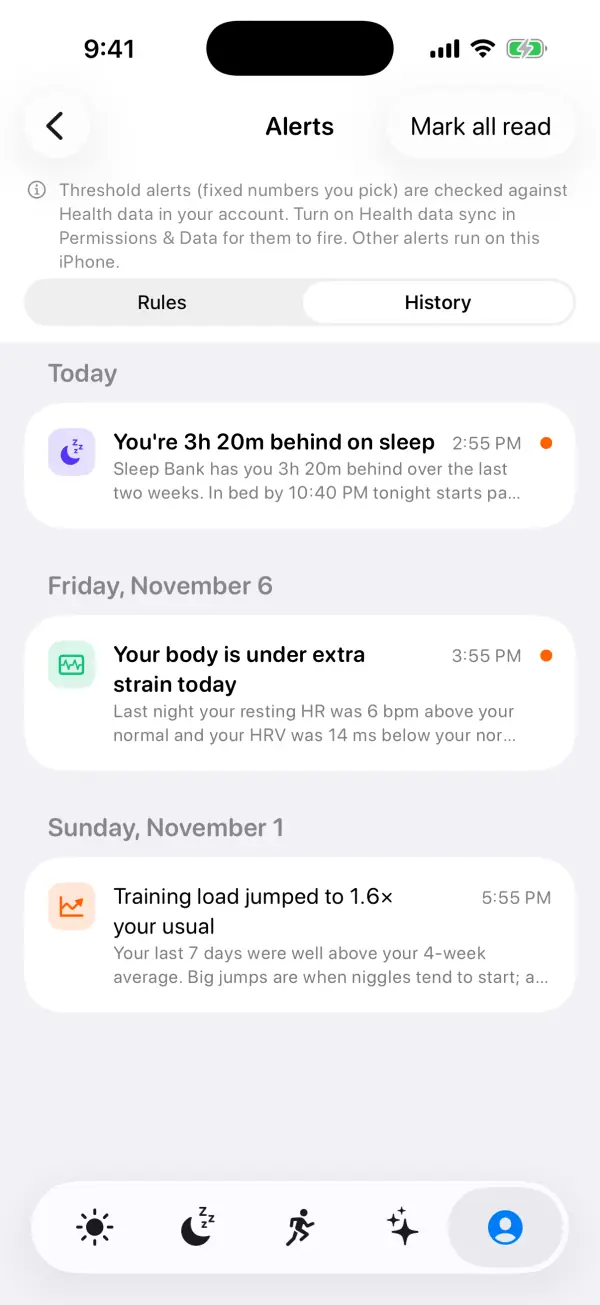
The History tab lists every alert that fired, grouped by day, with a dot on unread ones and a Mark all read button. Tapping an alert, or its notification, opens it in full: what happened, a Behind this alert list of the numbers (for example your reading against your normal range), a button to the relevant screen such as Open Recovery, Open Sleep Bank, Open Daily Charge or Open Training Load, and Snooze and Adjust buttons.
Several rules keep alerts rare. Each alert has a time window: body signal and readiness alerts come in the morning once last night's data is in, sleep debt in the early evening, Charge and load during the day. Each fires at most once a day, sleep debt at most once every 2 days and training load spike once every 3 days. A broader alert replaces narrower ones about the same night, so an early illness warning won't also send you body strain and resting HR.
Under Delivery you can set quiet hours (on by default, 22:00 to 07:00) and a daily limit (2 by default, up to 5). An alert found during quiet hours waits until they end. Past the daily limit, alerts are saved to History without a notification. Good news, like a green-light morning, arrives silently in Notification Center. If notifications are off for VedaWatch, alerts still appear in History.
Common questions about health alerts
Does an early illness warning mean I'm getting sick? No. It means last night's signals matched a pattern that often comes before a cold or flu. Alcohol, a hot room, stress or a hard day can produce the same pattern. Take it as a cue to keep the day easy and get to bed early. If you feel unwell, listen to your body and talk to a doctor.
Why haven't I had any alerts? That's normal. They're meant to be rare. The pattern alerts need a few weeks of nights to learn your normal, low readiness waits for your readiness baseline, and training load spike needs at least 6 workout days in the last 28. Also check that the rule is on, not snoozed, and that VedaWatch notifications are allowed.
Why didn't my threshold alert fire? Fixed thresholds are checked on VedaWatch's servers and need Health data sync. If sync is off, they can't see your data.
Can I change the numbers on early illness warning or body strain? No. They have no number to pick. They compare each night with your own normal from the last 4 weeks, so they adapt as you do.
Does my health data leave my phone for smart alerts? The checks themselves run on your iPhone and don't need Health data sync. When an alert fires, the alert (its title, message and the few numbers behind it) is saved to your account, which is how it appears in History on the phone and on the web.
How alerts fit with the rest of VedaWatch
Alerts use the same numbers as the rest of the app. The body signal and readiness alerts come from the readiness score and overnight signals on Today and Recover, and tapping one opens Recovery. Sleep debt comes from Sleep Bank, Charge from Daily Charge, and load spikes from Training Load, and each alert links straight there.
Your journal helps too. Logging alcohol, sauna or travel lets the early illness warning leave those nights out, and wrist temperature alerts mention them when they explain a rise. If you're travelling or racing, snoozing an alert for a few days keeps your settings without the noise.
Sources & further reading
- Nature Biomedical Engineering (2020): Pre-symptomatic detection of COVID-19 from smartwatch data (Mishra et al.)
- The Lancet Digital Health (2020): Harnessing wearable device data to improve state-level real-time surveillance of influenza-like illness in the USA (Radin et al.)
- British Journal of Sports Medicine (2016): The training-injury prevention paradox: should athletes be training smarter and harder? (Gabbett)
- International Journal of Sports Physiology and Performance (2020): Acute:Chronic Workload Ratio: Conceptual Issues and Fundamental Pitfalls (Impellizzeri et al.)
- Apple Support: Track your nightly wrist temperature changes with Apple Watch
- Apple Support: Track your overnight and daytime vitals
This guide is educational, not medical advice, and has not been clinically reviewed. VedaWatch is not a medical device. If you have symptoms or concerns about your heart or health, contact a qualified healthcare professional.
Put your trends in perspective.
Explore HRV, sleep, and recovery with VedaWatch on your iPhone.
Download VedaWatch on the App Store →