 VedaWatch
Recovery & Apple Watch
How to get more HRV readings on Apple Watch (and fix gaps)
How to get more HRV readings on Apple Watch: when it measures, settings and fit that stop it, how to take a manual Breathe reading, and when gaps are normal.
By VedaWatch editorial team · · 9 min read
The short answer
Apple Watch records HRV in the background only while you're still, so most readings come from sleep. To get more, wear it snugly to bed, keep Wrist Detection and heart rate on, avoid Low Power Mode overnight, and take a manual reading with a 1-minute Breathe session in the Mindfulness app.
How to get more HRV readings on Apple Watch
There is no setting that tells Apple Watch to measure heart rate variability (HRV) every hour. Apple describes HRV as something the Watch captures opportunistically in the background while you are still, plus during any Breathe session you start yourself in the Mindfulness app. So getting more readings comes down to two things: giving the Watch more still, well-measured time, and starting a reading when you want one.
In practice, that means the overnight hours matter most. Sleep is the longest stretch of the day when you are not moving, so it is where most people's readings come from. If your Watch is off your wrist at night, charging, loose, or in Low Power Mode, you lose the readings that the rest of your day can't make up for.
The checklist below covers the fixes in order of how often they're the cause. The rest of this guide explains when the Watch measures, how to take a manual reading properly, and when it's better to have fewer, more consistent readings than more of them.
- Wear your Watch to bed, charged. A quick top-up before dinner or while you shower usually gets it through the night.
- Check that Wrist Detection is on: Watch app on iPhone, My Watch, Passcode, Wrist Detection. Apple says background heart rate readings aren't taken when it's off.
- Check that heart rate measurement is on: on the Watch, Settings, Privacy & Security, Health, Heart Rate.
- Don't leave Low Power Mode on overnight. Apple says it turns off background heart rate measurements, including during sleep.
- Wear the Watch snugly on top of your wrist, with the sensor touching skin. Tighten it a notch for bed if it slides around.
- Want a reading right now? Sit still, open Mindfulness, and start a Breathe session of 1 minute or more.
When does Apple Watch measure HRV?
Apple's technical paper on the Watch's heart sensors explains that HRV comes from a tachogram, a list of the times between heartbeats. The Watch builds these from its green optical sensor and accelerometer, and only while you're still. They are captured opportunistically in the background through the day, and also during a Breathe session, which asks you to stay still. Each measurement is saved to the Health app with a time stamp.
That word opportunistically is the key to most missing readings. The Watch doesn't measure on a fixed clock; it waits for a window when your wrist is quiet and the signal is clean. Apple also says its heart rate algorithms prioritize accuracy over availability and withhold measurements when the signal isn't good enough. A day of typing, walking, cooking and driving can offer few usable windows, while a night of sleep offers many.
How often should you expect a reading? Apple doesn't publish a fixed number for most models, and it varies with how active you are. A 2024 validation study of Apple Watch Series 9 and Ultra 2 describes background SDNN readings roughly every two to four hours, citing Apple. On Apple Watch Series 12 and Apple Watch Ultra 4, Apple's guide says the Watch takes continuous heart rate measurements and adds a Recovery HRV view in the Heart Rate app.
Apple Watch reports HRV as SDNN, in milliseconds. Other devices may use different calculations and measurement windows, so compare your Apple Watch number only with your own Apple Watch history, not with a chest strap or another wearable.
How to take a manual HRV reading on Apple Watch
The only way to start an HRV reading yourself is a Breathe session in the Mindfulness app. Apple's paper says that during Breathe the Watch shows a heart rate each minute and saves an estimated HRV and a tachogram to Health. A Reflect session also shows heart rate, but Apple only describes HRV being saved for Breathe.
Opening the Heart Rate app measures heart rate, not HRV, on most models. On Series 12 and Ultra 4 you can view Recovery HRV in the Heart Rate app, but Apple describes it as sampled while you're still, so it still depends on quiet time.
- Sit or lie down and stay still for a minute first. If you've just exercised, give your heart rate time to settle.
- Make sure the Watch is snug on top of your wrist and your arm is resting on something.
- Open the Mindfulness app on your Watch and tap Breathe. To change the length, tap the More Options button next to Breathe, then Duration (1 to 5 minutes).
- Stay still for the whole session. Moving your wrist can make the Watch discard the reading.
- Afterwards, open Health on your iPhone, then Browse, Heart, Heart Rate Variability, and Show All Data to see the new sample and its time.
- If you take manual readings to track a trend, do it at the same time and in the same position each day, for example sitting on the edge of the bed before coffee.
Do Breathe readings inflate your HRV?
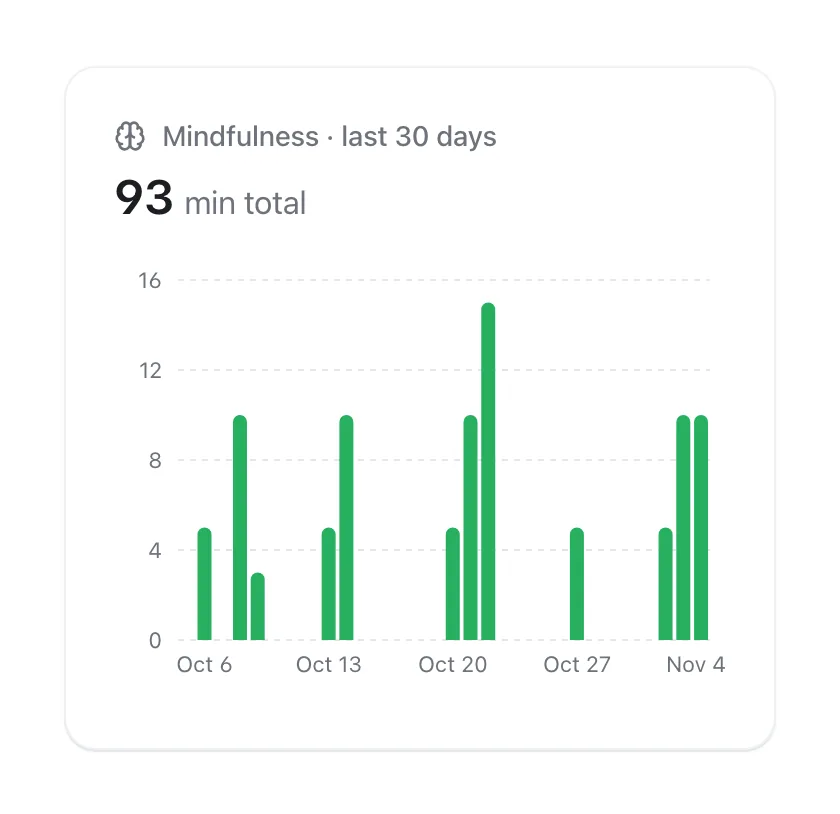
Often, yes, and that matters if you mix them into your trend. Breathe guides you through slow, deep breathing. A large meta-analysis of 223 studies found that voluntary slow breathing increases vagally mediated HRV during the session, right after it, and after weeks of practice. So a reading taken while following a slow breathing animation tends to come out higher than one taken while you sleep.
That doesn't make Breathe readings wrong. It makes them a different measurement. Two simple rules keep your data honest. First, if you want a reading that's comparable to your normal, breathe at your usual relaxed pace rather than following the animation, and keep the session the same every time (same length, same Breath Rate, which you can change on the Watch in Settings, Mindfulness, Breath Rate). Second, if you use Breathe as relaxation practice, enjoy the higher number as biofeedback, but don't read it as better recovery.
Apps that work from your Health data, including VedaWatch, see Breathe readings as ordinary HRV samples. If you take three Breathe sessions one afternoon and none the next, the two days aren't measured the same way.
Apple Watch settings that stop HRV recording
If your readings stopped suddenly, check settings before anything else. These are the ones Apple documents as affecting background heart measurements.
- Wrist Detection off: Apple says background heart rate readings won't be taken. Turn it on in the Watch app on iPhone, My Watch, Passcode.
- Heart rate data off: on the Watch, Settings, Privacy & Security, Health, Heart Rate. Or in the Watch app on iPhone, My Watch, Privacy.
- Low Power Mode on: Apple lists background heart rate measurements, including during sleep, among the features it turns off. Some people switch it on for the night to save battery and lose their overnight data.
- Series 12 and Ultra 4 only: Continuous Measurements (Watch app on iPhone, Apps, Heart) controls the daytime green-light measurements. Leave it on if you want daytime data.
- Third-party app missing HRV but Health has it: that's a permission problem, not a Watch problem. In Health on iPhone, open your profile, then Apps, choose the app and make sure Heart Rate Variability is allowed.
Fit and wrist detection: the most common cause of gaps
Apple's advice is to wear the Watch "not too tight, not too loose" and on the top of your wrist, because the sensors only work there and the back needs to stay close to your skin. A band that's comfortable during the day can slide while you sleep, especially on your side, and a sliding sensor gives the Watch fewer clean windows.
Other things Apple names as reducing sensor performance: some tattoos, whose ink and pattern can block the light, and cold, which lowers blood flow in the wrist. If you sleep in a cold room with your arm outside the covers, or have a tattoo under the sensor, those may explain thin nights; with a tattoo, wearing the Watch on the other wrist may be worth trying.
A simple test: wear the Watch one notch tighter at night for a week and compare how many HRV samples Show All Data lists per night with the week before. Keep it comfortable; a band tight enough to mark your skin isn't needed.
Does turning on AFib History give more HRV readings?
You'll see this tip on forums and some app help pages. Apple's paper does say that the same background tachograms are used for HRV, irregular rhythm detection and AFib History, but Apple doesn't say that turning AFib History on increases HRV sampling.
More importantly, AFib History is a medical feature for people with a physician's diagnosis of atrial fibrillation. Apple says it isn't intended for people under 22, and setup asks you to confirm that diagnosis. Don't enable it just to get more HRV data. If you've been diagnosed with AFib, follow your doctor's advice on using it.
More readings vs better readings
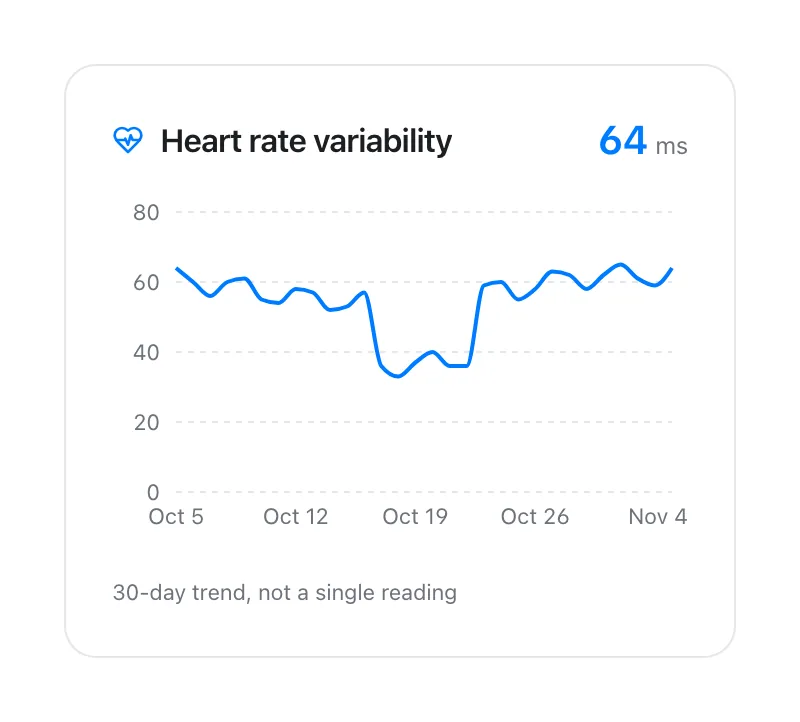
More HRV samples isn't always the goal. HRV changes a lot through the day with posture, breathing, caffeine, stress and movement, so a stack of daytime readings mostly adds noise. What makes a trend useful is comparing like with like: readings taken in similar conditions, day after day.
That's why overnight readings are the best foundation. They happen in the same state every night, without you having to remember anything. A 2024 study comparing Apple Watch Series 9 and Ultra 2 with a chest strap found the Watch underestimated HRV by about 8 ms on average and concluded it may be useful for tracking relative trends rather than absolute values. Consistent conditions are what make those relative trends meaningful.
If you can't wear your Watch to bed, a daily manual reading taken at the same time, in the same position, breathing normally, is the next best option. Use one method or the other for your trend rather than mixing them.
Finally, HRV is a wellness signal, not a diagnosis. Missing readings don't mean anything is wrong with your heart, and an unusual reading on its own isn't a reason to worry. If you have symptoms such as chest pain, fainting, a racing or irregular heartbeat, or shortness of breath, contact a doctor or emergency services rather than checking your Watch.
How VedaWatch helps you spot and fill HRV gaps
VedaWatch reads the HRV your Watch saves to Apple Health, with your permission; it can't create readings your Watch didn't record. Its readiness score compares each day's average HRV, along with resting heart rate and sleep, with your recent baseline, and gives plain reasons such as how far HRV sits below that baseline.
When a night is missing, the Recover tab says so. If your Watch recorded no sleep, HRV or resting heart rate last night, a "No data from last night" card explains that today's score leans on older nights, shows how many of the last 14 nights were recorded, and offers a one-tap reminder to charge your Watch in the evening so it lasts through the next night.
Because VedaWatch averages all of a day's HRV readings, extra Breathe sessions are counted too. If you rely on the readiness score, the most consistent approach is to let your Watch measure overnight and keep any manual readings to the same routine each day.
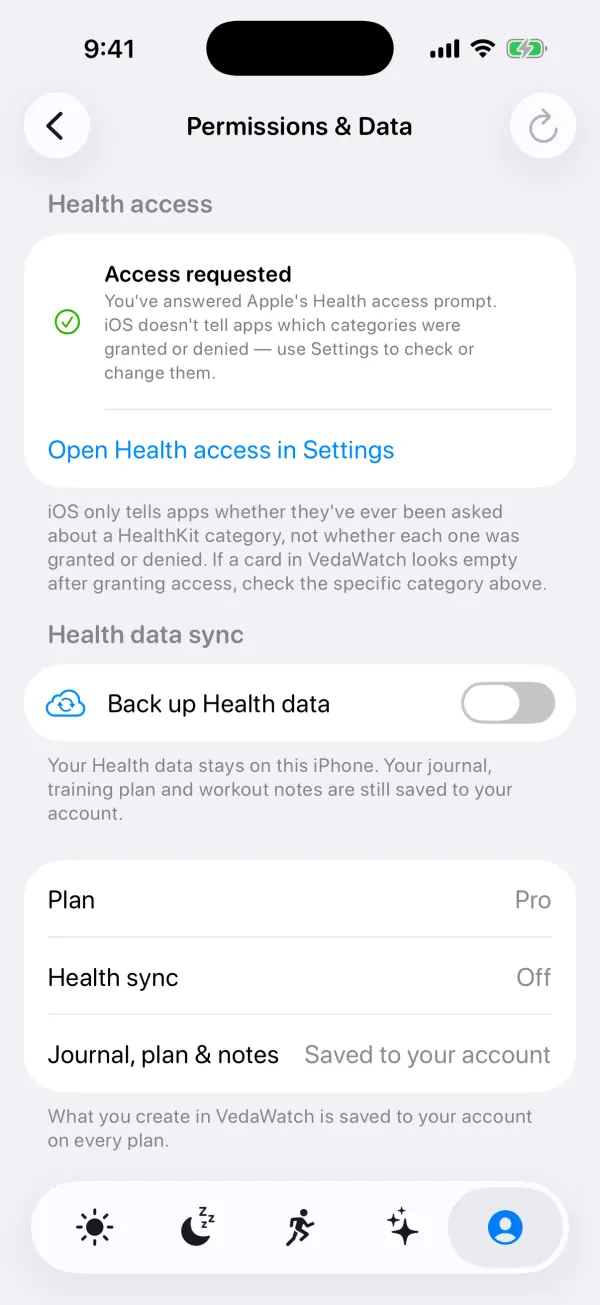
If cards look empty even though Health has HRV, open the profile tab, then Permissions & data, which links straight to Health access in Settings so you can check that Heart Rate Variability is allowed.
Frequently asked questions
Why does my Apple Watch only show one or two HRV readings a day?
Background HRV is measured only when you're still and the signal is clean, so an active day with the Watch off at night can leave very few samples. Wearing it to bed is usually what fills in the gaps.
Can I make Apple Watch measure HRV every hour?
No. Apple doesn't offer a setting for HRV frequency. You can add readings yourself with Breathe sessions in the Mindfulness app.
Does the Heart Rate app measure HRV?
On most models it measures heart rate only. Apple Watch Series 12 and Ultra 4 add a Recovery HRV view in the Heart Rate app, which is still based on readings taken while you're still.
Why is my HRV higher after a Breathe session?
Slow, paced breathing tends to raise HRV while you're doing it. Breathe at your normal pace if you want a reading comparable to your overnight numbers.
Will a sleep Focus or sleep schedule give more HRV readings?
Apple doesn't document a sleep Focus or schedule as increasing HRV sampling. What reliably helps is wearing the Watch through the night, charged, snug and out of Low Power Mode.
Related guides
- Apple Watch HRV: how to check it and understand your trends
- Is Apple Watch HRV accurate? What the validation studies actually show
- Apple Watch Readiness score missing or not updating: what to check
- Breathing exercises to increase HRV: a 6-breaths-a-minute routine
- Apple Watch battery and sleep tracking: when to charge it
- How long it takes to establish your HRV baseline
Sources & further reading
- Apple: Using Apple Watch to measure heart rate, calorimetry, and activity (November 2024)
- Apple Watch User Guide: Check your heart rate on Apple Watch
- Apple Watch User Guide: Start a Reflect or Breathe session on Apple Watch
- Apple Support: Get the most accurate measurements using your Apple Watch
- Apple Support: Use Low Power Mode on your Apple Watch
- Apple Support: Track your AFib History with Apple Watch
- O'Grady B et al. The Validity of Apple Watch Series 9 and Ultra 2 for Serial Measurements of Heart Rate Variability and Resting Heart Rate. Sensors, 2024
- Laborde S et al. Effects of voluntary slow breathing on heart rate and heart rate variability: A systematic review and a meta-analysis. Neuroscience & Biobehavioral Reviews, 2022
This guide is educational, not medical advice, and has not been clinically reviewed. VedaWatch is not a medical device. If you have symptoms or concerns about your heart or health, contact a qualified healthcare professional.
Put your trends in perspective.
Explore HRV, sleep, and recovery with VedaWatch on your iPhone.
Download VedaWatch on the App Store →