 VedaWatch
Nutrition
Are Apple Watch calories accurate? Cardio and strength studies
Are Apple Watch calories accurate? What validation studies found for cardio and strength training, active vs resting vs total, and how to use them for eating.
By VedaWatch editorial team · · 10 min read
The short answer
Roughly, not precisely. Apple Watch measures heart rate well, but independent studies find its calorie estimates are off by around 20 to 30% on average, and worse during strength training. Treat Active Energy as a useful daily estimate, set up your watch properly, and adjust how much you eat by your weight trend, not by single-day numbers.
How accurate are Apple Watch calories?
Apple Watch is one of the better wrist devices for calories, but no wrist device measures calories directly. It estimates them from heart rate, motion and your personal details, and those estimates carry real error.
The largest summary so far is a 2025 meta-analysis in Physiological Measurement that pooled 56 studies comparing Apple Watch with reference methods such as indirect calorimetry (measuring the oxygen you breathe in and the carbon dioxide you breathe out). Heart rate and step counts were generally accurate. For energy expenditure, every subgroup the authors looked at had an average error above the 10% threshold usually used to call a device valid. The University of Mississippi's release on the study gives the average absolute error for energy as 27.96%, against 4.43% for heart rate and 8.17% for steps.
That matches older work. A 2017 Stanford study of seven wrist devices in 60 people found that no device got its energy error below 20%, although Apple Watch had the lowest overall error of the group. So the honest answer is: Apple Watch calories are good enough to compare your days and weeks, not exact enough to count to the last 50 kcal.
Active vs resting vs total calories: what each number means
Apple reports two separate numbers, and mixing them up causes more confusion than the measurement error does.
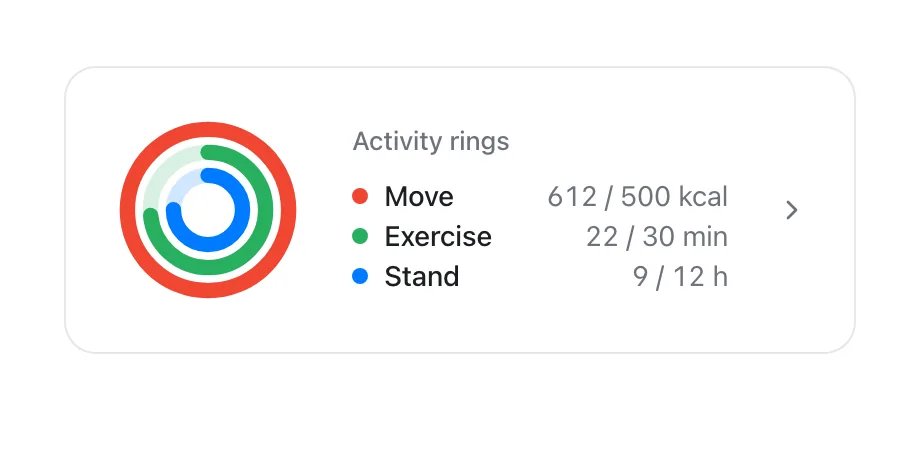
Active Energy (Active Calories) is what fills the red Move ring. Apple defines it as the calories you burn above your basal, or resting, calories. Resting Energy is the estimate of what your body uses just to function. Total calories are the two added together. In the Health app you'll find Active Energy and Resting Energy as separate entries.
Two details matter for eating. First, Resting Energy isn't really measured. Apple's technical paper says the basal model is computed from your weight, height, age, sex and wheelchair status, adjusted slightly for what you're doing, so it is only as good as the details you entered and the equation behind them. Second, workout calories are not a bonus on top of your day. The active calories from a workout are part of that day's Active Energy, so adding a workout's calories to your daily active total counts them twice.
A quick sense check, with example numbers: if Health shows 1,650 kcal of Resting Energy and 650 kcal of Active Energy, your estimated burn for the day is about 2,300 kcal. That total, not the 650 in your Move ring, is the figure to compare with what you ate.
How Apple Watch estimates calories (and why it can't be exact)
According to Apple's November 2024 paper on heart rate and calorimetry, the watch first classifies what you're doing, then runs a model for that activity that turns sensor data into METs (multiples of resting energy use), and finally converts METs to calories using your weight and the time spent. Walking and running models lean on steps, stride, GPS speed, grade and heart rate. Other workouts, including Functional Strength Training, HIIT, Pilates and yoga, use heart-rate-predominant models.
Apple also publishes its own validation results, measured against a metabolic cart when its best practices are followed. Walking, running and hiking showed an average error of 0% with a standard deviation of 9% in 130 people. Functional strength training, core training and Pilates showed 2% with a standard deviation of 17% in 53 people. In plain terms: the average is close, but any single session can be noticeably high or low, and the spread is almost twice as wide for strength work as for walking and running.
Apple notes that errors may be higher when the watch isn't calibrated, or when an activity involves a lot of anaerobic effort. These are Apple's own figures from its own testing; independent studies, below, tend to find larger errors.
Are Apple Watch calories accurate for strength training?
This is where the estimates are weakest, and it's worth knowing why. Lifting is short bursts of high effort with rests in between. Your heart rate rises with effort but lags behind it, and some of the energy comes from anaerobic pathways that heart rate doesn't track well. Arm motion during a squat or a deadlift also tells the watch little about how hard the muscles are working.
Independent studies agree. In a 2018 study in Medicine & Science in Sports & Exercise, 50 adults did three sets of four resistance exercises at a 10-repetition-maximum load wearing seven devices, including an Apple Watch Series 2. No device met the validity threshold for energy expenditure during cycling or resistance exercise.
A 2026 study in Bioengineering tested an Apple Watch Series 8 and three other smartwatches on 70 men doing bench press, T-bar row, squat and deadlift. The Apple Watch tracked heart rate best of the four, with an average error of about 1.8 bpm across the session. Calorie estimates were a different story: agreement with indirect calorimetry was poor for every device, with intraclass correlations of only 0.021 to 0.033. In practice, that means a lifting session the watch scores at 300 kcal tells you little about what that particular session cost.
So for lifting: trust the heart rate, use the calories loosely, and don't let a low or high calorie number change how you train. Progress in strength training is better judged by load, reps and sets than by calories burned.
Settings that make Apple Watch calories more accurate
You can't remove the error, but Apple lists several things that reduce it. Most take a minute and are worth doing once.
- Update your details. On iPhone, open the Watch app, tap My Watch, then Health, then Health Details, and check your height, weight, age and sex. Update your weight when it changes, because both resting and active calories scale with it.
- Turn on what calibration needs. In iPhone Settings, go to Privacy & Security, then Location Services, and make sure it's on. Under System Services, turn on Motion Calibration & Distance.
- Calibrate outdoors. Start an Outdoor Walk or Outdoor Run in the Workout app on flat, open ground with good GPS and go at your normal pace for about 20 minutes. You can split it across sessions, and if you walk or run at different speeds, Apple suggests 20 minutes at each.
- Keep Wrist Detection on (Watch app, My Watch, Passcode) so background heart rate is measured through the day.
- Wear it snugly on top of your wrist, and tighten the band for workouts. A loose band gives patchy heart rate, and heart rate drives the strength and HIIT models.
- Start the workout type that matches what you're doing, for example Indoor Run on a treadmill. If heart rate is erratic during lifting or boxing, Apple suggests pairing a Bluetooth chest strap.
- If something went wrong, such as calibrating with the wrong weight, you can clear it under Watch app, My Watch, Privacy, Reset Fitness Calibration Data, then calibrate again.
Should you eat back your Apple Watch calories?
You can use the watch for eating targets, as long as you treat its number as a starting estimate that you correct with real-world results. Food logging has its own error too (portion sizes, forgotten snacks, database entries), so you're comparing two imperfect numbers.
A sensible approach is to use the trend, not the day. Here's a worked example with made-up numbers. Over two weeks, your watch averages 2,400 kcal of total burn a day and you log an average of 2,300 kcal a day. On paper that's a 100 kcal daily deficit, so your weight should drift down slowly. If after three or four weeks your weight has been flat, your real burn is closer to what you eat than the watch suggests, and you adjust intake rather than trying to work out which number was wrong.
A few rules of thumb follow from the research. Don't eat back a big lifting session calorie for calorie, since those are the least reliable estimates. Use total burn (active plus resting), and don't add Active Energy to a calculator figure that already includes an activity multiplier, or you'll count your activity twice. Compare averages over at least a week, because a single day's burn and intake both bounce around. And keep eating enough protein every day whatever the calorie numbers say.
- Weigh yourself a few mornings a week, at the same time, and look at the weekly average.
- Log food consistently for 2 to 4 weeks, including the days you'd rather not.
- Compare your average intake with your average total burn from the watch over the same weeks.
- Weight steady while the watch says you're in a deficit? Your real burn is probably lower than shown. Weight falling faster than planned? It's probably higher.
- Change intake by a small amount, keep the rest the same, and check again after another two weeks.
How VedaWatch uses your Apple Watch calories for nutrition targets
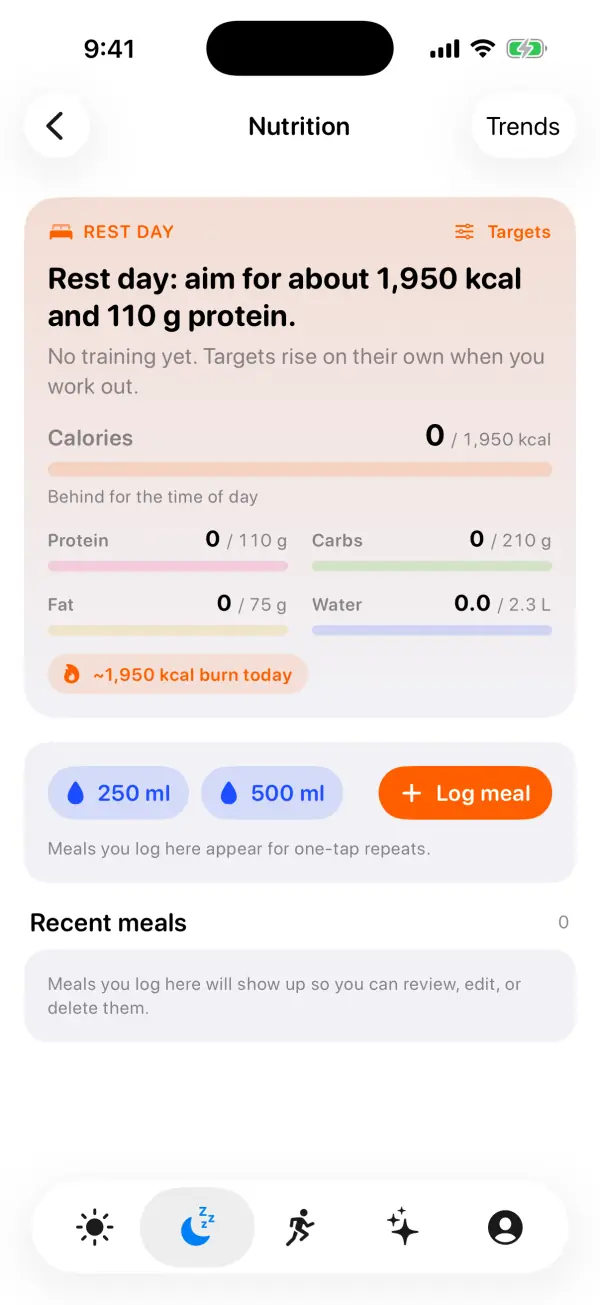
VedaWatch's Fuel targets, on the Nutrition screen under the Recover tab, are built to work with imperfect burn data rather than pretend it's exact. It reads your Resting Energy and Active Energy from Apple Health and averages the last two weeks, leaving out partial days (such as days the watch was off your wrist) so they don't drag the average down.
Instead of adding every active calorie to your target, it scales your usual active burn by the kind of day: about 0.85 times on a rest day, the same on a light day, 1.25 times on a training day and 1.6 times on a hard day, while never counting less than you've already burned. It shows the result as a rounded estimate, such as a "~2,350 kcal burn today" chip, and the calorie target is rounded to the nearest 50. Protein follows your body weight, so it stays steady even when a strength session gets a strange calorie score.
The Eaten vs burned card does the trend check described above for you: seven days of logged calories against total burn (resting plus active), with the average daily difference over finished days. Days with under 500 kcal logged are left out, since they usually mean forgotten logging rather than fasting. If you pick Lose gradually, the deficit is capped at 15% of expected burn and at most 500 kcal, and it shrinks on training days. For how the targets are calculated, see our guide to calories and protein on training days.
Reading the calories on a single workout
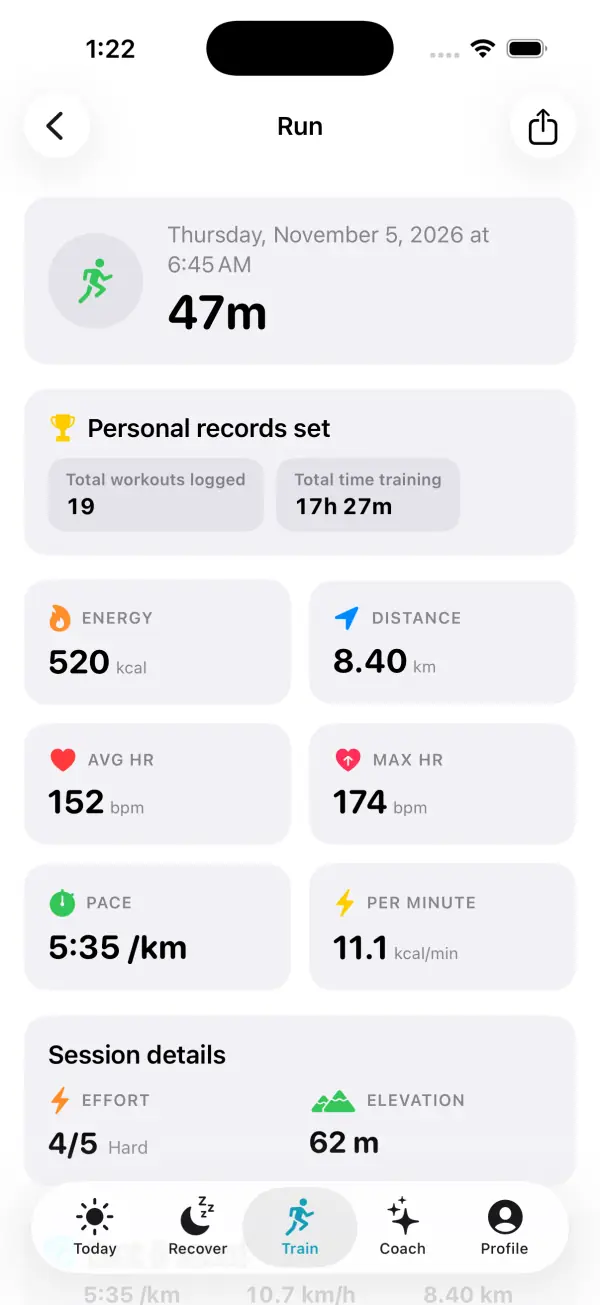
Per-workout calories are most useful compared with your own similar sessions. The same 45-minute run at a similar pace and heart rate should score similarly each time, and a big change usually means a different effort, different conditions or a sensor problem, not a sudden change in your metabolism.
Calories per minute is a handy way to compare sessions of different lengths. Keep comparisons within one activity type, though: a running number and a lifting number come from different models with different error, so they don't rank against each other well.
When calorie numbers aren't the right tool
Calorie estimates from any wearable are general fitness information, not a medical measurement. If you're managing a health condition such as diabetes or kidney disease, are pregnant, are trying to gain weight after illness, or have a history of disordered eating, work out targets with your doctor or a registered dietitian rather than from watch numbers.
And if tracking calories starts to make eating feel stressful or obsessive, it's fine to stop counting and focus on regular meals, enough protein and how you feel and perform. That's a reasonable choice, not a failure.
Frequently asked questions
Does Apple Watch overestimate or underestimate calories?
It can go either way. Pooled across studies, the 2025 meta-analysis found the average bias was small but the range of individual errors stretched well above and below the reference. Your own weight trend over several weeks is the most practical way to tell which way it runs for you.
Should I use Traditional or Functional Strength Training on Apple Watch?
Pick the one that best describes your session, and use the same one each time so your sessions stay comparable. Apple's published calorie validation covers Functional Strength Training as a heart-rate-predominant model, so with either choice a snug fit and good heart rate readings matter most.
Why does my Move ring show fewer calories than the Health app?
The Move ring shows Active Energy only. Health also lists Resting Energy, and total calories are the two added together, so a total will always be higher than your Move number.
Will a chest strap make Apple Watch calories more accurate?
It can help when wrist heart rate is unreliable, such as during lifting or boxing, because strength and HIIT calorie models lean on heart rate. Apple suggests a Bluetooth chest strap if readings are inconsistent. It improves the heart rate input, but the calorie estimate is still a model with error.
Are newer Apple Watch models more accurate for calories?
The researchers behind the 2025 meta-analysis said newer models seem to be more accurate, with gradual improvement over time, but energy error stayed above the 10% validity threshold in every subgroup. A 2026 study of a Series 8 still found poor calorie agreement during weightlifting.
Related guides
- How to use Apple Watch for weight loss: an evidence-based guide
- How much to eat on training vs rest days: calorie and protein targets from your Apple Watch
- Logging nutrition to Apple Health: what actually syncs, and why your numbers might be off
- Apple Watch Activity Rings explained: why they won't close, and the research behind them
- Apple Watch heart rate zones explained: what each zone means and how to set them
- How to track strength training progress with Apple Watch: volume, 1RM and muscle balance
- How much protein per day to build muscle: g/kg by body weight
Sources & further reading
- Physiological Measurement (2025): Apple Watch accuracy in monitoring health metrics: a systematic review and meta-analysis (Choe and Kang)
- University of Mississippi via EurekAlert! (2025): Study examines how well wearable tech tracks fitness metrics
- Journal of Personalized Medicine (2017): Accuracy in Wrist-Worn, Sensor-Based Measurements of Heart Rate and Energy Expenditure in a Diverse Cohort (Shcherbina et al.)
- Medicine & Science in Sports & Exercise (2018): Validity of Wearable Activity Monitors during Cycling and Resistance Exercise (Boudreaux et al.)
- Bioengineering (2026): Criterion Validity of Smartwatches for Measuring Heart Rate and Energy Expenditure During Resistance Exercise
- Apple (November 2024): Using Apple Watch to measure heart rate, calorimetry, and activity
- Apple Support: Get the most accurate measurements using your Apple Watch
- Apple Support: Calibrate your Apple Watch for improved Workout and Activity accuracy
This guide is educational, not medical advice, and has not been clinically reviewed. VedaWatch is not a medical device. If you have symptoms or concerns about your heart or health, contact a qualified healthcare professional.
Put your trends in perspective.
Explore HRV, sleep, and recovery with VedaWatch on your iPhone.
Download VedaWatch on the App Store →