 VedaWatch
Workouts & Training
Apple Watch Activity Rings explained: why they won't close, and the research behind them
Move, Exercise, and Stand aren't arbitrary—each ring tracks something specific, and there's real public-health research behind the "sit less, move more" idea they're built on. Here's exactly what each ring measures, the most common reasons they won't close, and the evidence for why the Stand ring exists at all.
By VedaWatch editorial team · · 6 min read
The short answer
The red Move ring tracks active calories burned, green Exercise tracks minutes of brisk activity, and blue Stand tracks hours where you stood and moved for at least 1 minute. Most "stuck ring" complaints trace back to calibration, Motion & Fitness settings, or misunderstanding what each ring actually requires—not a broken watch. The Stand ring's design lines up with real research tying long, unbroken sitting to higher mortality risk, independent of total exercise.
What each ring actually measures
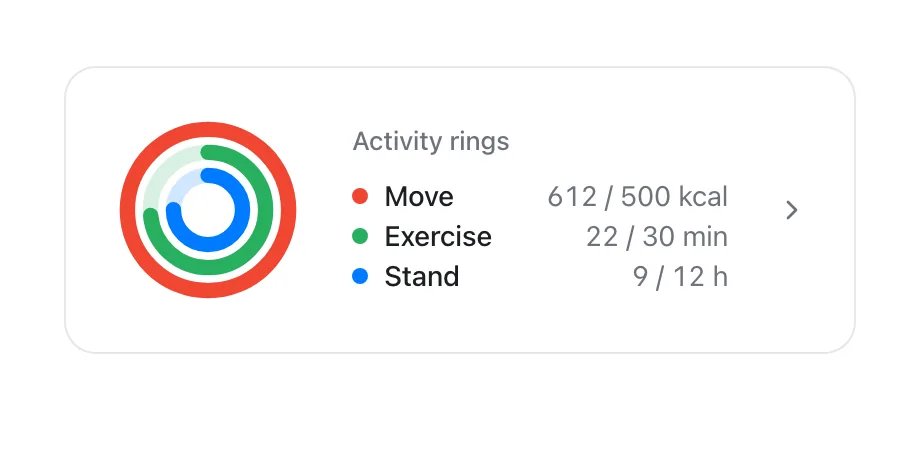
Apple's own description: the red Move ring shows how many active calories you've burned, the green Exercise ring shows how many minutes of brisk activity you've done, and the blue Stand ring shows how many times in the day you've stood and moved for at least 1 minute per hour.
That last detail trips people up constantly: Stand isn't about standing still at your desk—it specifically requires moving for at least a minute within that hour. An overlapping ring means you've exceeded your goal for the day, and your weekly summary shows your daily average and weekly total progress toward closing each one.
Why rings won't close, in the order to check them
Before assuming something's broken, work through these—most "stuck ring" problems trace back to one of them.
- Check Motion Calibration & Distance: on iPhone, Settings → Privacy & Security → Location Services → System Services, and make sure Motion Calibration & Distance is on—without it, distance, pace, and calorie accuracy suffers.
- Calibrate your watch: wear it outdoors with clear GPS reception, start an Outdoor Walk or Outdoor Run workout, and walk or run at your normal pace for about 20 minutes (can be split across sessions, and repeated at each speed you typically move at). This specifically improves the Move and Exercise calorie/accuracy calculations.
- Confirm your personal info is current: height, weight, age, and sex all feed into how your watch calculates calories burned—outdated info after a significant weight change can throw Move off.
- Remember what Stand actually requires: standing still at a desk for an hour does not close that ring—you need to move for at least 1 minute within the hour.
- If distance or calories look persistently wrong after calibration, Apple's calibration data can be reset from the Watch app (My Watch → Privacy → Reset Fitness Calibration Data) as a last resort.
The research behind "sit less, move more"
Apple states the Activity app's goal plainly: sit less, move more, and get some exercise. That general framing lines up with established public-health guidance—WHO's 2020 physical activity guidelines recommend adults get 150–300 minutes of moderate-intensity aerobic activity per week (or 75–150 minutes vigorous), which an Exercise ring default of 30 brisk minutes a day (≈210 minutes a week) comfortably sits within.
The Stand ring's specific logic—move for at least a minute within each hour—tracks closely with independent research on sedentary behavior. A 2017 Annals of Internal Medicine study followed nearly 8,000 middle-aged and older adults using accelerometers and found that both total daily sedentary time and the length of unbroken sitting bouts were linked to all-cause mortality; the most sedentary participants with the longest uninterrupted sitting periods had roughly double the mortality risk of the least sedentary group, independent of how much total exercise they got.
To be clear, Apple's own materials don't cite that specific study—this is independent context for why "stand and move hourly" is a reasonable design choice, not a claim Apple makes directly.
Common questions
Do I need to close every ring every day? No single day matters as much as the pattern—Apple's own Trends view in the Fitness app compares your recent activity to your longer-term average, which is a more useful signal than any one day's rings.
Can I change my ring goals? Yes—Move, Exercise, and Stand goals can all be adjusted in the Activity app on watch or the Fitness app on iPhone if the defaults are too easy or too hard.
Why did my Move ring count a walk but not count toward Exercise? Move counts all active calories regardless of intensity; Exercise specifically requires brisk-intensity activity, so an easy stroll can add to Move without adding much to Exercise.
See your rings in VedaWatch
VedaWatch's Today screen shows the full Move/Exercise/Stand ring picture, reading your active energy, exercise minutes, and stand hours straight from Apple Health—the same three numbers your Apple Watch already tracks.
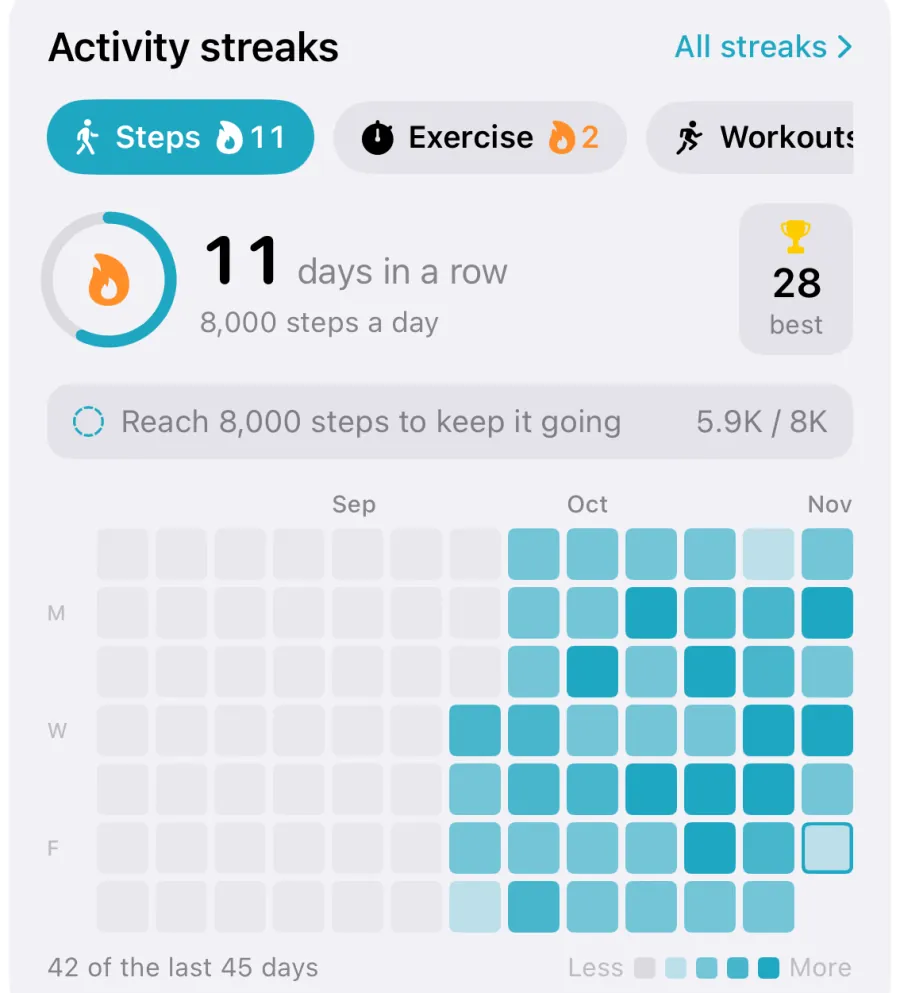
The dedicated Activity trend view currently charts your Move-ring energy history over time; Exercise and Stand history are visible day-to-day on Today, with longer trend views for those two planned.
Sources & further reading
- Apple Support: Track daily activity with Apple Watch
- Apple Support: Calibrate your Apple Watch for improved Workout and Activity accuracy
- British Journal of Sports Medicine (2020): World Health Organization 2020 guidelines on physical activity and sedentary behaviour (Bull et al.)
- Annals of Internal Medicine (2017): Patterns of Sedentary Behavior and Mortality in U.S. Middle-Aged and Older Adults (Diaz et al.)
This guide is educational, not medical advice, and has not been clinically reviewed. VedaWatch is not a medical device. If you have symptoms or concerns about your heart or health, contact a qualified healthcare professional.
Put your trends in perspective.
Explore HRV, sleep, and recovery with VedaWatch on your iPhone.
Download VedaWatch on the App Store →