 VedaWatch
Workouts & Training
How much to eat on training vs rest days: calorie and protein targets from your Apple Watch
How VedaWatch turns your Apple Watch burn, body weight and training plan into daily calorie, protein, carb, fat and water targets that rise on training days, and how to log meals fast.
By VedaWatch editorial team · · 8 min read
The short answer
Protein stays steady from day to day because it follows your body weight (1.6 g per kg by default). Calories, carbs and water are what move: VedaWatch raises them when your plan or your workouts make it a training day, and lowers carbs on rest days. Meals and water you log are saved to Apple Health, and food from other apps counts too.
Why training days and rest days need different targets
A single daily calorie number treats a rest day and a long interval session the same. Your body doesn't: on a hard day you burn more, and the fuel that mostly changes is carbohydrate, the main energy source for harder efforts. Sports-nutrition position statements describe carbohydrate needs that scale with training volume, from a few grams per kilogram of body weight on light days up to much more on heavy ones.
Protein works differently. Research on resistance training suggests that around 1.6 g per kg of body weight a day covers most of the benefit for muscle, and position stands for active people give a range of roughly 1.4 to 2.0 g/kg. That need doesn't jump around with each day's session, so it makes sense to hit a steady protein number every day and let carbs and total calories follow the training.
That is the idea behind the Fuel targets on VedaWatch's Nutrition screen. This guide explains how the numbers are worked out. For the basics of how food data gets into Apple Health in the first place, see our guide to logging nutrition to Apple Health.
Rest, light, training or hard: how VedaWatch decides what kind of day it is
Each day gets one of four labels, shown at the top of the Fuel card: Rest day, Light day, Training day or Hard training day. VedaWatch looks at two things and uses whichever is bigger.
First, today's session in your VedaWatch training plan, if you have one. Rest means a rest day, Recovery means a light day, Easy aerobic and Strength mean a training day, and Long session, Tempo, Intervals and Race day mean a hard day.
Second, what you've actually done so far, from the workouts and active energy your Apple Watch saved to Apple Health. Any workout makes it at least a light day, 30 minutes or more of workouts makes it a training day, and 75 minutes or more, or an active burn of at least 800 kcal (or 1.6 times your usual, if that's higher), makes it a hard day.
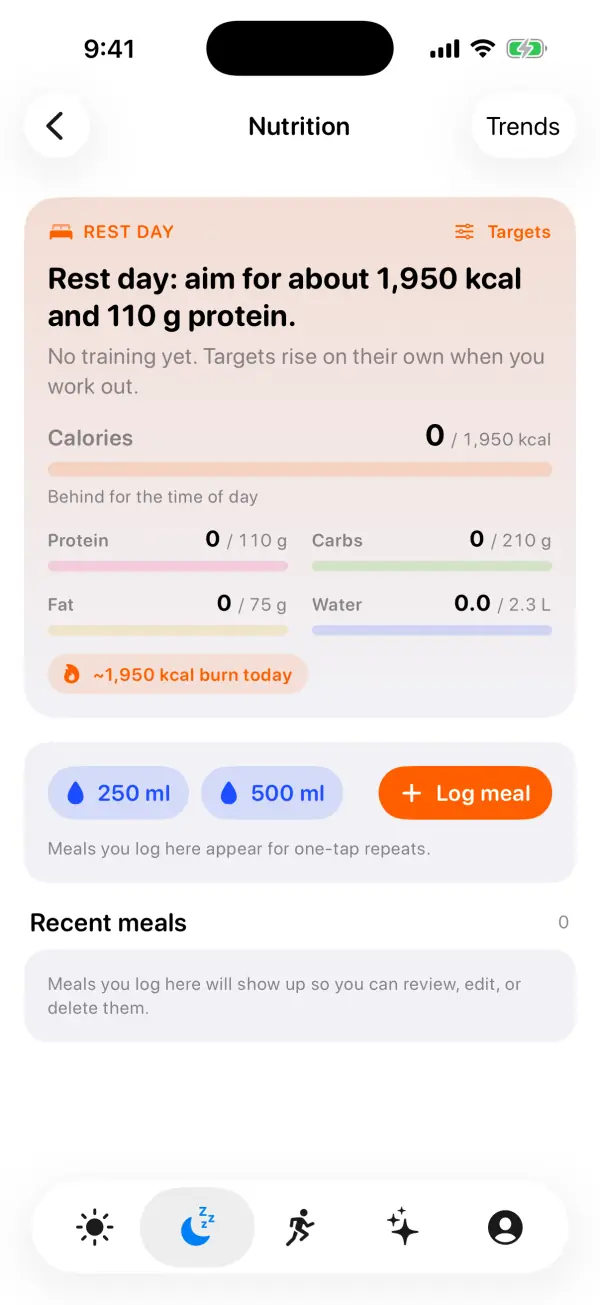
So with no plan and no workout yet, you start on a rest day, and the card says "No training yet. Targets rise on their own when you work out." Finish a 45-minute run and the label, and the targets, move up without you touching anything.
How the calorie, protein, carb, fat and water targets are calculated
Calories: VedaWatch estimates what you're likely to burn today. That's your usual resting burn (the average from Apple Health over the last two weeks, ignoring partial days) plus active burn for this kind of day: about 0.85 times your usual active burn on a rest day, the same as usual on a light day, 1.25 times on a training day and 1.6 times on a hard day. It never counts less than you've already burned, and a planned session you haven't done yet is added at about 10 kcal a minute. On the default goal, the calorie target matches that expected burn, rounded to the nearest 50.
Protein: your latest weight from Apple Health times 1.6 g/kg by default, the same on every kind of day. You can set anything from 1.2 to 2.4 g/kg.
Carbs: 3 g/kg on a rest day, 4 on a light day, 5 on a training day and 7 on a hard day. If that many carbs wouldn't fit inside the calorie target alongside your protein and a minimum amount of fat, carbs give way first, but never below 2 g/kg.
Fat fills whatever calories are left, with a floor of 0.8 g/kg. Water is about 33 ml per kg of body weight plus 0.6 L per hour of training (planned or done), capped at 5 L.
As a worked example, here is someone at 70 kg with no burn history yet, so the app's defaults apply. Rest day: about 1,950 kcal, 110 g protein, 210 g carbs, 75 g fat and 2.3 L of water. With a 45-minute Easy aerobic session on the plan: about 2,100 kcal and 2.8 L of water, with carbs up to about 290 g. Protein stays at 110 g. With your own weight and burn history, your numbers will differ.
Losing weight or building muscle: how your goal changes the numbers
In the Fuel targets sheet you pick one of three goals. Fuel performance (the default) matches what you're likely to burn. Lose gradually applies a deficit of 15% of your expected burn, at most 500 kcal, aimed at about 0.3–0.5 kg a week. Build muscle adds a surplus of 10%, at most 350 kcal.
The weight-loss deficit is deliberately smaller when you train: three quarters of it on a training day and half on a hard day, and the target never drops below your resting burn. The card tells you when this happens, for example "Your deficit is halved today so you can recover." While losing weight, protein also goes up by 0.2 g/kg to help hold on to muscle, and carbs are trimmed a little on days that aren't hard.
If Apple Health has no weight for you, VedaWatch assumes 70 kg and says so. Adding your weight in Apple Health gives you targets that fit you.
How to see your targets and log meals and water
The Nutrition screen is on the iPhone app, under the Recover tab.
- Open VedaWatch, go to the Recover tab and tap Nutrition in the Habits group. Allow Health access if asked, so VedaWatch can read your burn and weight and save what you log.
- Read the Fuel card: the day type, one sentence on where today stands, and bars for Calories, Protein, Carbs, Fat and Water. A small tick on each bar marks where you'd expect to be by this time of day.
- Tap 250 ml or 500 ml to log water in one tap. It's saved to Apple Health straight away.
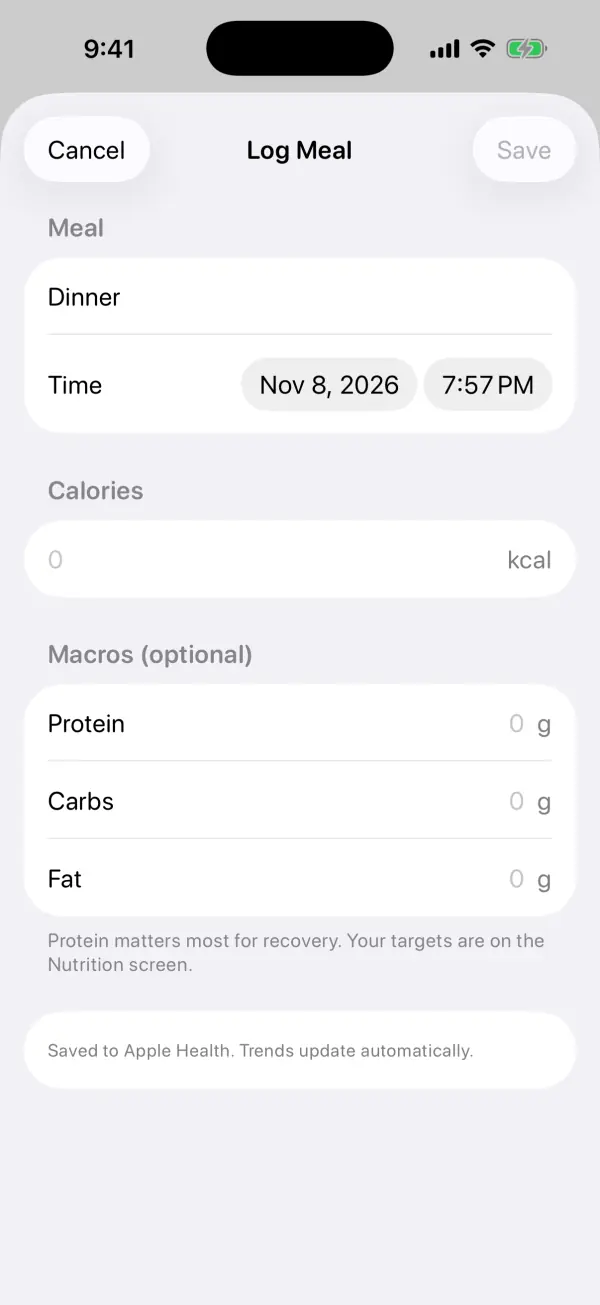
- Tap Log meal, enter a name and calories, and add protein, carbs and fat if you know them. Tap Save.
- Under LOG AGAIN, tap one of your usual meals to open the form already filled in, adjust if needed, and save.
- To change your goal or protein, tap Targets at the top right of the Fuel card. Changes apply straight away.
Logging meals: usual meals, macros and editing
The Log Meal sheet starts with a name based on the time of day (Breakfast, Lunch, Dinner or Snack) and the current time, both of which you can change. Macros are optional. If you fill in macros but leave calories blank, VedaWatch works the calories out at 4 kcal per gram of protein and carbs and 9 per gram of fat, and shows that estimate in the field.
Usual meals appear in two places: as up to four LOG AGAIN rows on the Nutrition screen, and as "Start from a usual meal" chips at the top of a blank Log Meal sheet. They're ranked by how often you've logged them in the last 30 days, with a boost for meals you usually eat at this time of day and ones logged in the last two days.
Everything is saved to Apple Health as nutrition data. Meals you logged in VedaWatch over the past week appear under Recent meals: tap one to edit it (your changes replace the original entry in Apple Health) or swipe to delete it. Food logged in other apps that write to Apple Health counts towards your targets as well, and the card notes when it does.
Pace through the day, meal timing and your week
Being at zero at 9am isn't a problem, so the Fuel card judges you against the time of day, not the whole day. It assumes eating runs from 7:00 to 20:00 and draws a straight line between. Because meals come in lumps, it only says "Behind for the time of day" when you're more than a quarter of the day's target behind that line. On a training or hard day, from 1pm it may nudge you to eat some carbs; later in the day, if protein is lagging, it suggests making dinner protein-heavy.
The Meal timing & recovery card compares nights when your last meal was within 3 hours of bedtime with nights you ate earlier. Once there are at least three of each in the last 30 days, it looks at the next morning's resting heart rate, HRV and sleep and reports the clearest difference, but only if it's meaningful (at least 2 bpm, an 8% HRV drop or 20 minutes less sleep). Otherwise it says there's no clear effect so far. If you have a Sleep Bank bedtime for tonight, it also suggests when to finish eating.
Eaten vs burned shows the last seven days of calories eaten against calories burned, with a line on how many days you hit your protein target. Days with under 500 kcal logged are left out, since they usually mean forgotten logging rather than fasting.
Common questions
Why didn't my protein target go up on a training day? By design. Protein follows body weight and stays the same every day; carbs, calories and water are what rise with training. Protein only changes if you edit it or choose Lose gradually.
Why are my carbs lower than 5 or 7 g/kg on a training day? When your calorie target can't hold the full carb amount alongside protein and a minimum of fat, carbs give way first, down to 2 g/kg. This is more likely with a weight-loss goal.
How accurate are the calorie targets? They're estimates built on Apple Watch energy readings and your logging, both of which have error. Use them as a guide and watch the weekly trend rather than chasing an exact number each day.
Can I ask Siri? Yes. Ask "How's my fuel in VedaWatch" for today's targets and what's left, or use the Log Water and Log a Meal shortcuts.
Is this medical or dietetic advice? No. The targets are general guidance for healthy adults who train. If you have a health condition, are pregnant, or have a history of disordered eating, check targets with your doctor or a registered dietitian.
Sources & further reading
- Journal of the International Society of Sports Nutrition (2017): International Society of Sports Nutrition Position Stand: protein and exercise (Jäger et al.)
- British Journal of Sports Medicine (2018): A systematic review, meta-analysis and meta-regression of the effect of protein supplementation on resistance training-induced gains in muscle mass and strength in healthy adults (Morton et al.)
- Medicine & Science in Sports & Exercise (2016): American College of Sports Medicine Joint Position Statement. Nutrition and Athletic Performance (Thomas, Erdman, Burke)
- Journal of Sports Sciences (2011): Carbohydrates for training and competition (Burke et al.)
- Apple Support: Intro to Health data on iPhone
This guide is educational, not medical advice, and has not been clinically reviewed. VedaWatch is not a medical device. If you have symptoms or concerns about your heart or health, contact a qualified healthcare professional.
Put your trends in perspective.
Explore HRV, sleep, and recovery with VedaWatch on your iPhone.
Download VedaWatch on the App Store →