 VedaWatch
Workouts & Training
How to track strength training progress with Apple Watch: volume, 1RM and muscle balance
Track strength progress from guided Apple Watch sessions: weekly sets per muscle, estimated 1RM with the Epley formula, personal records, muscle freshness and a quick post-session check-in.
By VedaWatch editorial team · · 8 min read
The short answer
VedaWatch turns the guided strength sessions you finish into progress you can read: sets and volume per muscle against a 10-sets-a-week guide, an Epley estimated 1RM and best sets for every exercise, records that only count once there's something to beat, and a short check-in that feeds how fresh each muscle looks.
Why tracking strength is different from tracking cardio
Apple Watch is very good at heart rate, calories and time. For lifting, those numbers miss most of the story. A set of 10 goblet squats with 22 kg and a set with 16 kg can look almost the same on a heart rate graph, but only one of them is progress.
Strength progress shows up in three places: how much work each muscle gets in a week, whether you can lift a bit more or do a few more reps over time, and whether you recover well enough to keep doing it. VedaWatch's strength progress screens are built around those three questions.
Everything here comes from guided sessions you finish in VedaWatch, on Apple Watch or iPhone. Each completed work set is logged with its reps and weight (or hold time for timed moves like a plank). Cardio, mobility and stretching steps are left out so they don't inflate your lifting numbers.
How to find your strength progress
Strength progress lives on the Train tab of the VedaWatch iPhone app. It fills in once you've finished at least one guided strength session.
- Open VedaWatch on your iPhone and tap the Train tab.
- Under Guided training, tap Strength progress. Once you've lifted this week, the row shows how many sets you've done in the last 7 days.
- Scroll the screen for Last 7 days, Muscles, Sets per week, Recent records, Trends, Exercises and Recent sessions.
- Tap any exercise under Exercises, or any record or exercise trend, to open that exercise's own progress page.
- Tap a session under Recent sessions, or the Last guided session card on the Train tab, to open the session review.
- To switch between kilograms and pounds, open Coach preferences under Guided training and change the units.
Sets and volume per muscle
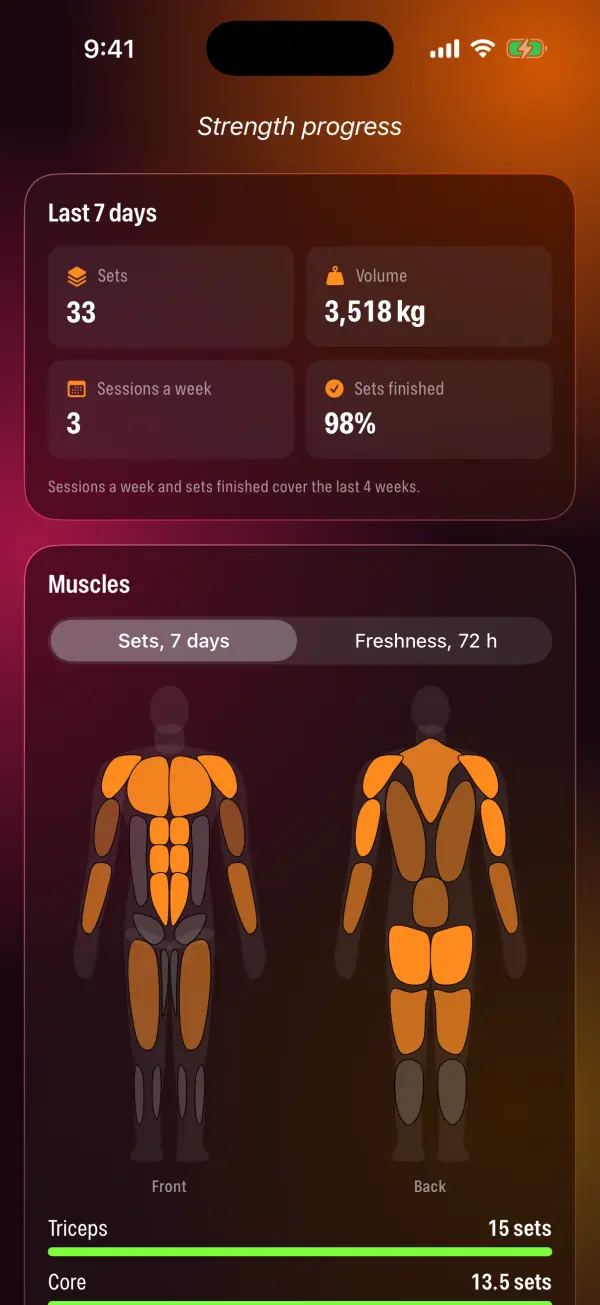
The Last 7 days card shows four numbers. Sets is the work sets you finished. Volume is the total weight lifted, adding up weight × reps for every loaded set (bodyweight sets add nothing here). Sessions a week and Sets finished look back over the last 4 weeks, so one missed day doesn't swing them.
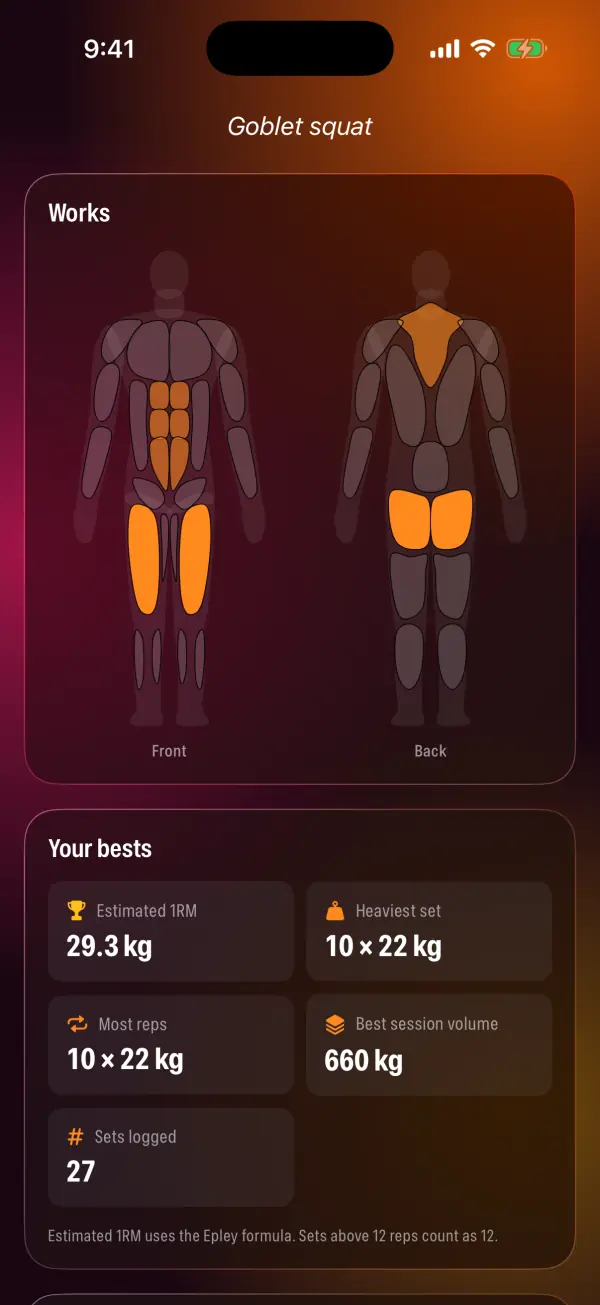
The Muscles card counts sets per muscle, which is how most training research measures volume. Each set gives a full set to the exercise's primary muscles and half a set to the muscles that help. A goblet squat, for example, counts fully for the main movers and half for the helpers, so you'll often see numbers like 13.5 sets.
Each muscle's bar fills against 10 sets a week, and the body map gets brighter as a muscle gets closer to it. The app uses 10 because research reviews have found that around 10 or more weekly sets per muscle tends to produce more muscle growth than fewer sets. It's a useful guide, not a rule: fewer sets still build strength, and more isn't automatically better if you can't recover from it.
Below the map, Sets per week shows a bar for each of the last 8 weeks, with the current week highlighted. It's the easiest way to see whether your training is steady, building, or tailing off.
Muscle freshness over the last 72 hours
Switch the Muscles card from Sets, 7 days to Freshness, 72 h to see how recently each muscle was worked. Each muscle is labelled Fresh, Recovering or Worked hard, with when it was last trained.
The logic is simple on purpose. Sets you did fade out in a straight line over 3 days, and about 8 recent sets in one muscle counts as fully worked. Soreness you report in a check-in adds to it and fades the same way, so a muscle you marked very sore reads as worked hard on its own.
If nothing has been trained or reported sore in the last 3 days, the card simply says everything's fresh. Treat this as a reminder of what you've done, not a measurement of muscle damage. How you actually feel still matters more.
Estimated 1RM and your bests for each exercise
Every exercise you've done has its own page. Works shows the muscles it trains. Your bests lists your estimated 1RM, heaviest set, most reps in a set, best session volume and how many sets you've logged. Timed moves show your longest hold instead.
Estimated 1RM (one-rep max) is a guess at the heaviest single rep you could lift, worked out from a set you actually did. VedaWatch uses the Epley formula: weight × (1 + reps ÷ 30). Ten reps at 22 kg gives 22 × (1 + 10 ÷ 30), or about 29.3 kg. A single rep counts as its own weight.
Formulas like Epley are most accurate with fairly heavy sets and get less reliable as reps climb. So VedaWatch counts any set above 12 reps as 12. That stops a set of 25 light reps from looking like a big jump in strength. You never have to test a real max to see the trend.
Below your bests, a chart plots your best estimated 1RM from each session and labels the change since the first one (for example +6% since a given date). Best sets lists the heaviest weight you've lifted for each rep count, and History shows every session's sets.
Personal records and trends
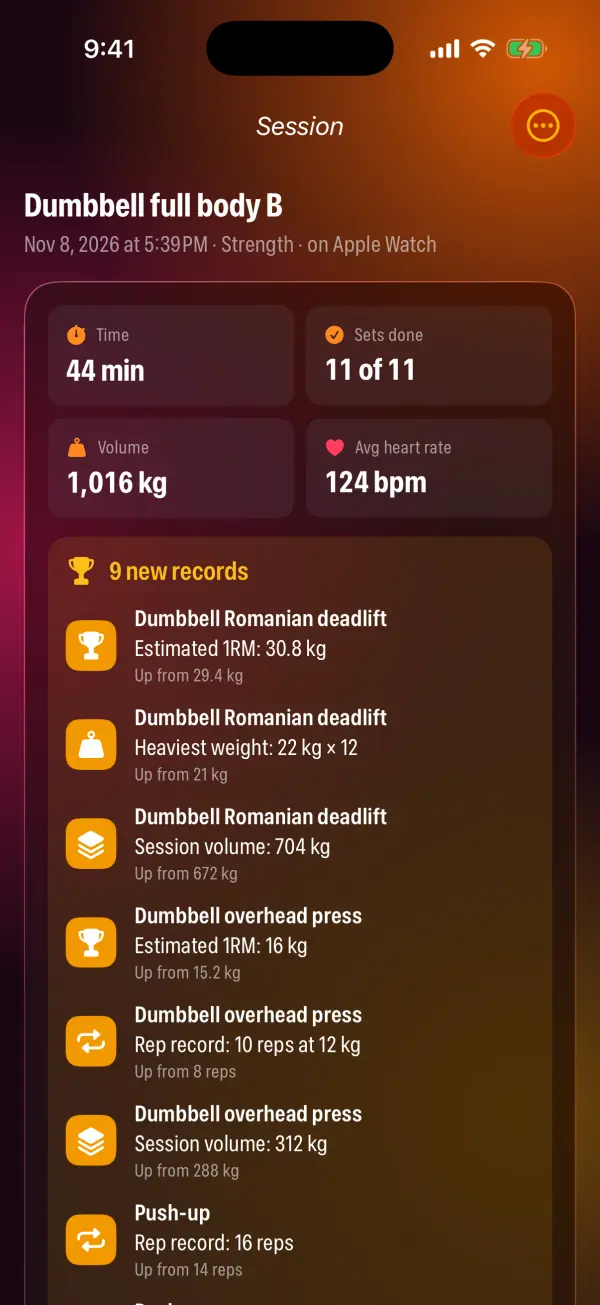
VedaWatch watches for six kinds of record: Estimated 1RM, Heaviest weight, Rep record (more reps than ever at that weight or heavier, or more bodyweight reps), Session volume, Total reps for bodyweight moves, and Longest hold. Each one shows the new value and what it beat, such as "Up from 8 reps".
The first time you do an exercise it sets your starting point quietly, so a first session doesn't bury you in trophies. From then on, any real improvement over every earlier session counts. Recent records shows how many you've set in the last 30 days.
Trends turns the last 4 weeks into short, plain lines. An exercise's estimated 1RM counts as up if it rose at least 3% between your first and latest sessions at least a week apart, and down if it fell 5% or more. It shows as flat if it moved less than 1% over at least 3 sessions and 3 weeks. After two weeks of history you may also see a nudge when a major muscle (chest, upper back, lats, shoulders, quads, hamstrings or glutes) is averaging under 10 sets a week. With a month of history, the app flags weeks with clearly more or fewer sets than usual. If you finish under 70% of planned sets across three or more sessions, it suggests a shorter session you'll actually finish.
New users see no trends rather than guesses. Each rule waits until there's enough history to say something honest.
Reviewing a session: plan vs done
Open any finished session to see what it came to. The top shows the time, sets done out of sets planned, volume (or total reps for bodyweight sessions) and average heart rate from the workout, or active energy if no heart rate was recorded. Any records from that session are listed underneath.
Muscles worked shades the body map by how much each muscle did in that session. Plan vs done goes exercise by exercise, set by set, showing what was planned next to what you did and marking each set Done, Beat the plan, Short of plan or Skipped. A set beats the plan when you did more reps than planned or the same reps with more weight.
From the menu in the top corner you can add or edit a check-in, or delete the session. Deleting removes its sets, records and check-in from your strength progress. A workout already saved to Apple Health stays there.
The post-session check-in
When a guided session finishes, VedaWatch shows a short Check in sheet on your iPhone. It recaps the session, celebrates any new records, and asks three things.
How hard was it? Pick an effort from 1 to 10, where 1 is barely working and 10 is everything you had. The labels run from Very easy through Moderate and Hard to Near max and All out. This is a rating of perceived exertion (RPE), a simple scale lifters and researchers use to describe how close a set or session was to failure. It's the only answer you need to save.
Anything sore or tight? This part is optional. Tap a muscle once for a little, twice for sore, and a third time for very sore. That soreness feeds the freshness map for the next 3 days. You can also add a short note, like a tweak or a cue that clicked. Tap Skip if you'd rather not, and add a check-in later from the session.
Common questions
Is the estimated 1RM my real max? No. It's an estimate from a set you did, and estimates from higher-rep sets are less precise. It's most useful for comparing yourself with yourself over time, as long as you use similar rep ranges.
Why don't my regular Apple Watch strength workouts show up? Strength progress is built from guided VedaWatch sessions, because they know which exercise each set was and how many reps and how much weight you did. A strength workout started in Apple's Workout app doesn't tell VedaWatch which exercises, reps or weights you did.
Why didn't my first session set any records? The first time you do an exercise sets your baseline. Records start from the second session.
Do I need 10 sets a week for every muscle? No. It's a common guide for muscle growth, not a requirement. Beginners often make good progress with less, and the right amount depends on your goals, schedule and recovery.
Is any of this medical advice? No. These are training summaries for general fitness. If something hurts in a way that isn't normal training soreness, stop and talk to a health professional.
Sources & further reading
- Schoenfeld BJ, Ogborn D, Krieger JW. Dose-response relationship between weekly resistance training volume and increases in muscle mass: a systematic review and meta-analysis. J Sports Sci. 2017
- LeSuer DA, McCormick JH, Mayhew JL, Wasserstein RL, Arnold MD. The accuracy of prediction equations for estimating 1-RM performance in the bench press, squat, and deadlift. J Strength Cond Res. 1997
- Zourdos MC et al. Novel resistance training-specific rating of perceived exertion scale measuring repetitions in reserve. J Strength Cond Res. 2016
- American College of Sports Medicine. Progression models in resistance training for healthy adults. Med Sci Sports Exerc. 2009
This guide is educational, not medical advice, and has not been clinically reviewed. VedaWatch is not a medical device. If you have symptoms or concerns about your heart or health, contact a qualified healthcare professional.
Put your trends in perspective.
Explore HRV, sleep, and recovery with VedaWatch on your iPhone.
Download VedaWatch on the App Store →