 VedaWatch
Lifestyle & Mindfulness
Logging nutrition to Apple Health: what actually syncs, and why your numbers might be off
Your Apple Watch doesn't log food—nutrition data in Apple Health comes from manual entry or a connected app. Here's how that actually works, plus a landmark research finding on just how far off self-logged calories tend to run compared to what people actually eat.
By VedaWatch editorial team · · 5 min read
The short answer
Apple Watch has no food-logging feature of its own—calories, protein, carbs, and other nutrition data in Apple Health come from manual entry in the Health app or from a connected third-party app like MyFitnessPal or Cronometer writing to HealthKit. Research using doubly-labeled water as an objective reference found people typically under-report their energy intake by roughly 12-20% on daily recalls, and substantially more on less rigorous methods—worth knowing before treating any logged calorie total as exact.
How nutrition data actually gets into Apple Health
Apple Watch itself has no built-in food-logging feature—there's no equivalent of the Workout app for meals. Nutrition entries in Apple Health (dietary energy, protein, carbohydrates, fat, water, and more) come from one of two places: manual entry in the Health app on iPhone, or a connected third-party app that writes to HealthKit's nutrition data types.
Apps like MyFitnessPal, Cronometer, and similar food-logging tools read and write to these same HealthKit types, which is why a calorie total logged in one app shows up consistently across Health and any other app—including VedaWatch—that reads the same data.
Apple has been reported in the press to be expanding native food-tracking inside the Health app through 2026, including camera-based meal logging, though we haven't independently verified the current state of that feature against an official Apple support page—worth checking Apple's own release notes for your iOS version if you're curious exactly what's built in today.
Why your logged calories might not match reality
This isn't specific to any one app—it's a well-documented property of self-reported dietary data generally. The OPEN Study (Subar et al., 2003, American Journal of Epidemiology), a landmark validation study, compared self-reported energy intake against doubly-labeled water—an objective biomarker method considered the gold standard for measuring true energy expenditure, not a recall-based estimate.
The finding: men under-reported energy intake by about 12-14% using 24-hour recalls and 31-36% using food frequency questionnaires; women under-reported by about 16-20% and 34-38% respectively. Under-reporting wasn't uniform across nutrients, either—the percentage of energy coming from protein was reported much more accurately than absolute energy intake.
The practical read, echoed in later commentary from the same research group: don't treat self-reported energy intake as a measure of true intake, but self-reported data can still be useful for tracking relative change and energy-adjusted nutrient ratios—which is a different, more defensible use than trusting the absolute number.
What this means for how you actually use the number
If your logged calories consistently run lower than your Apple Watch's Active Energy burn would suggest they should, under-reporting bias is a more likely explanation than a tracking error on either side.
Two practical implications: first, consistency in how you log matters more than chasing a precise total—if your own under-reporting tendency stays roughly constant, your trend is still informative even if the absolute number isn't. Second, macronutrient ratios (like percentage of calories from protein) tend to be more reliable than the absolute calorie figure, per the research above.
Common questions
Does this mean food-logging apps are useless? No—it means the absolute number should be read with appropriate skepticism, not that tracking provides no value. Trends and consistency are more defensible uses than treating any single day's total as exact.
Why does my calorie total vary between apps for the same meal? Different food databases, serving-size assumptions, and user-entry precision all introduce their own variance on top of the self-report bias described above.
Is manual logging worse than automated tracking? Generally, yes—manual self-report carries more opportunity for both honest estimation error and selective omission than a passive sensor would, which is part of why dietary research increasingly looks for objective biomarker-based alternatives.
What VedaWatch shows from your nutrition data
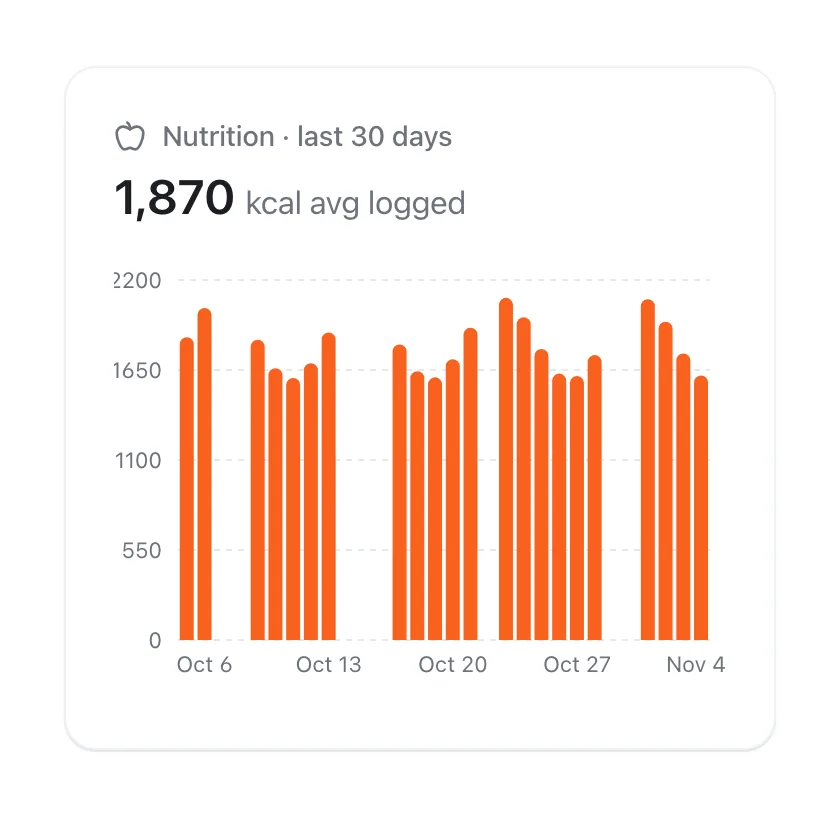
VedaWatch's Nutrition view currently displays calories logged in Apple Health or a connected app as a daily trend—it doesn't log food itself. Worth knowing: protein, carbohydrate, fat, and water data types are also available from Apple Health, though VedaWatch's Nutrition screen doesn't yet chart those alongside calories.
As with every lifestyle metric in VedaWatch, this is a read-only view: it reflects whatever your other apps and manual entries have already recorded, with the accuracy caveats above baked in from the source data itself.
Sources & further reading
- Apple Support: Intro to Health data on iPhone
- American Journal of Epidemiology (2003): Using Intake Biomarkers to Evaluate the Extent of Dietary Misreporting in a Large Sample of Adults: The OPEN Study (Subar et al.)
This guide is educational, not medical advice, and has not been clinically reviewed. VedaWatch is not a medical device. If you have symptoms or concerns about your heart or health, contact a qualified healthcare professional.
Put your trends in perspective.
Explore HRV, sleep, and recovery with VedaWatch on your iPhone.
Download VedaWatch on the App Store →