 VedaWatch
Nutrition
How to use Apple Watch for weight loss: an evidence-based guide
How to use Apple Watch for weight loss: what the calorie numbers mean, setting a Move goal, steps, strength training, protein, sleep and a realistic weekly pace.
By VedaWatch editorial team · · 9 min read
The short answer
Apple Watch doesn't make you lose weight, but it can help you build the habits that do. Use it to keep daily movement and strength training steady, treat its calorie numbers as rough estimates rather than a food budget, and judge progress by your weight trend over weeks. NHS and CDC guidance suggests a gradual pace of about 0.5 to 1 kg (1 to 2 lb) a week.
Does Apple Watch help you lose weight?
Not on its own, but it can help. Body weight changes when the energy you take in from food and drink differs from the energy you use, over weeks and months. A watch can't change either side by itself. What it does well is make movement visible: steps, workouts, active calories and rings give you daily feedback and a nudge to keep going on the days you'd rather not.
It's worth knowing what exercise alone tends to achieve. A 2014 review in Progress in Cardiovascular Diseases concluded that aerobic exercise at the levels in public health guidelines produces modest weight loss on average, around 2 kg, and that results vary a lot from person to person. Larger losses from exercise alone usually need very high training volumes.
That's not a reason to skip exercise. The same review stresses that physical activity brings many health benefits even when the scale doesn't move, and that it plays an important role in keeping weight off afterwards. The most useful way to think about Apple Watch is as a habit tool for the activity side, combined with changes to what you eat that you can keep up.
How many calories should I burn a day on Apple Watch?
There isn't a right number that applies to everyone, and this guide won't give you one. What matters for weight is your total energy use (resting plus active) compared with what you eat, averaged over weeks, not whether a single day's Active Energy reaches a particular figure.
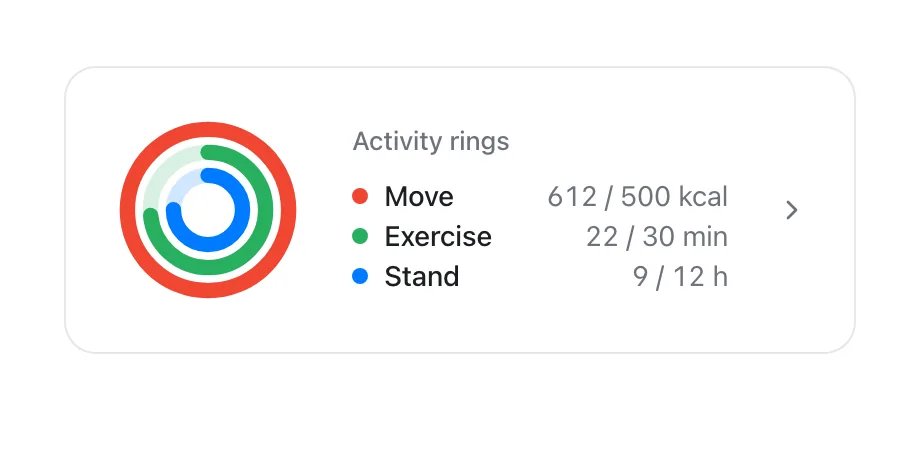
Apple Watch shows two parts of your burn. Active Energy is what you burn through movement, and it's what the Move ring counts. Resting Energy is what your body uses to keep you alive, and it's usually the larger share. Both are estimates built from your heart rate, movement and the age, sex, height and weight in your settings. They can be off by a wide margin, especially for strength training. Our guide on whether Apple Watch calories are accurate covers the research in detail.
Your body's energy use also isn't fixed. A 2012 review by Hall and colleagues in The American Journal of Clinical Nutrition explains that changes on one side of energy balance cause compensating changes on the other: as you eat less and lose weight, the energy you use falls too. The authors recommended no longer using the old rule that 3,500 kcal equals one pound of fat to predict results. That's one reason weight loss often slows over time even when you keep doing the same things.
Should you eat back your Apple Watch calories?
Generally, not all of them. If you add every active calorie the watch shows to your food for the day, any overestimate goes straight onto your plate. Strength sessions and unusual activities are the least reliable estimates, so they're the worst ones to eat back calorie for calorie.
A calmer approach is to keep your eating fairly steady from day to day, eat a little more on genuinely big training days if you're hungry, and let your weight trend over several weeks tell you whether the overall balance is working. If it isn't, change one thing by a small amount and give it a few more weeks. Our calorie accuracy guide walks through this trend check step by step.
What Move goal should you set for weight loss?
Your Move goal is a target for estimated active calories, so a higher goal isn't a weight-loss plan in itself. The goal that helps most is one you can reach on most days without dreading it. A goal you miss four days out of seven tends to feel like failure, and that makes it easier to give up altogether.
Start from what you already do: look at your recent Move totals and set the goal near what you reach on an ordinary day. Raise it a little once that feels routine. Apple Watch also lets you schedule a different goal for each day of the week, which suits a lighter goal on busy or rest days, and you can pause your rings when you're ill or injured.
- On Apple Watch, open the Activity app and turn the Digital Crown to the Move ring.
- Tap Change Goals, then choose Change for Today for a one-off change, or Change Daily Goal for an ongoing one.
- Use the minus and plus buttons to set the goal, then tap Set.
- To give different days different goals, tap the Goal Type button in Change Daily Goal, then Schedule.
- When you need a break, tap the rings and choose Pause Rings. Apple says a pause of up to 90 days won't break your award streaks.
Steps and strength training: what to do with your watch
Walking is the easiest movement to add and keep. It doesn't need equipment or long recovery, and every extra walk adds to your daily energy use. A step goal you hit most days is a good companion to your Move goal. Our guide on how many steps a day you need covers what the large studies found.
Strength training matters for a different reason: it helps you keep muscle while you lose weight. A 2010 systematic review in Nutrition Reviews looked at 52 studies in overweight adults aged 50 and over. In groups that only cut calories, 81% lost at least 15% of their lost weight as fat-free mass, compared with 39% of groups that also exercised. Most of that exercise was aerobic, and there wasn't enough data for a pooled analysis, but the direction is clear: moving while you eat less helps you keep muscle.
In practice, a couple of strength sessions a week alongside your walking is a sensible base. Log them as Traditional Strength Training or Functional Strength Training on the watch so they count toward your rings, but don't judge them by their calorie number, which is the least accurate estimate the watch makes.
Protein and sleep: the two habits a watch can't see
Eating enough protein while you're in a calorie deficit helps protect muscle. In a 2016 randomised trial in The American Journal of Clinical Nutrition, 40 young men ate about 40% less energy than they needed for four weeks while doing intense resistance and interval training six days a week. Those on a higher-protein diet (2.4 g per kg of body weight a day) gained about 1.2 kg of lean mass and lost about 4.8 kg of fat; those on 1.2 g/kg gained about 0.1 kg of lean mass and lost about 3.5 kg of fat. That's an extreme setup, so treat it as a principle rather than a target. Our protein guide covers how much most people need.
Sleep matters too. In a small 2010 crossover study in Annals of Internal Medicine, 10 overweight adults followed the same moderately reduced-calorie diet for 14 days twice: once with 8.5 hours in bed and once with 5.5 hours. With short sleep, they lost 0.6 kg of fat instead of 1.4 kg, lost more fat-free mass (2.4 kg instead of 1.5 kg) and reported more hunger. It was a short study with few people, but it fits a broader picture: short sleep makes a deficit harder.
Apple Watch can track your sleep if you wear it to bed, which makes it easy to notice when a run of short nights lines up with harder days, hungrier evenings or a stalled week.
How fast should you lose weight?
Slower than many people hope, and that's a good thing. The NHS suggests aiming to lose 0.5 to 1 kg (1 to 2 lb) a week. The CDC says people who lose weight at a gradual, steady pace of about 1 to 2 pounds a week are more likely to keep it off.
Smaller losses still count. The CDC notes that losing even a modest amount, such as 5% of your body weight, can improve blood pressure, cholesterol and blood sugar. For someone who weighs 90 kg, that's 4.5 kg.
Day-to-day weight jumps around with water, food and salt, so a single weigh-in tells you very little. If you weigh yourself, do it at the same time of day and look at the weekly average or the trend line. Some weeks will go up even when you've done everything right; what matters is the direction over a month or two.
How VedaWatch helps
VedaWatch reads your activity, sleep and weight from Apple Health. On the Weight page you can tap Log weight to save a new reading to Apple Health and see your weight as a trend line, which is more useful than any single weigh-in.
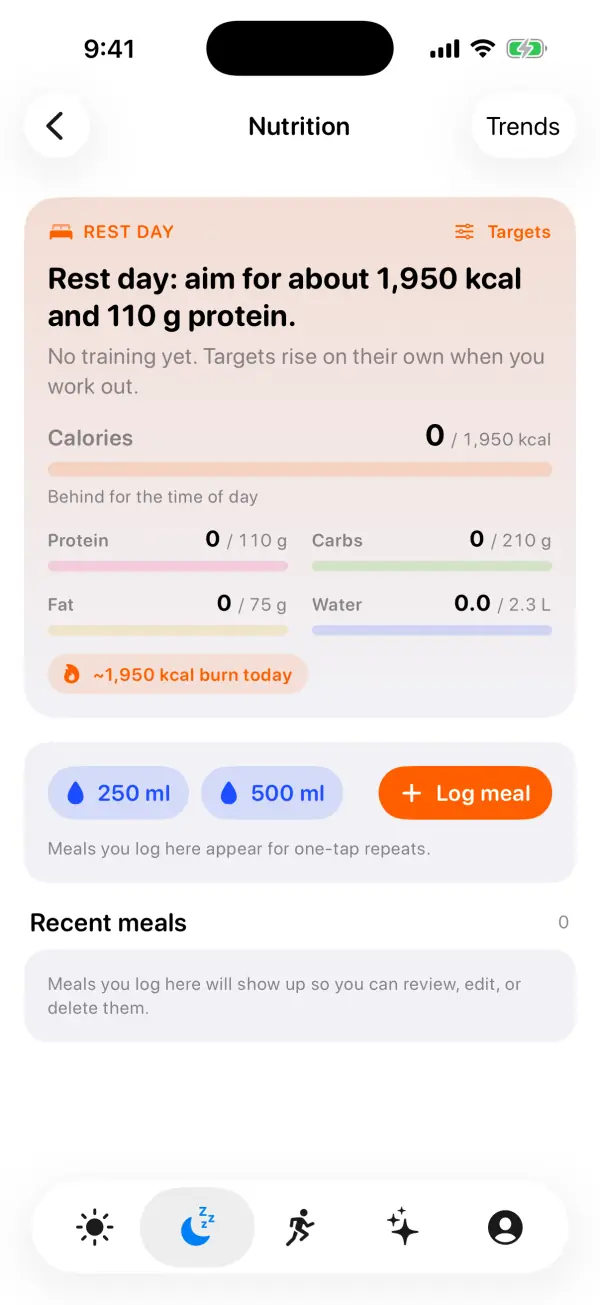
The Nutrition screen, under the Recover tab, lets you log meals and water, with calories and, if you know them, protein, carbs and fat. Its Fuel targets have a Lose gradually goal, which the app describes as a modest deficit that shrinks on training days, about 0.3 to 0.5 kg a week. The deficit is capped at 15% of your expected burn and at most 500 kcal, it's three quarters as big on training days and half on hard days, the target never drops below your resting burn, and protein goes up a little to help hold on to muscle. The Eaten vs burned card compares the last seven days of logged food with your total burn and leaves out days with under 500 kcal logged, since those usually mean forgotten logging.
These are estimates built from estimates, so use them as a guide alongside your weight trend, not as rules. VedaWatch doesn't diagnose anything and isn't a substitute for advice from a doctor or dietitian.
When to see a doctor
Talk to a GP or doctor before making big changes if you have a long-term condition such as diabetes, heart disease or high blood pressure, if you take medicines that affect weight or blood sugar, or if you're pregnant. They can also tell you about local weight management services; in England the NHS says you may be able to refer yourself to some of them.
See a doctor too if you're losing weight without trying. The NHS advises getting checked if you keep losing weight without changing your diet or exercise, and to see a GP as soon as possible if weight loss comes with other symptoms.
And if tracking calories, rings or weight starts to make you anxious, or eating feels out of control, it's fine to stop tracking and get support. You don't need to close every ring or log every meal to make progress, and a doctor can point you to help.
Frequently asked questions
Can you lose weight just by closing your rings?
Some people do, but exercise alone usually produces modest weight loss unless the volume is very high. Closing your rings works best as part of a plan that also includes changes to what you eat, and it brings health benefits even if the scale doesn't move.
Is Apple Watch accurate enough to count calories for weight loss?
It's good for spotting trends but not precise enough to use as a daily food budget. Treat active and resting calories as estimates and check them against your weight trend over several weeks.
Should I count active calories or total calories?
Total calories (resting plus active) is what matters for weight, because it's your whole day's energy use. The Move ring only shows active calories.
Why am I not losing weight when I close my Move ring every day?
Calorie estimates can be too high, eating often rises with activity, and your energy use falls as you lose weight. Look at your weight trend over a month and adjust eating or activity a little at a time, rather than raising your Move goal sharply.
How much weight can I safely lose in a week?
The NHS suggests 0.5 to 1 kg (1 to 2 lb) a week, and the CDC says a gradual, steady pace is more likely to last. Some weeks will be slower, which is normal.
Does Apple Watch track weight?
Not by itself. You can add your weight in the Health app, sync it from a smart scale, or log it in an app such as VedaWatch, and keeping it up to date also helps the watch's calorie estimates.
Related guides
- Are Apple Watch calories accurate? Cardio and strength studies
- How many steps a day do you need? What the studies show by age
- How much protein per day to build muscle: g/kg by body weight
- How to close your rings every day (and when to pause them)
- How much to eat on training vs rest days: calorie and protein targets from your Apple Watch
- How much sleep do I need? By age, for athletes, and for you
Sources & further reading
- NHS: Tips to help you lose weight
- CDC: Steps for losing weight
- NHS: Unintentional weight loss
- Hall KD et al. (2012). Energy balance and its components: implications for body weight regulation. The American Journal of Clinical Nutrition 95(4):989-994. doi:10.3945/ajcn.112.036350
- Swift DL et al. (2014). The role of exercise and physical activity in weight loss and maintenance. Progress in Cardiovascular Diseases 56(4):441-447. doi:10.1016/j.pcad.2013.09.012
- Weinheimer EM, Sands LP, Campbell WW (2010). A systematic review of the separate and combined effects of energy restriction and exercise on fat-free mass in middle-aged and older adults. Nutrition Reviews 68(7):375-388. doi:10.1111/j.1753-4887.2010.00298.x
- Longland TM et al. (2016). Higher compared with lower dietary protein during an energy deficit combined with intense exercise promotes greater lean mass gain and fat mass loss: a randomized trial. The American Journal of Clinical Nutrition 103(3):738-746. doi:10.3945/ajcn.115.119339
- Nedeltcheva AV et al. (2010). Insufficient sleep undermines dietary efforts to reduce adiposity. Annals of Internal Medicine 153(7):435-441. doi:10.7326/0003-4819-153-7-201010050-00006
- Apple Support: Adjust your Activity ring goals on Apple Watch
This guide is educational, not medical advice, and has not been clinically reviewed. VedaWatch is not a medical device. If you have symptoms or concerns about your heart or health, contact a qualified healthcare professional.
Put your trends in perspective.
Explore HRV, sleep, and recovery with VedaWatch on your iPhone.
Download VedaWatch on the App Store →