 VedaWatch
Sleep
Does Apple Watch track naps? What it records and how to log them
Does Apple Watch track naps? What it records for daytime sleep, why naps go missing in Health, how to log one yourself, and how long a nap should be.
By VedaWatch editorial team · · 10 min read
The short answer
Sometimes. Since watchOS 11, Apple Watch has been reported to record daytime naps in Health without Sleep Focus, but Apple doesn't document how nap detection works, and short naps are often missed. Check Health > Browse > Sleep after a nap, and add it by hand if it isn't there. Apple's Sleep Score rates your night, not naps.
Does Apple Watch track naps?
Partly. Apple Watch tracks sleep once Track Sleep with Apple Watch is turned on, and Apple's sleep pages are written around your night: a sleep schedule, a bedtime and a morning Sleep Score. They don't describe a nap feature, how short a nap can be and still be recorded, or whether naps get sleep stages.
What we do know comes from two places. First, when watchOS 11 was in beta in June 2024, MacRumors reported that the Watch appeared to record a nap in the Health app without Sleep Focus being turned on. Apple didn't announce that change, and it hasn't documented it since. Second, Apple's own Readiness app guide for watchOS 27 says your readiness score updates throughout the day based on calories burned, naps and your daytime heart rate. So Apple's software does use naps the Watch knows about.
In practice, that means a longer nap with your Watch on is often recorded as sleep in Health, while a 10 or 15 minute doze may leave nothing at all. Apple Community threads still report daytime naps that don't show up. Treat automatic nap tracking as a bonus, not something to rely on, and check your data after you nap.
What Apple Watch records for a nap, and what it doesn't
It helps to separate what Apple documents from what people report. Here's where each part of nap tracking stands as of November 2026, on watchOS 27.
- Recorded sleep in Health: reported since watchOS 11, not documented by Apple. When it works, the nap appears as asleep time in Health > Browse > Sleep for that day.
- Sleep Score: night only, as far as Apple's pages describe it. Apple says you get a 0 to 100 Sleep Score every morning after you wake up, built from duration (50 points), bedtime consistency (30 points) and interruptions (20 points). Nothing says a nap is scored.
- Readiness score: Apple says it updates through the day based on calories burned, naps and daytime heart rate, so a recorded nap can move it. Apple's Readiness guide names Apple Watch Series 12 and Apple Watch Ultra 4.
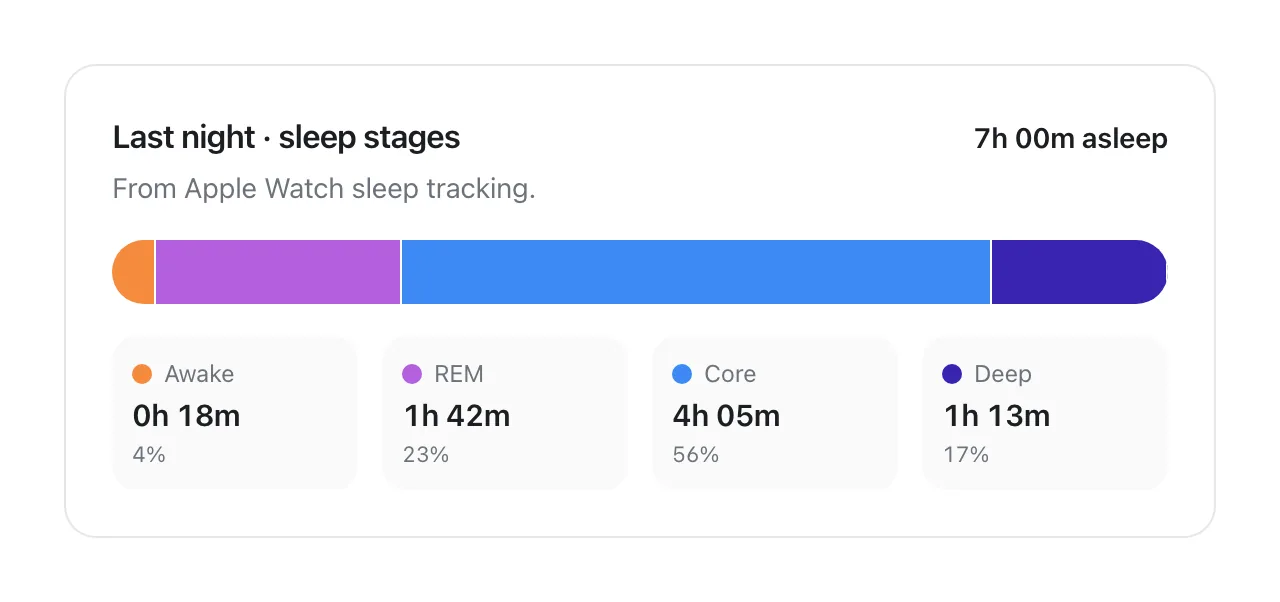
- Sleep stages: Apple documents REM, Core and Deep estimates for your night. It doesn't say whether short naps get a stage breakdown, so don't expect one.
- Sleep schedule and Sleep Focus: these are for bedtime. Apple describes Sleep Focus as a way to reduce distractions; it doesn't say a nap needs it.
- Your own nap goal or nap history: there is no separate nap view in Health. A nap is just more asleep time on that day's sleep chart.
Why your nap didn't show up in the Health app
If you napped with your Watch on and Health shows nothing, it's usually one of a handful of ordinary causes rather than a fault.
The nap was short. A 10 or 20 minute nap, which is the length research favours for a quick lift, is also the length most likely to be missed. There's no published minimum from Apple, so there's no setting to change.
Sleep tracking is off. Apple says that to receive sleep data you must turn on Track Sleep with Apple Watch, which you'll find in your sleep settings.
The Watch was loose, charging or low. Apple notes that a loose band can let the accelerometer register too much movement during sleep, and recommends at least 30% charge before bed. The same logic applies to an afternoon nap: if the Watch was on the charger or locked off your wrist, it had nothing to measure.
You weren't still. Dozing in a car, on a train or while scrolling on the sofa often looks like resting wakefulness to a wrist sensor.
The data is there but filed under another day or source. Health shows sleep by day, and if you use another sleep app as well, its data may appear under a different source. Tap Show All Data at the bottom of the Sleep page to see every entry and where it came from.
How to log a nap on iPhone if your Watch missed it
If a nap matters to you, for example because you're tracking how much you sleep on shift-work days, adding it yourself takes under a minute. Apple's steps for adding Health data by hand work for sleep as they do for steps or weight.
- Open the Health app on your iPhone and tap the Browse tab.
- Tap Sleep. If you have a Sleep page with an Add Data button in the top corner, tap it.
- Enter the date and the time you fell asleep and woke up. Be honest about the start: time lying down before you dropped off isn't sleep.
- Tap Add or Done. The entry appears on that day's sleep chart with you as the source.
- If you made a mistake, open Show All Data, find your entry and delete it, then add it again.
- Optional: some third-party sleep apps let you start a nap session by hand and save it to Health. If you use one, keep only one app writing naps, or the same nap may be counted twice by apps that read Health.
Tips that make an automatically recorded nap more likely
None of these are guarantees, since Apple doesn't document nap detection, but they remove the common reasons a nap goes unrecorded.
Keep Track Sleep with Apple Watch on all the time, not only on work nights. Wear the Watch snugly, as you would at night. Don't nap with the Watch on its charger; top it up before or after.
Lie down somewhere you can be still. A nap on a bed or sofa is far more likely to register than one sitting upright.
You can turn on Sleep Focus or Do Not Disturb from Control Center to stop notifications buzzing your wrist awake. Apple doesn't say this starts nap tracking, but fewer interruptions make a real nap more likely, and that's the point.
Set an alarm or timer for the length you want. A Watch timer taps your wrist, which is less jarring than a phone alarm and keeps the nap from turning into a 90 minute sleep by accident.
How long should a nap be?
For a quick boost, short. In a 2006 study in the journal Sleep, Brooks and Lack restricted 24 healthy young adults to about five hours of sleep, then gave them a 3 pm nap of 0, 5, 10, 20 or 30 minutes of actual sleep and tested them for three hours afterwards. Their conclusion was that the 10 minute nap was overall the most effective. Here's what each length did:
- 5 minutes of sleep: few benefits compared with no nap.
- 10 minutes: improvements on all measures straight away, some lasting up to 155 minutes.
- 20 minutes: improvements that appeared about 35 minutes after waking and lasted up to 125 minutes.
- 30 minutes: a dip in alertness and performance right after waking (sleep inertia), then benefits lasting up to 155 minutes.
- About 90 minutes: the Sleep Foundation notes a nap this long can be refreshing because it allows a full cycle through the sleep stages, and cites the CDC suggesting it for shift and emergency workers, but warns it can be a problem late in the day.
Putting the nap research into practice
Those study numbers are minutes asleep, not minutes lying down. Most people take a few minutes to drop off, so a 20 minute alarm usually gives you something close to the 10 to 15 minutes of sleep that worked best. The Sleep Foundation's general advice lines up: about 20 minutes for most adults, and no longer than 30, because longer naps can reach deep sleep and leave you groggy.
Timing matters as much as length. The Sleep Foundation says experts typically recommend napping eight or more hours before bedtime, which for most people means before 3 pm. A 2021 meta-analysis by Dutheil and colleagues pooled 11 studies with 381 participants and found that an afternoon nap improved cognitive performance, most clearly alertness, with gains seen mainly in the two hours after the nap. Results in the groggy period just after waking were mixed.
A worked example: you slept 6 hours, you have a 4 pm meeting and you go to bed at 11 pm. Lie down at about 1:30 pm with a 20 minute timer. You'll likely get 10 to 15 minutes of sleep, wake before deep sleep, and be past any grogginess well before the meeting, with more than nine hours until bedtime. A 2 hour nap at 5 pm on the same day is the version most likely to push your bedtime back.
Keep in mind these are averages from small groups, mostly young adults in labs. If you regularly nap for an hour and sleep fine at night, that's useful information about you.
Do naps count toward your total sleep?
In Apple Health, a recorded nap is asleep time on that day, so it can show up in your daily sleep total. Apple's Sleep Score, as Apple describes it, is a rating of the previous night, so a nap doesn't add points to it. Readiness, on the newest Watches, does take naps into account during the day.
Whether a nap makes up for a short night is a different question. The studies above measured alertness for a few hours after the nap, not whether a nap replaces night sleep. That's why many sleep tools, including VedaWatch, keep naps separate from the main sleep they use to judge whether you're getting enough.
How VedaWatch handles your naps
VedaWatch reads the sleep your Apple Watch, or any app you've allowed, saves to Apple Health. It doesn't detect naps itself, so if Health has no record of a nap, VedaWatch has none either. A nap you add by hand in Health is read the same way as one your Watch recorded.
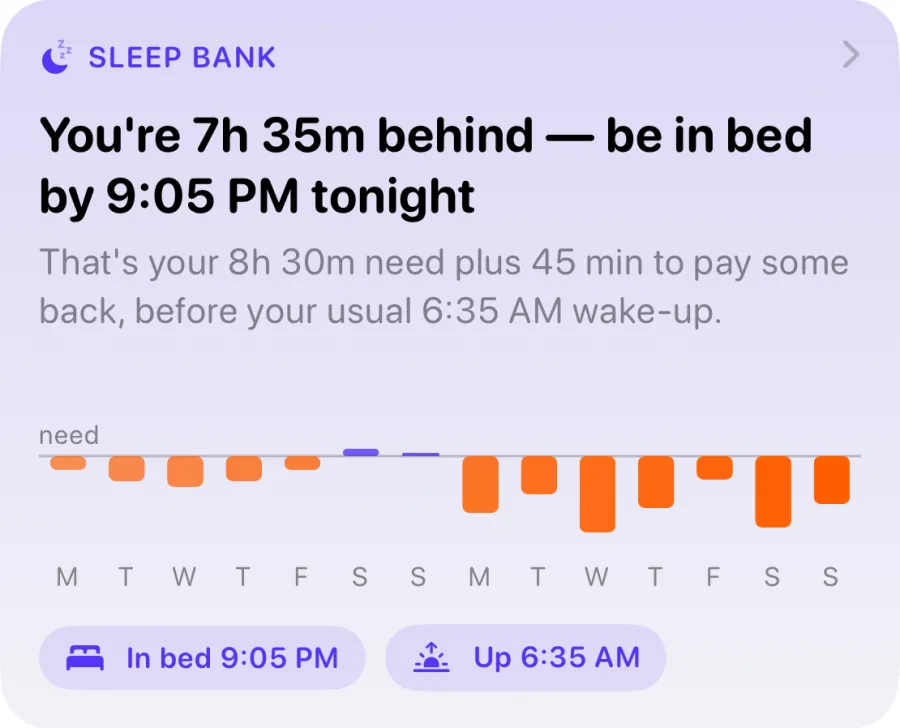
Sleep Bank, the sleep debt balance on the Recover tab, uses one main sleep per day. Sleep pieces less than 2 hours apart are joined into one sleep, the longest sleep ending on each day counts, and anything under 2 hours is treated as a nap and left out. So a 30 minute nap neither repays sleep debt nor changes tonight's suggested bedtime.
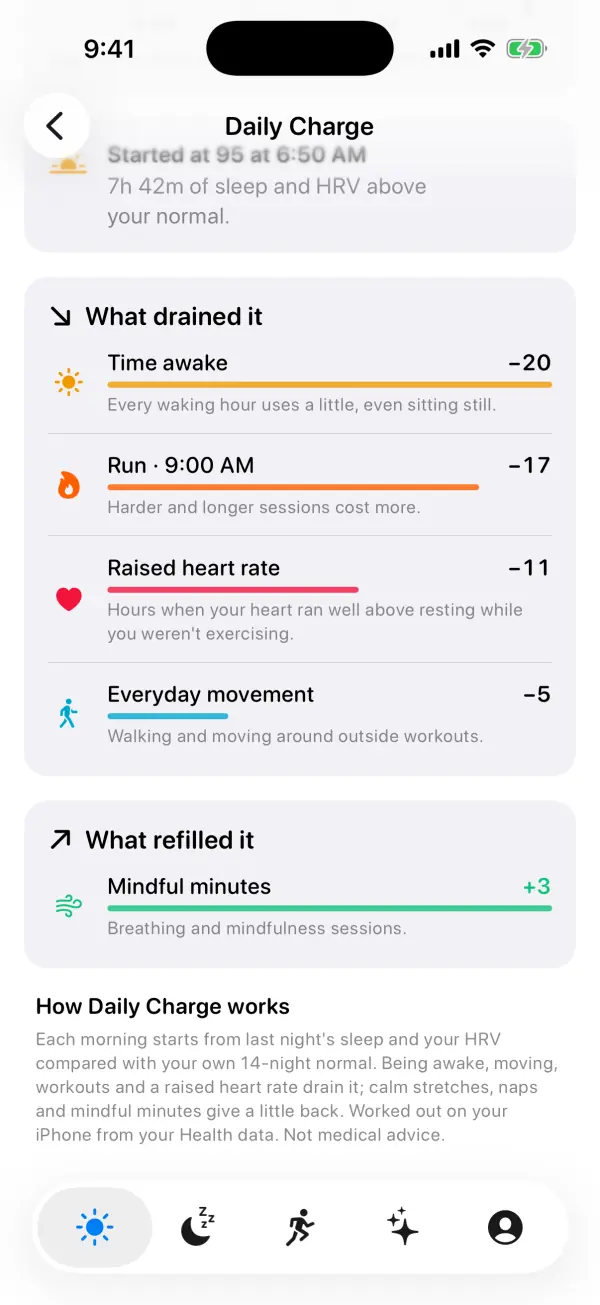
Daily Charge, the 0 to 100 energy gauge on Today, does count naps. Sleep that starts more than half an hour after your morning wake-up counts as a nap, adds 0.12 points a minute and pauses the 1.6 points an hour that being awake costs. A 20 minute nap therefore gives back about 2 points, enough to see on the curve but not to undo a hard workout. Naps appear under What refilled it on the Daily Charge screen.
The daily sleep total on the Sleep screen adds up everything Health records as asleep on that day, so a recorded nap can make that day's figure slightly higher than the night alone. All of this is worked out on your iPhone from your Health data. It's a wellness guide, not medical advice.
When needing naps is worth a doctor's visit
An afternoon dip after a short night is normal. Needing to nap every day, or falling asleep when you don't mean to, is different. The Sleep Foundation says excessive daytime sleepiness may point to a sleep disorder and should be checked by a professional, and that frequent napping along with low mood, appetite or weight changes, or losing interest in things you enjoy is a reason to call your doctor.
Talk to a clinician if you can't stay awake during normal daytime hours, nod off while driving or in conversation, snore loudly or have been told you stop breathing in your sleep, or still feel exhausted after a full night. Your Watch's sleep data can be a useful thing to bring, but it's a consumer estimate, not a diagnosis.
Frequently asked questions
Does Apple Watch need Sleep Focus on to track a nap?
Apple doesn't say. Reports since the watchOS 11 beta describe naps being recorded without Sleep Focus, but Apple only documents that Track Sleep with Apple Watch must be on to get sleep data.
Will a nap mess up my Apple Watch Sleep Score?
Apple describes the Sleep Score as a morning rating of your previous night's sleep, based on duration, bedtime consistency and interruptions. Its pages don't say naps are scored, though a long late nap can make your next night shorter or later, which would show up there.
Can I delete a nap from Apple Health?
Yes. In Health, go to Browse > Sleep > Show All Data, find the entry and delete it. Entries recorded by your Watch can be removed the same way if, for example, quiet time on the sofa was logged as sleep.
Is a 10 minute nap really enough?
In Brooks and Lack's study of people who'd slept about five hours, 10 minutes of actual sleep gave the best overall result of the lengths tested, with benefits lasting up to 155 minutes. Because it takes a few minutes to fall asleep, a 15 to 20 minute nap window is a practical way to get it.
Does Apple Watch track naps on older models?
Apple doesn't publish a nap feature list by model. Nap recording was reported with watchOS 11, so a Watch that runs current watchOS with sleep tracking on is the best bet; Apple's Readiness guide, which mentions naps, names Series 12 and Ultra 4.
Related guides
- Apple Watch Sleep Score explained: what's good and how to raise it
- Sleep debt calculator for Apple Watch: how VedaWatch's Sleep Bank works
- Body battery on Apple Watch: how VedaWatch's Daily Charge energy score works
- Apple Watch sleep tracking: how accurate is it, and what to do when it's wrong
- Can you catch up on sleep? What weekend recovery sleep can't fix
- How much sleep do I need? By age, for athletes, and for you
Sources & further reading
- Apple Support: Track your sleep on Apple Watch and use Sleep on iPhone
- Apple Support: Use the Readiness app on Apple Watch
- Apple Support: Manage Health data on your iPhone, iPad, or Apple Watch
- MacRumors: watchOS 11 Supports Automatic Nap Detection (June 2024)
- Brooks A, Lack L. A brief afternoon nap following nocturnal sleep restriction: which nap duration is most recuperative? Sleep, 2006
- Dutheil F, et al. Effects of a Short Daytime Nap on the Cognitive Performance: A Systematic Review and Meta-Analysis. IJERPH, 2021
- Sleep Foundation: Napping, benefits and tips
This guide is educational, not medical advice, and has not been clinically reviewed. VedaWatch is not a medical device. If you have symptoms or concerns about your heart or health, contact a qualified healthcare professional.
Put your trends in perspective.
Explore HRV, sleep, and recovery with VedaWatch on your iPhone.
Download VedaWatch on the App Store →