 VedaWatch
Using VedaWatch
Sleep debt calculator for Apple Watch: how VedaWatch's Sleep Bank works
See how many hours of sleep you're behind over the last two weeks, how your sleep need is set, and what time to be in bed tonight to start paying the debt back, using Apple Watch sleep data.
By VedaWatch editorial team · · 7 min read
The short answer
Sleep Bank compares each of your last 14 nights of Apple Watch sleep with your sleep need, counts recent nights most, and turns the result into one sentence: how far behind or ahead you are, and when to be in bed tonight. It pays debt back in small steps, never more than 45 extra minutes a night.
What sleep debt is, and why a running balance helps
Sleep debt is the gap between the sleep your body needs and the sleep you actually get, added up over several nights. One short night is easy to notice. Five nights that each run 40 minutes short are much easier to miss, even though they add up to more than three hours.
That slow build-up matters. In a well-known lab study, people limited to 6 hours a night for two weeks got steadily worse on attention tests, yet rated themselves as only slightly sleepy. In other words, you can't always feel a debt you're carrying.
Most adults need at least 7 hours a night, according to the American Academy of Sleep Medicine and Sleep Research Society. A running balance turns that guidance into something personal: how your last two weeks compare with your own need, and what to do about it tonight.
What the Sleep Bank card shows
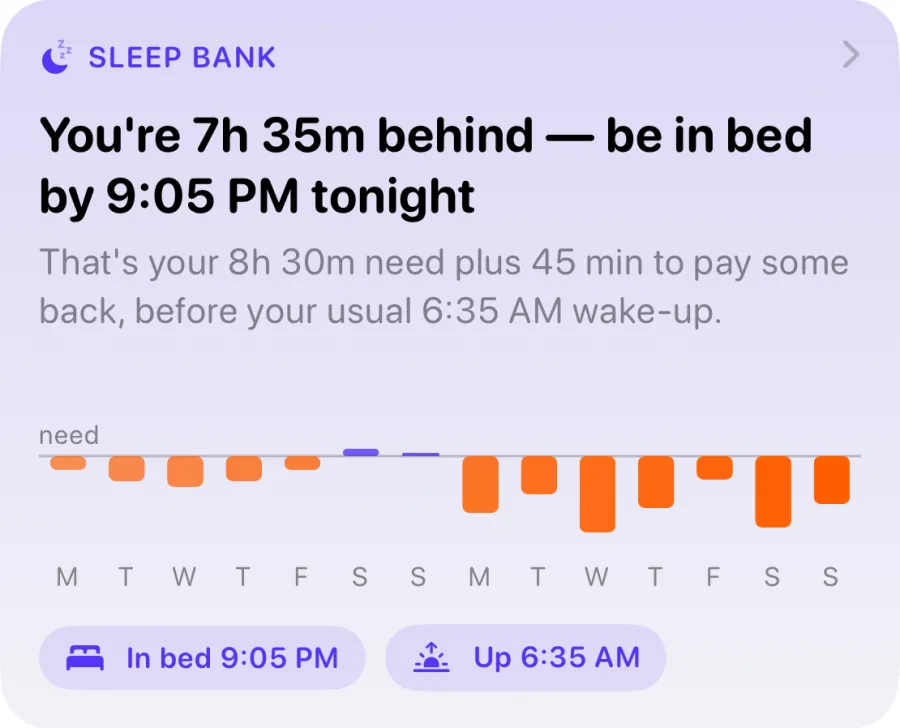
Sleep Bank lives on the Recover tab of the VedaWatch iPhone app. The card leads with one sentence, for example "You're 3h 20m behind — be in bed by 10:40 PM tonight". When you're even (within 15 minutes either way) it says "You're even on sleep", and when you're ahead it says how much, with the bedtime that keeps it.
Under the headline, a short line explains the bedtime: your sleep need plus any minutes added to pay debt back, before your usual wake-up time. Below that is a bar chart of the last 14 nights against a "need" line. Purple bars sit above it on nights you slept more than your need, orange bars hang below it on nights you were short.
Two chips at the bottom repeat the plan: "In bed" with tonight's bedtime and "Up" with your usual wake-up. Tap anywhere on the card to open the full Sleep Bank screen.
How the two-week sleep balance is calculated
Each of the last 14 nights gets a simple number: hours asleep minus your sleep need. A 7h 15m night against an 8h need is 45 minutes short; a 9h night is an hour over.
Those numbers are then added up with recent nights counting more. Last night counts fully, and the weight falls steadily back to 40% for the night two weeks ago. So a rough week just gone weighs more than a rough week before that, and a debt fades from the balance as you sleep well again.
Nights without sleep data from your Watch are skipped, not counted as zero, so forgetting to wear it doesn't invent a debt. The balance needs at least 3 recorded nights in the last 14 days before it says anything; until then the card reads "Your Sleep Bank opens after 3 nights".
How your sleep need is set
Everything is measured against your sleep need. It starts at 8 hours. As data comes in, VedaWatch looks at nights from the last 30 days when you woke up on your own: wake-ups on a weekend, or at least 45 minutes later than your usual time. Alarm nights show how much sleep fits into your schedule, not how much your body wants, so they don't count.
A lie-in straight after a short night (under 7 hours) is treated as catching up rather than your true need, so it's left out too. Once there are at least 4 of these natural-wake nights, their median starts pulling the 8-hour starting point towards it, fully after 10 nights. The learned need always stays between 7 and 9 hours and is rounded to the nearest 15 minutes.
If you know your number better, set it yourself under "Your sleep need" on the Sleep Bank screen, anywhere from 6 to 10 hours in 15-minute steps. The app still shows what your nights suggest, and "Use what my nights suggest" switches back to the learned value.
How tonight's bedtime target is worked out
The bedtime starts from your usual wake-up time: the median wake time of your last 14 nights, rounded to 5 minutes. It needs at least 5 nights before it suggests a time. From there it counts back your sleep need, any extra minutes to repay debt, and 15 minutes to fall asleep.
The extra minutes aim to pay the debt back over about four nights: roughly a quarter of the debt, in 5-minute steps, and never more than 45 minutes in one night. Debts under 30 minutes don't change the plan at all. For example, with a 6:35 AM wake-up, an 8h 30m need and a big debt, the plan is 8h 30m plus 45 minutes plus 15 minutes to drift off, so in bed by 9:05 PM.
Capping the catch-up is deliberate. Research on recovery suggests a large debt isn't cleared by one long night, and asking for two extra hours is a plan most people won't follow. A steady 45 minutes earlier over several nights is more realistic.
How to use Sleep Bank in the app
Sleep Bank reads the sleep your Apple Watch already saves to Apple Health, so wear your Watch to bed and make sure VedaWatch has Health access.
- Open VedaWatch on your iPhone and go to the Recover tab.
- Find the Sleep Bank card and read the headline: how far behind or ahead you are and when to be in bed tonight.
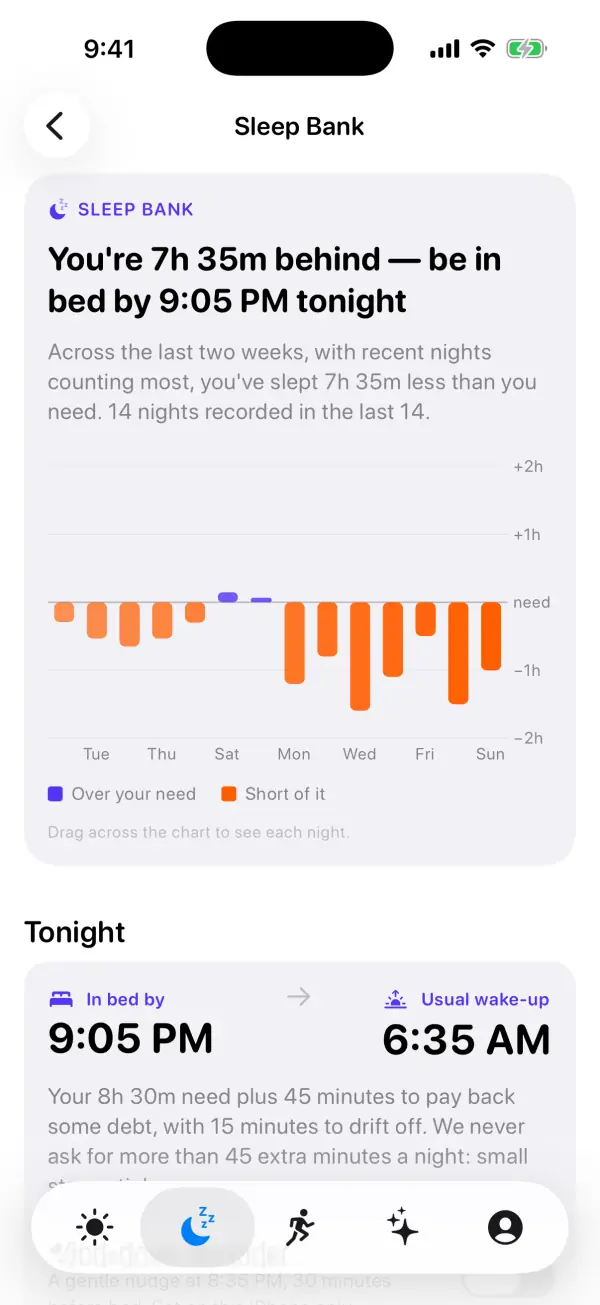
- Tap the card to open the Sleep Bank screen. Drag across the chart to see each night's sleep and how far over or short of your need it was.
- Under Tonight, check the "In bed by" and "Usual wake-up" times and the line explaining how they were worked out.
- Turn on "Wind-down reminder" if you want a gentle nudge 30 minutes before bed. Allow notifications when asked.
- Under "Your sleep need", use the stepper to set your own need, or tap "Use what my nights suggest" to go back to the learned value.
The wind-down reminder
The wind-down reminder is off by default. When you turn it on, VedaWatch schedules a local notification titled "Time to wind down" 30 minutes before tonight's bedtime, suggesting screens off and lights low. On nights with debt to repay, it mentions that going to bed then pays some of it back.
It also schedules the next six nights at your usual bedtime (your need before your usual wake-up, without the catch-up minutes), so it keeps working even if you don't open the app. The times are re-planned whenever Sleep Bank updates.
The reminder is set on that iPhone only and doesn't go through a server. If notifications are off for VedaWatch, the toggle tells you and offers an Open Settings button.
Common questions about Sleep Bank
Why does it say I'm behind when I slept well last night? The balance covers two weeks. One good night helps, and it counts fully, but it may not cancel several short nights before it. Keep going and the debt shrinks as older nights lose weight.
Why is there no bedtime yet? A bedtime needs your usual wake-up time, which takes at least 5 nights in the last two weeks. Until then the card shows your balance and says a bedtime is coming.
Can I sleep 10 hours on Saturday to clear it? A long lie-in does count as a surplus night. Sleep Bank's own plan spreads repayment over several nights instead, and research suggests a single recovery night doesn't fully undo a run of short ones.
Is my sleep data uploaded? The balance, need and bedtime are worked out on your iPhone from Apple Health. If you set your sleep need by hand and you're signed in, that setting is saved to your account so it carries over.
Is this medical advice? No. Sleep Bank is an educational estimate based on your Watch's sleep tracking, which isn't perfect. If you're regularly exhausted despite enough time in bed, snore heavily, or struggle to fall or stay asleep, talk to a doctor.
Sources & further reading
- Van Dongen HPA et al. The cumulative cost of additional wakefulness: dose-response effects on neurobehavioral functions and sleep physiology from chronic sleep restriction and total sleep deprivation. Sleep, 2003
- Watson NF et al. Recommended amount of sleep for a healthy adult: a joint consensus statement of the AASM and SRS. Sleep, 2015
- Kitamura S et al. Estimating individual optimal sleep duration and potential sleep debt. Scientific Reports, 2016
- Apple Support: Track your sleep on Apple Watch and use Sleep on iPhone
This guide is educational, not medical advice, and has not been clinically reviewed. VedaWatch is not a medical device. If you have symptoms or concerns about your heart or health, contact a qualified healthcare professional.
Put your trends in perspective.
Explore HRV, sleep, and recovery with VedaWatch on your iPhone.
Download VedaWatch on the App Store →