 VedaWatch
Recovery & Apple Watch
Apple Watch sleep tracking: how accurate is it, and what to do when it's wrong
Apple published its own validation numbers for sleep stage tracking: how often it correctly spots sleep, how often it correctly spots being awake, and where it tends to make mistakes. Here's what the data actually says, plus fixes for the most common tracking problems.
By VedaWatch editorial team · · 7 min read
The short answer
In Apple's own validation study, its sleep-stage algorithm correctly identified true sleep about 97% of the time but true wake only about 75-79% of the time—meaning a watch slightly overstates how much you slept, on average, more than it understates it. That's still a real improvement over older wrist-actigraphy methods, and most "wrong" readings trace back to setup, not the algorithm.
How Apple Watch actually tracks sleep
Apple Watch doesn't use brainwave sensors—it classifies sleep from accelerometer data alone, reading subtle wrist movements, including those from breathing, in 30-second windows. Each window gets sorted into one of four states: Awake, REM, Core (which covers both light N1 and the larger N2 stage), or Deep (clinical slow-wave N3 sleep).
Getting stage data requires wearing your watch to bed with a sleep schedule set up and Sleep Focus on. Two thresholds matter in practice: a detected sleep session of 1-3 hours gets basic sleep/wake data, while a session longer than 3 hours is needed to get full stage breakdowns (Awake, REM, Core, Deep).
What Apple's own validation data shows
Apple published a white paper describing how the algorithm was built and tested: 1,171 nights from 858 participants for development, then a separate 299 nights from 166 participants—never seen during training—for validation, using lab and at-home polysomnography (PSG) as the ground truth.
The results, in Apple's own numbers: median sleep sensitivity of 97.9% (true sleep correctly called sleep) against a lower median specificity of 75.0% (true wake correctly called wake)—later improved to 96.8% sensitivity and 78.9% specificity with a 2025 algorithm update. In plain terms, the watch is excellent at not missing real sleep, but roughly a fifth to a quarter of the time you're genuinely awake, it still logs it as sleep.
On four-stage accuracy (Awake/REM/Core/Deep), Apple reports a kappa coefficient—a statistic that accounts for chance agreement—of 0.63, improving to 0.68 with the 2025 update. The most common mix-up across every stage, including Awake, was misclassifying it as Core sleep; genuinely distinct stages, like mistaking Deep sleep for Awake, were rare (0.13%).
How this compares to older sleep trackers
Apple frames its own numbers against traditional wrist actigraphy, the older multi-night tracking method most consumer devices historically used: generally 90-97% sensitivity but specificity "often 50 percent or less"—meaning older actigraphy-based trackers frequently mislabel being awake as being asleep. Apple's reported 75-79% specificity is a meaningful step up from that baseline, which it attributes to using high-frequency raw accelerometer data instead of simpler movement-count binning.
Accuracy wasn't uniform across everyone in the validation set. Apple found that more frequent stage transitions and a higher apnea-hypopnea index (a measure of sleep apnea severity) each modestly reduced four-stage accuracy—unsurprising, since both make sleep architecture itself more complex to classify, for algorithms and human PSG technologists alike.
Fixing the most common tracking problems
Most "inaccurate" sleep data traces back to one of these, not the algorithm itself.
- No sleep data at all: confirm a Sleep schedule is set up in the Health app (Browse → Sleep) and that Sleep Focus turns on automatically overnight.
- Sleep shows but no stage breakdown: your detected sleep session was under 3 hours—short naps and fragmented nights only get basic sleep/wake data, not stages, by design.
- Bedtime or wake time looks wrong: this usually means the watch wasn't worn snugly, or wasn't on your wrist yet when you actually fell asleep—fit affects how well the accelerometer picks up stillness and breathing motion.
- Missing a whole night: check battery—Apple Watch needs enough charge going into the night to track through to morning, so a charging-schedule conflict is a common, boring cause.
Common questions
Is Apple Watch sleep tracking medical-grade? No. Apple is explicit that sleep stages "aren't intended for clinical use"—it's a consumer wellness estimate, not a diagnostic tool.
Why does my sleep duration look longer than I feel it was? Given the sensitivity/specificity numbers above, the algorithm is somewhat more likely to call true wake time "asleep" than the reverse—so very still quiet wakefulness (lying in bed awake) can occasionally get logged as light sleep.
Does which Apple Watch model I own affect accuracy? Apple states it found no meaningful difference in four-stage kappa performance across the different Apple Watch models it assessed.
See sleep trends alongside the rest of your recovery
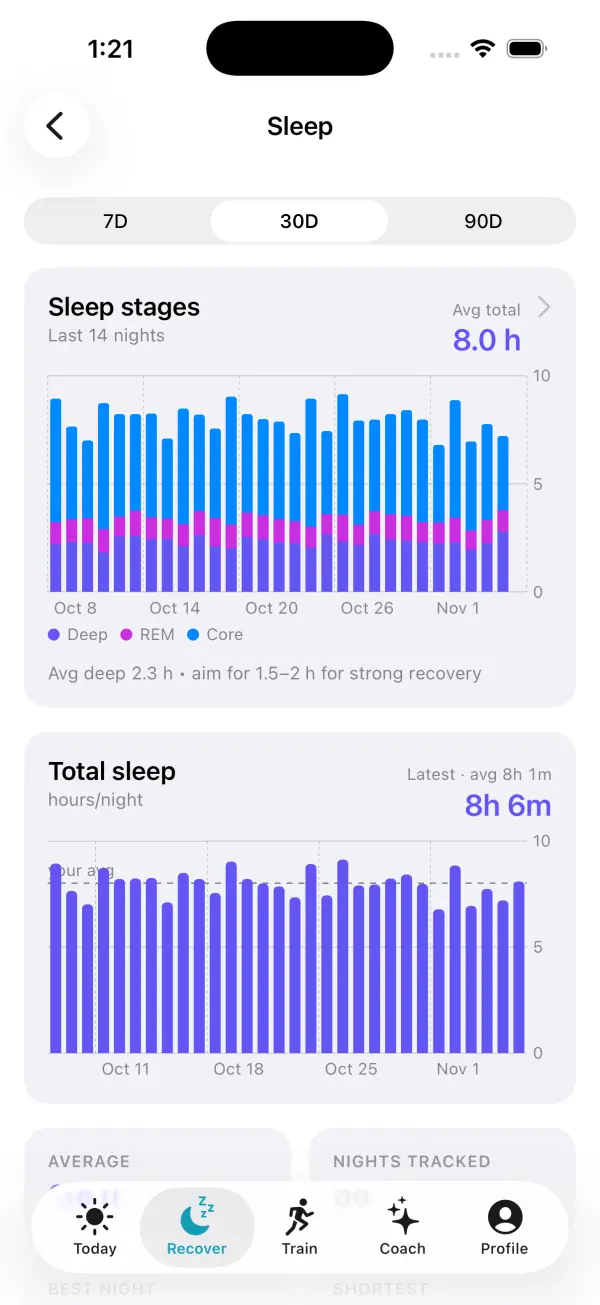
VedaWatch's iPhone Recovery view reads your sleep duration and trend from Apple Health alongside HRV, resting heart rate, and wrist temperature, so one off night shows up in context instead of in isolation.
With permission, it works off the data your watch already collects. AI coaching is optional, requires your permission to share relevant data for processing, and is subject to your plan's limits.
Sources & further reading
- Apple: Estimating Sleep Stages from Apple Watch (white paper, updated October 2025)
- Apple Support: Track your sleep on Apple Watch and use Sleep on iPhone
This guide is educational, not medical advice, and has not been clinically reviewed. VedaWatch is not a medical device. If you have symptoms or concerns about your heart or health, contact a qualified healthcare professional.
Put your trends in perspective.
Explore HRV, sleep, and recovery with VedaWatch on your iPhone.
Download VedaWatch on the App Store →