 VedaWatch
Sleep
Apple Watch Sleep Score explained: what's good and how to raise it
What the Apple Watch Sleep Score measures (duration, bedtime consistency, interruptions), what a good score is, why yours is low, and how to raise it.
By VedaWatch editorial team · · 9 min read
The short answer
The Apple Watch Sleep Score rates each night from 0 to 100: up to 50 points for sleep duration, 30 for bedtime consistency over recent nights, and 20 for interruptions. Since watchOS 26.2, 81 to 95 is High and 96 or more is Very High. To raise it, sleep longer, fall asleep at a steady time, and cut night-time wake-ups.
What is the Apple Watch Sleep Score?
Sleep Score arrived with watchOS 26. Every morning after you wake up, your Apple Watch gives the previous night a number from 0 to 100 and a label, from Very Low to Very High. It's meant to answer one question at a glance: how well did that night set you up, compared with what sleep guidance recommends?
Apple builds the score from three parts. Sleep duration is worth up to 50 points, bedtime consistency up to 30, and interruptions up to 20. Apple's Newsroom also says the score takes time in each sleep stage into account, but the point split Apple publishes only names those three parts, so duration, timing and wake-ups are what move the number.
Apple says the scoring was developed with guidance from sleep organizations and tested on more than 5 million nights of data from the Apple Heart and Movement Study. It's a summary of estimates from your Watch, not a medical measurement, and it can't tell you whether you have a sleep disorder.
How Apple calculates the Sleep Score
Each component looks at something different, which is why two nights with the same total sleep can score quite differently. Apple doesn't publish how points are divided inside each component, so treat the descriptions below as what each part rewards, not an exact formula.
- Sleep duration (up to 50 points): how long your Watch estimates you were asleep. Time awake in bed doesn't count, so 8 hours in bed with 40 minutes awake is not an 8-hour night. Sleep guidance for adults is at least 7 hours a night on a regular basis, so short nights cost the most here.
- Bedtime consistency (up to 30 points): when you fell asleep compared with the previous 13 nights. Apple measures the time you actually fell asleep, not the bedtime you set in your sleep schedule, so lying awake until 1 am after getting into bed at 11 pm counts as a late night.
- Interruptions (up to 20 points): how often you woke up during the night and how long you stayed awake each time. A few brief wake-ups are normal; long or frequent ones pull this part down.
- Total: the three parts add up to the 0 to 100 score, and the total sets the label you see in the Sleep app.
What is a good Sleep Score on Apple Watch?
Apple changed the ranges in watchOS 26.2 and iOS 26.2, so a score that was High before may read OK now. The current bands from Apple Support are below. On the earlier watchOS 26 releases, 70 to 89 was High and 90 to 100 was called Excellent, which is why older articles and screenshots show different numbers.
A score in the High band (81 or more) means you hit most of what the score looks for: enough sleep, a familiar sleep time and few long wake-ups. OK (61 to 80) is a normal, usable night that usually has one weak spot. Low or Very Low usually means a short night, a very different sleep time, or a lot of time awake, and often two of these at once.
Don't chase 100. Very High (96 or more) is a near-perfect night by the score's rules, and most people won't get there often. A steady run of High and OK nights is a better sign than the odd perfect score between rough ones.
- Very Low: 0 to 40
- Low: 41 to 60
- OK: 61 to 80
- High: 81 to 95
- Very High: 96 to 100
Why is my Sleep Score low?
Open the score in the Sleep app on your Watch, or in Health on iPhone, and look at the component breakdown before you change anything. The part that lost the most points is the one to work on. These are the usual reasons each part drops.
- Duration is low: you slept under about 7 hours, or you spent a long time awake in bed so your asleep time was short even though your time in bed looked fine. A late night out or an early alarm is the most common cause.
- Bedtime consistency is low: you fell asleep much earlier or later than over the last 13 nights. Weekends are the classic case: a 1 am Saturday after a week of 11 pm nights costs points, and so can the first early night after a late run of them.
- Interruptions are high: you woke often or stayed awake for a while. Alcohol, a late heavy meal, a warm or noisy room, a partner, a child, a pet, needing the bathroom, or stress can all do this. Waking at the same hour most nights, with loud snoring or gasping, is worth mentioning to a doctor.
- The Watch missed part of the night: if the battery ran out, the Watch was loose, or you took it off, the night can look shorter or more broken than it was. Apple asks for at least 30% charge at bedtime and at least 1 hour of wear for sleep data at all.
- You slept somewhere unusual: travel, a new time zone or a different bed often lowers both consistency and interruptions for a few nights. That's expected and passes.
A worked example: reading one low score
Say your score on Sunday morning is 58, which is Low. You slept about 7 hours, but you fell asleep at 1 am after two weeks of falling asleep around 11 pm, and you were awake for a while around 4 am.
Duration is probably fine: 7 hours meets the adult guideline, so this part likely kept most of its 50 points. Consistency is the likely culprit: a two-hour shift from your usual sleep time is exactly what the 30-point part penalises. Interruptions may have cost a few more of their 20 points because of the long wake-up.
The fix isn't to sleep longer on Sunday night. It's to fall asleep near your usual time again, because consistency is judged against your recent nights and one more late night widens the gap. Then check the breakdown on Monday to see whether consistency recovered.
How to raise your Sleep Score
Because duration is worth half the score, the biggest gain for most people is simply more sleep. After that, consistency is worth more than interruptions. These steps follow the CDC's sleep advice and target each component in turn.
- Protect at least 7 hours asleep, not just in bed. If you usually take 20 minutes to fall asleep and wake once, plan for more than 7 hours in bed.
- Fall asleep at about the same time every night, weekends included. Going to bed and getting up at the same time every day is the CDC's first tip, and it's what the 30-point consistency part measures.
- Shift gradually. If you want an earlier bedtime, move it a little at a time over several nights instead of jumping two hours, which will also cost consistency points.
- Cut what wakes you up. The CDC suggests avoiding caffeine in the afternoon or evening, and large meals and alcohol before bed, and keeping your bedroom quiet, relaxing and cool.
- Turn off screens at least 30 minutes before bed, per the CDC, and use Sleep Focus to quiet notifications that might wake you.
- Set up the Watch properly: charge to at least 30% before bed, wear it snugly, and keep Track Sleep with Apple Watch turned on in your sleep settings.
- Judge the trend, not one night. Look at your scores over a week or two in Health on iPhone before deciding a change worked.
Why bedtime consistency counts for so much
It can seem odd that falling asleep at a regular time is worth 30 points, more than waking up in the night. Research supports giving regularity real weight. In a UK Biobank study of about 61,000 people who wore activity trackers for a week, those with the most regular sleep timing had a lower risk of death over the following years than those with the least regular sleep, and regularity predicted that risk better than sleep duration did.
That study shows an association, not cause and effect, and it doesn't mean one late night is harmful. It does suggest that a steady sleep schedule is worth aiming for in its own right, not only as a way to get more hours.
Your Sleep Score also uses consistency to show the cost of irregular weeks you might not feel. If your scores swing between High on weeknights and Low on weekends, consistency is likely what's moving them, and evening out your weekend sleep time is the fix.
Sleep Score vs sleep stages: which should you watch?
Sleep stages (Awake, REM, Core and Deep) show what happened inside the night. The Sleep Score sums the night up against duration, timing and wake-ups. You can see your stages in Health under Sleep, then Show More Sleep Data, then Stages.
For most people the score is the more useful daily number, because duration, timing and wake-ups are things you can change tonight. Stage amounts vary from night to night and are harder to influence directly. Our guide to Apple Watch sleep stages covers what each stage means and how much of each is typical, so we won't repeat it here.
How VedaWatch helps you act on your sleep
VedaWatch doesn't show Apple's Sleep Score itself. It reads the sleep your Apple Watch saves to Apple Health and turns it into a plan for the parts of the score you can change.
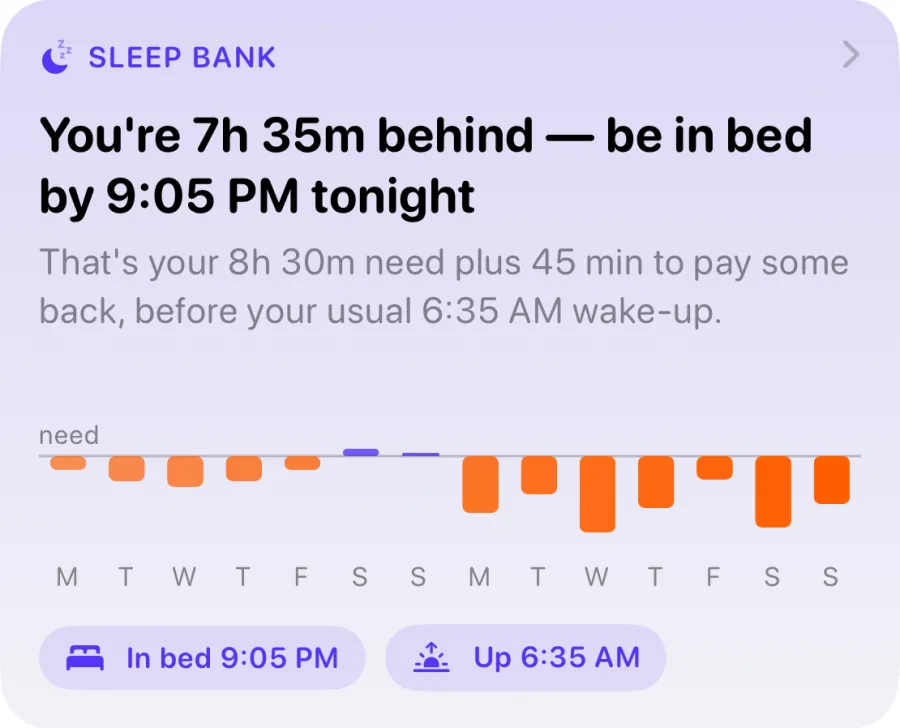
Sleep Bank on the Recover tab compares your last 14 nights with your sleep need and gives you one sentence: how far behind or ahead you are, and what time to be in bed tonight. It repays debt in small steps, never more than 45 extra minutes a night, so catching up doesn't wreck your bedtime consistency. An optional wind-down reminder nudges you 30 minutes before that bedtime.
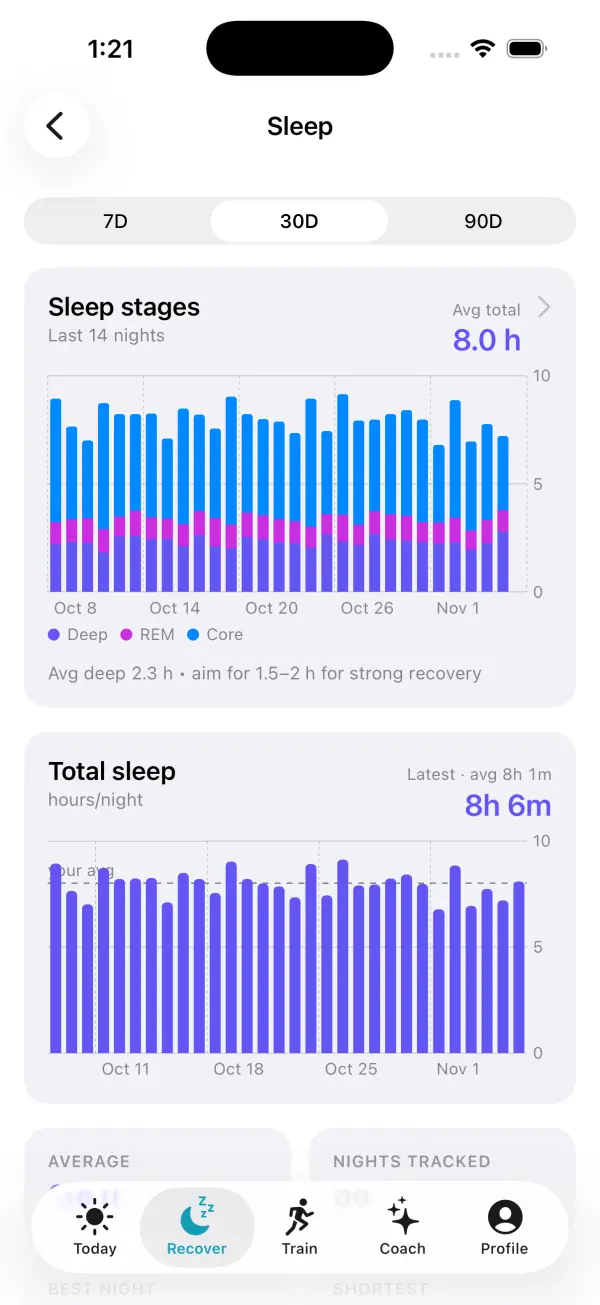
The Sleep screen (Recover, then Sleep) shows your stages for each night and your total sleep over 7, 30 or 90 days, with your average, best night and shortest night, so you can spot the short nights pulling your duration points down. Last night's sleep also feeds your readiness score, and a Sleep streak counts nights in a row with 6 hours or more.
See which nights are dragging your score down
A single low score is rarely worth worrying about. A pattern is. Looking at a month of nights side by side makes it easy to see whether your low scores line up with short nights, specific days of the week, or a busy stretch.
If your sleep stays short or broken for weeks despite good habits, if you feel very sleepy during the day, or if someone notices you snore loudly or stop breathing in your sleep, talk to a doctor. Apple Watch sleep data can help that conversation, but it can't diagnose anything.
Frequently asked questions
Which Apple Watch models get Sleep Score?
Apple says Sleep Score works with watchOS 26 on Apple Watch Series 6 or later, Apple Watch SE (2nd generation) or later, and all Apple Watch Ultra models, paired with an iPhone 11 or later on iOS 26.
Where do I see my Sleep Score?
On Apple Watch it's in the Sleep app after you wake up, and you can add it to the Smart Stack or a watch face complication. On iPhone, open Health, tap Browse, then Sleep, and tap your Sleep Score to see the breakdown.
Why did my Sleep Score drop after a software update?
watchOS 26.2 and iOS 26.2 changed the label ranges. For example, High used to start at 70 and now starts at 81, so a similar night can get a lower label than before.
Do naps count toward my Sleep Score?
Apple's support pages don't say that naps are scored. The score is described as a rating of your previous night's sleep, delivered each morning.
Can I get a Sleep Score without a sleep schedule?
Apple's pages don't list a sleep schedule as a requirement, but you do need Track Sleep with Apple Watch turned on, and the Watch needs at least 30% charge at bedtime and an hour or more of wear.
Is a low Sleep Score a sign of a health problem?
Usually not: a short night, a late bedtime or a restless night is the common cause. If poor sleep or daytime sleepiness lasts for weeks, or you snore loudly or stop breathing in your sleep, see a doctor.
Related guides
- Apple Watch sleep stages: what Awake, REM, Core, and Deep mean
- Sleep debt calculator for Apple Watch: how VedaWatch's Sleep Bank works
- Sleep consistency: why a regular bedtime matters, and how much
- How much sleep do I need? By age, for athletes, and for you
- Apple Watch sleep tracking: how accurate is it, and what to do when it's wrong
- How alcohol affects sleep: REM, waking at 3 am and your heart
Sources & further reading
- View your sleep score on Apple Watch (Apple Support)
- Track your sleep on Apple Watch and use Sleep on iPhone (Apple Support)
- About watchOS 26 Updates (Apple Support)
- Introducing Apple Watch Ultra 3 (Apple Newsroom, September 2025)
- iOS 26.2 and watchOS 26.2 update Sleep Score ranges (MacRumors)
- Watson NF et al. Recommended Amount of Sleep for a Healthy Adult: AASM and SRS consensus statement. Sleep, 2015
- Windred DP et al. Sleep regularity is a stronger predictor of mortality risk than sleep duration. Sleep, 2024
- About Sleep (CDC)
This guide is educational, not medical advice, and has not been clinically reviewed. VedaWatch is not a medical device. If you have symptoms or concerns about your heart or health, contact a qualified healthcare professional.
Put your trends in perspective.
Explore HRV, sleep, and recovery with VedaWatch on your iPhone.
Download VedaWatch on the App Store →