 VedaWatch
Using VedaWatch
Body battery on Apple Watch: how VedaWatch's Daily Charge energy score works
Daily Charge is a 0–100 energy gauge for Apple Watch. It starts from last night's sleep and HRV, drains with time awake, workouts and stress, and refills a little when you rest.
By VedaWatch editorial team · · 8 min read
The short answer
Daily Charge gives you one number from 0 to 100 for how much energy you have left today. It starts each morning from last night's sleep and your HRV compared with your own 14-night normal. Time awake, workouts, everyday movement and a raised heart rate drain it, and calm stretches, naps and mindful minutes give a little back. It's worked out on your iPhone from your Health data, and it's a rough guide, not medical advice.
What Daily Charge is
Apple Watch doesn't have a built-in "body battery". It tells you how you slept, what your HRV and heart rate were, and how much you moved, but it doesn't add those up into one sense of how much you have left for the rest of the day. Daily Charge is VedaWatch's take on that idea.
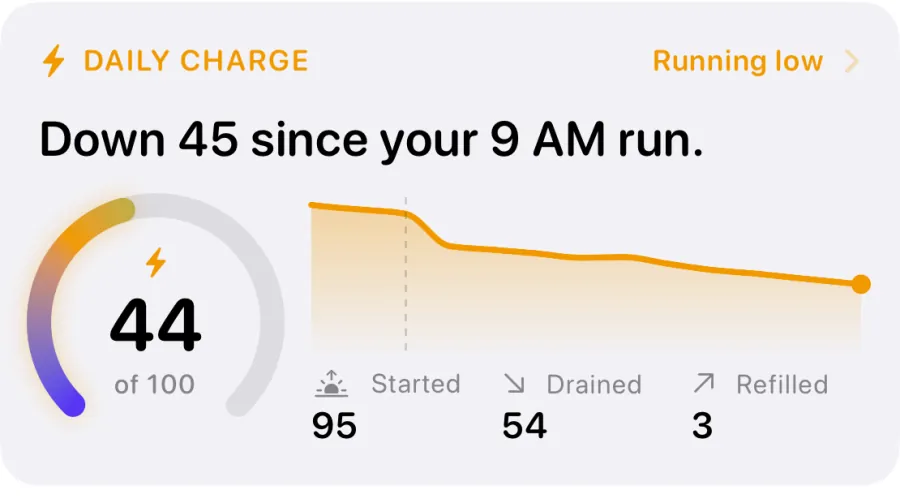
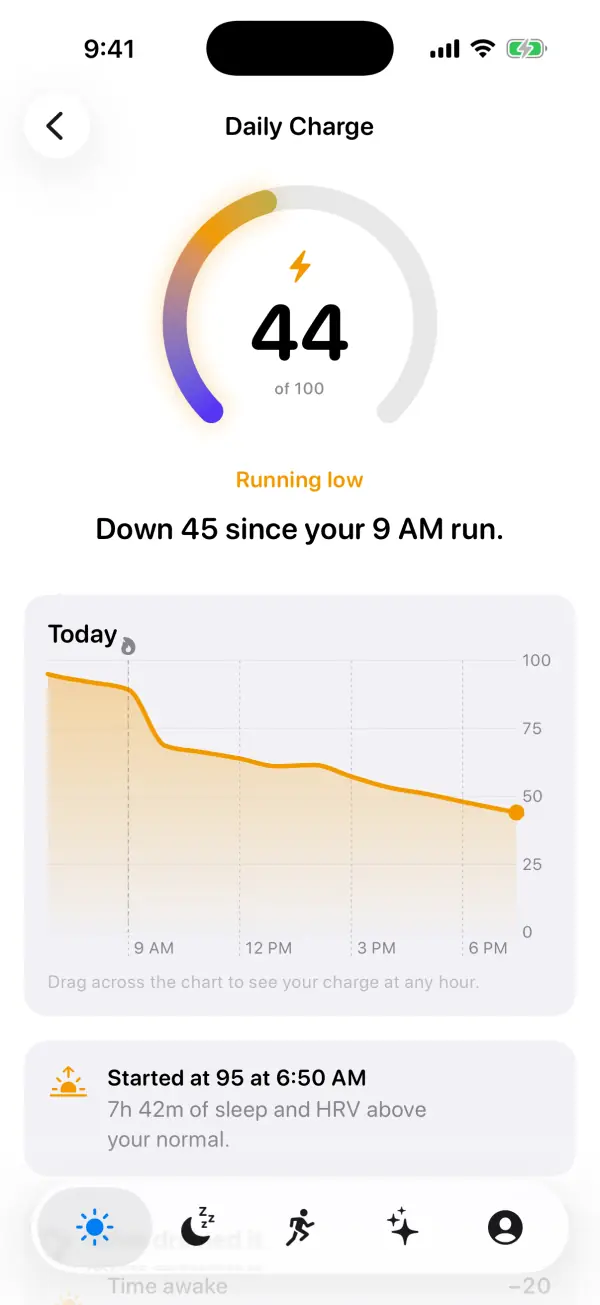
It's a gauge from 0 to 100. Each morning it starts at a value set by how well you recovered overnight. Through the day it goes down while you're awake and active, and it goes up a little when you rest. On the Today screen it comes with one plain sentence that explains the biggest change, such as "Down 45 since your 9 AM run."
The number also gets a simple label: Fully charged at 75 and above, Good charge from 50 to 74, Running low from 25 to 49, and Nearly empty below 25. The colours are deliberately calm. A low charge fades to a dusky indigo rather than red, because it's a cue to take it easier, not an alarm.
How your morning value is set
Your charge starts when you woke up, using the end of last night's sleep as recorded in Apple Health. Two things decide the starting value: how long you slept, and your HRV this morning compared with your own normal.
Sleep counts for 60% and HRV for 40%. Sleep is scored the same way as VedaWatch's readiness score, so the two never disagree about a night. Around 5 hours scores nothing, 7 hours scores 70, and a full night around 8 hours scores near the top. Very long nights of 10 hours or more score a little lower again.
HRV is compared with your average from the last 14 nights, and it needs at least 3 of those nights before it counts. A reading right on your normal scores 50, and readings well above or below move it up or down. The detail screen sums it up as "HRV above your normal", "HRV in your normal range" or "HRV below your normal".
The two scores are combined and mapped onto a range from 25 to 100. Even a rough night leaves something in the tank, and a great night fills it. If there's no sleep or HRV from last night, today starts from 70, a typical day's start, and the app tells you it's an estimate. If you have no sleep data, the day's curve starts at midnight instead of your wake-up time.
What drains your charge
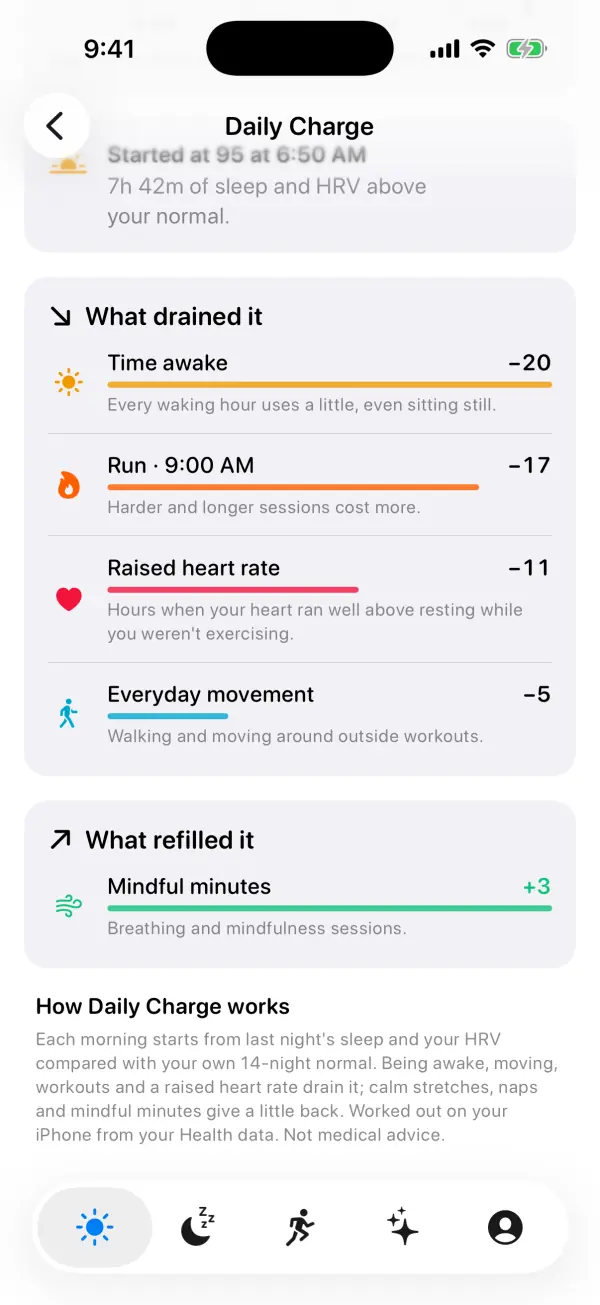
Daily Charge works hour by hour, using your heart rate, active energy and workouts from Apple Health. Four things take points away, and each one shows up by name on the detail screen.
Time awake: every waking hour costs 1.6 points, even sitting still. Over a 12-hour day that adds up to about 19 points, which is why the curve slopes gently down even on a quiet day. This cost pauses while you're napping.
Workouts: each workout costs points per minute, and harder sessions cost more. Intensity comes from your average heart rate during the workout as a share of your heart rate reserve, the range between your resting and maximum heart rate. A very easy session costs about 0.12 points a minute and an all-out one about 0.44, so an hour at a hard effort can take 20 points or more. If there's no heart rate for a workout, it counts as moderate. Each workout is listed by name and start time, like "Run · 9:00 AM".
Everyday movement: walking and moving around outside workouts costs about 1 point for every 80 active kilocalories. Calories burned during a workout aren't counted twice.
Raised heart rate: if your average heart rate for an hour is more than 12 bpm above your resting heart rate while you're not working out, that hour costs extra. The higher it runs, the more it costs. This often reflects stress, caffeine, heat or illness, but the app can't tell which, so treat it as a nudge to notice how you feel rather than a stress diagnosis.
What refills your charge
Rest gives a little back, but it's slower than the drain. That's on purpose: a short break helps, but it doesn't undo a hard morning.
Calm stretches: an hour when your heart settled within 6 bpm of resting, you barely moved and you didn't work out adds 1 point.
Mindful minutes: breathing and mindfulness sessions saved to Apple Health add 0.3 points a minute, so a 10-minute session adds 3.
Naps: daytime sleep adds 0.12 points a minute, and it also pauses the time-awake cost. Any sleep that starts more than half an hour after you woke up counts as a nap.
The gauge can't go above 100 or below 0. When it hits either end, only what actually moved it is counted in the lists, so the numbers add up to what you see.
How to find and use Daily Charge
Daily Charge lives on the Today tab of the VedaWatch iPhone app, and you can also put it on your Home Screen, Lock Screen and watch face.
- Open VedaWatch on your iPhone and go to the Today tab (the sun icon).
- Find the Daily Charge card under the top card. It shows today's sentence, the dial, a small curve, and how much you started with, drained and refilled.
- Tap the card to open the Daily Charge screen.
- Drag across the Today chart to see your charge at any hour. Workouts are marked on the curve.
- Read the card under the chart to see what your morning value was and why, for example "Started at 95 at 6:50 AM" with your hours of sleep and how your HRV compared with normal.
- Scroll down to What drained it and What refilled it to see each item and how many points it moved, biggest first.
- To keep an eye on it without opening the app, add the Daily Charge widget to your Home Screen (small or medium) or Lock Screen, or add the Daily Charge complication to your Apple Watch face. Tapping the widget opens the Daily Charge screen.
How to read your charge during the day
Look at the shape of the day, not just the number. A steep step down around a workout is expected. A steady slide on a day with no workouts usually means a long day awake, lots of moving around, or hours with a raised heart rate, and the lists will tell you which.
The sentence changes with what's happened. Early in the morning it says how much you woke up with. After a workout that cost a real amount, it tells you how far you've dropped since that workout. On a quiet day it might say you're holding steady, or that rest is topping you up.
A low number in the evening is normal. You've been awake for hours, and the charge is meant to run down by bedtime. What matters more is the morning value over several days and how quickly a typical day drains it. If your mornings keep starting lower than usual, look at your sleep first.
Use it as a nudge, not a rule. If you're Running low by mid-afternoon and you feel tired, that's a fair reason to make an evening workout easier, take a short walk instead, or get to bed a little earlier. If you feel fine, trust how you feel.
Where the numbers come from and what stays on your phone
Daily Charge reads sleep, HRV, resting heart rate, heart rate, active energy, mindful minutes and workouts from Apple Health on your iPhone, and works the gauge out there. It doesn't need a network connection, and the calculation doesn't send your health data anywhere. The widget and the watch complication get the latest value from your iPhone.
It needs a night of sleep or some heart and activity data from today. With nothing at all, the card says "Wear your watch to bed tonight", and the Daily Charge screen shows "No charge yet". Wearing your watch to bed gives you the best start, because without last night's sleep and HRV the morning value is only an estimate.
Common questions about Daily Charge
Is Daily Charge the same as Garmin Body Battery? It's a similar idea: a 0–100 energy gauge that drains and refills. The formula is VedaWatch's own and works from Apple Watch data, so the numbers aren't comparable with other brands.
Why did I start below 100 after a good night? The morning value combines sleep with HRV. If you slept well but your HRV was below your normal, you'll start lower. The card under the chart on the Daily Charge screen tells you which applied.
Why does my charge drop when I'm just sitting at my desk? Every waking hour costs a little. If it drops faster than that, check What drained it for Raised heart rate, which counts hours when your heart ran well above resting while you weren't exercising.
Why does it say the start is an estimate? There was no sleep or HRV from last night, often because the watch was charging overnight. The day starts from 70 instead.
Can Daily Charge tell me if I'm ill or overtraining? No. It's a rough, general guide to energy through the day, built from simple rules. It isn't a medical device and can't diagnose anything. If you feel unwell, listen to your body and talk to a doctor.
Sources & further reading
- Shaffer F, Ginsberg JP. An Overview of Heart Rate Variability Metrics and Norms. Frontiers in Public Health, 2017
- Plews DJ, Laursen PB, Stanley J, Kilding AE, Buchheit M. Training adaptation and heart rate variability in elite endurance athletes. Sports Medicine, 2013
- Watson NF et al. Recommended Amount of Sleep for a Healthy Adult. Journal of Clinical Sleep Medicine, 2015
- Zaccaro A et al. How Breath-Control Can Change Your Life: A Systematic Review on Psycho-Physiological Correlates of Slow Breathing. Frontiers in Human Neuroscience, 2018
- Apple Support: Start a Reflect or Breathe session on Apple Watch
This guide is educational, not medical advice, and has not been clinically reviewed. VedaWatch is not a medical device. If you have symptoms or concerns about your heart or health, contact a qualified healthcare professional.
Put your trends in perspective.
Explore HRV, sleep, and recovery with VedaWatch on your iPhone.
Download VedaWatch on the App Store →