 VedaWatch
Habits & Goals
How to close your rings every day (and when to pause them)
How to close your rings every day on Apple Watch: goals you can actually hit, a plan for each ring, how to pause rings, and why rest days still count.
By VedaWatch editorial team · · 9 min read
The short answer
To close your rings every day, set goals you already hit on most days, schedule easier goals on busy days, and plan each ring: Stand early and hourly, Exercise as one brisk block, Move as the sum of everything. When you need rest, illness or injury, pause your rings in the Activity app instead of forcing a workout.
How to close your rings every day: the short version
Closing all three rings every day is less about willpower and more about setup. Most people who keep a long run going do the same few things: their goals fit a normal day rather than their best day, they know which ring tends to fail and plan for it, and they treat rest as part of the routine rather than a broken promise.
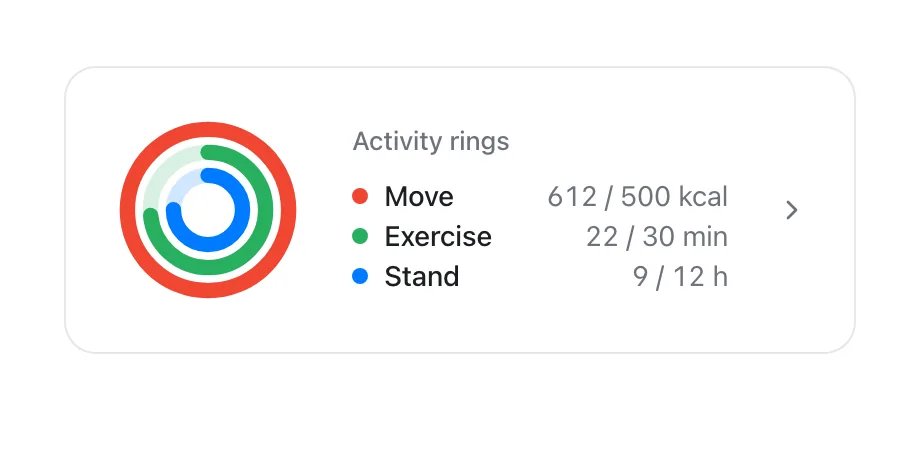
Each ring asks for something different. Apple describes the red Move ring as active calories burned, the green Exercise ring as minutes of brisk activity, and the blue Stand ring as the number of hours in which you stood and moved for at least 1 minute. That means the three rings fail for different reasons, and fixing them needs different habits. If you want the full detail on what each ring measures and why a ring can seem stuck, start with our Activity rings explainer; this guide is about closing them reliably.
- Set each goal to something you already reach on most ordinary days, not on your best day.
- Use a goal schedule so lighter days (long commutes, travel days) have lighter goals.
- Bank Stand hours early: move for a minute in each of the first hours after you wake up.
- Do your Exercise minutes as one planned brisk block, such as a 20 to 30 minute walk, rather than hoping they add up.
- Let Move take care of itself: a brisk Exercise block plus normal daily walking usually covers most of it.
- Check your rings at a fixed time, such as 5 pm, while there is still time to fix a gap.
- Pause your rings on planned rest days, sick days and injuries, so your award streak survives without a forced workout.
How to set ring goals you can close every day
The most common reason a streak dies is a goal that only works on a good day. If your Move goal needs a gym session to close, every day without one is a coin flip. A better rule: pick a goal you would have closed on about four or five of the last seven days, keep it for a few weeks, then raise it a little.
Your Apple Watch helps with this. Each Monday it tells you how the previous week went and lets you adjust your goals for the coming week, with suggestions based on your past performance. Treat those suggestions as a starting point, and lower them if they assume your best week was normal.
Since watchOS 11 you can also give each ring a different goal for each day of the week. That is the single most useful setting for closing rings every day, because your Tuesday and your Saturday are rarely the same.
- Open the Activity app on your Apple Watch.
- Turn the Digital Crown to a ring, then tap Change Goals.
- Choose Change for Today for a one-off change, or Change Daily Goal for a lasting one.
- To set different goals per weekday, tap the Goal Type button in the top-right corner, then tap Schedule.
- Use the minus and plus buttons to set each goal, then tap Set or Set Schedule.
A worked example: a weekly goal schedule
Say you work at a desk, walk at lunch on weekdays, and go for a longer walk or ride on Saturdays. A flat 45 minute Exercise goal would close on Saturday and fail on most weekdays. A schedule fits the goal to the week instead.
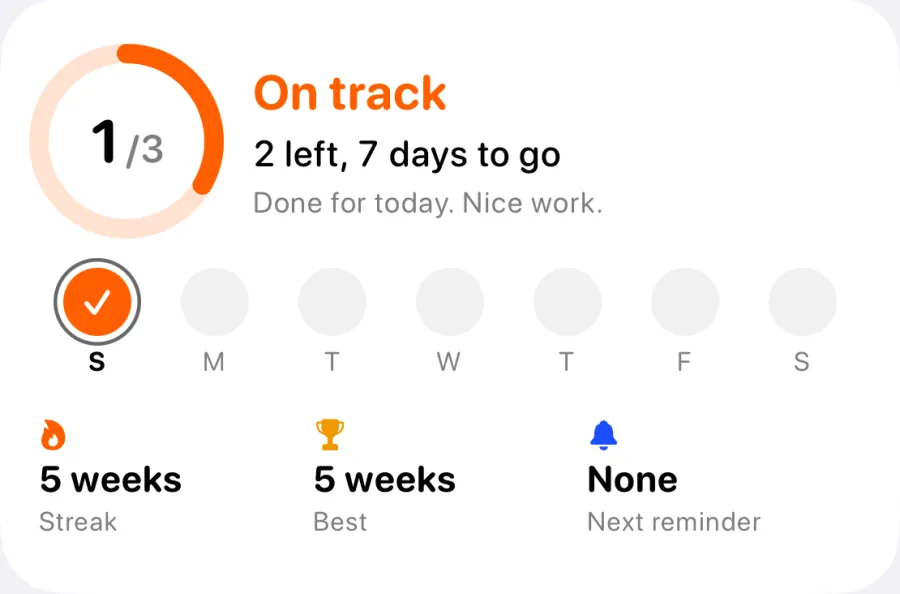
One option: Exercise at 20 minutes Monday to Friday (the lunch walk, done briskly), 45 minutes on Saturday, and 15 minutes on Sunday as an easy day. That adds up to 160 minutes across the week. The World Health Organization recommends that adults get 150 to 300 minutes of moderate aerobic activity a week, so this schedule clears the lower end while still being closable every single day.
Do the same for Move: lower on the day you sit in a car or plane the longest, higher on the day you are usually on your feet. For Stand, a slightly lower goal on travel days is often the difference between a closed ring and a broken streak. The aim is a week that adds up to enough, not seven identical days.
A daily plan for each ring
Stand is the ring people most often miss late in the day, because it cannot be rushed. A Stand hour only counts once per hour, so if your goal is 12 hours and you are awake for 16, you can only afford to miss 4 of them. By 8 pm there may simply not be enough hours left. The fix is to bank Stand early: get up and walk around for a minute in each of the first hours of the morning, and use your Watch's Activity alerts, which tell you when you are on track or falling behind (you choose which ones you get in Settings, then Activity, on the Watch).
Exercise is the ring that most rewards a plan. It counts brisk activity, so a slow amble may add to Move without adding much to Exercise. Put one block in your calendar, such as a 20 to 30 minute walk at a pace where talking is possible but singing is not, a bike commute, or a workout. Doing it at the same time and in the same context each day helps it become automatic.
Move is the ring that usually follows the other two. A brisk Exercise block, normal walking between meetings and standing up every hour add to your active calories. If Move is the ring you keep missing, ask whether the goal reflects a typical day or your best one, and lower it on the days that are usually quiet.
A simple routine that covers all three: a short walk within an hour of waking (Stand and Move), a brisk 20 to 30 minute block at lunch or after work (Exercise and Move), and a minute of moving at the start of each hour you are at a desk (Stand).
What to do when you are behind in the evening
Pick a check-in time, such as 5 pm, and look at the gaps while you can still do something about them. At that point the options are clear.
- Exercise short by 10 minutes or less: a brisk walk around the block usually closes it. Walk fast enough to raise your breathing.
- Exercise short by more than that: one brisk 20 to 30 minute walk, an easy bike ride, or a short home workout.
- Stand short: count the hours left before bed. If there are not enough, lower today's goal with Change for Today or accept the miss. Do not stay up later to close it.
- Move short: whatever you do for Exercise also counts here; a walk after dinner is often enough.
- Tired, sore or unwell: skip it. A missed ring costs less than poor sleep or a hard session when your body needs rest.
How to pause your rings on Apple Watch
Since watchOS 11, Apple Watch lets you pause your Activity rings. Apple says you can pause for a day, a week, a month or more, up to 90 days, and pausing does not break your award streak. You can resume at any time.
The menus below follow Apple's current Apple Watch User Guide. Wording can differ slightly between watchOS versions; if your Watch looks different, check Apple's guide for your version.
- Open the Activity app on your Apple Watch.
- Tap the Activity rings, then tap Pause Rings.
- Choose one of the preset durations, or tap Custom and set your own length.
- To change how long a pause lasts, tap the rings, tap Edit Pause, turn the Digital Crown to set the new length, then tap Set.
- To end a pause early, tap the rings and tap Resume Rings.
Should you pause your rings or lower your goal?
Pausing and lowering a goal solve different problems. Pause when you should not be chasing rings at all: a planned rest day in a training plan, a cold or fever, an injury, surgery recovery, or a long-haul travel day. Apple itself describes pausing as a way to take a rest day or recover from an injury without affecting award streaks.
Lower the goal (Change for Today) when you still want to move but less than usual: a busy workday, a day in transit with some walking, or the day after a hard race when an easy walk is right. That keeps the habit going at a level that fits the day.
A useful test: if closing the ring today would mean doing something your body or your doctor would not want, pause. If it would just mean a smaller version of your normal day, lower the goal.
Why rest days still matter when you close your rings
Chasing an unbroken streak can quietly push people into exercising when they should rest. Sports scientists treat recovery as part of training, not a gap in it. A 2018 expert consensus statement on recovery and performance describes monitoring recovery and building in recovery routines as a way to support performance and to help prevent underrecovery, overreaching, overtraining, injuries and illness.
Rest also does not undo the habit. In a well-known study of how habits form, people repeated a chosen daily behaviour, such as a walk after breakfast, for 12 weeks. On average it took about 66 days for the behaviour to become automatic, with a wide range from 18 to a predicted 254 days, and missing a single opportunity did not materially affect the process. One rest day, or a paused week while you are ill, is not what breaks a habit. Quitting after the miss is.
A rest day can still include light movement. A relaxed walk or some stretching may fit fine, as long as it feels easy. If you are ill, have chest pain, unusual shortness of breath, dizziness, or pain that gets worse with movement, stop and talk to a doctor rather than trying to close a ring.
How VedaWatch helps you close rings without overdoing it
VedaWatch reads your Move, Exercise and Stand data from Apple Health and shows it on Today next to your readiness call for the day: Push, Hold or Rest. When a ring is still open, the Today card names the gap in plain numbers, such as how many exercise minutes are left, and pairs it with an effort that suits the day. On a Push day it suggests a proper session fits; on a Hold day, a moderate session or a brisk walk; on a Rest day, easy movement only, with a relaxed walk counting.
On a Rest day, once you have done at least 10 exercise minutes, VedaWatch stops nudging you toward your rings and tells you that you have moved enough for a rest day. In the evening it only mentions a ring that is realistically close to closing, and from 9 pm, if you use a sleep plan, it puts your bedtime first, because sleep sets up tomorrow's score.
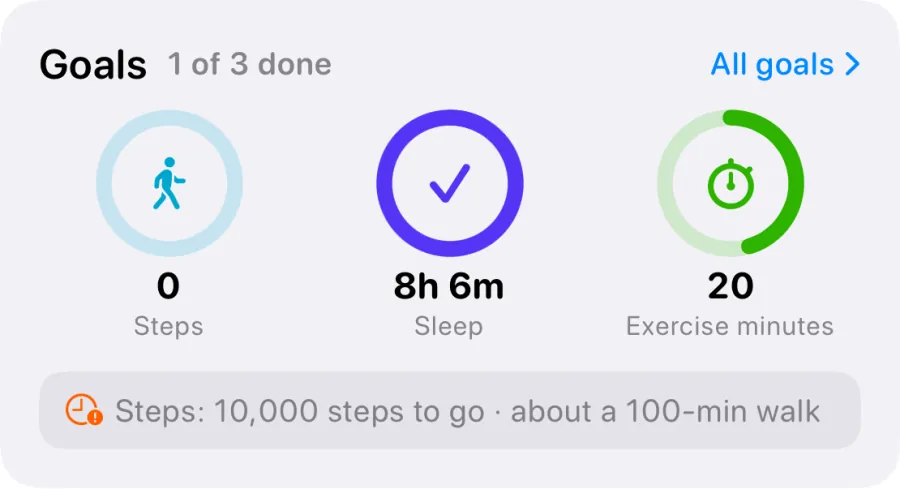
The ring progress in VedaWatch is measured against standard targets (500 kcal, 30 minutes and 12 hours), which may differ from the goals you set on your Watch, and VedaWatch does not see whether your rings are paused. Your Apple Watch's Activity app stays the record for ring awards and streaks. You can also set your own daily or weekly goals for steps, exercise minutes, active energy, sleep and distance in VedaWatch, and the Activity detail view charts your Move, Exercise, Stand and steps over the last 7, 30 or 90 days, with your own goals drawn as goal lines.
Frequently asked questions
Does pausing rings break my Apple Watch streak?
No. Apple says pausing your rings does not affect your award streaks. You can pause for up to 90 days and resume whenever you are ready.
Can I pause just one ring?
Apple's instructions pause the Activity rings together rather than one at a time. If only one ring is the problem today, use Change for Today to lower that ring's goal instead.
Is it bad to close my rings every day without a rest day?
Not if most days are light. A closable daily goal made of walking and standing is very different from a hard workout every day. The concern is high-intensity training with no recovery, so keep some days easy or pause on planned rest days.
Why did my Exercise ring barely move on a long walk?
Exercise counts brisk activity, so a slow, relaxed pace may add to Move without adding much to Exercise. Walk a little faster, or include some hills, and the minutes usually start counting.
Can I pause my rings from iPhone?
Apple's documented steps for pausing are on Apple Watch, in the Activity app. Ring goals can also be adjusted in the Fitness app on iPhone; check Apple's iPhone User Guide for your iOS version.
Related guides
- Apple Watch Activity Rings explained: why they won't close, and the research behind them
- Apple Watch streaks beyond Move: track sleep, steps and exercise consistency
- Weekly vs daily fitness goals: which keeps you consistent?
- Rest day vs active recovery: which one do you need today?
- How many steps a day do you need? What the studies show by age
- Apple Watch Readiness score: what Recover, Pace Yourself, Ready, and Go For It mean
Sources & further reading
- Apple Support: Adjust your Activity ring goals on Apple Watch (includes Pause Rings)
- Apple Support: Track daily activity with Apple Watch
- Apple Newsroom (June 2024): watchOS 11 brings powerful health and fitness insights
- British Journal of Sports Medicine (2020): World Health Organization 2020 guidelines on physical activity and sedentary behaviour (Bull et al.)
- European Journal of Social Psychology (2010): How are habits formed: Modelling habit formation in the real world (Lally et al.)
- International Journal of Sports Physiology and Performance (2018): Recovery and Performance in Sport: Consensus Statement (Kellmann et al.)
This guide is educational, not medical advice, and has not been clinically reviewed. VedaWatch is not a medical device. If you have symptoms or concerns about your heart or health, contact a qualified healthcare professional.
Put your trends in perspective.
Explore HRV, sleep, and recovery with VedaWatch on your iPhone.
Download VedaWatch on the App Store →