 VedaWatch
Habits & Goals
Apple Watch battery and sleep tracking: when to charge it
Apple Watch battery and sleep tracking: a charging routine for wearing it overnight, charge times by model, power-saving settings and what Low Power Mode costs.
By VedaWatch editorial team · · 10 min read
The short answer
Apple asks for at least 30% charge at bedtime, and its battery ratings for Series 12 and Ultra 4 already include a night of sleep tracking. The easiest routine is one short daily top-up while you're awake, such as during your morning shower or the hour before bed. Avoid Low Power Mode overnight: it switches off background heart rate and blood oxygen readings.
How much battery does Apple Watch sleep tracking use?
Less than most people expect, and Apple already counts it. As of November 2026, Apple rates Apple Watch Series 12 at up to 24 hours on a charge, and that test day includes 6 hours of sleep tracking. Apple Watch Ultra 4 is rated at up to 50 hours including 12 hours of sleep tracking, which is two nights. Apple Watch SE 3 is the exception: its up-to-18-hour all-day figure doesn't include sleep, while its up-to-32-hour Low Power Mode figure does include 6 hours of sleep tracking.
Those are lab numbers on preproduction hardware, and Apple says actual results will vary. Cellular use away from your iPhone, long workouts with GPS, music through the speaker and an older battery all pull your own day below the rating. That's why the useful number isn't Apple's but yours: how many percentage points your Watch loses between bedtime and waking.
Measuring it takes one week. Apple's guidance is simple: go to bed with at least 30% charge, and if the battery dies during the night, the Watch records no sleep data for the rest of it. If you know your own overnight drain, you know whether you can skip a charge or not.
- At bedtime, note the battery percentage. Press the side button to open Control Center, where it's shown.
- In the morning, check it again. The Sleep wake-up greeting on the Watch shows the current charge.
- Subtract the two and write it down. Do this for 5 to 7 nights, including a night after a long workout.
- Take your largest overnight drop and add a margin of 10 to 15 points. That's your personal bedtime minimum; if it comes out below Apple's 30%, use 30%.
When to charge your Apple Watch if you sleep with it
If the Watch is on your wrist all night, it has to charge while you're awake. The trick is to tie charging to something you already do every day at the same time, so it doesn't depend on remembering. Three routines cover almost everyone:
Whichever you choose, keep it at the same time each day. A fixed routine also helps the Watch's Optimized Charge Limit and Optimized Battery Charging learn your habits, which protects the battery over the years. On a new Watch you'll see "Charging to full" while it learns.
- Morning routine: put the Watch on the charger when you get up and take it off after your shower and breakfast, usually 30 to 45 minutes. Best if your day is long and you want the most charge in the afternoon.
- Evening routine: charge for 30 to 60 minutes while you cook, eat or wind down, then put it on just before bed. Best if your day often ends below 30%, since it guarantees the night.
- Split routine: two short top-ups, for example 15 minutes after waking and 15 minutes before bed. Best for Ultra owners who charge every second day, or anyone with an unpredictable schedule.
- On workout days, charge after the workout, not before bed alone: GPS workouts are the single biggest drain most people have.
- Travelling: pack the charging cable. Optimized charging mainly works at places you spend a lot of time, so expect it to behave differently in a hotel.
How long to charge before bed, model by model
If you're low at bedtime, you don't need a full charge. Apple publishes how much sleep tracking a few minutes on the fast charger buys you. These figures, as of November 2026, are with the included Magnetic Fast Charger to USB-C Cable and a 20W USB-C power adapter; a slower adapter or an older cable takes longer.
Worked example: it's 10:30 pm, your Series 12 shows 18%, and you want to be asleep by 10:45. Fifteen minutes on the fast charger while you brush your teeth and set out tomorrow's clothes is three times what Apple says a night needs, so you'll be above the 30% line comfortably. On an SE 3 in the same spot, give it the full 15 minutes rather than 8, then top up properly in the morning.
- Apple Watch Series 12: about 30 minutes from 0 to 80%, about 1 hour to 100%. 5 minutes of charging gives up to 10 hours of sleep tracking, and 15 minutes up to 12 hours of normal use.
- Apple Watch Ultra 4: about 45 minutes from 0 to 80%, about 75 minutes to 100%. 5 minutes gives up to 10 hours of sleep tracking, and 15 minutes up to 18 hours of use.
- Apple Watch SE 3: about 45 minutes from 0 to 80%, about 75 minutes to 100%. 8 minutes gives up to 8 hours of sleep tracking, and 15 minutes up to 8 hours of use.
- Older models: check the battery page for your model; Apple lists charge times per model and they differ by generation.
Turn on Charging Reminders and the sleep schedule
Your Watch can do the remembering for you. With Sleep Tracking on and a sleep schedule set, Apple Watch can remind you to charge before your Wind Down time, and if it's below 30% before bed you're prompted to charge it. That reminder is the safety net under whatever routine you pick.
Sleep Focus helps battery too. At your scheduled bedtime it turns off the Watch display and limits distractions, so a stray notification at 2 am doesn't light up the screen. Apple asks you to wear the Watch for at least 1 hour each night to get sleep data at all.
- On iPhone, open the Health app, tap Browse, then Sleep, and set up your sleep schedule with a bedtime and wake-up time.
- Make sure Track Sleep with Apple Watch is on, so sleep is recorded when you wear it to bed.
- In the Sleep options for your schedule, turn on Charging Reminders to get a nudge on your Watch to charge before your Wind Down time.
- Turn on Sleep Focus for your schedule so it starts at bedtime.
- Set your Wind Down time 30 to 60 minutes before bed. That reminder then lands exactly in the evening charging window.
Does Low Power Mode affect sleep tracking?
It's tempting to switch on Low Power Mode at bedtime to stretch a low battery. It works, but it costs you health data. Apple lists what Low Power Mode turns off, and several items happen while you sleep: background heart rate measurements, including during sleep; background blood oxygen measurements, including during sleep; collection of heart data for hypertension notifications; and notifications for irregular rhythm, high heart rate and low heart rate.
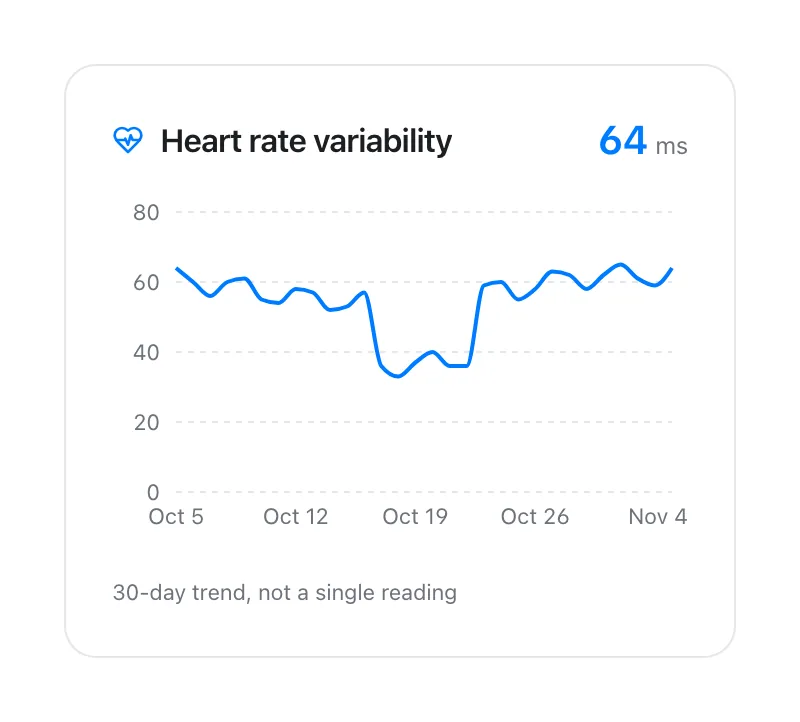
In practice that means your overnight HRV and sleeping heart rate readings can be missing, and anything built on them can look thin the next morning. Apple Watch takes HRV readings in the background, mostly while you're still, so sleep is when most of them happen. Apple doesn't list sleep tracking itself among the features Low Power Mode turns off, and its own Low Power Mode battery tests include sleep tracking, but the heart data around that sleep is what you lose.
Two details catch people out. Low Power Mode turns off by itself once the Watch charges above 80%, which is easy to miss. But if you chose Turn On For 1, 2 or 3 days, it stays on through the night regardless. Check Control Center before bed if you used it during the day.
If you rely on heart notifications such as irregular rhythm alerts, don't leave Low Power Mode on overnight, and remember the Watch is a screening tool, not a diagnosis. If you have symptoms such as palpitations, fainting or chest pain, see a doctor whatever the Watch says.
Settings that save battery without losing sleep data
The goal is to cut what you don't need during the day, so the night is never the thing you give up. These come from Apple's own battery advice; each is worth trying for a week while you track your drain from the first section.
One more thing Apple notes: after a watchOS update, background tasks can lower battery life for a few days, so wait before judging a new routine. And Apple says turning off Optimized Charge Limit can increase battery wear, so leave it on unless you need one full charge for a long day; you can tap Charge to Full Now on the charging screen for that instead.
- Turn off Always On if you don't need it: Settings, then Display & Brightness, then Always On.
- Keep your iPhone within Bluetooth range. Apple Watch uses the least power when it's connected to its paired iPhone, so a cellular Watch left far from the phone all day drains faster.
- Away from your iPhone, prefer Wi-Fi over cellular, and use Airplane Mode where the signal will be weak for a long time.
- Play audio through AirPods or other Bluetooth headphones rather than the Watch speaker.
- For long outdoor walks, runs and hikes, consider Fewer GPS and Heart Rate Readings in Settings, then Workout. It applies while Low Power Mode is on during the workout, and it turns off workout alerts and splits, so keep it for long days rather than every run.
- Use Low Power Mode during the day, not at night, if you need to stretch a charge. It turns off by itself once you charge above 80%.
Why your Watch still dies before morning
If you charge daily and still wake to a flat Watch, work through these in order. Most of the time it's one of the first three.
- The charge didn't finish: Optimized Battery Charging can hold the battery between 75% and 80% when it expects the Watch to stay on the charger, and Optimized Charge Limit may stop below 100% on some days. That's normal and usually still plenty for one night.
- A heavy day: a long GPS workout, hours on cellular or music through the speaker can use far more than a typical day. On those days, add an evening top-up.
- A recent watchOS update: Apple notes battery life can dip for a few days while background tasks finish.
- Low Power Mode is off when you thought it was on, or the reverse. Check Control Center before bed.
- Battery wear: go to Settings, then Battery, then Battery Health, and look at Maximum Capacity. If it says the battery needs service, contact Apple Support about a replacement.
How VedaWatch handles nights you miss
VedaWatch reads the sleep, heart rate and HRV your Apple Watch already saves to Apple Health, so it doesn't run anything of its own overnight and adds no sleep-time battery drain. What it does do is make a missed night visible instead of quietly wrong.
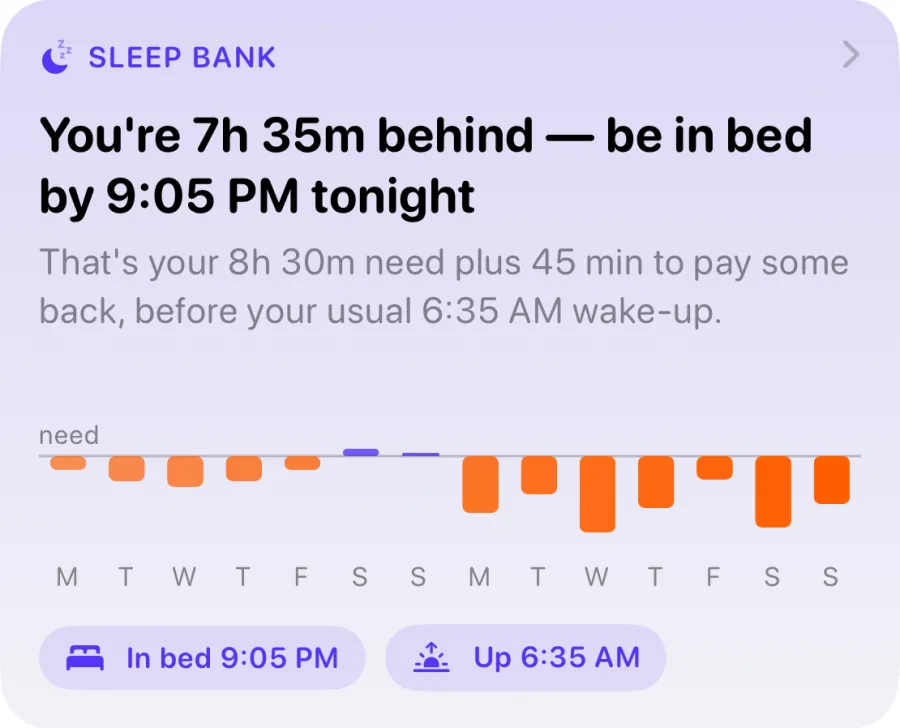
Sleep Bank, which keeps a running balance of the last 14 nights against your sleep need, skips nights without sleep data from your Watch rather than counting them as zero. Forgetting to charge doesn't invent hours of sleep debt; it just leaves that night out, and the balance needs at least 3 recorded nights before it says anything.
The readiness score works the same way. With no sleep recorded, it gives you a score from heart data alone, lists "No sleep recorded last night" among its reasons, and the Today screen adds a nudge to wear your Watch to bed for a fuller score. Daily Charge, the energy gauge that starts from your sleep and HRV, starts from 70 on a morning with no sleep or HRV data and tells you that start is an estimate.
In other words, the app is honest about the gap, but the best data still comes from the routine above: a charge while you're awake and the Watch on your wrist all night. VedaWatch is free to download, with VedaWatch Pro at $6.99 a month or $59.99 a year (US App Store, November 2026) for its advanced features.
Frequently asked questions
Is it bad to charge my Apple Watch every day?
No. Daily charging is what Apple designs for, and Optimized Battery Charging and Optimized Charge Limit are on by default to reduce wear by learning your routine. Leaving them on is the main thing you can do for long-term battery health.
Can I sleep with my Apple Watch at 20%?
It may well last, but Apple's guidance is at least 30% at bedtime, and below that the Watch prompts you to charge. Five minutes on the fast charger is enough for a night of sleep tracking on Series 12 and Ultra 4, according to Apple.
Does Sleep Focus save battery?
It helps a little. Apple says it turns off the Watch display and limits distractions at bedtime, so notifications don't wake the screen. It doesn't stop any health measurements.
Will one missed night ruin my sleep or HRV trends?
No. A single missing night is just a gap, and averages are worked out from the nights you did record. It matters more when gaps become a habit, because a baseline built on few nights is less reliable.
Should I turn off overnight blood oxygen or heart rate to save battery?
Not if you want sleep insights. Those background readings are what overnight HRV, sleeping heart rate and vitals depend on, and the battery you save is small next to a short top-up while you're awake.
Related guides
- How to get more HRV readings on Apple Watch (and fix gaps)
- Apple Watch sleep tracking: how accurate is it, and what to do when it's wrong
- Apple Watch Sleep Score explained: what's good and how to raise it
- Sleep debt calculator for Apple Watch: how VedaWatch's Sleep Bank works
- Best sleep tracking app for Apple Watch (2026): 6 apps compared
- Body battery on Apple Watch: how VedaWatch's Daily Charge energy score works
Sources & further reading
- Apple: Apple Watch battery (battery life and charging tests by model)
- Apple Support: Track your sleep on Apple Watch and use Sleep on iPhone
- Apple Watch User Guide: Track your sleep on Apple Watch
- Apple Support: Use Low Power Mode on your Apple Watch
- Apple Support: If the battery in your Apple Watch drains too quickly
- Apple Support: About Optimized Battery Charging on Apple Watch
This guide is educational, not medical advice, and has not been clinically reviewed. VedaWatch is not a medical device. If you have symptoms or concerns about your heart or health, contact a qualified healthcare professional.
Put your trends in perspective.
Explore HRV, sleep, and recovery with VedaWatch on your iPhone.
Download VedaWatch on the App Store →