 VedaWatch
Recovery & Apple Watch
How long it takes to establish your HRV baseline
There's no good HRV number in the abstract—only a good number for you, built from your own history. Here's how much data that actually takes, what research says about reliable windows, and what can reset a baseline you've already built.
By VedaWatch editorial team · · 6 min read
The short answer
A handful of nights gives a rough weekly average; a trustworthy personal baseline generally takes two to four weeks of fairly normal, consistent wear. Apple's own Readiness feature requires at least 7 of the last 49 nights before it will compare your vitals to a personal baseline at all—treat that as a floor, not a target.
Why a baseline matters more than the number itself
HRV varies enough between people that a number which is completely normal for one person can look alarming for another—Cleveland Clinic is explicit that HRV naturally declines with age and that what's normal for you may not be normal for someone else. That's exactly why every recovery or readiness feature compares you to your own recent history rather than a fixed universal target. None of that comparison works until you've actually built up that history.
What the research says about how much data is enough
A 2026 analysis of roughly 2 million nocturnal HRV readings from over 21,000 wearable users (Grosicki et al., funded by WHOOP—worth noting as a disclosed conflict of interest) found that at least 5 of 7 nights were enough to reliably estimate a week's worth of night-to-night HRV variability. That's evidence for how much data a single week needs to be trustworthy, not for how long a stable long-term baseline takes to form.
For the baseline itself—the reference point your day-to-day readings get compared against—platforms generally use longer windows than a single week, because a week can still be skewed by one hard training block, one bad night, or one trip. Apple's own Readiness feature requires wearing your watch to bed for at least 7 of the past 49 nights before it will compare your overnight vitals to a personal baseline at all, and recommends setup be completed before relying on the score.
A practical timeline
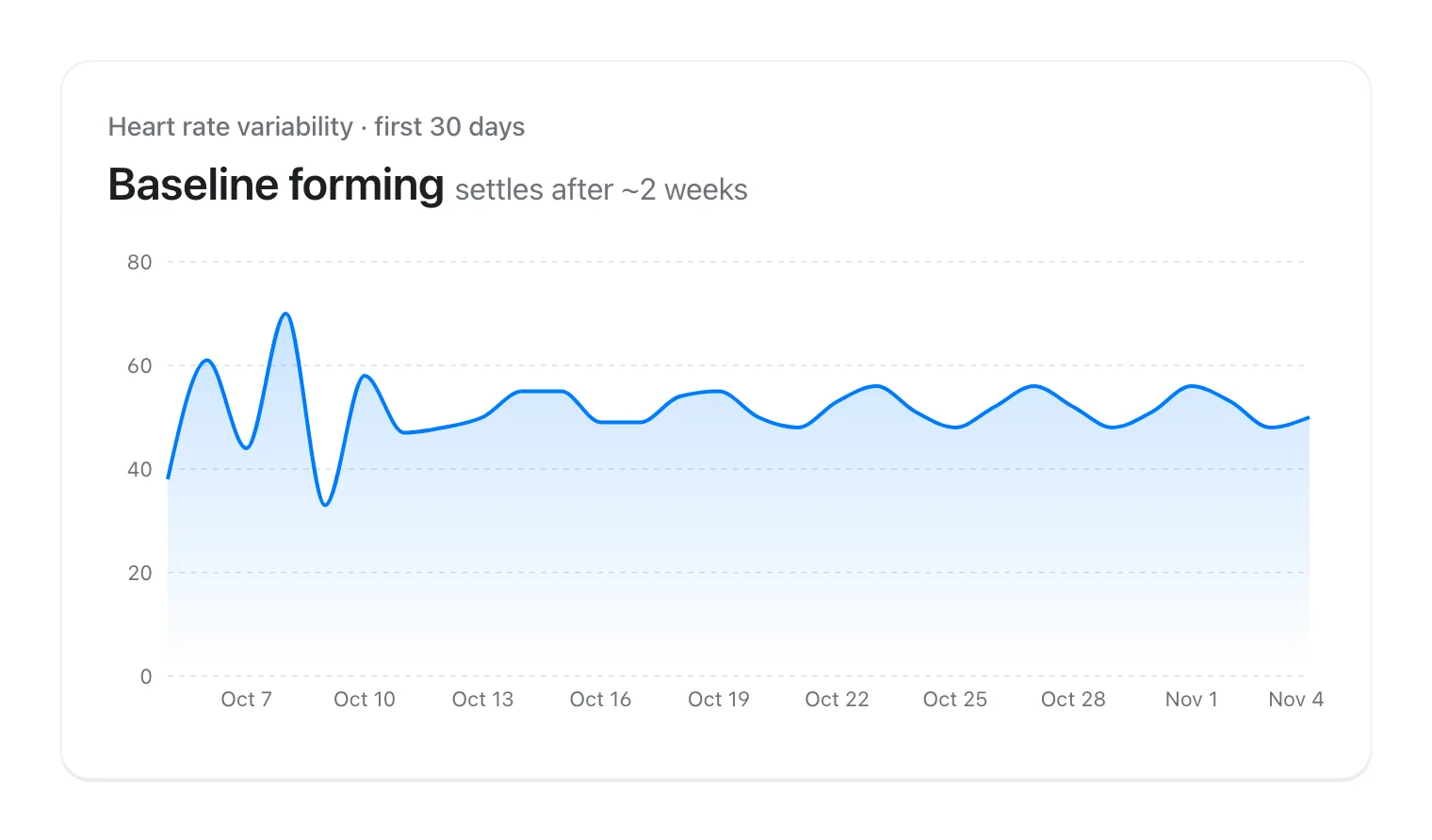
A few days: enough to see that the feature is working and data is flowing, not enough to know what's normal for you. Don't draw conclusions yet.
One to two weeks: enough to smooth out night-to-night noise and get a rough sense of your typical range, though it can still be skewed by an unusually easy or hard stretch.
Three to four weeks of fairly consistent wear, under fairly normal conditions: a reasonably trustworthy personal baseline. This is also roughly the window Apple Watch's own HRV guidance in Apple Health points to when it suggests reviewing several weeks of your own readings before judging a single day's number.
What can reset or skew a baseline you've already built
A baseline isn't permanent. Illness, travel and jet lag, a new medication, a significant change in training volume, or an extended stretch without wearing your watch overnight (a dead battery habit, a vacation from tracking, a device swap) can all shift what's "normal" for you, or temporarily throw an existing baseline out of sync with how your body actually is right now.
If you notice your readings have looked unusual for more than a week or two after one of these changes, that's often the baseline catching up to a genuine new normal rather than a measurement problem.
Common questions
Can I speed up building a baseline? Not really—consistency is what matters, not urgency. Wearing your watch overnight every night from day one gets you there as fast as it reasonably happens.
Should I ignore my recovery score during the first couple of weeks? Treat it as provisional rather than ignoring it outright—early readings are real data, just noisier and less contextualized than they'll be once you have a few weeks of history.
Does switching watches reset my baseline? It can, since a new device may sample slightly differently. Give it the same few weeks of runway you'd give a first-time setup.
Build your baseline once, use it everywhere
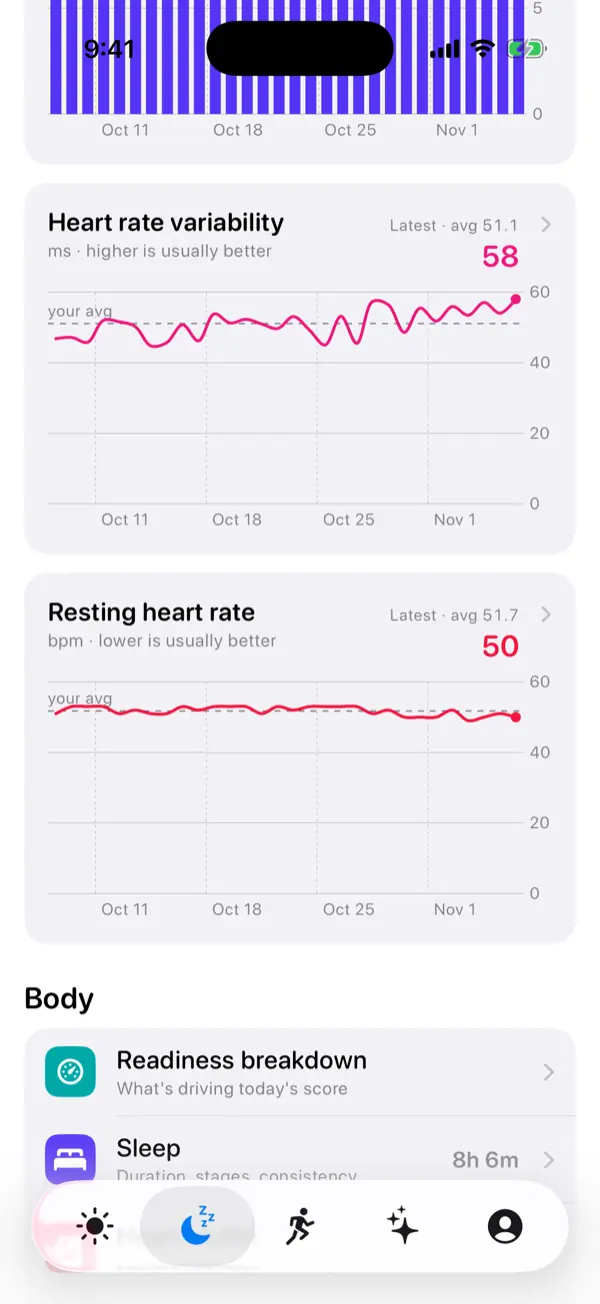
VedaWatch reads your HRV, resting heart rate, sleep, and wrist temperature history from Apple Health to build your personal baseline, then compares each new day against it—so the more consistently you wear your watch, the more useful every reading becomes.
With permission, it works off the data your watch already collects. AI coaching is optional, requires your permission to share relevant data for processing, and is subject to your plan's limits.
Sources & further reading
- Apple Support: Understand your readiness score on Apple Watch
- Cleveland Clinic: Heart Rate Variability (HRV)
- Grosicki et al., American Journal of Physiology-Heart and Circulatory Physiology: Heart rate variability coefficient of variation during sleep as a digital biomarker
This guide is educational, not medical advice, and has not been clinically reviewed. VedaWatch is not a medical device. If you have symptoms or concerns about your heart or health, contact a qualified healthcare professional.
Put your trends in perspective.
Explore HRV, sleep, and recovery with VedaWatch on your iPhone.
Download VedaWatch on the App Store →