 VedaWatch
Workouts & Training
How to calculate max heart rate: formulas, tests and Apple Watch
How to calculate max heart rate: 220 minus age vs the Tanaka and Gellish formulas, how far off they can be, a safer field test, and using Apple Watch workout data.
By VedaWatch editorial team · · 8 min read
The short answer
The quickest estimate is 208 − 0.7 × age (the Tanaka formula), which is closer than 220 minus age for most adults, especially older ones. Any age formula can still be off by 10 bpm or more for you. A better number is the highest reliable heart rate from your own hard workouts, and if you're healthy and already training, a structured all-out field test can confirm it.
How do you calculate your max heart rate?
Maximum heart rate is the highest number of beats per minute your heart reaches during an all-out effort. It matters because heart rate zones, training load and many fitness scores are built on it. Get it wrong and every zone moves with it.
There are three ways to find it, from least to most personal: estimate it from your age with a formula, look for the highest reliable reading in your own past workouts, or do a structured maximal effort. A lab test on a treadmill or bike with medical supervision is the most accurate, but most people don't need one.
If you just want a number today, use 208 − 0.7 × age. For a 40-year-old that's 208 − 28 = 180 bpm. Then treat it as a starting point and check it against your own workout data over the next few weeks.
220 minus age vs the Tanaka and Gellish formulas
220 minus age is the formula most people know, but it wasn't derived from a single large study. Two later studies are the ones usually recommended instead.
In 2001, Tanaka, Monahan and Seals pooled 351 studies covering 18,712 people and found that maximum heart rate fell with age along the line 208 − 0.7 × age. They then checked it in a lab study of 514 healthy adults who were tested directly, and got an almost identical line, 209 − 0.7 × age. The line didn't differ between men and women or between more and less active people, and the authors concluded that 220 minus age underestimates maximum heart rate in older adults.
In 2007, Gellish and colleagues took a different approach. Instead of comparing different people of different ages, they followed 132 people who each had repeated maximal exercise tests, 908 tests in all, over 25 years. Their equation was 207 − 0.7 × age, very close to Tanaka's.
In practice the formulas agree in middle age and drift apart at the ends:
- Age 25: 220 − age gives 195 bpm, Tanaka about 190, Gellish about 190.
- Age 40: 220 − age gives 180 bpm, Tanaka 180, Gellish 179.
- Age 60: 220 − age gives 160 bpm, Tanaka 166, Gellish 165.
- Age 70: 220 − age gives 150 bpm, Tanaka 159, Gellish 158.
How accurate is 220 minus age?
For a group, these formulas are a decent average. For one person, they're a rough guess. In the HUNT Fitness Study, which measured maximum heart rate in 3,320 healthy Norwegian adults, age alone predicted it with a standard error of 10.8 bpm. That means plenty of people sit 10 to 20 bpm above or below the line, in both directions. The same study found that older formulas underestimated maximum heart rate in people over 30.
A 2020 study compared nine common equations, including 220 minus age, Tanaka and Gellish, against 99 measured treadmill tests. All of them showed wide limits of agreement with the measured values, which the authors described as poor agreement. The equations also tended to overestimate maximum heart rate in people whose true maximum was low, and underestimate it in people whose true maximum was high. Their advice was to use measured values where possible.
Maximum heart rate isn't a fitness score. A high one doesn't mean you're fitter, and training doesn't raise it much. It's largely set by age and by the individual. That's exactly why a formula can't capture it well, and why your own data is worth more.
How to find your max heart rate from Apple Watch workouts
If you've done hard sessions with your Apple Watch, you probably already have a better estimate than any formula. The highest heart rate you've reached at the end of a race, a hard hill or the last interval of a tough session is close to your real maximum, or at least a floor for it.
The catch is that wrist sensors sometimes record false spikes or lock onto your running cadence. So look for a peak that makes sense in the shape of the graph, not a single odd reading.
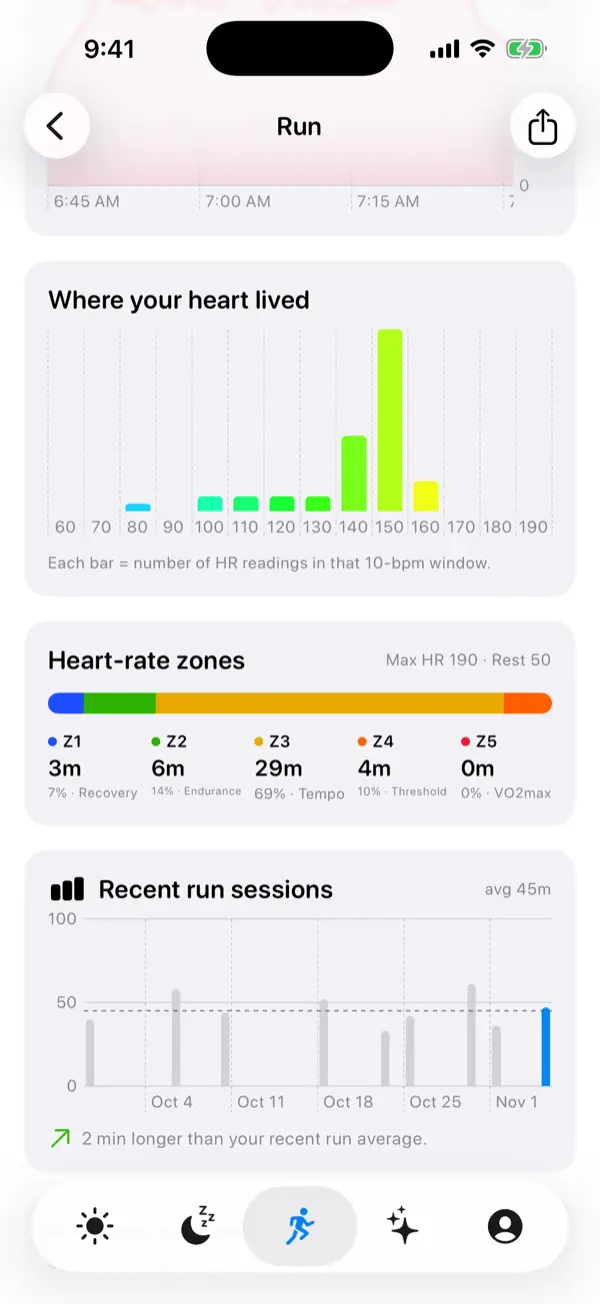
- On your iPhone, open the Fitness app, tap a hard workout from the last few months, and look at the heart rate graph.
- Find the highest point that sits at the end of a sustained climb in heart rate, during an effort that felt close to all-out.
- Ignore isolated spikes that jump far above the readings around them, or peaks during easy running that sit close to your step rate. These are usually sensor errors.
- Check two or three hard sessions. If the peaks agree within a few beats, that's a good working maximum.
- If the number is clearly higher than your age formula, use the higher one. If every peak is lower, you may simply not have pushed to maximum yet, so keep the formula for now.
Max heart rate test: a safer field test
A field test is a short, structured all-out effort. It only makes sense if you're healthy, already exercising regularly, and comfortable with hard efforts. It's not a medical test and it can't tell you anything about your heart's health.
A chest strap paired with your Apple Watch gives the most reliable peak, because wrist readings tend to lag behind fast rises in heart rate. Do it on a fresh day, not after a hard session, poor sleep or illness, and ideally with someone else around.
- Warm up for 15 minutes at an easy pace, finishing with a few short, faster pick-ups.
- Find a steady hill or a track. Run (or ride) 3 minutes hard, at a pace you could only just hold for that time, then recover with 2 minutes of easy jogging or spinning.
- Repeat the 3-minute effort, a little harder this time, and recover again.
- On the third effort, build for 2 minutes, then go all-out for the final minute until you can't go any harder.
- Cool down for at least 10 minutes, then check the highest heart rate in that last effort. Treat it as your maximum or slightly under it.
- Stop at once and seek medical help if you feel chest pain or pressure, unusual breathlessness, dizziness, faintness or a racing or irregular heartbeat.
Who shouldn't do a max heart rate test?
The American College of Sports Medicine bases its exercise screening advice on three things: how active you already are, whether you have symptoms or known heart, metabolic or kidney disease, and how hard you plan to exercise. An all-out test is the hardest exercise there is, so the bar is high.
Talk to a doctor before any maximal effort if you have heart disease, diabetes or kidney disease, high blood pressure that isn't well controlled, if you've had chest pain, fainting or palpitations with exercise, if you're pregnant, or if you're currently inactive. In these cases a supervised lab test, or skipping the number and training by feel, is the safer choice.
Some medicines change your heart rate response. Beta blockers in particular slow the heart, and people taking them may not be able to reach the heart rates a formula predicts. Formulas and zones based on them don't apply, so ask your doctor what heart rate range is right for you, and use how hard the effort feels instead. If you've had an unexplained high heart rate notification at rest, see the high heart rate guide and talk to a doctor rather than testing.
Apple Watch max heart rate setting: how it shifts your zones
Apple says its Heart Rate Zones are a percentage of your maximum heart rate, calculated automatically from your health data, and only shown if your date of birth is entered in the Health app. Apple doesn't publish the exact formula, and there's no field where you type in your maximum.
To use your measured maximum, you set the zones yourself. On Apple Watch, open Settings, go to Workout → Heart Rate Zones, tap Manual, then enter the lower and upper limits for Zones 2, 3 and 4. You can do the same on iPhone in the Watch app under My Watch → Workout → Heart Rate Zones. Zone 1 covers everything below Zone 2, and Zone 5 everything above Zone 4.
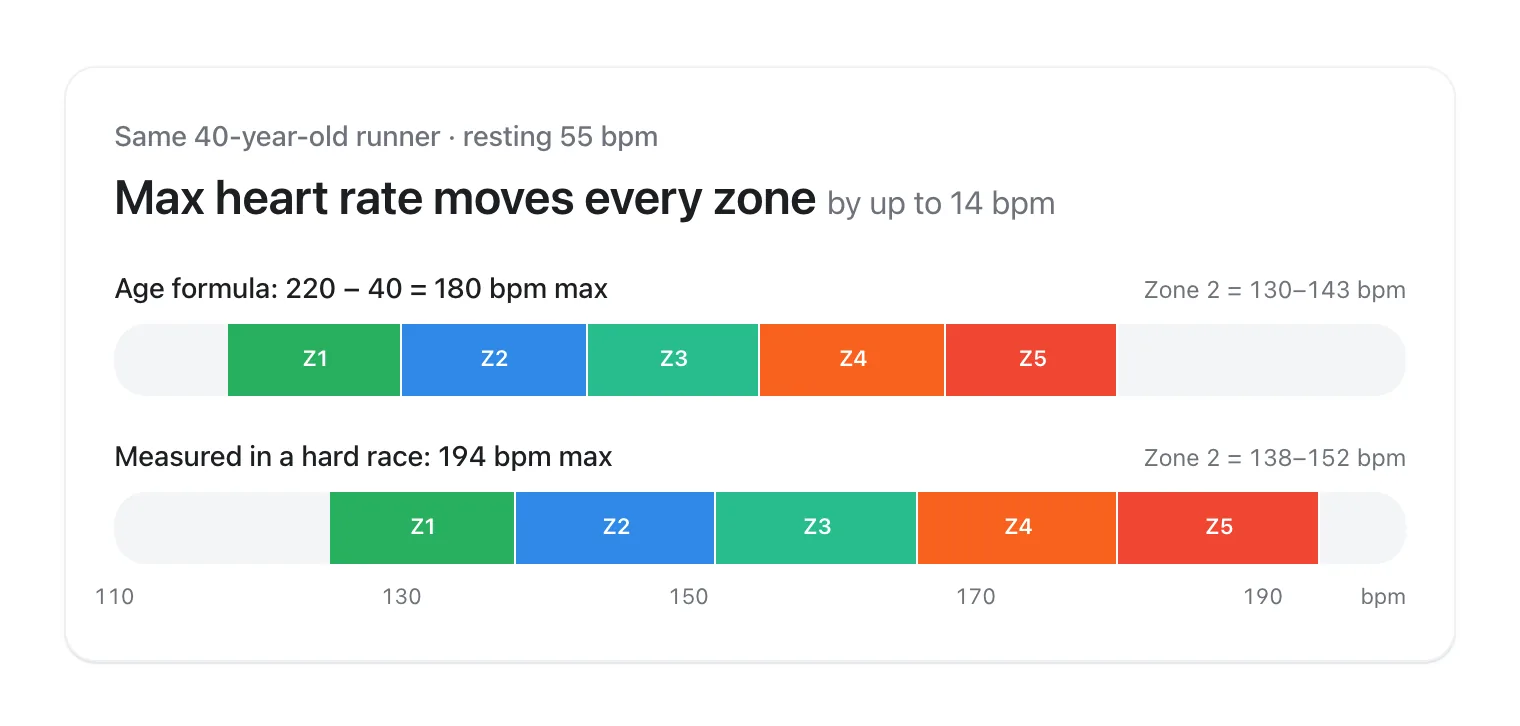
Because every zone is built from the maximum, a change of a few beats moves all of them. For a 40-year-old with a resting heart rate of 55, an age-based maximum of 180 bpm puts Zone 2 (60–70% of heart rate reserve) at about 130–143 bpm. A measured maximum of 194 bpm moves it to about 138–152 bpm. The zones guide explains how to work out each limit, and the Zone 2 guide shows how to use them in training.
How VedaWatch picks your max heart rate
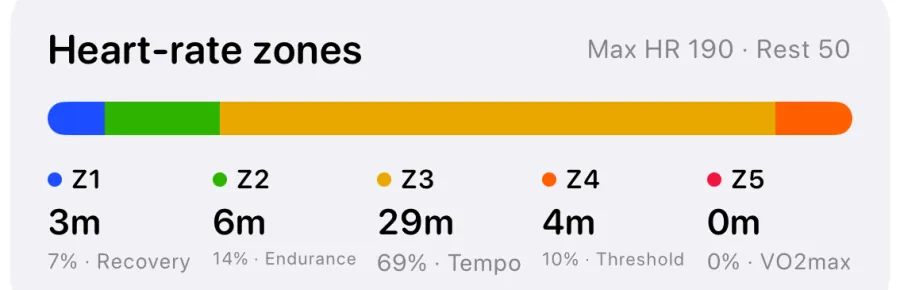
VedaWatch doesn't use an age formula for its zones. It takes the highest heart rate recorded in your Apple Health workouts over the last 56 days, and never uses a value below 190 bpm. That maximum, together with your latest resting heart rate, sets five zones using heart rate reserve (the Karvonen method). The same numbers are sent to the VedaWatch app on Apple Watch, so live zones and Zone 2 coaching during a workout match what you see on iPhone.
Each workout's zones card shows the maximum and resting heart rate it used, so you can see where your zones come from. If no resting heart rate is on file, VedaWatch says so and uses an estimated 60 bpm. Because of the 190 bpm floor, if your true maximum is well below that, for example if you're older or take a heart-rate-lowering medicine, VedaWatch's zones may run slightly low for you. Use the talk test and how the effort feels as a cross-check.
None of this is a diagnosis. If your heart rate during exercise seems unusually high or low for the effort, or comes with symptoms, talk to a doctor.
Frequently asked questions
What is the most accurate formula for max heart rate?
For healthy adults, 208 − 0.7 × age (Tanaka) or 207 − 0.7 × age (Gellish) fit large data sets better than 220 minus age, especially over 40. No formula is accurate for an individual; errors of 10 bpm or more are common.
What is a normal max heart rate for my age?
On average, roughly 190 bpm at 25, 180 at 40 and 166 at 60, using 208 − 0.7 × age. Healthy people often sit 10 to 20 bpm either side of these averages.
Can my heart rate go above my max heart rate?
Not by definition, but it can go above an estimated maximum, which just means the estimate was too low. A reading far above everything else in a workout is more likely a sensor spike.
Does max heart rate change with fitness?
Not much. It falls with age, and training has little effect on it. Fitness shows up more in a lower resting heart rate and a faster heart rate recovery.
Can I set my max heart rate on Apple Watch?
Not directly. Apple calculates zones from your health data, including your date of birth. To use your own maximum, switch Heart Rate Zones to Manual in the Workout settings and enter the zone limits worked out from it.
Is it safe to test my max heart rate?
For healthy people who already exercise hard, a structured field test is usually reasonable. If you have heart disease or symptoms, take heart medicines, are pregnant or are currently inactive, talk to a doctor first.
Related guides
- Apple Watch heart rate zones explained: what each zone means and how to set them
- Zone 2 training with Apple Watch: find your heart rate range and stick to it
- Apple Watch heart rate wrong? 9 fixes for accurate readings
- Heart rate recovery: normal values, Apple Watch Cardio Recovery
- Resting heart rate on Apple Watch: what's high, low, and why it changes
- Apple Watch high heart rate notification: causes and what to do
Sources & further reading
- Tanaka H, Monahan KD, Seals DR. Age-predicted maximal heart rate revisited. Journal of the American College of Cardiology, 2001
- Gellish RL, et al. Longitudinal modeling of the relationship between age and maximal heart rate. Medicine & Science in Sports & Exercise, 2007
- Nes BM, et al. Age-predicted maximal heart rate in healthy subjects: The HUNT Fitness Study. Scandinavian Journal of Medicine & Science in Sports, 2013
- Shookster D, et al. Accuracy of commonly used age-predicted maximal heart rate equations. International Journal of Exercise Science, 2020
- Riebe D, et al. Updating ACSM's recommendations for exercise preparticipation health screening. Medicine & Science in Sports & Exercise, 2015
- Apple Support: View Heart Rate Zones on Apple Watch
- Harvard Health Publishing: Target heart rate on a beta blocker
This guide is educational, not medical advice, and has not been clinically reviewed. VedaWatch is not a medical device. If you have symptoms or concerns about your heart or health, contact a qualified healthcare professional.
Put your trends in perspective.
Explore HRV, sleep, and recovery with VedaWatch on your iPhone.
Download VedaWatch on the App Store →