 VedaWatch
Workouts & Training
Zone 2 training with Apple Watch: find your heart rate range and stick to it
Zone 2 is easy, conversational aerobic exercise. Here's how to work out your Zone 2 heart rate, see it live in the Apple Watch Workout app, set manual zones when the automatic ones are off, and how much of it is worth doing.
By VedaWatch editorial team · · 7 min read
The short answer
Zone 2 is an easy pace where you can still talk in full sentences. A common way to estimate it is 60–70% of your heart rate reserve. Apple Watch shows your zone live during cardio workouts, and you can enter your own limits if the automatic zones don't match how the effort feels.
What Zone 2 training is
Zone 2 is the second of five heart rate zones: steady, easy aerobic exercise you can keep up for a long time. Think of a relaxed jog, an easy ride, or a brisk walk uphill, at a pace where you can still hold a conversation.
There's no single agreed definition. Some coaches use a percentage of maximum heart rate, some use heart rate reserve, and exercise physiologists often define it as the intensity just below your first lactate or ventilatory threshold, which can only be measured precisely in a lab. The formulas below are estimates, so check them against how the effort actually feels.
How to estimate your Zone 2 heart rate
A common method is the Karvonen, or heart rate reserve, formula. Your reserve is your maximum heart rate minus your resting heart rate. Zone 2 is then your resting heart rate plus 60–70% of that reserve.
For example, with a resting heart rate of 60 bpm and a maximum of 190 bpm, the reserve is 130. Sixty percent of 130 is 78 and seventy percent is 91, which gives a Zone 2 range of about 138–151 bpm.
The weak link is maximum heart rate. Age formulas like 220 minus age can be off by 10 bpm or more for an individual, which moves the whole range. If you've seen a higher heart rate in a hard, all-out effort, that number is usually a better maximum than any formula.
- Find your resting heart rate in the Health app (Browse → Heart → Resting Heart Rate) and use a typical recent value.
- Use the highest heart rate you've reliably reached in a hard effort as your maximum, or an age-based estimate if you don't have one.
- Work out resting + 0.6 × (max − resting) and resting + 0.7 × (max − resting). Those two numbers are your range.
- Check it with the talk test: in Zone 2 you should be able to speak in full sentences, but not sing.
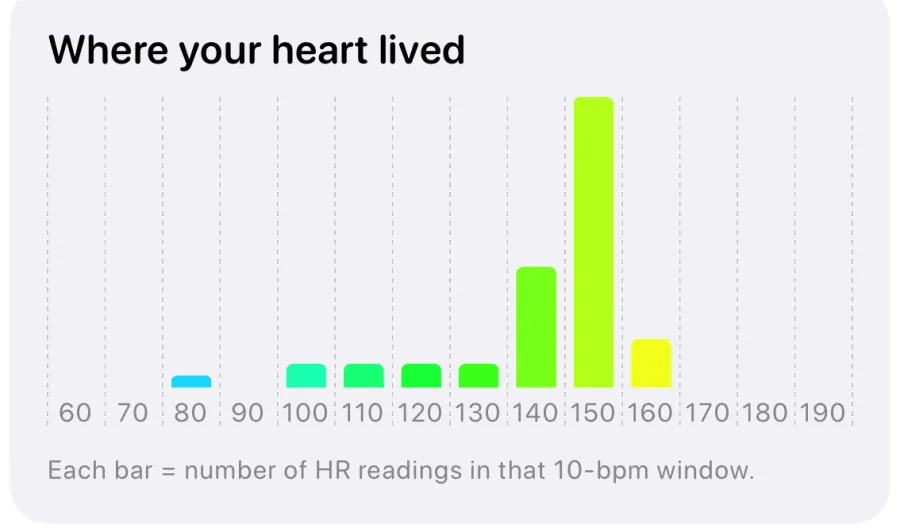
How to see Heart Rate Zones on Apple Watch
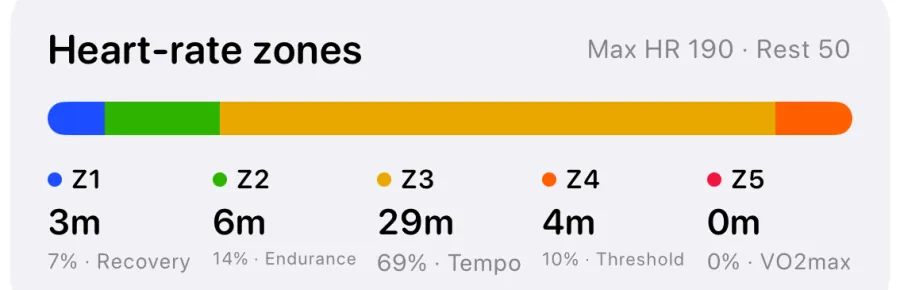
The Workout app calculates five Heart Rate Zones automatically from your health data, as long as your date of birth is entered in the Health app. You can see your current zone live during any cardio workout and review the time spent in each zone afterwards.
- Start a cardio workout, such as Outdoor Run, Outdoor Cycle, or Outdoor Walk, in the Workout app.
- Turn the Digital Crown until you reach the Heart Rate Zones view. It shows your current zone, heart rate, time in the zone, and average heart rate.
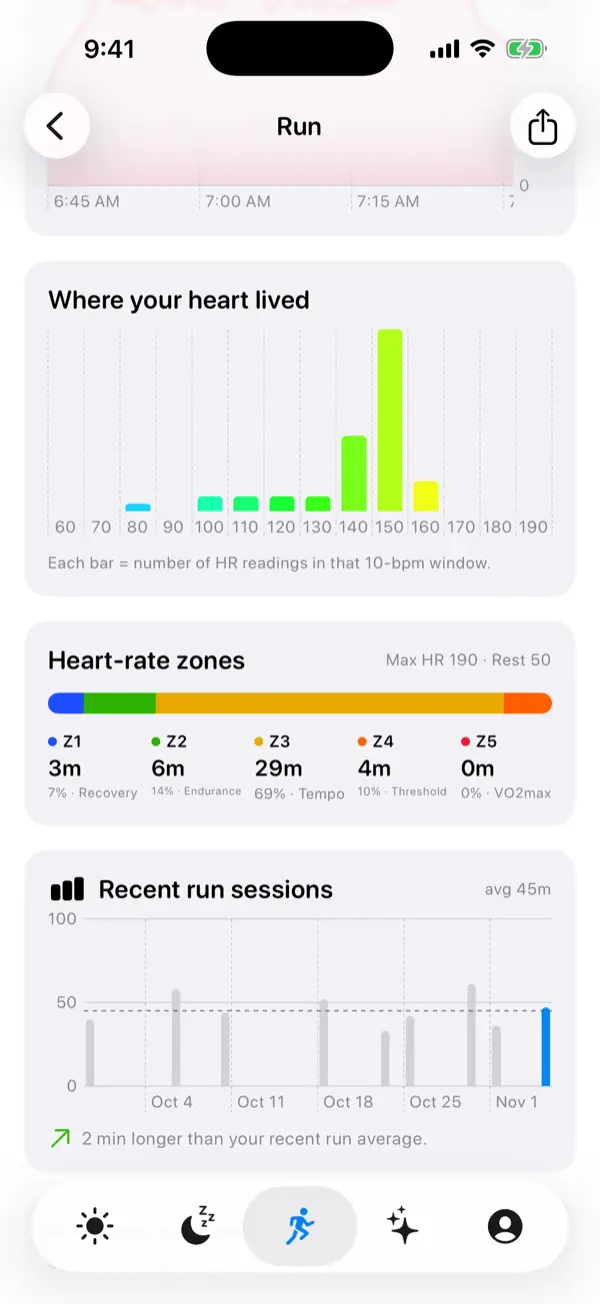
- After the workout, open the Fitness app on iPhone, tap the workout under Sessions, then tap Show More next to Heart Rate to see time in each zone.
- If the automatic zones don't match your own estimate, open Settings → Workout → Heart Rate Zones on your watch (or the Watch app on iPhone → My Watch → Workout → Heart Rate Zones), choose Manual, and enter your own limits.
How much Zone 2 should you do?
For general health, the World Health Organization recommends that adults get 150–300 minutes of moderate-intensity aerobic activity a week, or 75–150 minutes of vigorous activity, or an equivalent mix. For many people, much of Zone 2 counts as moderate activity, so it's an easy way to reach that total.
Endurance athletes have long done most of their training at low intensity. Research on elite athletes describes roughly 80% of sessions at easy effort and the rest hard. You don't need to copy elite training to benefit, but the principle carries over: easy sessions let you train more often without wearing yourself down.
Zone 2 isn't magic, though. Much of the online enthusiasm for it goes further than the evidence. Higher-intensity work improves fitness and VO2 max too, often faster. For most people, a mix of mostly easy sessions and some harder ones works well.
Tips for staying in Zone 2
Expect to slow down. For many people, Zone 2 running feels uncomfortably easy at first, and some may need to walk the hills to stay in range. As your aerobic fitness improves, your pace at the same heart rate usually rises.
Your heart rate also drifts upward during long sessions, especially in heat or when you're dehydrated. That's normal. Ease off to stay in range rather than chasing a set pace.
Wrist heart rate sensors are reliable at steady efforts but can lag when your effort changes quickly. If you want closer tracking, you can pair a Bluetooth chest strap with Apple Watch in Settings → Bluetooth.
Common questions about Zone 2 training
Does walking count as Zone 2? It can. If a brisk or uphill walk puts your heart rate in range, it counts. Fitter people often need to jog to get there.
Why is my Zone 2 so slow? That's common, especially if most of your training has been at a moderate-hard effort. Use the talk test to make sure your range isn't set too low because of a wrong maximum heart rate.
Does Zone 2 improve VO2 max? It can, especially if you're starting from low fitness. Harder intervals usually raise VO2 max more quickly, which is why many plans include both.
Should I do Zone 2 on a low recovery day? Easy aerobic exercise is often a reasonable choice when you feel a bit flat, but rest is the better call if you're unwell or exhausted.
Start a Zone 2 run with VedaWatch
Say "Start a Zone 2 run in VedaWatch" to Siri, or run the Zone 2 Run shortcut, and VedaWatch starts an outdoor run on your Apple Watch and tells you your Zone 2 range. It uses the 60–70% heart rate reserve method above, with your latest resting heart rate from Apple Health.
The shortcut assumes a maximum heart rate of 190 bpm. If your real maximum is well below that, its range will run high, so set manual zones in Apple's Workout app as described above and use those during the run. Your runs then feed into VedaWatch's training load alongside your other workouts.
Sources & further reading
- Apple Watch User Guide: View Heart Rate Zones on Apple Watch
- World Health Organization: Guidelines on physical activity and sedentary behaviour (2020)
- International Journal of Sports Physiology and Performance (2010): What is best practice for training intensity and duration distribution in endurance athletes? (Seiler)
This guide is educational, not medical advice, and has not been clinically reviewed. VedaWatch is not a medical device. If you have symptoms or concerns about your heart or health, contact a qualified healthcare professional.
Put your trends in perspective.
Explore HRV, sleep, and recovery with VedaWatch on your iPhone.
Download VedaWatch on the App Store →