 VedaWatch
Recovery & Apple Watch
Apple Watch heart rate wrong? 9 fixes for accurate readings
Apple Watch heart rate jumping, stuck or missing during workouts? Why the optical sensor misreads, and 9 fixes for fit, settings, cold, tattoos and chest straps.
By VedaWatch editorial team · · 6 min read
The short answer
Most wrong Apple Watch heart rate readings come from fit and motion, not a faulty sensor. Wear the Watch snug, above the wrist bone, tighten the band for workouts, keep Wrist Detection on, and pick the matching workout type. For boxing, tennis or cold-weather sessions, a Bluetooth chest strap is more reliable.
How accurate is Apple Watch heart rate?
At rest and during steady exercise, wrist-based heart rate is generally reasonably accurate. A 2020 Duke University study in npj Digital Medicine compared several consumer and research wearables and concluded that they were all reasonably accurate at rest and during prolonged elevated heart rate.
The same study found that error during activity was on average 30% higher than at rest, and that devices differed most in how quickly they responded to changes in activity. In other words, the hard moments for any wrist sensor are sprints, intervals, and sports with sudden, irregular arm movement.
Apple itself notes that some anomalies may appear in the displayed data, with occasional readings that are abnormally high or low. A single odd number isn't a problem. A pattern of odd numbers usually has a fixable cause.
How the Apple Watch heart rate sensor works
Apple Watch uses photoplethysmography. Green LEDs on the back flash hundreds of times per second, and light-sensitive photodiodes measure how much light your wrist absorbs. Blood absorbs green light, so each heartbeat, which briefly increases blood flow in the wrist, shows up as a change in absorbed light. Apple says the optical sensor supports a range of 30 to 210 beats per minute.
Some models also use infrared light during your sleep schedule or when a Sleep Focus is on, and models with the electrical heart sensor can take a reading through the Digital Crown in the Heart Rate app.
Because the method depends on light reaching blood vessels and coming back, anything that changes that path, such as a gap between sensor and skin, sliding, low blood flow in the skin, or ink, can cause dropouts or wrong readings.
Signs your Apple Watch heart rate reading is off
Wrist heart rate errors tend to follow a few recognisable patterns. Knowing them helps you decide whether a workout's numbers are worth trusting.
- Cadence lock: during a run, the reading sits suspiciously close to your step rate (for example 165-175) even on an easy jog. The sensor has picked up the rhythm of your arm swing instead of your pulse.
- Lag: heart rate stays low for the first few minutes of an interval or climbs only after you've already stopped.
- Dropouts: gaps or flat lines in the workout graph, often in cold weather or with a loose band.
- Spikes: one or two readings far above your normal maximum in the middle of an otherwise steady effort.
- Strength-training lows: readings that barely move during heavy lifts, when your wrist is flexed and the band shifts.
9 fixes for more accurate Apple Watch heart rate
Work through these in order. The first three solve most problems.
- Wear it snug but comfortable. Apple's guidance is not too tight and not too loose, with room for your skin to breathe. Turn your palm up: if the back of the Watch lifts off your skin, tighten the band.
- Move it above the wrist bone. Apple recommends wearing it toward your elbow, not your hand, for the best skin contact.
- Tighten the band for workouts, then loosen it afterward. A sport loop or a band with fine adjustment makes this easy.
- Keep Wrist Detection on. In the Watch app on iPhone, go to My Watch, then Passcode. Without it, background heart rate readings such as resting and walking heart rate aren't taken.
- Check that Heart Rate is allowed in Privacy settings. If it's switched off, no heart rate is measured at all.
- Choose the workout type that best matches what you're doing, such as Indoor Run on a treadmill, as Apple recommends.
- Warm up before hard efforts, especially in the cold. Apple notes that in cold conditions skin blood flow in the wrist may be too low for a reading.
- Keep the back of the Watch clean and dry. Wipe it after sweaty sessions so nothing sits between the sensor and your skin.
- Use a Bluetooth chest strap for the toughest activities. Apple says you can connect Apple Watch to external heart rate monitors such as Bluetooth chest straps if readings are inconsistent.
Tattoos, skin tone and other personal factors
Apple says the ink, pattern and saturation of some tattoos can block light from the sensor and make readings unreliable. If your wrist is tattooed and readings are patchy, a chest strap during workouts is the simplest fix.
Skin perfusion, meaning how much blood flows through the skin, varies between people and with the environment. Cold, dehydration and some circulation conditions can all reduce it.
Skin tone is a common worry. In the Duke study, there was no statistically significant difference in accuracy across skin tones; the larger differences were between devices and between activity types.
Workouts where wrist heart rate struggles most
Apple notes that rhythmic movement such as running or cycling gives better results than irregular movement such as tennis or boxing. Activities with a lot of grip or wrist flexion are the other weak spot.
Expect less reliable readings during boxing and martial arts, racket sports, heavy lifting, kettlebells, rowing with a tight grip, CrossFit-style circuits, and short sprints. For these, use the wrist numbers as a rough guide, or pair a chest strap.
For steady running, cycling, walking and elliptical sessions, a well-fitted Apple Watch is usually good enough for zone training. The Zone 2 guide covers how to set your own zone limits.
Resting heart rate and overnight readings
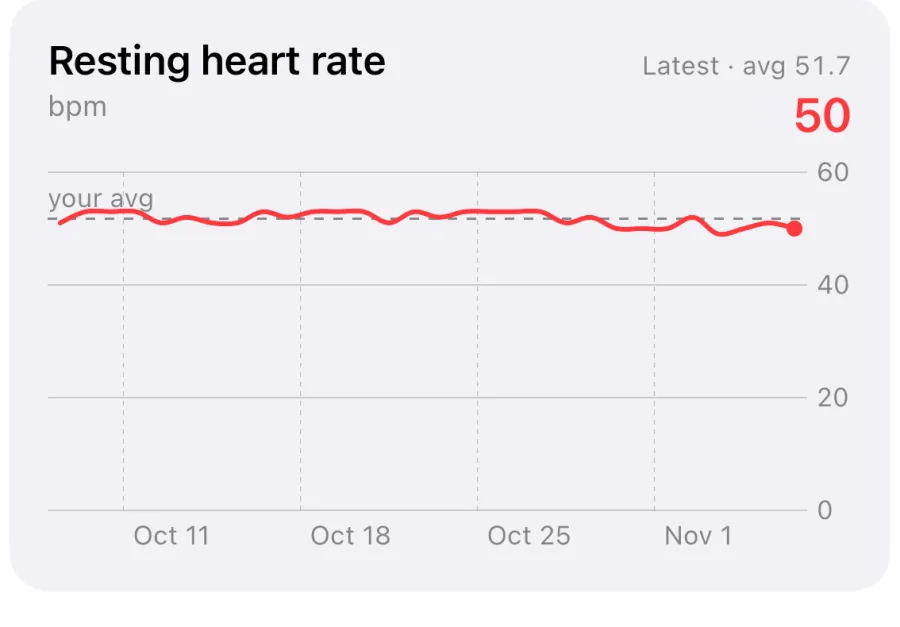
Resting heart rate and overnight HRV are calculated from readings when you're still, so they're much less affected by motion than workout heart rate. Fit and Wrist Detection still matter: a Watch worn loosely to bed records fewer good readings.
Because these are trends rather than single values, a few bad samples rarely change the picture. Look at the 7-day or 30-day line instead of one night.
If your resting heart rate suddenly jumps, check fit before drawing conclusions, then consider the usual causes: poor sleep, alcohol, illness, stress or hard training.
How VedaWatch uses your Apple Watch heart rate
VedaWatch reads heart rate, resting heart rate and HRV from Apple Health, so the fixes above improve everything it shows. Its readiness score compares last night's HRV and resting heart rate with your recent baseline, which is why consistent overnight wear matters more than any single workout reading.
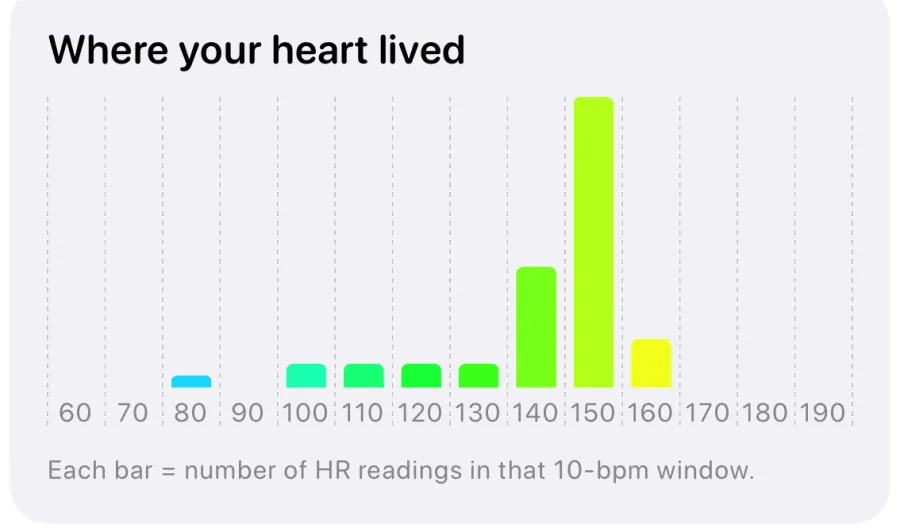
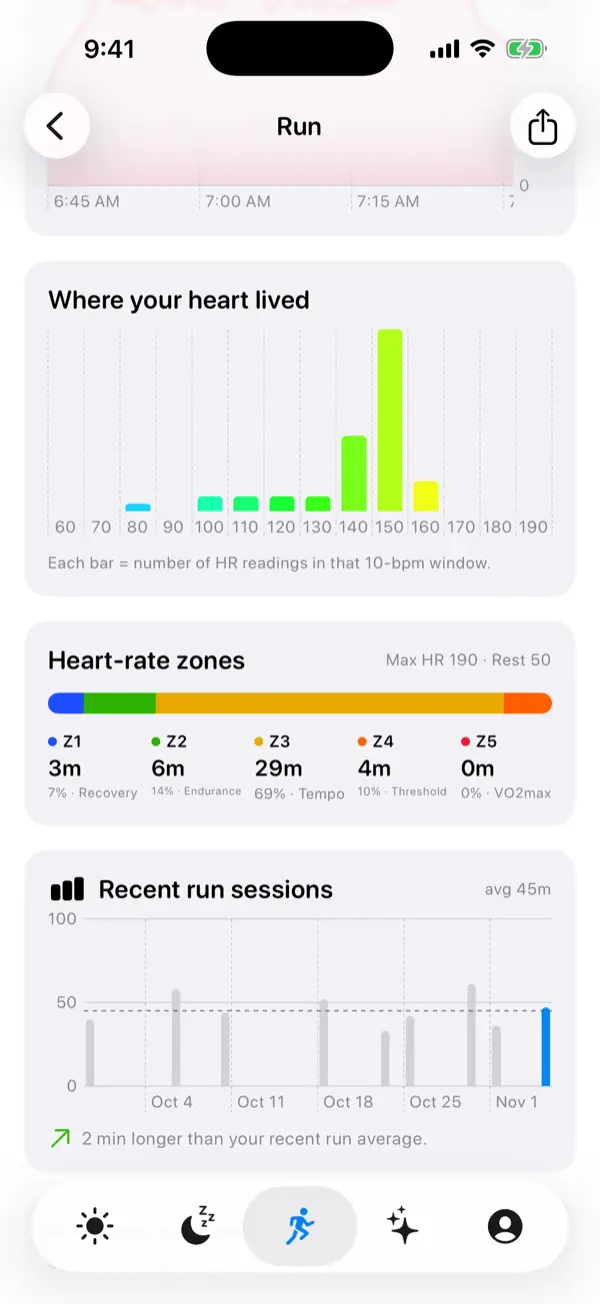
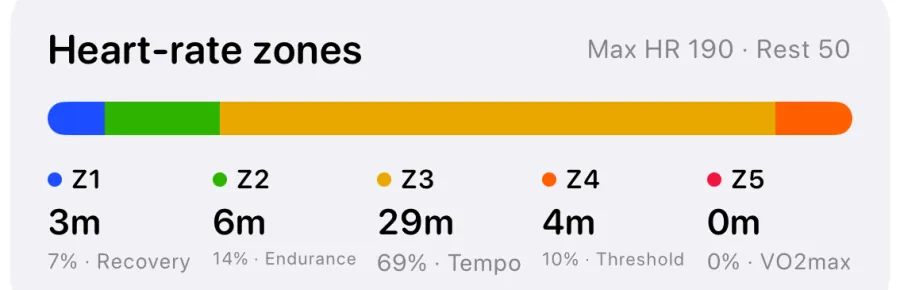
For workouts, the VedaWatch app on Apple Watch shows live heart rate zones, and each workout in the iPhone app has a Where your heart lived chart and time in each zone. The histogram is a quick way to spot a misread: a run that should be easy but shows a big block of readings near your step rate is worth a second look.
During easy and long runs started from your plan, Zone 2 coaching nudges you to slow down or speed up when your heart rate stays outside the zone for about 20 seconds, after a 5-minute warm-up. Good fit makes those nudges much more trustworthy.
Frequently asked questions
Why is my Apple Watch heart rate so high when I run?
If it sits close to your steps per minute on an easy run, the sensor may be locked onto your cadence. Tighten the band, move it above the wrist bone, and compare with a chest strap if it keeps happening.
Is a chest strap more accurate than Apple Watch?
Chest straps measure the heart's electrical signal directly and generally respond faster to sudden changes. For steady exercise the difference is often small; for intervals, lifting and racket sports a strap is usually more reliable.
Why does my Apple Watch not show heart rate sometimes?
Common causes are a loose fit, Wrist Detection switched off, Heart Rate disabled in Privacy settings, cold skin, or a tattoo under the sensor. Fix fit and settings first.
Does wearing Apple Watch tighter make it more accurate?
Snug is better than loose, but it shouldn't be uncomfortable or leave deep marks. Tighten it for workouts and loosen it again afterward.
Should I trust a single weird heart rate reading?
No. Apple says occasional abnormally high or low readings can appear. Look for patterns over time, and talk to a doctor if you notice symptoms or repeated unexplained readings at rest.
Related guides
- Is Apple Watch HRV accurate? What the validation studies actually show
- Apple Watch heart rate zones explained: what each zone means and how to set them
- Zone 2 training with Apple Watch: find your heart rate range and stick to it
- Resting heart rate on Apple Watch: what's high, low, and why it changes
- Apple Watch high heart rate notification: causes and what to do
- How to get more HRV readings on Apple Watch (and fix gaps)
Sources & further reading
- Apple Support: Get the most accurate measurements using your Apple Watch
- Apple Support: Monitor your heart rate with Apple Watch
- Apple Support: Wearing your Apple Watch
- Bent B, et al. Investigating sources of inaccuracy in wearable optical heart rate sensors. npj Digital Medicine, 2020
This guide is educational, not medical advice, and has not been clinically reviewed. VedaWatch is not a medical device. If you have symptoms or concerns about your heart or health, contact a qualified healthcare professional.
Put your trends in perspective.
Explore HRV, sleep, and recovery with VedaWatch on your iPhone.
Download VedaWatch on the App Store →