 VedaWatch
Using VedaWatch
Apple Watch streaks beyond Move: track sleep, steps and exercise consistency
Apple Watch streak awards centre on your rings. Here's how VedaWatch builds sleep, workout, exercise, step and mindfulness streaks from Apple Health, and how it handles missed days.
By VedaWatch editorial team · · 8 min read
The short answer
VedaWatch keeps five daily streaks from your Apple Health data: Sleep (6 h+ a night), Workouts (a workout of 5 min+), Exercise (30 exercise minutes), Steps (8,000 a day) and Mindfulness (one session). Each has a heatmap, a best run and milestone badges from 3 to 365 days. There are no rest days or streak freezes, so the heatmap and your best run matter more than any single missed day.
Five streaks, built from your Apple Health data
Apple's Fitness app celebrates Move ring streaks, but sleeping enough, walking every day or taking a mindful minute are habits too. VedaWatch keeps a daily streak for five of them, read straight from Apple Health on your iPhone. Nothing is typed in by hand and nothing is stored as a separate counter. The app works out each streak again from your Health data every time, so the numbers match on every screen.
Each streak has one simple daily rule. Sleep: 6 h+ of sleep a night. Workouts: a workout of 5 min+ a day. Exercise: 30 exercise minutes a day. Steps: 8,000 steps a day. Mindfulness: a mindful session a day.
Your current streak is the number of days in a row you met the rule, ending today. If you haven't met it yet today, the count runs up to yesterday instead, so a fresh morning never looks like a broken streak. VedaWatch looks back about 200 days, which is enough for your current run, your best run and the heatmaps.
What counts as a day for each habit
Sleep counts only time Apple Health records as asleep (core, deep, REM or unspecified sleep), not time in bed. The night is credited to the day you wake up, so last night's sleep shows up this morning. You need at least 6 hours in total.
Workouts need a workout saved to Apple Health that lasted at least 5 minutes. Shorter workouts are usually accidental starts, so they don't count. Several workouts on the same day add together for the heatmap, and the day is credited to when the workout started.
Exercise uses the minutes behind your green Exercise ring and needs 30 of them, which is Apple's default Exercise goal. Steps needs 8,000 steps in Apple Health for the day, a sensible target: a 2022 analysis of 15 studies found the drop in mortality risk levelled off at roughly 8,000 to 10,000 steps a day for adults under 60, and 6,000 to 8,000 for older adults. Mindfulness counts any mindful session, such as a Breathe or Reflect session on Apple Watch. Even a session of a few seconds counts as one minute, because showing up is the point.
These rules are set by VedaWatch rather than taken from your own ring goals, so a streak means the same thing to everyone and doesn't change if you adjust your goals in the Fitness app.
The Consistency card and its heatmap
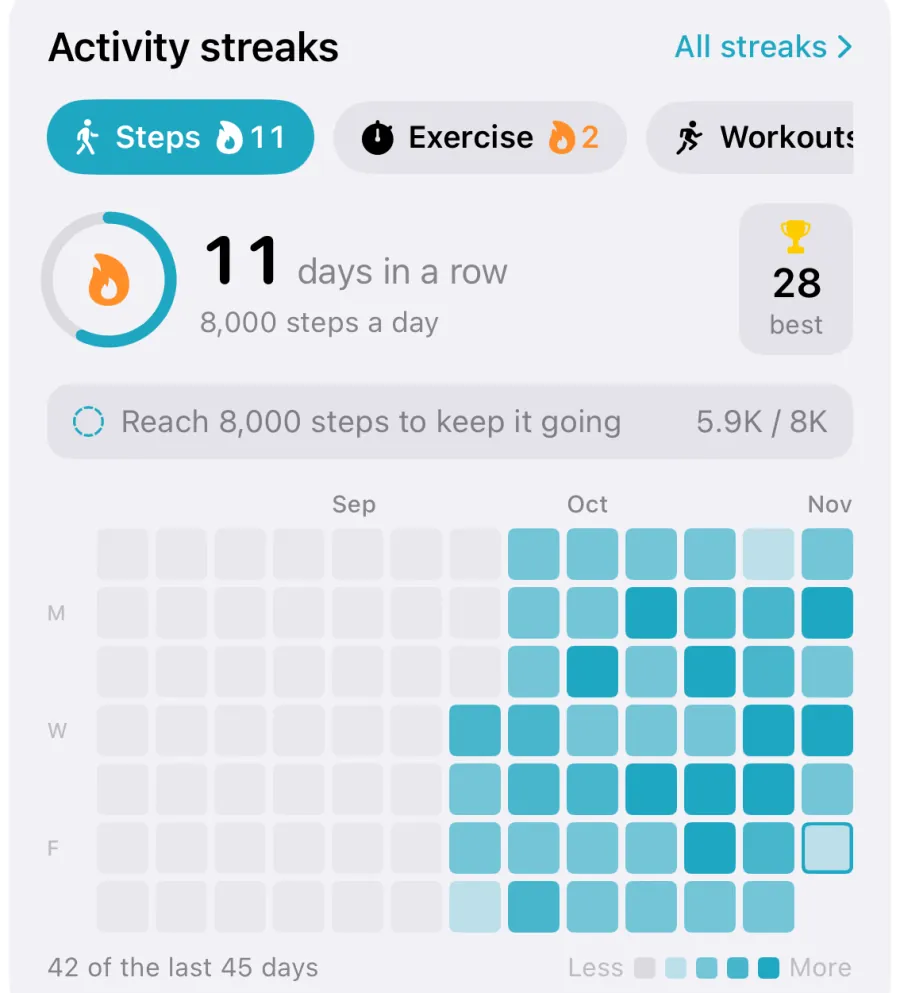
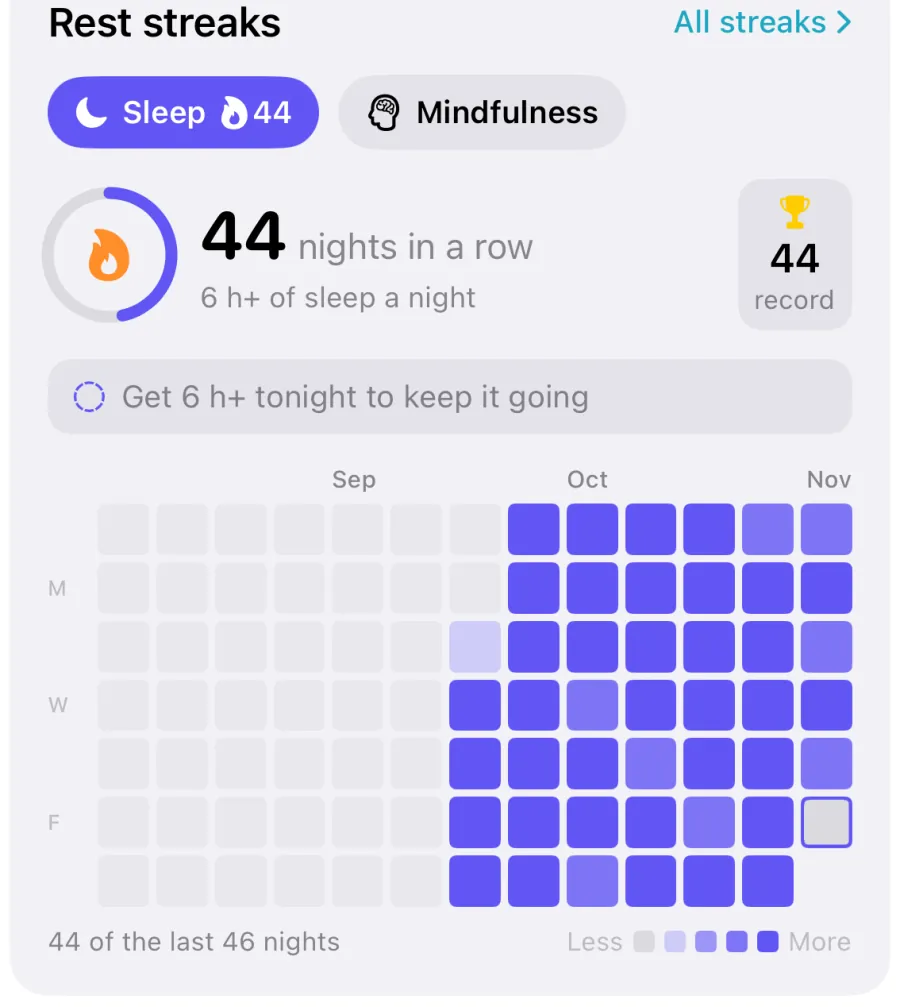
Streaks show up as a card on three screens. Today has a Consistency card with every habit. Recover has Rest streaks for Sleep and Mindfulness, and Train has Activity streaks for Workouts, Exercise and Steps. If you track more than one habit, chips across the top let you switch between them, with each chip showing its flame and current count. The card remembers which habit you picked on each screen.
Under the big number you'll see the habit's rule, a trophy with your best run (it says record when today's run is your best ever), and a line telling you whether today is done. If it isn't, the line says what keeps it going, such as "Reach 8,000 steps to keep it going". For Steps and Exercise it also shows how far you've got, like 5.9K / 8K.
The heatmap has one column per week and one row per weekday, with the most recent week on the right. A grey cell means nothing was logged. A faint tint means you tracked something but stayed under the goal. Stronger shades mean you went further past it, up to the darkest shade at 7.5 hours of sleep, 45 workout minutes, 60 exercise minutes, 12,000 steps or 10 mindful minutes. Days from before you started tracking are drawn fainter still, so the grid doesn't look like weeks of failures.
Tap any cell to see that day's date and value, with a tick if it met the goal. Underneath, a line such as "42 of the last 45 days" sums up the visible stretch.
How to find your streaks in VedaWatch
Streaks only use data already in Apple Health, so the first step is making sure VedaWatch can read it.
- Open VedaWatch on your iPhone. If you haven't granted Health access yet, the Streaks screen shows Track your streaks with a button to allow it.
- On Today, scroll to the Consistency card. On Recover you'll find Rest streaks, and on Train you'll find Activity streaks.
- Tap a chip to switch habits, and tap any heatmap cell to see that day's value.
- Tap All streaks at the top right of any of these cards to open the Streaks screen.
- On the Streaks screen, scroll through each habit's run, heatmap and milestones. Pull down to refresh after a workout or a long walk.
- Tap the share button next to a habit's name to make an image of that streak.
Milestones, badges and when a streak appears
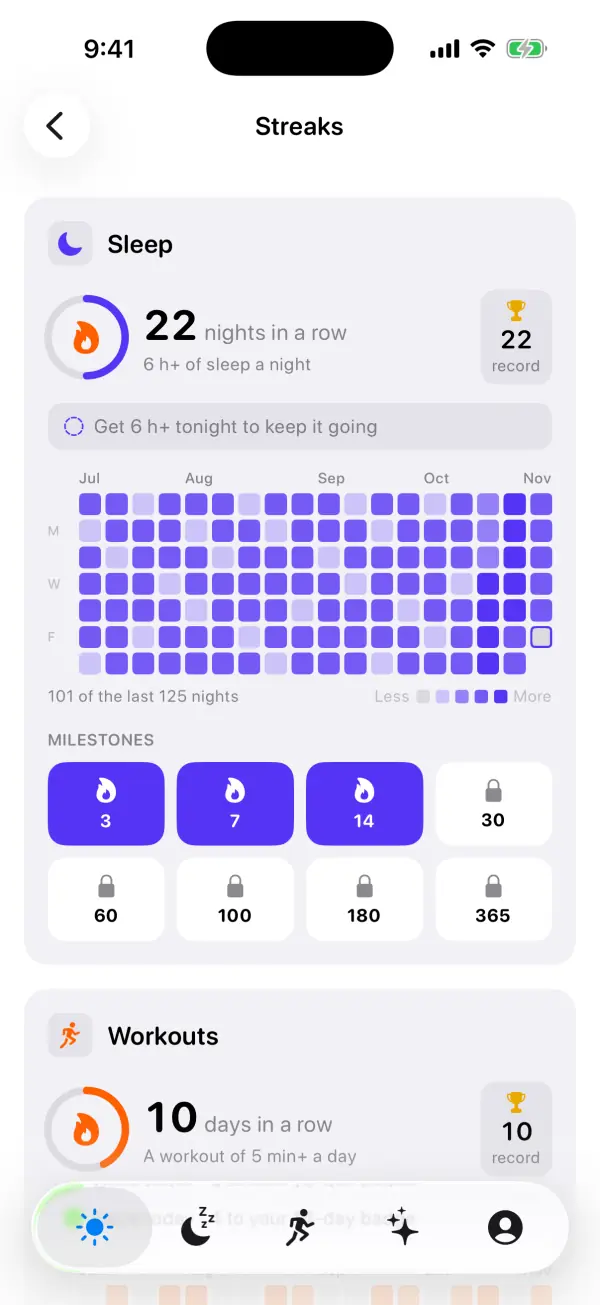
Every habit has the same eight milestones: 3, 7, 14, 30, 60, 100, 180 and 365 days. On the Streaks screen they appear as badges under each habit. A badge unlocks once your best run reaches it, so badges you've earned stay unlocked even after a streak ends. The ring around the flame fills as you get closer to the next milestone, and the today line counts down, as in "Done today · 3 to your 14-day badge".
A habit only gets a card once it has some history: at least 7 days with any data and at least 3 days that met the goal. A heatmap with two lit cells feels like failure rather than progress. Until then, the habit sits in a Building up list at the bottom of the Streaks screen with a hint such as "4 more days to unlock". On the main cards, habits with the longest current run come first.
Missed days, rest days and why one gap is fine
VedaWatch doesn't have rest days, freezes or skips. If a day ends without meeting the rule, the current streak goes back to zero. Until midnight, though, the streak counts up to yesterday, so you always have the whole day to keep it going. Your best run, your unlocked badges and the heatmap all stay, and the card's today line changes to "Start a new run today".
For workouts this matters most, because good training includes easy days. That's why the rule is deliberately small: any workout of 5 minutes or more counts, so a short walk you record as a workout can keep a streak alive on a recovery day. If your body needs a full day off, take it. The heatmap will still show a mostly filled grid, and that is the better measure of a habit anyway.
Habit research backs this up. In a well-known 2010 study, Lally and colleagues followed people building a new daily habit and found it took a median of 66 days for the behaviour to feel automatic, with a very wide range between people. Missing a single day didn't meaningfully set back habit formation. In other words, long-term consistency counts, and a perfect run is optional.
Streak-at-risk nudges and milestone celebrations
From 5 pm, if you have a workout streak of 3 days or more and fewer than 5 exercise minutes so far today, Today shows a card titled "Keep your 3-day streak going" (with your own number). It says "Record a 5-minute workout before midnight to keep it. A brisk walk counts if you start it as a workout." Tapping it opens the Streaks screen. It only appears on Today and only for the workout streak, and it stays hidden while Today is asking you to turn on notifications.
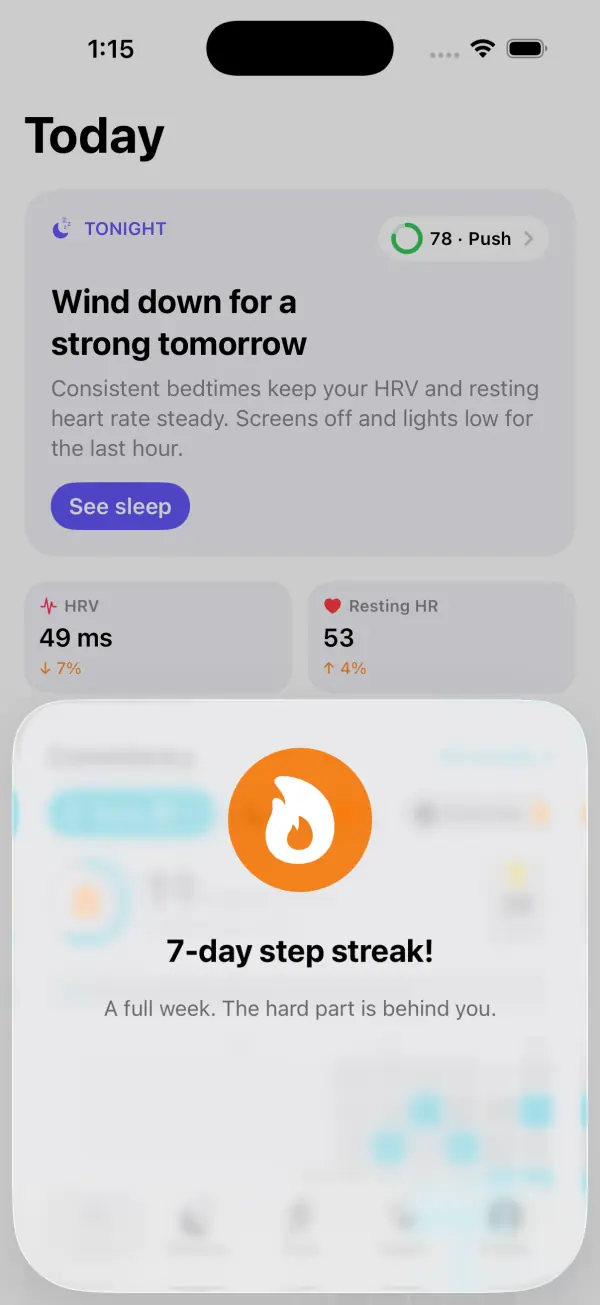
When a streak reaches a milestone, Today shows a celebration sheet, like "7-day step streak!". The message grows with the milestone: "Three days in a row" at 3, "A full week" at 7, "Two weeks strong" at 14, "A full month of consistency" from 30, and "Legendary consistency" from 100. You'll see one sheet at a time. If two habits hit a milestone together, the bigger one wins.
Each milestone is celebrated only once per habit. If the streak ends, it resets so the next run can earn the celebrations again. Only habits with enough history can trigger a celebration, so a single lucky mindful minute won't pop up a sheet. Celebrations are for everyone, free or Pro.
Common questions about streaks
Why didn't last night count for my sleep streak? Only time recorded as asleep counts, and you need 6 hours in total. If your watch was off or Sleep tracking wasn't on, there's no data for that night. Tap the heatmap cell to see how much sleep was logged.
Why is 6 hours the sleep rule when most adults need 7 or more? Sleep experts recommend at least 7 hours for adults. The streak uses 6 hours as a reachable floor that rules out clearly short nights, and the heatmap only reaches its darkest shade at 7.5 hours. Aim for the darker cells.
Why did my long walk not count for Workouts? The Workouts streak needs a workout saved in Apple Health. A walk that wasn't recorded as a workout still adds to your Steps and possibly Exercise streaks.
Can I change the step or exercise goal? Not at the moment. The rules are fixed at 8,000 steps and 30 exercise minutes so streaks stay comparable over time.
Why can't I see my mindfulness streak? It's probably in the Building up list on the Streaks screen. It needs at least 7 days with a session and 3 that met the goal before it gets a card.
Can I see streaks on the web? The VedaWatch web app has a Streaks page for Sleep and Workouts with a 91-day heatmap, based on the health data you've chosen to sync to your account.
Sources & further reading
- European Journal of Social Psychology (2010): How are habits formed: Modelling habit formation in the real world (Lally et al.)
- Journal of Clinical Sleep Medicine (2015): Recommended Amount of Sleep for a Healthy Adult (Watson et al.)
- The Lancet Public Health (2022): Daily steps and all-cause mortality: a meta-analysis of 15 international cohorts (Paluch et al.)
- Apple Support: Track daily activity with Apple Watch
- Apple Support: Track your sleep on Apple Watch and use Sleep on iPhone
This guide is educational, not medical advice, and has not been clinically reviewed. VedaWatch is not a medical device. If you have symptoms or concerns about your heart or health, contact a qualified healthcare professional.
Put your trends in perspective.
Explore HRV, sleep, and recovery with VedaWatch on your iPhone.
Download VedaWatch on the App Store →