 VedaWatch
Recovery & Apple Watch
Does Apple Watch track stress? What it measures and how to check
Does Apple Watch track stress? There's no native stress score, but HRV, resting heart rate and State of Mind help. How to check stress on Apple Watch, and limits.
By VedaWatch editorial team · · 8 min read
The short answer
Not directly. As of watchOS 27, Apple Watch has no stress score or stress app. It measures signals that move with stress, mainly heart rate variability (HRV) and resting heart rate, and lets you log how you feel with State of Mind in the Mindfulness app. On Series 12 and Ultra 4, Recovery HRV is the closest Apple gets: Apple says it can be an indicator of stress and recovery.
Does Apple Watch track stress?
Not as a single number. Apple Watch running watchOS 27 has no stress score, stress gauge or stress app, and Apple's list of what's new in watchOS 27 doesn't mention stress at all. If you've seen a stress reading on a friend's Garmin, Fitbit or Samsung watch, there's no built-in equivalent on Apple Watch.
What Apple Watch does is measure some of the body signals that change when you're under pressure, and give you a way to record how you actually feel. The measured part is mostly heart rate variability (HRV) and resting heart rate, plus sleep. The recorded part is State of Mind, a quick mood log in the Mindfulness app.
On Apple Watch Series 12 and Apple Watch Ultra 4, there's one more piece. The Heart Rate app shows Recovery HRV, which Apple describes as something that "can be an indicator of stress and recovery". That's as close as Apple comes to a stress reading, and it's still a heart measurement, not a verdict on how stressed you are.
So the short answer: Apple Watch gives you the ingredients for noticing stress, but it leaves the interpretation to you, or to an app that reads your Health data.
Which Apple Watch measurements reflect stress?
None of these measures stress on its own. Each one moves with stress, but also with sleep, exercise, alcohol, illness and more. Read them as clues, not answers.
- Heart rate variability (HRV): the small variation in time between heartbeats. It tends to drop when the stress response is switched on and the rest-and-digest side of your nervous system eases off. Apple Watch samples HRV in the background while you're still, so how many readings you get depends on how active you are. Health stores it as SDNN in milliseconds.
- Recovery HRV (Series 12 and Ultra 4 only): an HRV reading Apple positions for daily stress and recovery signals, shown in the Heart Rate app. Apple's watchOS 27 notes also add HRV to the Vitals app on these models. Updating an older watch to watchOS 27 doesn't add Recovery HRV.
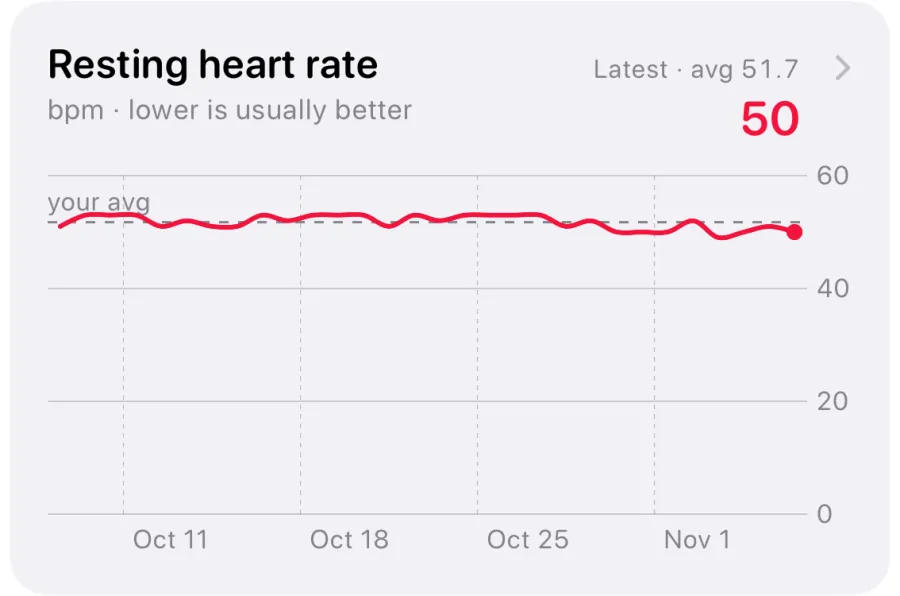
- Resting heart rate: often a few beats higher during stressful stretches, and easy to read because it moves in whole beats per minute.
- Heart rate while you're still: a heart rate well above your resting rate while you're sitting at a desk can reflect tension, caffeine, heat or simply standing up. Apple shows the raw numbers but doesn't label any of it as stress.
- Sleep: stress you take to bed can show up as shorter or more broken sleep, and as lower overnight HRV.
- Readiness (Series 12 and Ultra 4 only): a 0 to 10 score from activity, vitals and sleep. It answers how much you can take on today, not how stressed you are, and Apple's description doesn't list stress as an input.
How to check stress on Apple Watch
Because there's no stress screen, checking stress on Apple Watch means looking at a few places and comparing them with your normal. This works on any recent Apple Watch; the Recovery HRV and Readiness steps need Series 12 or Ultra 4.
- Check HRV on iPhone: open Health, tap Browse, then Heart, then Heart Rate Variability. Switch to week or month view and compare recent days with your usual range rather than reading one value.
- Check resting heart rate in the same Heart section. A few days running a few beats above your normal is worth noticing.
- On Series 12 or Ultra 4, open the Heart Rate app on the watch and turn the Digital Crown to find Recovery HRV. Tap the info button to learn more about it.
- Log how you feel: open the Mindfulness app on the watch, tap State of Mind, and choose how you feel right now or how you've felt overall today. Turn the Digital Crown, tap Done, then optionally pick words for the feeling and for what's affecting you.
- Review State of Mind on iPhone: in Health, tap Browse, then Mental Wellbeing, then State of Mind, and tap Show in Charts to compare your entries with sleep, exercise, daylight and mindful minutes.
- Look for agreement. A tense week in your State of Mind log, lower HRV and a higher resting heart rate together is a much stronger signal than any one of them alone.
State of Mind, Mindfulness and mental health questionnaires
The most direct stress tool Apple offers is the one that asks you. State of Mind, in the Mindfulness app on Apple Watch and in Health on iPhone, lets you log a momentary emotion or a daily mood, along with words for what's behind it, such as work, family or health. It's subjective, but stress is something you experience, and a watch can't feel it for you. You can set reminders to log, which helps if you tend to only remember on bad days.
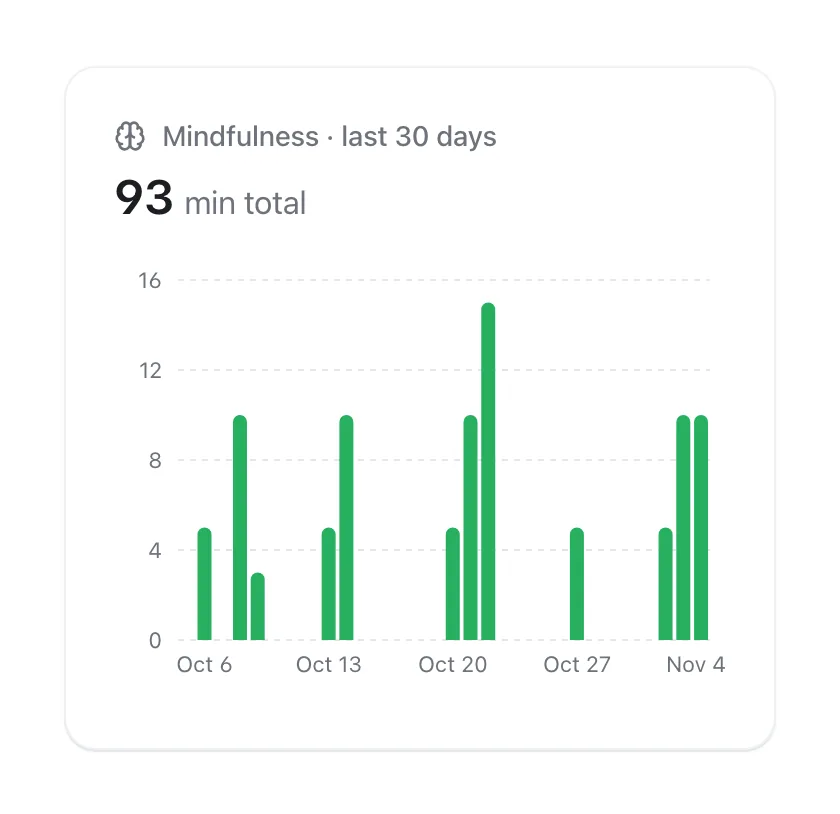
The Mindfulness app also has Reflect and Breathe sessions of one to five minutes. Breathe paces your breathing with an animation, you can set the breath rate in Settings, and your heart rate appears on the summary afterwards. Session time is saved to Health as mindful minutes. That makes it a stress-relief tool rather than a stress measurement, but it's useful to see next to your other data.
On iPhone, Health also includes two standard questionnaires under Mental Wellbeing: Depression Risk, based on the PHQ-9, and Anxiety Risk, based on the GAD-7. They ask about the last two weeks. Apple says they're for information only and the results aren't a medical diagnosis, but you can export a PDF to share with a doctor.
How accurate is stress tracking on a watch?
Less accurate than a single number on a screen suggests, on any brand. Wrist wearables can't read stress directly. They infer it from heart signals that react to many things, and they can't tell an anxious afternoon from a hot room, a strong coffee or the start of a cold.
Research backs up that caution. A 2021 systematic review in Sensors found that the studies detecting stress and anxiety with wearables relied on HRV, and concluded that average heart rate, which many commercial devices use, is less accurate for detecting stress than HRV, skin conductance or possibly breathing rate. Apple Watch doesn't measure skin conductance.
Real life is also messier than the lab. Physiological signals are reliable markers of stress in controlled experiments, but a 2018 study of 1,002 people wearing sensors for five days in daily life, published in npj Digital Medicine, found associations between the signals and self-reported stress, but also identified groups of people, with poorer health and higher depression, anxiety and stress scores, whose bodies showed blunted physiological responses to stress. The authors called for personalised stress models rather than one formula for everyone.
The practical upshot: treat any watch-based stress reading, Apple's signals or a third-party score, as a prompt to check in with yourself. Trends over days, compared with your own normal, are far more meaningful than one reading. For the science of why stress lowers HRV, see our guide on HRV and stress.
Is there an Apple Watch stress app?
Not from Apple. Third-party apps fill the gap by reading HRV and heart rate from Apple Health and turning them into a score. They differ in what they count, so it's worth knowing what's under the hood before you trust one.
A few questions separate useful scores from guesswork. Does it compare you with your own baseline, or with a population average? Does it leave out workouts, so a run doesn't look like a panic attack? Does it tell you why the score moved? Does it say clearly that it's an estimate, not a diagnosis? And does it work on your watch model, or rely on data only newer watches record?
How VedaWatch's stress score works
VedaWatch adds a daily stress score to the Today screen on iPhone: a 0 to 100 estimate read from your Apple Health data, where 0 to 39 is Calm, 40 to 60 Balanced and 61 to 100 High. It blends two things. The overnight part compares last night's HRV and resting heart rate with your own recent normal. The daytime part compares each hour's average heart rate with your resting heart rate, but only while you're still. Workouts, the half hour after them, busy moving-around hours and naps aren't counted, so exercise never reads as stress. Early in the day, before enough heart data is in, it shows an early estimate from last night.
Tap the card for the detail view. It has a timeline of your day split into calm, balanced and high stretches, with workouts and other uncounted hours marked, up to three plain-language reasons such as overnight HRV below your normal or time with a raised heart rate while still, and a 7-day trend (30 days with Pro). There's also a Stress Score widget for iPhone and a complication for your watch face.
If you want, VedaWatch can nudge you when stress runs high: after a raised stretch while you're still, 40 minutes by default and adjustable from 30 to 90, it sends a reminder to take a breather. Nudges come only between 8:00 and 21:00, never in quiet hours, at most three a day and two hours apart, and tapping one opens a short breathing exercise. The score is worked out on your iPhone and works on any Apple Watch that records heart rate and HRV. It's a wellness estimate to help you notice patterns, not a medical measurement or diagnosis.
When to talk to a doctor about stress
No watch can tell you whether stress is harming your health. Talk to a doctor or another qualified professional if stress, worry or low mood has lasted for weeks, or is getting in the way of sleep, work or relationships. Apple's anxiety and depression questionnaires can be a useful starting point for that conversation, but only a clinician can make a diagnosis.
Get medical help promptly for chest pain, fainting, breathlessness, or a racing or irregular heartbeat that's new or unexplained, whatever your HRV or a stress score says. If you're in crisis or thinking about harming yourself, contact your local emergency number or a crisis line straight away.
Frequently asked questions
Does Apple Watch have a stress score?
No. As of watchOS 27 there's no native stress score. Recovery HRV on Series 12 and Ultra 4 is the closest feature, and third-party apps can build a score from your Health data.
How do I check my stress level on Apple Watch?
Look at HRV and resting heart rate in the Health app on iPhone, compared with your usual range, and log how you feel with State of Mind in the Mindfulness app. On Series 12 or Ultra 4, also check Recovery HRV in the Heart Rate app.
Can Apple Watch detect anxiety?
No. It can show heart changes that sometimes come with anxiety, but it can't tell them apart from caffeine, heat or exercise. The Anxiety Risk questionnaire in the Health app screens for anxiety risk, but it isn't a diagnosis.
Does Apple Watch measure cortisol or skin conductance?
No. Apple Watch has no sensor for cortisol or electrodermal activity (skin conductance). Its stress-related signals come from the heart sensor and from what you log yourself.
Does Recovery HRV work on older Apple Watch models?
No. Apple lists Recovery HRV and Readiness for Apple Watch Series 12 and Ultra 4 only. Older watches still record HRV in the background, which you can see in the Health app.
Is a low HRV reading a sign of stress?
It can be, but poor sleep, alcohol, hard training and getting ill lower HRV too. Our guide on HRV and stress covers how to tell the difference.
Related guides
- HRV and stress: what your Apple Watch can and can't tell you
- Mindful Minutes on Apple Watch: how tracking works, and what the research actually shows
- Breathing exercises to increase HRV: a 6-breaths-a-minute routine
- Apple Watch Readiness score: what Recover, Pace Yourself, Ready, and Go For It mean
- Resting heart rate on Apple Watch: what's high, low, and why it changes
- Body battery on Apple Watch: how VedaWatch's Daily Charge energy score works
Sources & further reading
- Apple Support: Monitor your heart rate with Apple Watch
- Apple Watch User Guide: What's new in watchOS 27
- Apple Support: Understand your readiness score on Apple Watch
- Apple Watch User Guide: Log your state of mind
- Apple Watch User Guide: Start a Reflect or Breathe session
- Apple Support: Understand and use Mental Health Assessments in the Health app
- Hickey BA et al. (2021). Smart devices and wearable technologies to detect and monitor mental health conditions and stress: a systematic review. Sensors 21(10):3461. doi:10.3390/s21103461
- Smets E et al. (2018). Large-scale wearable data reveal digital phenotypes for daily-life stress detection. npj Digital Medicine 1:67. doi:10.1038/s41746-018-0074-9
- Kim HG et al. (2018). Stress and heart rate variability: a meta-analysis and review of the literature. Psychiatry Investigation 15(3):235-245. doi:10.30773/pi.2017.08.17
This guide is educational, not medical advice, and has not been clinically reviewed. VedaWatch is not a medical device. If you have symptoms or concerns about your heart or health, contact a qualified healthcare professional.
Put your trends in perspective.
Explore HRV, sleep, and recovery with VedaWatch on your iPhone.
Download VedaWatch on the App Store →