 VedaWatch
Comparisons
Whoop alternative: 5 ways to get it from your Apple Watch
The best Whoop alternatives for Apple Watch owners: Apple's free tools and four apps for recovery, strain and sleep, compared on price, features and setup.
By VedaWatch editorial team · · 11 min read
The short answer
If you already wear an Apple Watch, you don't need a Whoop band to get recovery, strain and sleep coaching. Apple's free Vitals, Sleep Score and Training Load cover the raw signals, and apps such as Athlytic, Bevel, Gentler Streak and VedaWatch turn them into a daily score and a plan. Several have free tiers, and the paid tiers we checked cost $29.99 to $99.99 a year.
What is the best Whoop alternative if you already have an Apple Watch?
The best Whoop alternative for most Apple Watch owners is not another wearable. It's an app that reads the data your Watch already writes to Apple Health and turns it into the three things people buy Whoop for: a morning recovery score, a sense of how much strain you took on, and guidance on sleep.
Your Watch already records the main inputs: overnight heart rate variability (HRV), resting heart rate, respiratory rate, sleep stages, workouts with heart rate and, on Series 8 or later and every Ultra, wrist temperature. What it doesn't do on most models is combine them into one Whoop-style daily verdict. That's the gap an app fills.
Below we look at what you get for free from Apple, then compare four apps as of November 2026: Athlytic, Bevel, Gentler Streak and VedaWatch. We cover what each one scores, what it costs, and which kind of person it suits. If you're still deciding between the band and the Watch itself, read our Apple Watch vs Whoop guide first; this page assumes you're keeping the Watch.
What Whoop does, and what you need to replace
It helps to be clear about what you're replacing. According to Whoop's own developer documentation, as of November 2026 the band gives you three core numbers.
Recovery is a percentage from 0 to 100, calculated when you wake up from your previous day's measurements and sleep, including resting heart rate, HRV, respiratory rate, skin temperature and blood oxygen. It is colour-coded green (67-100%), yellow (34-66%) or red (0-33%).
Strain is a 0 to 21 score based on the Borg scale of perceived exertion. It's non-linear: Whoop notes that it takes more stress to go from 16 to 17 than from 4 to 5.
Sleep tracking covers how long you slept and your light, REM and deep sleep, plus an estimate of how much sleep you need based on sleep debt and the previous day's activity.
So a real alternative needs four pieces: a baseline-relative recovery score, a load or strain measure that accounts for how hard each day was, a sleep-need or sleep-debt estimate, and something that turns all three into advice for today.
The free option: what Apple already gives you
Before paying for anything, check what's built in.
Vitals: wear your Watch to bed for 7 nights and the Vitals app learns your typical range for overnight heart rate, respiratory rate, blood oxygen, wrist temperature and sleep duration. If several metrics fall outside that range, it notifies you the next morning. Wrist temperature needs Series 8 or later or any Ultra, and blood oxygen isn't available on every model.
Sleep Score: Apple scores each night from 0 to 100, built from sleep duration (50 points), bedtime consistency over the last 13 nights (30 points) and interruptions (20 points).
Training Load compares the intensity and duration of your recent workouts with your longer-term normal, which is Apple's answer to strain. Readiness is Apple's own 0 to 10 recovery score with four bands (Recover, Pace Yourself, Ready, Go For It), built from activity, vitals and sleep. As of November 2026 Apple lists it for Apple Watch Series 12 and Ultra 4 only, and it needs at least 7 nights of overnight vitals.
What's missing: on older Watches there is no single daily recovery number, there's no Whoop-style strain score, and nothing works out a sleep debt or a bedtime for you. If you have a Series 12 or Ultra 4 and just want a daily readiness call, Apple's tools may be enough. Otherwise, an app is the next step.
Whoop alternatives compared (as of November 2026)
Here is how the main Apple Watch options line up. Prices and features are taken from each app's US App Store listing or Apple's support pages in November 2026 and can change, so check the listing before you subscribe. All four apps are free to download.
- Apple's built-in apps. Price: free. Recovery: Readiness (0-10) on Series 12 and Ultra 4 only; Vitals outlier alerts on other models. Strain: Training Load. Sleep: Sleep Score (0-100). Coaching: none beyond the Readiness bands. Best for: anyone who wants zero extra cost and owns a supported Watch.
- Athlytic. Price: free with Pro at $4.99 a month or $29.99 a year. Recovery: overnight HRV and resting heart rate against your own baseline. Strain: Exertion on a 0-10 scale, with a daily Target Exertion range set from your Recovery. Sleep: stages, sleep debt, consistency and a Target Sleep goal with a bedtime. Coaching: workout suggestions and Ask Athlytic, which uses Apple Intelligence. Needs iOS 17 and watchOS 10.6 or later. Best for: the closest one-to-one copy of the Whoop recovery-and-strain loop at the lowest price we found.
- Bevel. Price: free, with Pro at $14.99 a month or $99.99 a year, plus optional AI credit packs. Recovery, Strain and Sleep scores, an Energy Bank that combines recovery, sleep, strain and stress through the day, a smart alarm, and strength logging with 700+ exercises. Coaching: Bevel Intelligence. Needs iOS 18 and watchOS 10.6 or later. Best for: people who want an all-in-one dashboard with strength training built in.
- Gentler Streak. Price: free with a Premium subscription. Recovery: an Activity Path that models your recent workouts and their intensity from heart rate data, with daily suggestions from rest to high intensity based on your readiness. Sleep: analysis with 14-night trends. Needs iOS 16 and watchOS 9 or later. Best for: people who want a gentler, rest-friendly take on training rather than a hard strain target.
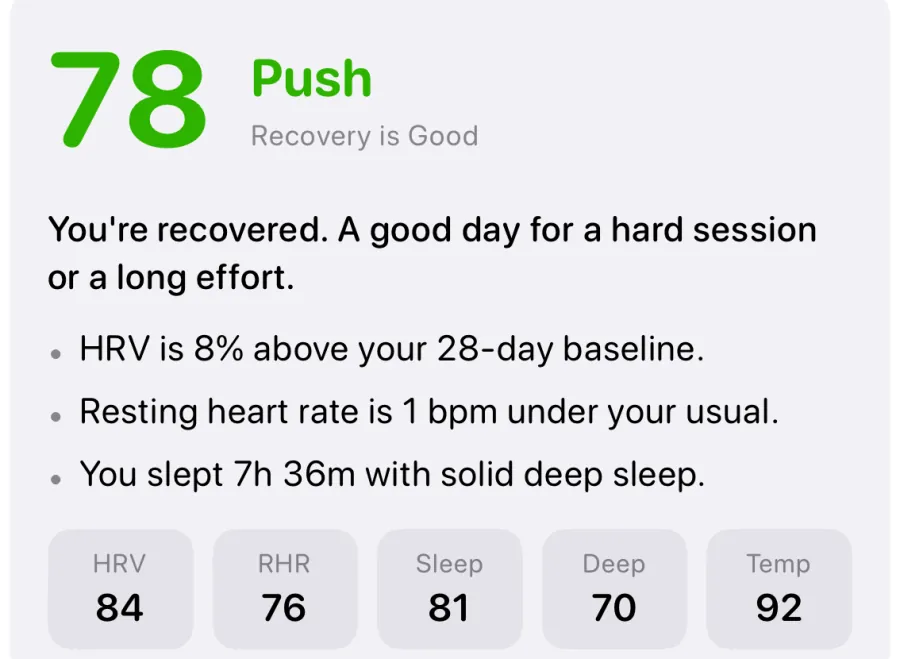
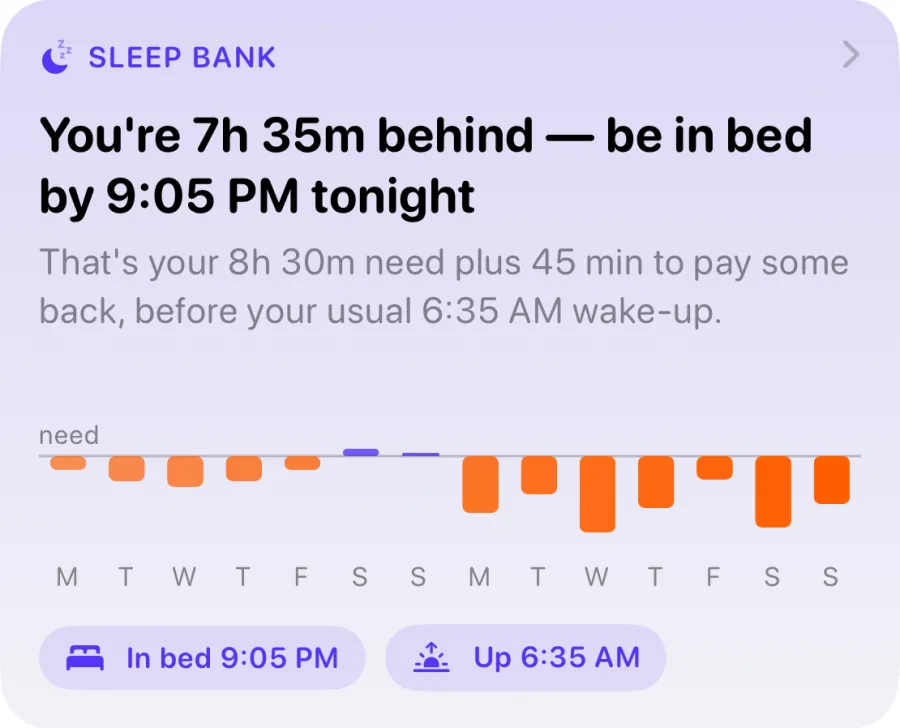
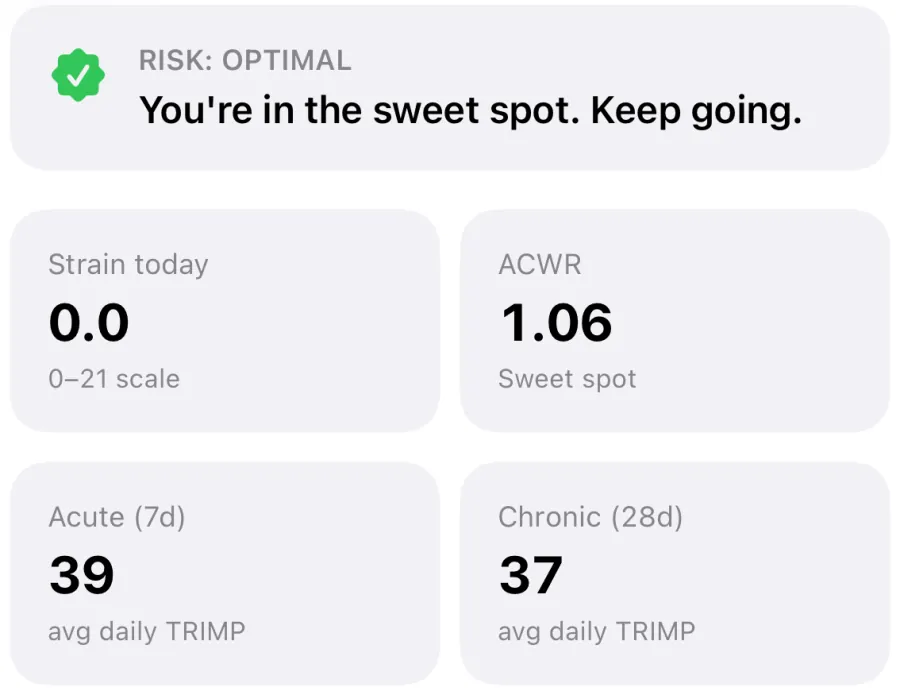
- VedaWatch. Price: core app free; Pro is $6.99 a month or $59.99 a year with a 7-day trial. Recovery: a 0-100 readiness score with a Push, Hold or Rest verdict and the reasons. Strain: a 0-21 daily strain on the Training Load screen, plus acute:chronic workload ratio (ACWR). Sleep: Sleep Bank, a 14-night sleep debt with a bedtime for tonight. Coaching: a suggested session each day, and in Pro, an AI coach, AI chat and a training plan that adapts to readiness. Needs an Apple Watch Series 4 or later. Best for: people who want Whoop-style numbers plus training plans and guided workouts on the Watch.
Can you get Whoop features without a subscription?
Partly. Whoop is sold as a paid membership that includes the band. With an Apple Watch you've already paid for the hardware, so the question becomes how much of the coaching layer you can get free.
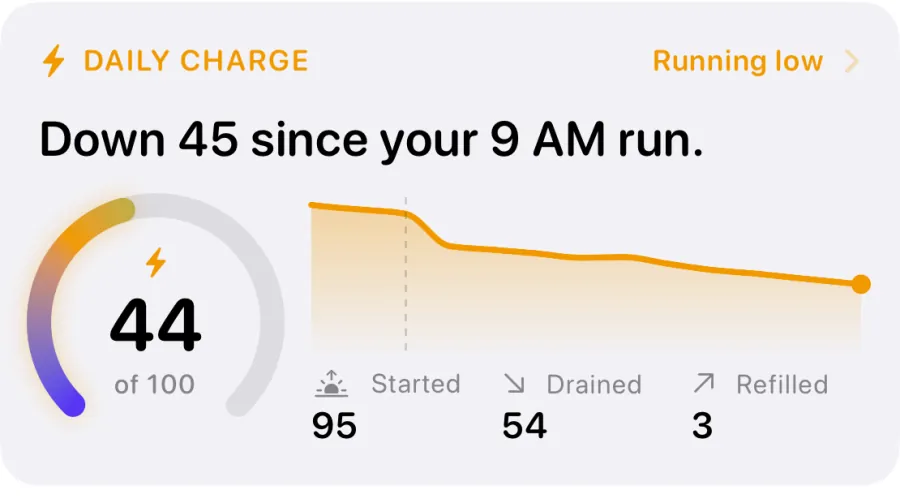
Free, as of November 2026: Apple's Vitals, Sleep Score and Training Load on supported watchOS versions, Readiness if you have a Series 12 or Ultra 4, and the free tiers of the apps above. VedaWatch's free tier, for example, includes the daily readiness score with its reasons, Sleep Bank, Daily Charge and the training load and strain view, all worked out on your iPhone.
A worked example for the first year, using the prices on each App Store listing in November 2026: Apple's built-in tools cost $0. Athlytic Pro yearly costs $29.99. VedaWatch Pro yearly costs $59.99, or $0 if the free tier covers what you need. Bevel Pro yearly costs $99.99. All of these are on top of a Watch you already own, and you can cancel any of them without losing access to your Health data, which stays in Apple Health.
One honest limit: a free tier usually means fewer extras, such as AI chat, adaptive plans or longer history. Decide which of the four pieces from earlier you actually use before paying for the rest.
How to choose the right app for you
Start from what you'd miss most about Whoop, or what made you look at it in the first place.
- You mainly want one recovery number each morning: try Apple's Readiness if your Watch supports it, or the free tier of any app above for a week before paying.
- You want a daily strain target like Whoop's: look at Athlytic's Target Exertion or the strain views in Bevel and VedaWatch. Expect the numbers to differ from Whoop's, since each app uses its own formula.
- You lift weights: Bevel and VedaWatch both include strength features; VedaWatch suggests a guided session each day that adapts to your readiness and to muscles you worked recently.
- You're training for a race: an app with a training plan that adjusts to recovery saves you doing it by hand. In VedaWatch this is part of Pro.
- You tend to overdo it or are coming back from a break: Gentler Streak's rest-friendly approach, or any app with a clear rest verdict, may suit you better than a strain target.
How to set up your Apple Watch for Whoop-style tracking
Whoop is designed to be worn around the clock. An Apple Watch has to come off to charge, so the main habit change is charging at a time that doesn't cost you overnight data. Every app on this page depends on the same Health data, so these steps help whichever one you pick.
- Enter your age, height and weight in the Health app. Apple's Readiness needs them, and most apps use them for calorie and load estimates.
- Turn on sleep tracking: set up Sleep in the Health app with Track Sleep with Apple Watch and Sleep Focus on. Without it, there are no overnight HRV, respiratory rate or sleep stages to work with.
- Charge before bed, not overnight. Topping up during your evening routine or your morning shower keeps the Watch on your wrist through the night.
- Wear it snugly. Apple notes that a loose fit can give inaccurate overnight readings.
- Give it a week. Vitals and Readiness need about 7 nights for a baseline; third-party apps also need some history before their scores settle.
- Start every workout on the Watch, or let it auto-detect. Strain and training load only count sessions that reach Apple Health, and heart rate during the session matters.
- Rate your effort after workouts when the Watch asks. Apple's Training Load uses these ratings.
Is an Apple Watch as accurate as Whoop for recovery?
For the basics, the research suggests they're in the same league. A 2022 study in Sensors by Miller and colleagues put 53 adults in a sleep lab for one night wearing six devices, including an Apple Watch Series 6 and a WHOOP 3.0, alongside polysomnography. For telling sleep from wake, agreement was 88% for Apple Watch and 86% for WHOOP. For specific sleep stages, agreement was 53% for Apple Watch and 60% for WHOOP. The authors concluded that all six devices were valid for sleep timing and duration, and all six need to improve on sleep stages.
That's one night in healthy young adults, using older models of both devices, so treat it as a rough guide rather than a ranking. The bigger source of difference in practice is the algorithm: Whoop, Apple and each app weigh inputs differently and use different baseline windows, so the same night can produce a green Whoop score and a middling app score.
What matters for coaching is consistency. Pick one app, wear the Watch the same way every night, and read each score against your own history rather than against another brand's number.
How VedaWatch covers recovery, strain and sleep
VedaWatch was built for exactly this case: Whoop-style guidance from the Apple Watch you already wear. It reads your HRV, resting heart rate and sleep from Apple Health and gives you a readiness score from 0 to 100 with a verdict of Push (70 and up), Hold (50 to 69) or Rest (under 50), plus the plain-language reasons, such as HRV being above your baseline. If your resting heart rate is more than 3 bpm above your baseline, a Push day is held back to Hold.
For strain, the Training Load screen shows today's strain on a 0 to 21 scale, log-scaled to your own chronic peak, alongside your 7-day and 28-day load and ACWR. Sleep Bank turns your last 14 nights into how far behind or ahead you are and when to be in bed tonight, and Daily Charge shows how much energy is left in your day from 0 to 100. Each day the Train tab suggests one session sized to your readiness, and the Watch app runs workouts with live heart rate zones. Readiness, Daily Charge, HRV and sleep can sit on your watch face as complications.
The core scores are free and worked out on your iPhone. Pro adds the AI coach and chat, weekly AI reports, smart alerts and a training plan that adjusts to your readiness. AI features only use your data after you agree to it. Like every app here, VedaWatch is a wellness tool, not a medical device.
When a recovery score isn't enough
Recovery scores, from Whoop or any Apple Watch app, are wellness estimates. They can flag that something is off, such as several nights of low HRV, a raised resting heart rate or a higher wrist temperature, but they can't tell you why, and they can't diagnose illness or overtraining.
If you feel unwell, have chest pain, shortness of breath, fainting or a racing heartbeat at rest, or your numbers stay well outside your normal for more than a few days without an obvious reason like travel or alcohol, talk to a doctor rather than waiting for a green score. Apple says its own Readiness score shouldn't be relied on alone to decide whether it's safe to exercise, and the same applies to every app on this page.
Frequently asked questions
Is there a free Whoop alternative for Apple Watch?
Yes. Apple's Vitals, Sleep Score and Training Load are free, Readiness is free on Series 12 and Ultra 4, and Athlytic, Bevel, Gentler Streak and VedaWatch all have free tiers. Paid tiers add extras such as AI coaching or plans.
Can I import my Whoop history into an Apple Watch app?
Apps on this page read from Apple Health, so only data that is in Apple Health can be used. Whoop's own Recovery and Strain scores are its own calculations, so expect to start fresh and give a new app a week or two to build your baseline from Apple Watch data.
Will my recovery score match what Whoop gave me?
Probably not exactly. Each system uses its own inputs, weights and baseline window, so compare a new app's score with its own history over a few weeks rather than with your old Whoop numbers.
Does wearing an Apple Watch to bed every night hurt battery life?
It changes when you charge, not how much. Most people top up during their evening routine or morning shower so the Watch is on through the night, which every recovery app needs.
Do I need the newest Apple Watch?
No. Apple's own Readiness needs a Series 12 or Ultra 4, but third-party apps work on older models: VedaWatch supports Series 4 and later, and others list their minimum watchOS on the App Store. Wrist temperature needs Series 8 or later or an Ultra.
Related guides
- Apple Watch vs Whoop: do you need a separate recovery band?
- Best recovery app for Apple Watch: an honest 2026 roundup
- Athlytic alternative: how other Apple Watch recovery apps compare
- Bevel app alternative: what to compare before you switch
- Apple Watch Readiness score: what Recover, Pace Yourself, Ready, and Go For It mean
- Apple Watch Training Load and ACWR, explained (and why sports scientists argue about it)
Sources & further reading
- WHOOP Developer Platform: WHOOP 101 (Recovery, Strain and Sleep)
- Apple Support: Understand your readiness score on Apple Watch
- Apple Support: Track your overnight vitals with Apple Watch
- Apple Watch User Guide: View your sleep score on Apple Watch
- App Store: Athlytic
- App Store: Bevel
- App Store: Gentler Streak
- Miller DJ, Sargent C, Roach GD. A Validation of Six Wearable Devices for Estimating Sleep, Heart Rate and Heart Rate Variability in Healthy Adults. Sensors, 2022
This guide is educational, not medical advice, and has not been clinically reviewed. VedaWatch is not a medical device. If you have symptoms or concerns about your heart or health, contact a qualified healthcare professional.
Put your trends in perspective.
Explore HRV, sleep, and recovery with VedaWatch on your iPhone.
Download VedaWatch on the App Store →