 VedaWatch
Workouts & Training
Apple Watch Training Load and ACWR, explained (and why sports scientists argue about it)
Apple Watch's Training Load feature compares your last 7 days of workouts to the previous 28—the same acute:chronic workload ratio sports scientists have debated for a decade. Here's where the idea comes from, what the research actually supports, and how VedaWatch computes its own version.
By VedaWatch editorial team · · 7 min read
The short answer
Apple's Training Load compares your last 7 days of workout intensity and duration against your previous 28, on a scale from well below to well above. That 7:28-day comparison is the acute:chronic workload ratio (ACWR) from sports science—a widely used idea, but one that methodologists have specifically challenged on statistical grounds. Treat a spiking ratio as a prompt to ease up, not a precise injury forecast.
What Apple Watch's Training Load feature actually shows
Apple's own description: training load compares the intensity and duration of your workouts over the last 7 days to what you've done over the previous 28 days, then classifies your current training load on a scale from well below to well above—to help you understand the relative strain on your body and decide whether it's sustainable.
You can rate your own effort on a workout (the watch also estimates this automatically for many cardio types), and filter your training load view by workout type. The feature doesn't publish its underlying formula or an injury-risk claim—it's presented as a relative-strain indicator, not a diagnostic score.
Where the 7-day-vs-28-day idea comes from
That short-term-vs-long-term comparison has a name in sports science: the acute:chronic workload ratio (ACWR), popularized by sports scientist Tim Gabbett's 2016 paper in the British Journal of Sports Medicine, "The training-injury prevention paradox: should athletes be training smarter and harder?" The core observation: athletes accustomed to high training loads tend to get injured less than athletes training at lower, more erratic workloads—so the ratio of recent to habitual load was proposed as a practical way to flag risky spikes.
A commonly cited "sweet spot" of roughly 0.8–1.3, with risk rising above 1.5, circulates widely in coaching and wearable-app contexts. Those specific cutoffs come from secondary commentary and commercial sources rather than being fixed thresholds stated in Gabbett's original paper, so treat them as a rough, widely-used convention rather than a clinically validated line.
Why sports scientists have pushed back on the ratio itself
ACWR is popular, but it isn't settled science. A 2020 methodological critique in the International Journal of Sports Physiology and Performance (Impellizzeri et al., "Acute:Chronic Workload Ratio: Conceptual Issues and Fundamental Pitfalls") argues that the ratio's statistical properties make it an inaccurate metric that complicates interpretation for practical use, and that it can introduce noise and statistical artifacts rather than removing it.
The same research group's later work goes further, arguing that recommending athletes manipulate the ratio to reduce injury risk assumes a causal relationship that hasn't been established, and that substituting contrived chronic-load values into the formula can produce misleading results—evidence they say undermines the theory behind the ratio's individual components.
None of this means the underlying intuition is wrong—a sudden, large jump in training volume after a quiet stretch is a real and intuitive risk signal. The critique is specifically about treating one derived ratio as a precise, validated predictor rather than one rough signal among several.
How VedaWatch's Training Load is actually computed
VedaWatch computes a load score for each workout using Banister's exponential TRIMP (training impulse) formula when heart rate data is available—weighting minutes spent at each heart-rate-reserve intensity exponentially, so hard efforts count disproportionately more than easy ones. When no heart rate is recorded, it falls back to MET-minutes for that workout type as an estimate.
One specific simplification worth knowing: Banister's original formula uses a slightly different exponential coefficient for men and women (1.92 vs. 1.67); VedaWatch applies the male coefficient to every workout regardless of sex, which can modestly under- or over-weight intensity for some users.
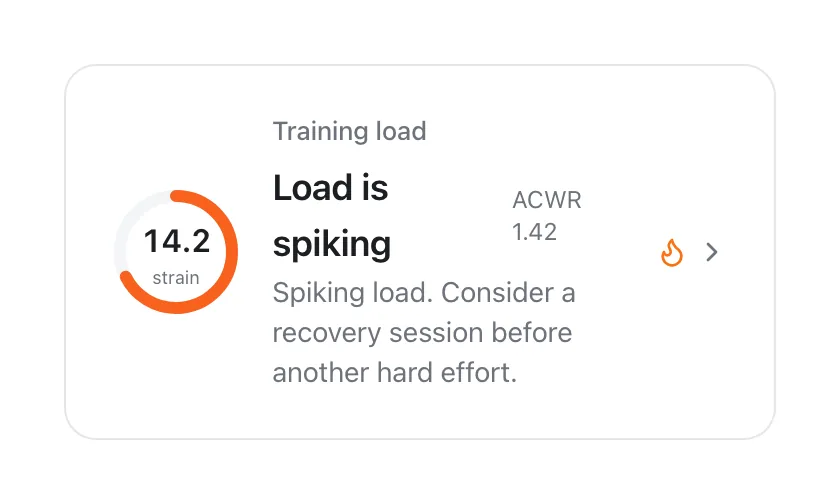
From there, VedaWatch calculates your acute load as your rolling 7-day average and chronic load as your rolling 28-day average of daily TRIMP, then divides acute by chronic to get an ACWR—the same 7-vs-28-day structure Apple's own feature uses. It bands the result using the same widely-cited (and contested) convention described above: roughly 0.8–1.3 as the target range, above 1.3 as elevated, above 1.5 as high, and below 0.8 as a signal of detraining—plus a separate "monotony" check (a classic Foster-style mean-to-variability ratio) that flags training that's too uniform even when the ratio itself looks fine.
How to actually use a training-load number
Given the debate above, the most defensible way to use this kind of score is as a rough prompt, not a verdict.
- Treat a ratio climbing quickly—whether Apple's "well above" label or VedaWatch's "elevated"/"high" band—as a cue to consider an easier session, not a precise probability of injury.
- Cross-check with how you actually feel, your sleep, and HRV trend before deciding to back off; none of these systems knows about soreness, illness, or life stress.
- Don't chase the number into the "sweet spot" artificially—a single easy week after a long layoff can look like detraining even though it's exactly the right call.
- If you're returning from injury or illness, this kind of self-tracked ratio is not a substitute for guidance from a coach or clinician managing your return to training.
Common questions
Is a high ACWR dangerous? It's associated with elevated injury risk in some research contexts, particularly in team sports, but the ratio's statistical validity as a precise predictor has been specifically challenged—read it as one input, not a diagnosis.
Why do Apple's and VedaWatch's training load numbers look different for the same workouts? They use different underlying formulas (Apple's isn't published; VedaWatch uses Banister TRIMP or a MET-minute fallback) and different display scales, so the two aren't meant to match exactly—both are built on the same 7-day-vs-28-day structure, though.
Can I trust the exact ACWR number, like 1.42 vs 1.38? No—treat these as directional, not precise. The underlying load estimate already carries real uncertainty (heart rate data quality, MET-value approximations for the no-HR fallback), before the ratio's own statistical issues are even considered.
See your training load trend in VedaWatch
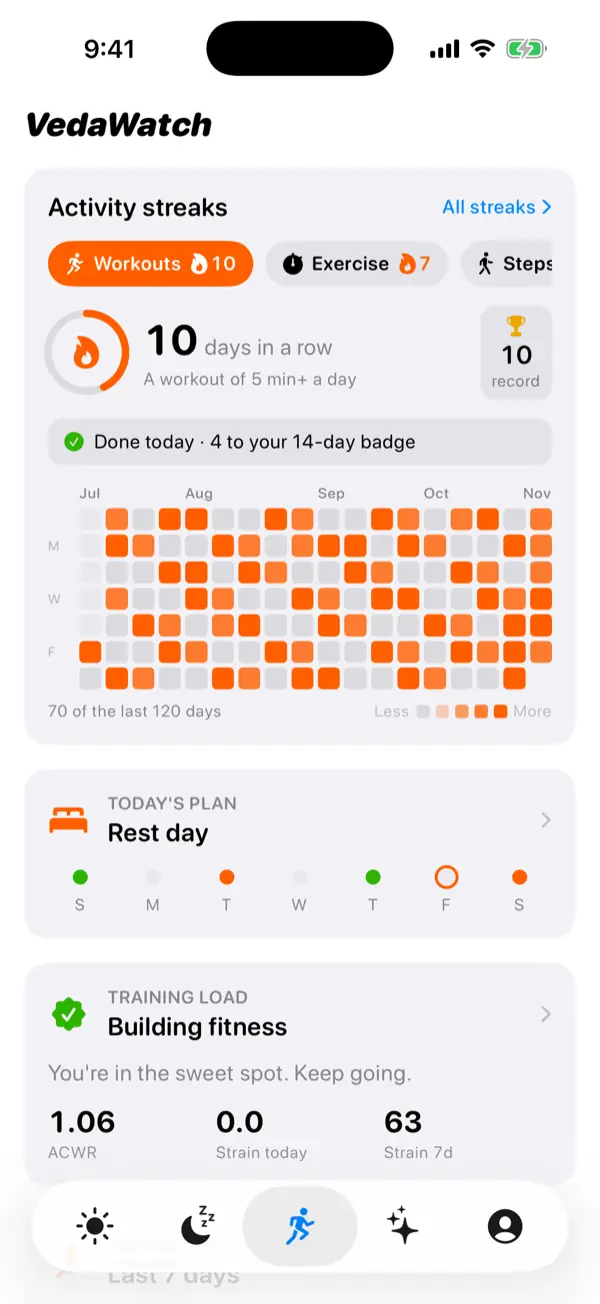
VedaWatch's Training Load screen charts your daily load, strain, and ACWR over the last 28 days, computed entirely from the Apple Health workouts already on your iPhone—no AI, deterministic math you can reason about.
It's designed to work alongside your Apple Watch's own Training Load feature, not replace the judgment call it's meant to support.
Sources & further reading
- Apple Support: Track your training load on Apple Watch
- British Journal of Sports Medicine (2016): The training-injury prevention paradox: should athletes be training smarter and harder? (Gabbett)
- International Journal of Sports Physiology and Performance (2020): Acute:Chronic Workload Ratio: Conceptual Issues and Fundamental Pitfalls (Impellizzeri et al.)
This guide is educational, not medical advice, and has not been clinically reviewed. VedaWatch is not a medical device. If you have symptoms or concerns about your heart or health, contact a qualified healthcare professional.
Put your trends in perspective.
Explore HRV, sleep, and recovery with VedaWatch on your iPhone.
Download VedaWatch on the App Store →