 VedaWatch
Comparisons
Best recovery app for Apple Watch: an honest 2026 roundup
The best recovery app for Apple Watch depends on your watch, budget and privacy needs. Compare Readiness, Athlytic, Bevel, Gentler Streak and more, with prices.
By VedaWatch editorial team · · 10 min read
The short answer
There's no single best recovery app for Apple Watch. On a Series 12 or Ultra 4, start with Apple's free Readiness app. On older watches, Athlytic is the cheapest focused recovery app, Bevel the broadest all-in-one, and Gentler Streak the gentlest. Pick the one whose inputs, explanations, privacy and price model suit you.
What is the best recovery app for Apple Watch?
It depends on which Apple Watch you wear and what you want from a recovery score. Every app below reads the same raw signals your watch already saves to Apple Health, mainly overnight heart rate variability (HRV), resting heart rate and sleep. None of them adds a new sensor. What differs is how they weigh those signals, how much they explain, what else they bundle in, where your data goes and how you pay.
Our short list, as of November 2026: if you have an Apple Watch Series 12 or Ultra 4, try Apple's built-in Readiness app first, because it costs nothing extra. If you want a focused recovery and strain score on any recent watch, Athlytic is the lowest-cost subscription here. If you want recovery plus nutrition, strength and an AI coach in one place, Bevel is the broadest. If streaks and scores tend to push you into overdoing it, Gentler Streak is built around rest. If you want a morning HRV check measured with your iPhone camera or a chest strap, HRV4Training is a one-time purchase.
VedaWatch, the app that publishes this guide, is also on the list. We've tried to describe it the same way as the others: what it does, what it costs, and where another app may suit you better.
Is Apple's built-in Readiness score enough?
For many people with a supported watch, yes. Apple's Readiness app gives a 0 to 10 score with four bands: Recover (0-1), Pace Yourself (2-4), Ready (5-7) and Go For It (8-10). Apple says it combines recent activity (active calories, workout effort ratings and Training Load), daytime and overnight vitals from the Vitals app, and last night's sleep score plus recent sleep trends.
The limits are hardware and setup. Apple Support lists Readiness only for Apple Watch Series 12 and Ultra 4. You also need to wear the watch to sleep for at least 7 nights after setting up overnight vitals, enter your height, weight and age in Health Details, and have Sleep turned on. If your watch is older, or you want more explanation, trend history or coaching than Apple shows, that's where a third-party app earns its place.
Apple is clear that Readiness is a general wellness feature, doesn't account for conditions or medications, and shouldn't be the only basis for deciding whether to exercise. The same caution applies to every app in this roundup.
Apple Watch recovery apps compared (as of November 2026)
Prices below are US App Store prices as listed in November 2026. They can change and vary by country, so check the listing before you subscribe. Privacy notes come from each app's App Store privacy label, which is provided by the developer and not verified by Apple.
- Apple Readiness (built in). Inputs: activity, vitals and sleep. Cost: included with Apple Watch Series 12 and Ultra 4. Best for: anyone on those models who wants one daily answer without another app.
- Athlytic. Inputs: a 0-100% Recovery score from overnight HRV and resting heart rate against your baseline, plus Exertion on a 0-10 scale with a daily target, sleep, a habit journal and live workouts on the watch. Cost: free to download, Athlytic Pro $4.99 a month or $29.99 a year with a one-week free trial. Privacy label: Data Not Collected. Best for: a focused, low-cost recovery and strain view.
- Bevel. Inputs: Recovery, Sleep, Strain and Stress scores, combined into an Energy Bank, plus nutrition logging, a strength builder with 700+ exercises and an AI coach called Bevel Intelligence. Cost: free to download, Bevel Pro $14.99 a month or $99.99 a year, with extra AI credit packs sold separately. Privacy label: health data listed as not linked to you; identifiers listed as used to track you. Best for: one app for recovery, food and lifting.
- Gentler Streak. Inputs: a daily summary of vitals and sleep, an Activity Path over 1, 10 or 30 days, and workout suggestions from rest to high intensity that respond to readiness. Streaks can include rest days, and you can mark illness, injury or vacation. Cost: free to download, Gentler Premium listed at $39.99 a year, with monthly, family and lifetime options. Best for: people who want permission to rest more than a hard number.
- HRV4Training. Inputs: a one-minute morning HRV measurement with your iPhone camera or a Bluetooth chest strap, plus tags for sleep, stress, soreness, alcohol and illness, training load and trend analysis. Cost: $9.99 up front. Best for: athletes who prefer a deliberate spot check and coach-style analysis over passive overnight data.
- VedaWatch. Inputs: a 0-100 readiness score from overnight HRV, resting heart rate, sleep, deep sleep and wrist temperature against your recent baseline, with a Push, Hold or Rest call and the reasons behind it. Cost: free to download with readiness included; Pro $6.99 a month or $59.99 a year adds the AI coach and an adaptive training plan. Privacy label: health and fitness data not linked to you. Best for: a score that shows its working, on any Apple Watch that writes HRV to Health.
How to choose a recovery app: five things to check
Most roundups rank apps by screenshots. A better test is to ask five questions, in this order, because the first two decide whether the score is useful to you at all.
- Inputs: what goes into the score? HRV and resting heart rate are the core of nearly every recovery score. Check whether sleep, wrist temperature or yesterday's training also count, and whether the app needs extra hardware. An app that also counts training load will tell you to back off after a hard day even if your HRV looks fine; one that doesn't will leave that call to you.
- Transparency: can you see why? A good app tells you which input moved the score and by how much, such as HRV a certain percentage below your baseline, not just a colour. If you can't explain to yourself why today is a rest day, you're less likely to trust the score on the days it matters.
- Coaching: what does it tell you to do? Some apps stop at a number. Others turn it into a target strain range, a suggested workout, a training plan that shifts with recovery, or an AI chat about your data. More coaching is only better if you'll actually follow it.
- Privacy: where is the math done? Read the App Store privacy label and the privacy policy. Some apps calculate everything on your iPhone; others upload Health data to their servers, which is often needed for web dashboards and AI features. Neither is wrong, but you should know which you're agreeing to.
- Price model: what will a year cost? Compare yearly prices, not monthly ones. Using the November 2026 US listings, a year costs $9.99 once for HRV4Training, $29.99 for Athlytic Pro, $39.99 for Gentler Premium, $59.99 for VedaWatch Pro and $99.99 for Bevel Pro. Apple's Readiness costs nothing extra if your watch supports it.
Are Apple Watch recovery scores accurate?
The raw data is reasonable for trends. In a 2018 validation study of 20 healthy adults, Apple Watch beat-to-beat intervals showed very good reliability and agreement (above 0.9) with a Polar H7 chest strap. The recordings had small gaps, averaging 5 per recording and 6.5 seconds each, which didn't significantly change time-domain HRV measures. That was a small, lab-based study on an older watch, so treat it as encouraging rather than definitive.
The scores built on top of that data are a different matter. Each app uses its own formula and baseline, so a 70 in one app isn't a 70 in another, and none of them is a medical measurement. Compare an app with itself over weeks, not with another app on the same morning.
Does training by recovery actually help? A 2021 meta-analysis found HRV-guided training was better than a fixed plan at improving vagal HRV measures, with less chance of a negative response. For maximal aerobic capacity and endurance performance, the advantage was small and not statistically significant. In plain terms: a recovery app can help you avoid digging a hole, but it won't make you fitter on its own. Consistent training does that.
How to test a recovery app before you pay for a year
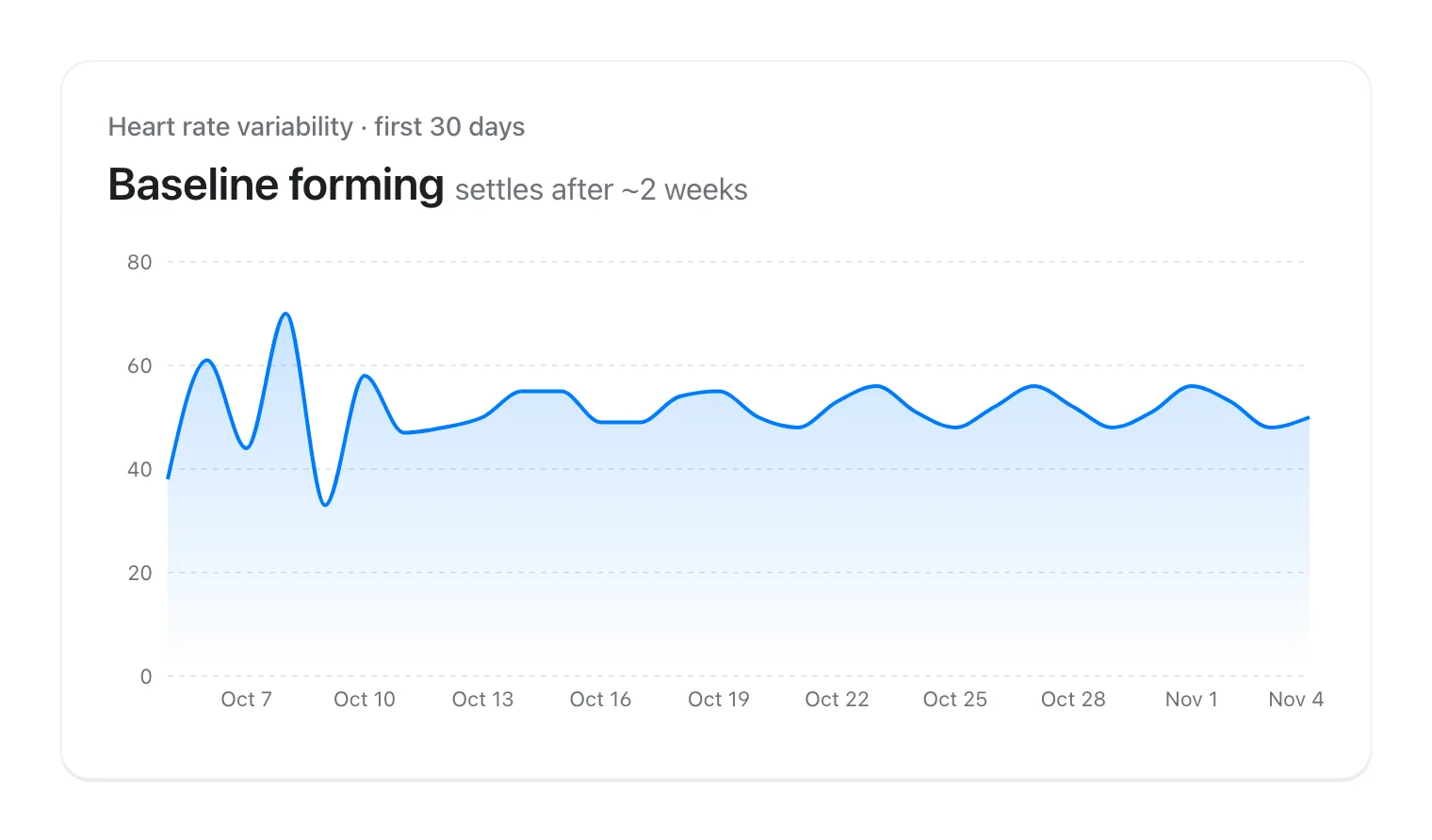
Most of these apps offer a free download or a one-week trial, which is too short for a baseline to settle. Here's a two-week test that uses the free parts and tells you whether a score is worth paying for.
- Nights 1-7: wear your Apple Watch to bed every night with Sleep turned on in the Health app. Don't judge the score yet; the baseline is still forming.
- Each morning, before you open the app, write down how you feel on a 1-5 scale. Then note the app's score and call.
- Include at least one hard training day and one easy or rest day so you can see whether the score responds the next morning.
- Nights 8-14: check whether the score matches your notes most mornings and whether, on the days it doesn't, the app's explanation makes sense.
- At the end, ask three questions: Did it change a decision I made? Could I tell why it said what it said? Would I miss it if I deleted it? Two yes answers is a good sign it's worth the yearly price.
How VedaWatch approaches recovery
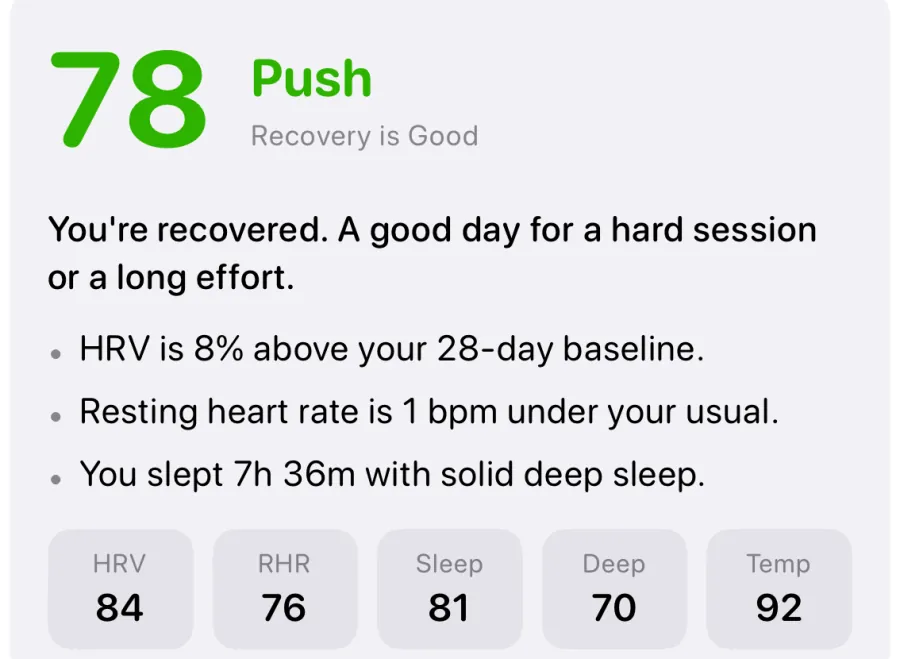
VedaWatch was built for people who want a recovery score from the Apple Watch they already own and want to see exactly how it's made. Each morning it compares last night's HRV and resting heart rate with your own baseline from up to the last 14 days, and adds sleep length, deep sleep and, when available, wrist temperature. The weights are HRV 30%, resting heart rate 25%, sleep 25%, deep sleep 10% and wrist temperature 10%, rescaled when a signal is missing. A score of 70 or more is Push, 50-69 is Hold and below 50 is Rest, and a resting heart rate more than 3 bpm above your baseline turns a Push into a Hold.
A worked example without wrist temperature: HRV 10% above baseline scores 75, resting heart rate 1 bpm under scores 80, 7.5 hours of sleep scores 83, and an hour of deep sleep scores 70. Weighted together that's 78, a Push, and the app lists the reasons in plain language. It needs 3 nights of HRV or resting heart rate history before it gives a score.
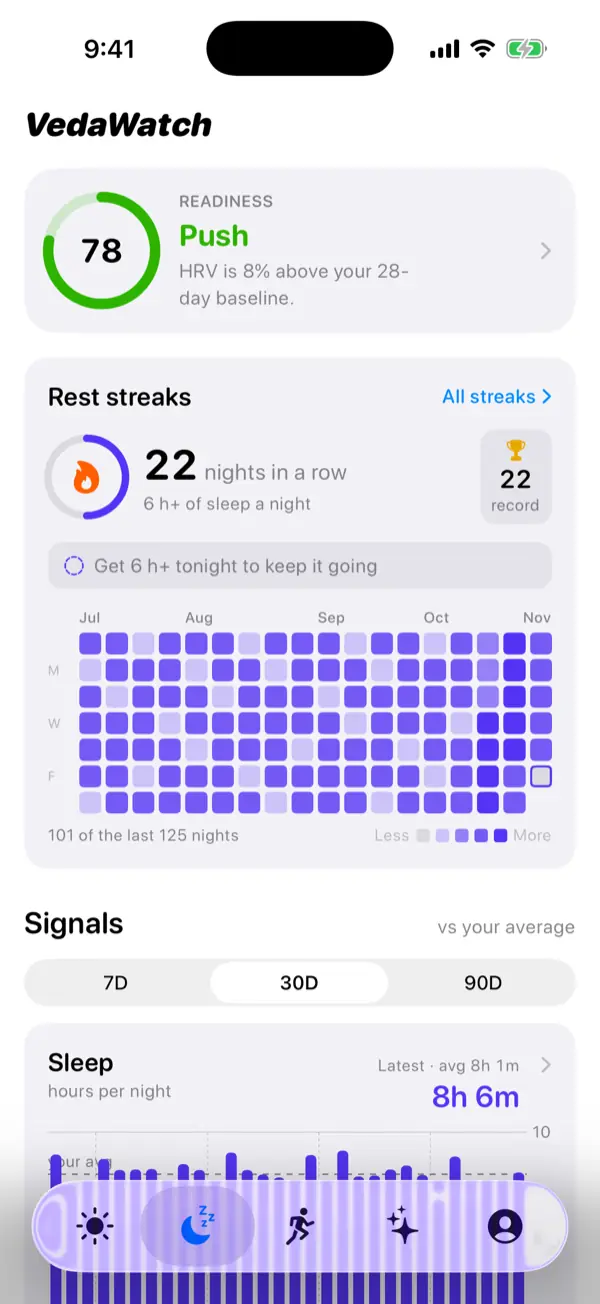
Readiness, sleep and HRV trends are free and calculated on your iPhone from Apple Health. Training load is tracked separately as an acute:chronic workload ratio, and Daily Charge, Sleep Bank and a daily tag journal sit alongside the score. Pro adds the AI Coach and a training plan that adjusts to your readiness, and Health data only leaves your phone if you turn on sync yourself. Where it may not suit you: if you want a strain target on the 0-10 scale, Athlytic does that; if you want food logging with a large database, Bevel is broader; and on a Series 12 or Ultra 4 you may find Apple's own Readiness is all you need.
When to ignore the score and talk to a doctor
Recovery apps are wellness tools. They can't diagnose illness, overtraining or heart problems, and a high score doesn't mean it's safe to train if you feel unwell. If you have chest pain, fainting, unusual shortness of breath or a racing or irregular heartbeat, stop exercising and get medical help, whatever the app says.
Talk to a doctor too if your resting heart rate stays well above your normal or your HRV stays well below it for more than a few days without an obvious reason such as travel, alcohol, a hard training block or a cold. Some medications, such as beta blockers, can change heart rate and HRV, which can make any app's baseline misleading. If you take one, ask your clinician how much weight to give these numbers.
Frequently asked questions
Can I use a recovery app without wearing my Apple Watch to bed?
Not well. Overnight HRV and resting heart rate are the main inputs for nearly every recovery score, so without sleep wear most apps either can't score the day or fall back on daytime readings that are noisier.
Do I need a Whoop or Oura ring if I have an Apple Watch?
For a daily recovery score, usually not, since the apps above work from the data your watch already records. A band or ring mainly makes sense if you dislike sleeping in a watch or want a dedicated device and its ecosystem.
Why do two recovery apps give me different scores on the same morning?
They weigh inputs differently, use different baseline windows and may include training load or temperature that the other ignores. Pick one app and follow its trend rather than averaging several.
Can I run more than one recovery app at once?
Yes. They all read the same data from Apple Health rather than recording their own, so running two side by side during a trial is a good way to compare how each one explains the same night.
Which Apple Watch do I need for third-party recovery apps?
Requirements differ by app, so check each App Store listing. For example, in November 2026 Athlytic and Bevel list watchOS 10.6 or later and VedaWatch lists watchOS 10.0 or later.
Related guides
- Apple Watch Readiness score: what Recover, Pace Yourself, Ready, and Go For It mean
- Whoop alternative: 5 ways to get it from your Apple Watch
- Athlytic alternative: how other Apple Watch recovery apps compare
- Bevel app alternative: what to compare before you switch
- Best HRV app for Apple Watch: 6 options compared for 2026
- Should you train or rest when HRV is low?
Sources & further reading
- Apple Support: Understand your readiness score on Apple Watch
- App Store: Athlytic: Fitness & Recovery
- App Store: Bevel: AI Health Coach
- App Store: Gentler Streak Workout Tracker
- App Store: HRV4Training
- App Store: VedaWatch
- Hernando et al. (2018). Validation of the Apple Watch for Heart Rate Variability Measurements during Relax and Mental Stress in Healthy Subjects. Sensors
- Manresa-Rocamora et al. (2021). Heart Rate Variability-Guided Training for Enhancing Cardiac-Vagal Modulation, Aerobic Fitness, and Endurance Performance: A Methodological Systematic Review with Meta-Analysis. IJERPH
This guide is educational, not medical advice, and has not been clinically reviewed. VedaWatch is not a medical device. If you have symptoms or concerns about your heart or health, contact a qualified healthcare professional.
Put your trends in perspective.
Explore HRV, sleep, and recovery with VedaWatch on your iPhone.
Download VedaWatch on the App Store →