 VedaWatch
Comparisons
Best strength training app for Apple Watch: 2026 roundup
The best strength training app for Apple Watch depends on how you lift. Compare logging, rep counting, rest timers, progression and 1RM tracking in 6 apps.
By VedaWatch editorial team · · 9 min read
The short answer
There's no single best strength training app for Apple Watch. For a fast logbook on your wrist, Hevy and Strong are the usual picks. For workouts built for you, look at SmartGym or Fitbod. For automatic exercise and rep detection, Motra. VedaWatch suits lifters who want guided sessions, wrist rep counting and estimated 1RM next to recovery data.
What is the best strength training app for Apple Watch?
The best app is the one that fits how you lift. Lifters tend to fall into three groups: people who follow their own program and just want a fast logbook, people who want the app to plan sets, reps and weights for them, and people who would rather not tap anything between sets. Each group is served by a different kind of app.
This roundup covers six apps that have a real Apple Watch app for lifting, not just a phone app that sends a workout to Apple Health. Everything about other apps comes from their App Store listings or official websites as of November 2026. Features and prices change often, so check the listing before you subscribe.
Quick picks: Hevy for a free logbook with a Watch app. Strong for detailed statistics such as estimated 1RM graphs. SmartGym for a standalone Watch app that can build workouts on your wrist. Fitbod for AI-planned gym sessions on iPhone. Motra for automatic exercise and rep detection from Watch motion. VedaWatch for guided sessions with wrist rep counting, progression and recovery in one app.
What makes a good Apple Watch lifting app?
A good Watch app for lifting saves you from picking up your phone between sets. These are the features worth checking before you commit, roughly in order of how much they matter day to day.
- Set logging on the wrist: you should be able to confirm reps and weight on the Watch, ideally with the Digital Crown, without typing.
- A rest timer that taps your wrist: a haptic when rest ends is the single most useful Watch feature in a gym, because you don't have to watch a clock.
- Works without your iPhone: some apps run the whole workout on the Watch; others need the phone to start it or nearby the whole time.
- Progression: does the app suggest the next weight or rep target, or only record what you did? Planning apps do the first; logbooks the second.
- 1RM and records: an estimated one-rep max (1RM) per exercise and personal records show strength progress without testing a true max.
- Rep counting: automatic counting from wrist motion is convenient but never perfect, so make sure you can correct the count.
- Apple Health: check that finished workouts are saved to Apple Health so they count toward your rings and other apps.
Can the Apple Watch Workout app track weightlifting?
Apple's own Workout app includes Traditional Strength Training and Functional Strength Training among its workout types. Starting one records a workout with your heart rate and time, and it counts toward your Activity rings.
What Apple's workout types page doesn't describe is logging exercises, sets, reps or weight. If you only want credit for a gym session and a heart rate graph, the built-in app is enough. If you want to know whether your squat went up this month, you need a lifting app that records each set. Most of the apps below also save their sessions to Apple Health, so you don't lose the ring credit by switching.
Best for logging your own program: Hevy and Strong
Hevy is a workout logbook with an Apple Watch app. As of November 2026, its App Store listing says you can log sets, start rest timers and finish a workout from the Watch without touching your phone, and monitor heart rate during the workout. It adds that workouts save automatically when the Watch reconnects to your phone. Progress shows as graphs and personal records for every exercise. The app is free with no ads. Hevy Pro adds Hevy Trainer, which the listing describes as a tailored program with progressive overload guidance, plus unlimited routines and custom exercises. The US listing shows Pro from $2.99 a month or $23.99 a year, and a $74.99 lifetime option.
Strong is one of the longest-running lifting logs. Its listing describes a fully featured Apple Watch app to log workouts with or without your iPhone. Its strength is statistics: personal records, an estimated one-rep max per exercise, graphs of volume and 1RM progression, plus a warm-up calculator and a plate calculator. It has an automatic rest countdown, and recent versions show rest timers as a Live Activity on iPhone. The free version is limited to 3 custom routines; Pro removes that limit and is listed at $4.99 a month or $29.99 a year.
Both are best if you already know what you want to lift. Neither listing mentions automatic rep counting, so you confirm each set yourself.
Best for workouts planned for you: SmartGym and Fitbod
SmartGym's website says its Watch app runs entirely on the Watch, with no iPhone or internet connection needed. You can record sets, reps and weight on the wrist, and logging a set starts a rest timer with a haptic alert when it's time to go again. Its Smart Trainer builds workouts from your goals and equipment, can suggest swaps when a machine is taken, and adjusts weights, reps and exercises after each session. The site also mentions progress charts, 1RM estimates and real-time heart rate zones. It's the strongest choice here if you want to leave your phone in the locker.
Fitbod plans gym sessions for you on iPhone. Its listing describes AI that uses non-linear periodization and adapts to the changes you make to its suggestions. The listing names Apple Watch as a supported platform (watchOS 10 or later) but doesn't spell out what the Watch app does, so if Watch-only training matters to you, try it during the 7-day free trial before you subscribe. After the trial it's a monthly or yearly subscription.
Does Apple Watch count reps automatically?
Apple's Workout app doesn't count lifting reps, but some third-party apps do, using the Watch's motion sensors. The Watch sees your wrist, not the bar, so counting works best on movements where the wrist moves in a clear, repeating path, such as presses, rows, curls and squats with dumbbells. Slow, partial or machine-based reps are harder.
Motra (formerly Train Fitness) goes furthest. Its listing says it detects exercises and reps using only the motion of your Apple Watch, across more than 470 exercise types. It's open about the limits: it does not detect weight, so it predicts your likely next weights instead, and machine-based isolation leg exercises are hard to detect. It needs an Apple Watch Series 4 or newer with watchOS 10 or later.
VedaWatch also counts reps on the Watch during guided sessions, for squats, lunges, hinges, pushes, pulls and jumps (more on that below). With any app, treat the count as a draft: glance at it when you finish the set and fix it if it's off, or your progress graphs will drift.
How to use rest timers, progression and 1RM data
Rest timers are only useful if they're set sensibly. The American College of Sports Medicine's position stand on resistance training suggests 3 to 5 minutes between heavy sets (1 to 6 rep maximum), 1 to 2 minutes for muscle-building work in the 6 to 12 rep range, and under 90 seconds for light, high-rep endurance sets. Set a longer default for your main lifts and a shorter one for accessories.
For progression, the same position stand recommends adding 2 to 10% to the load once you can do one or two reps more than your target. If your target is 3 sets of 8 on a 60 kg squat and you hit 10 reps, that's an increase of about 1 to 6 kg. Apps that plan for you apply rules like this automatically; with a logbook, you apply them yourself from the history.
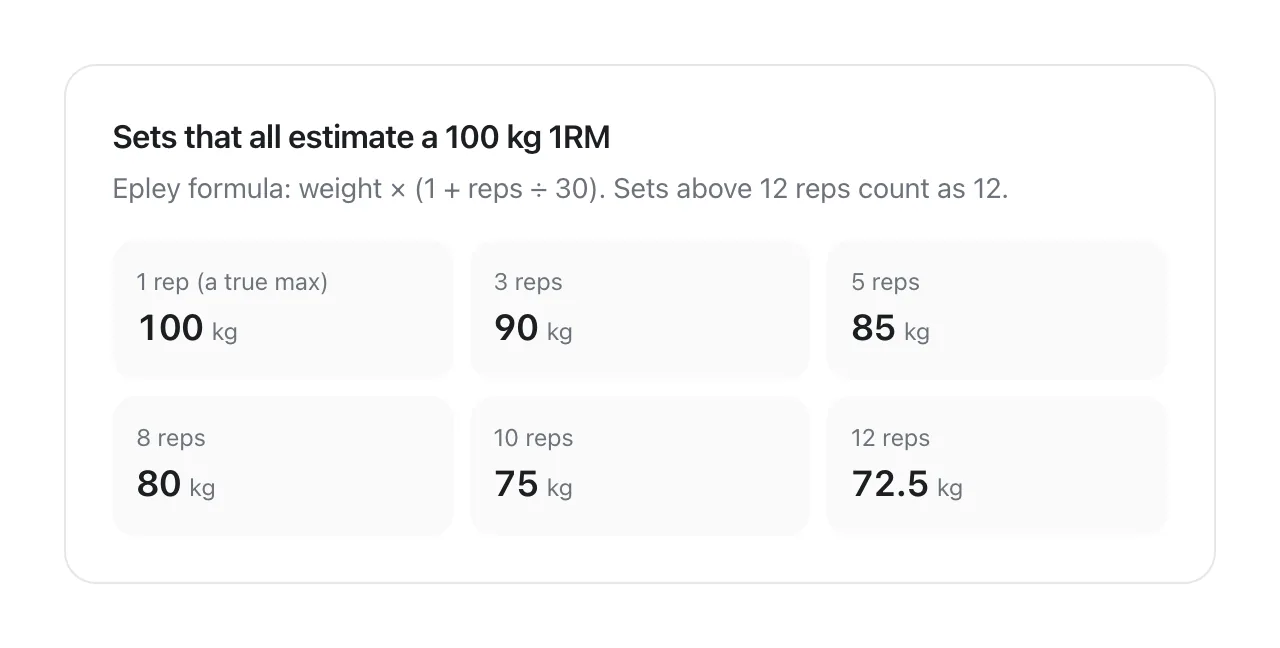
Estimated 1RM turns sets of different weights and reps into one comparable number. The common Epley formula is weight × (1 + reps ÷ 30), so 80 kg for 8 reps estimates about 101 kg. Estimates are most reliable from heavier sets of roughly 10 reps or fewer, and they get looser with high-rep sets. Use the trend over weeks, not one session's number, and don't test a true max just to check the app.
How VedaWatch helps with strength training on Apple Watch
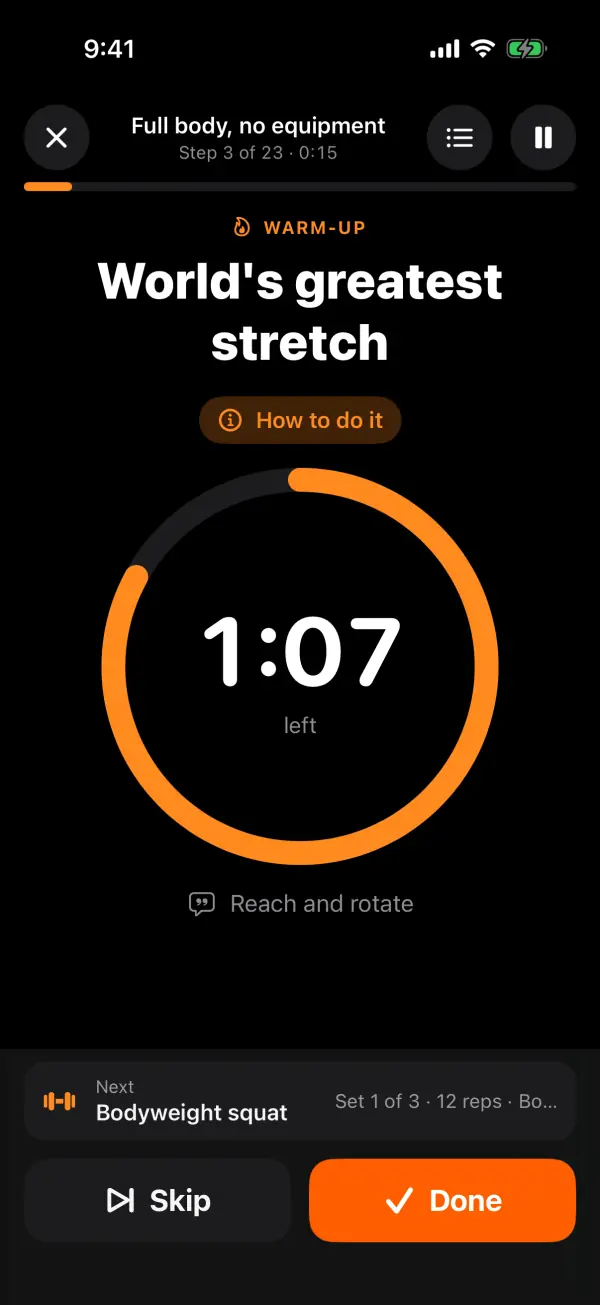
VedaWatch is built around guided sessions rather than a blank logbook. Its Guided library has more than 40 ready-made sessions and well over 100 exercises, from bodyweight to dumbbell, kettlebell and gym work, and Build a session lets you make your own: pick exercises, then set 1 to 10 sets, reps or a time, and rest from 0 to 300 seconds in 15-second steps. Any session can start on your Apple Watch or iPhone, and sessions sent to the Watch wait in its workout list.
On the Watch, the player shows your live heart rate and each step in turn. During rep sets it counts reps from wrist motion for squats, lunges, hinges, pushes, pulls and jumps. It waits for two consistent reps before counting, taps your wrist when you reach the target, and lets you confirm or correct the reps and weight with the Digital Crown. Planks, carries and mobility work aren't counted; you just tap Done.
Progression comes from the daily coach, which suggests today's session from your readiness, soreness, equipment and history. It uses double progression: reps go up until the top of the range, then the weight goes up, by 2 kg for most dumbbell moves or 5 kg for barbell lower-body lifts. Strength progress then shows sets per muscle, an Epley estimated 1RM for every exercise (sets above 12 reps count as 12), and records such as heaviest weight and rep records. Finished sessions are saved to Apple Health.
The honest limits: strength stats only come from guided VedaWatch sessions, not from workouts started in Apple's Workout app, and if you mainly want a freeform log of your own program, a logbook app may feel faster. The guided library, coach and strength progress don't need Pro; the readiness-based training plan does (Pro is $6.99 a month or $59.99 a year on the US App Store as of November 2026).
What your lifting data looks like after a few weeks
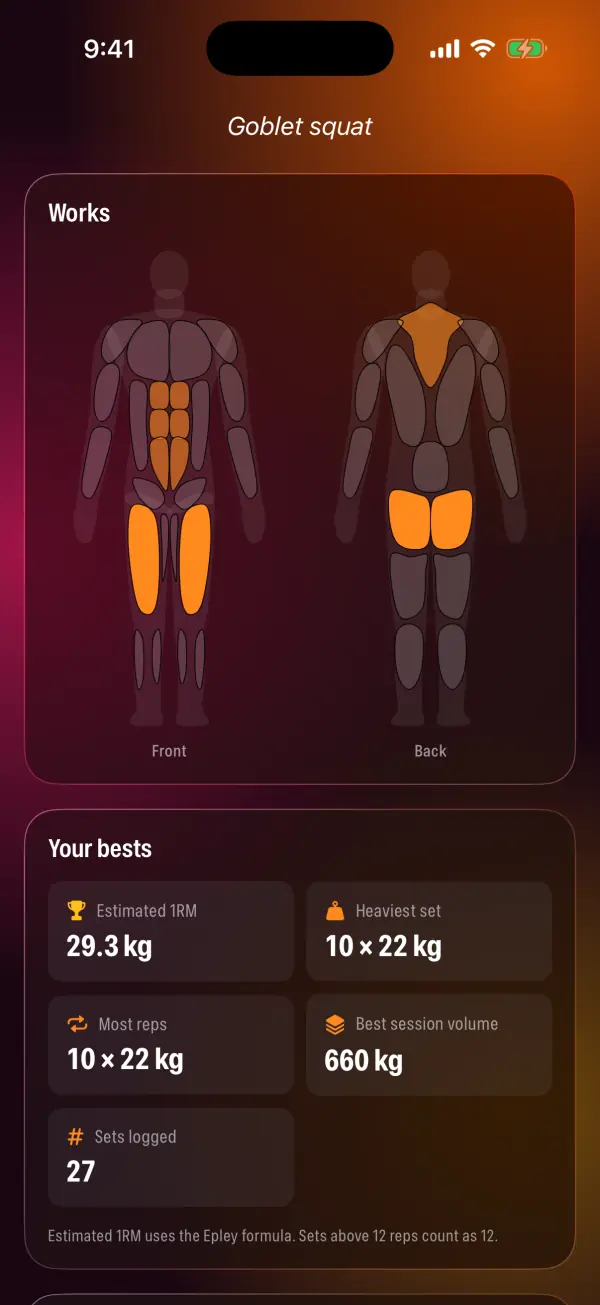
Whatever app you choose, the payoff comes after a few weeks of consistent logging. Look for an exercise page that shows your best sets at each rep count, an estimated 1RM trend, and when you last set a record. If those numbers are flat for a month on a lift you train regularly, that's your cue to change something: add a set, adjust rest, or take a lighter week.
In VedaWatch, the goblet squat example above shows how a single set becomes a comparable number: 22 × (1 + 10 ÷ 30) is about 29.3 kg. Pair that with how you're recovering. A record attempt on a morning with low HRV and short sleep is less likely to go well, which is why seeing strength and recovery side by side is useful.
How to choose: a quick decision guide
Most lifters can decide in a minute by answering these in order. Then use a free version or trial for two weeks of real sessions before paying.
- Do you write your own program? Start with Hevy or Strong. Pick Strong if detailed 1RM and volume graphs matter; Hevy if you want a generous free tier.
- Do you want the app to choose exercises and weights? Try SmartGym if you train with only your Watch, or Fitbod if you plan on your iPhone.
- Do you hate tapping between sets? Try Motra for automatic exercise and rep detection, and check how well it recognises your usual lifts.
- Do you want guided sessions plus recovery in one place? VedaWatch combines guided Watch sessions, rep counting and strength progress with readiness, sleep and HRV.
- Whichever you pick, confirm that it saves workouts to Apple Health, and export or note your bests before switching apps so you don't lose your history.
Frequently asked questions
Is there a free strength training app for Apple Watch?
Yes. As of November 2026, Hevy is free with no ads, and Strong has a free tier limited to 3 custom routines. VedaWatch's guided library, Watch sessions and strength progress also work without Pro.
Which Apple Watch lifting app works without an iPhone?
SmartGym says its Watch app runs entirely on the Watch with no iPhone or internet, and Strong's listing describes logging with or without your iPhone. Hevy's listing says Watch workouts save when the Watch reconnects to your phone.
Should I use Traditional or Functional Strength Training on Apple Watch?
Apple lists both as separate workout types; pick the one that best matches your session, Traditional for classic weight training and Functional for more varied, movement-based work. Apple's workout types page doesn't describe set, rep or weight logging for either, so pair it with a lifting app if you want that detail.
How accurate is Apple Watch rep counting?
It depends on the movement. The Watch tracks your wrist, so clear, repeating movements like presses and rows count better than slow, partial or machine leg exercises. Check the count after each set and correct it.
Do I need to test my one-rep max to track strength?
No. Apps estimate it from normal working sets with formulas such as Epley, which is safer than a true max test. Compare estimates from similar rep ranges over weeks.
Related guides
- Guided strength workouts on Apple Watch: step-by-step sessions with spoken cues and rep counting
- How to track strength training progress with Apple Watch: volume, 1RM and muscle balance
- How to calculate your one rep max: Epley, Brzycki and Lombardi
- Progressive overload explained: how to progress every lift
- How long to rest between sets: rest times by goal
- Train by readiness: how VedaWatch picks today's workout from your Apple Watch data
Sources & further reading
- American College of Sports Medicine position stand: Progression models in resistance training for healthy adults. Med Sci Sports Exerc. 2009
- LeSuer DA et al. The accuracy of prediction equations for estimating 1-RM performance in the bench press, squat, and deadlift. J Strength Cond Res. 1997
- Apple Support: Workout types on Apple Watch
- App Store: Hevy - Workout Tracker Gym Log
- App Store: Strong Workout Tracker Gym Log
- SmartGym: Apple Watch app
- App Store: Fitbod Gym & Fitness Planner
- App Store: Motra AI Workout Fitness Coach (formerly Train Fitness)
This guide is educational, not medical advice, and has not been clinically reviewed. VedaWatch is not a medical device. If you have symptoms or concerns about your heart or health, contact a qualified healthcare professional.
Put your trends in perspective.
Explore HRV, sleep, and recovery with VedaWatch on your iPhone.
Download VedaWatch on the App Store →