 VedaWatch
Comparisons
Best sleep tracking app for Apple Watch (2026): 6 apps compared
The best sleep tracking app for Apple Watch depends on your needs. Apple Sleep, AutoSleep, Pillow, SleepWatch and more compared on stages, debt and alarms.
By VedaWatch editorial team · · 10 min read
The short answer
Start with Apple's built-in Sleep app: it's free, tracks Awake, REM, Core and Deep sleep, and gives a 0-100 sleep score. Add a third-party app only for what it lacks: a smart alarm (AutoSleep, Pillow, Sleep Cycle, SleepWatch), a running sleep-debt balance (AutoSleep, VedaWatch), or snore recording (Pillow, Sleep Cycle).
What is the best sleep tracking app for Apple Watch?
For most people, the best sleep tracking app for Apple Watch is the one already on it. Apple's Sleep app records your sleep stages automatically, gives you a sleep score each morning, and saves everything to Apple Health, where other apps can read it. It costs nothing and doesn't need you to start or stop anything.
Third-party apps earn their place by adding something specific. The useful question isn't "which app tracks sleep best?" but "what do I want that Apple doesn't do?" In practice that comes down to four things: a smart alarm that wakes you in lighter sleep, a running sleep-debt balance across several nights, snore and sound recording through the iPhone, or a way to see sleep next to your recovery and training.
This roundup compares Apple's Sleep app with five alternatives, as of November 2026, on the things that actually differ: sleep stages, sleep debt, consistency, smart alarms and battery. App details come from each app's App Store listing; prices change and vary by country, so check the listing before you pay.
Apple Watch sleep apps compared (as of November 2026)
Here is what each app offers, based on its App Store listing or Apple's own support pages. "Not listed" means the listing doesn't mention the feature, not that it's impossible.
- Apple Sleep app (built in, free): Awake, REM, Core and Deep stages; 0-100 sleep score from duration, bedtime consistency and interruptions; sleep schedule with a wake-up alarm; no smart wake window in Apple's documentation; no running sleep-debt balance.
- AutoSleep by Tantsissa (one-time $9.99, no subscription or in-app purchases): can use Apple's sleep stages; sleep bank balance; sleep consistency; smart alarm on the Watch; a readiness view; can estimate time in bed even if you don't wear the Watch to sleep. Requires Apple Watch Series 4 or later.
- Pillow by Neybox Digital (free, Premium by subscription): sleep stage diagram and sleep score; smart wake-up aimed at your lightest sleep; on-device recording of snoring and sleep talking through the iPhone. Sleep debt not listed. Requires watchOS 11 or later.
- SleepWatch by Bodymatter (free, Premium by subscription): automatic sleep tracking; Sleep Rhythm Tracking of how consistently you sleep at the same time; sleeping heart rate dip; smart alarm and an ideal bedtime suggestion. A dedicated stage breakdown and sleep debt are not listed.
- Sleep Cycle by Sleep Cycle AB (free, Premium by subscription): smart alarm during your lightest sleep phase; sleep stages; snore, cough and sleep-talk detection (snore detection is Premium); syncs to Apple Health. Requires watchOS 9 or later for the Watch app.
- VedaWatch (core features free): reads your Apple Watch sleep from Apple Health; stage charts over 7, 30 or 90 days; Sleep Bank sleep-debt balance with a bedtime target; sleep feeds a daily readiness score. No smart alarm and no stage algorithm of its own.
What Apple's built-in Sleep app does well, and what it skips
Turn on Track Sleep with Apple Watch, wear the Watch for at least an hour of sleep, and Apple records Awake, REM, Core and Deep time each night. Apple asks you to charge to at least 30% before bed. The Sleep app on the Watch shows the last 14 days; the Health app on iPhone keeps the longer history, with weekly, monthly and 6-month views, plus overnight heart rate, respiratory rate and, on Series 8 or later and any Ultra, wrist temperature.
The sleep score runs from 0 to 100 and is built from three parts: sleep duration (up to 50 points), bedtime consistency (up to 30 points, based on when you fell asleep over the last 13 nights) and interruptions (up to 20 points). Apple labels scores Very Low (0-40), Low (41-60), OK (61-80), High (81-95) and Very High (96 and up).
What it skips: the score judges each night on its own, so it doesn't keep a running total of how much sleep you owe after a short week. Apple's sleep documentation describes a wake-up alarm at a set time, not a window that waits for lighter sleep. And it doesn't record sound, so snoring isn't captured.
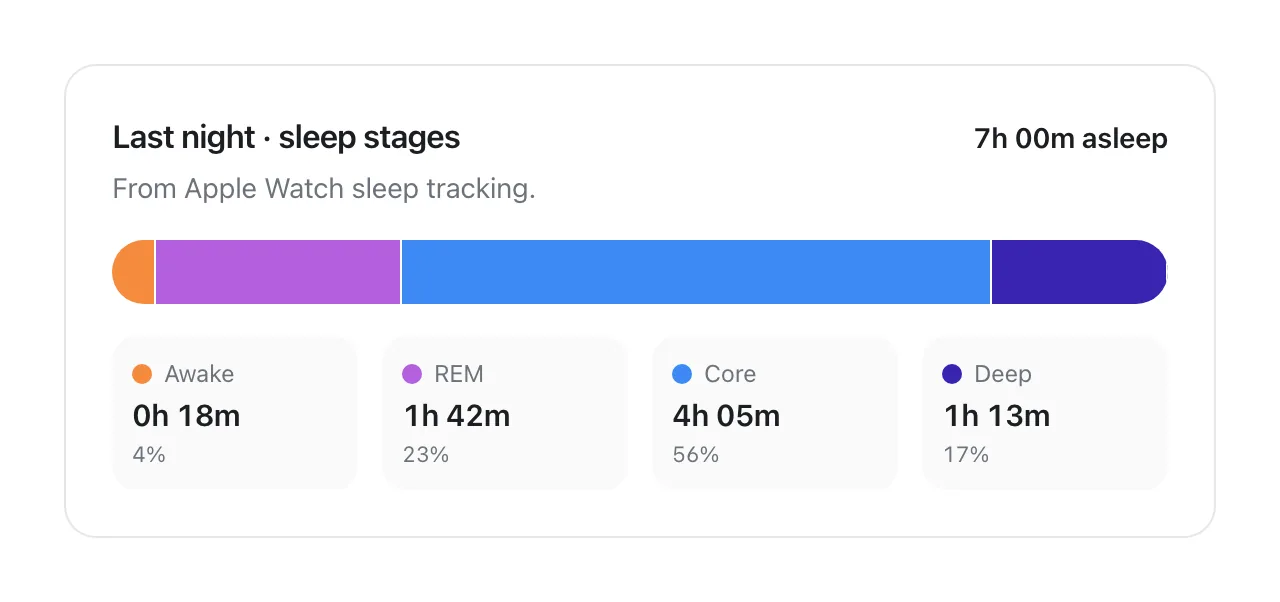
Do third-party apps track sleep stages better than Apple?
Not necessarily. Apple published how its sleep stage estimates compare with polysomnography (PSG), the lab test that measures brain activity. In its validation set of 299 nights from 166 people, the Watch correctly classed 97.9% of true sleep as sleep, correctly classed 75.0% of true wake as wake, and reached an average kappa of 0.63 for the four stages, where kappa measures agreement beyond chance and 1 would be perfect.
That makes Apple's stages a reasonable baseline, with a known weak spot: like most wrist trackers, it's better at spotting sleep than spotting quiet wakefulness, so it can count some time lying awake as sleep. Treat stage minutes as estimates and trust the trend over weeks more than any single night.
Some third-party apps use Apple's stages (AutoSleep offers this as an option, and apps like VedaWatch only read them). Others run their own analysis of motion and heart rate, or iPhone sound. Before you switch for "better stages", check whether the developer publishes a comparison against PSG. Apple has; most App Store listings don't mention one.
Which Apple Watch apps track sleep debt?
Sleep debt is the gap between the sleep you need and the sleep you get, added up over several nights. It matters because a short week can leave you behind even when each night only looks slightly short. Most adults need at least 7 hours a night, according to a consensus statement from the American Academy of Sleep Medicine and Sleep Research Society.
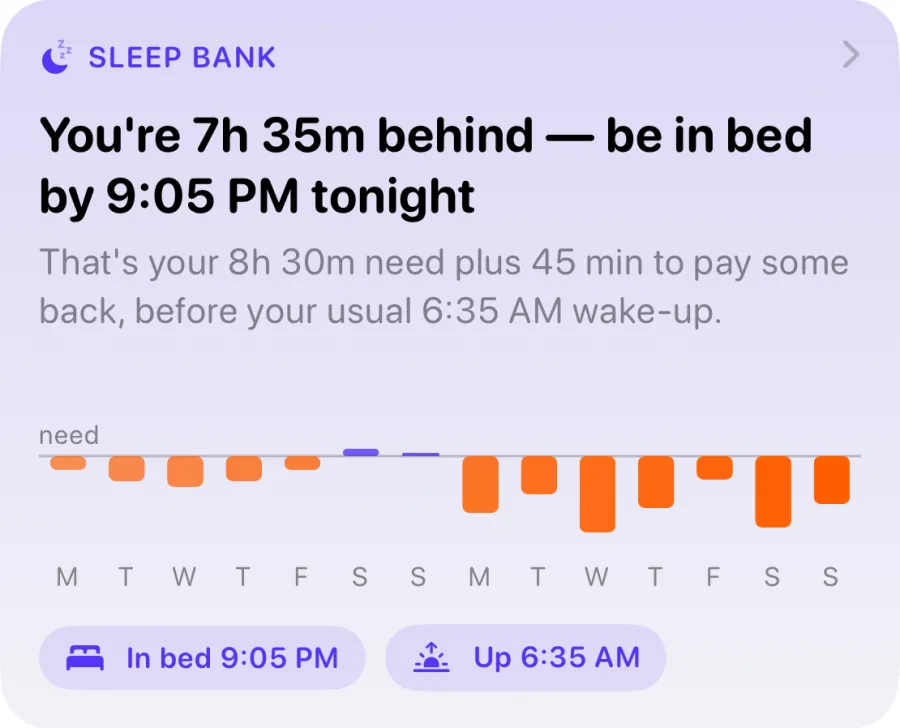
Apple's score rewards duration night by night but doesn't carry a balance forward. AutoSleep lists a "sleep bank balance". VedaWatch's Sleep Bank compares your last 14 nights with your sleep need, counts recent nights more, and turns the result into a bedtime for tonight. Pillow, SleepWatch and Sleep Cycle don't list a debt balance.
A worked example: with an 8-hour need, five nights of 7h 15m leave you 3h 45m short for the week. Any single night scores fine; the balance shows the pattern. Paying it back gradually is usually more realistic than one very long lie-in.
Why sleep consistency matters, and which apps measure it
Going to bed and getting up at similar times may matter as much as total hours. In a UK Biobank study of 60,977 adults who wore wrist accelerometers for about a week, the most irregular sleepers had higher mortality over about six years than everyone else: the more regular groups had a 20% to 48% lower risk of death from any cause. Regularity predicted risk more strongly than duration. It's an observational study, so it shows an association, not proof that irregular sleep causes harm.
Apple builds this into its score: bedtime consistency is worth up to 30 of the 100 points. AutoSleep lists a sleep consistency view of your bedtime habits, and SleepWatch tracks how consistently you sleep at the same time each day.
A simple target if you want one: keep bedtime and wake-up within about an hour of your usual times, weekends included, and watch the consistency part of your score rather than chasing a perfect total.
Does Apple Watch have a smart alarm?
Not according to Apple's documentation. The Sleep schedule sets a wake-up alarm at a fixed time, with sound and haptics you can adjust. The watchOS 27 page adds a Smart Stack suggestion to change your sleep alarm before some holidays, which is a reminder, not a wake window.
Third-party apps fill the gap. AutoSleep, Pillow, SleepWatch and Sleep Cycle all list a smart alarm that tries to wake you during lighter sleep. On Apple Watch these alarms run inside a system "smart alarm" session, which Apple's developer documentation limits to 30 minutes and lets an app schedule up to 36 hours ahead. So the widest wake window any Watch app can offer is about half an hour before your latest wake-up time.
Is it worth it? A review of sleep inertia research found that being woken abruptly from deep (slow-wave) sleep produces more grogginess than waking from lighter stages, and that without major sleep loss the grogginess rarely lasts more than 30 minutes. That's the idea behind smart alarms. How much any one app helps you is personal, so try it for a couple of weeks and judge by how you feel.
How much battery does sleep tracking use on Apple Watch?
Apple's own battery claims already include a night of sleep. As of November 2026, Apple rates Series 12 at up to 24 hours including 6 hours of sleep tracking, Ultra 4 at up to 50 hours including 12 hours of sleep tracking, and SE 3 at up to 32 hours in Low Power Mode including 6 hours of sleep tracking (its 18-hour all-day figure doesn't include sleep).
The practical fix is a top-up routine. Apple says 5 minutes of charging gives up to 10 hours of sleep tracking on Series 12 and Ultra 4, and 8 minutes gives up to 8 hours on SE 3. Charging while you shower or get ready for bed is usually enough, and the Watch app's Charging Reminders can prompt you before your Wind Down time.
Third-party apps differ in what they add. Apps that only read the sleep your Watch already saved to Apple Health, such as VedaWatch, run nothing extra overnight. Apps that run their own overnight tracking or a smart alarm session keep sensors and the app working longer, which can use more battery; the listings don't quantify it, so compare your morning battery level for a week with and without the app.
- Before bed: check you're above 30%, Apple's minimum for sleep tracking.
- Evening top-up: charge for 5 to 10 minutes while you get ready for bed.
- Morning: charge while you shower and have breakfast to cover the day.
- Test an app: note your battery at bedtime and on waking for 7 nights with it and 7 nights without.
How to choose the right sleep app for you
Pick based on the one gap you want to fill, then give it two weeks before judging. Sleep data is noisy night to night, so a fair test needs more than a weekend.
- You just want to know how you slept: use Apple's Sleep app and the sleep score. No extra app needed.
- You wake up groggy on an alarm: try a smart-alarm app (AutoSleep, Pillow, SleepWatch or Sleep Cycle) and compare a week with it against a week without.
- You're often short on sleep across the week: use an app with a running debt balance (AutoSleep or VedaWatch) and follow its bedtime suggestions.
- Someone says you snore: use an app that records sound on the iPhone (Pillow or Sleep Cycle), then take what you hear to a doctor rather than self-diagnosing.
- You train and want sleep in context: choose an app that puts sleep next to HRV, resting heart rate and workouts.
- You don't want another subscription: Apple's app is free, AutoSleep is a one-time purchase, and VedaWatch's sleep features are free.
Where VedaWatch fits in your sleep tracking
VedaWatch doesn't replace Apple's sleep tracking; it builds on it. It reads the sleep your Apple Watch saves to Apple Health, so there's nothing to start at night and no extra overnight battery use. It doesn't have a smart alarm, so keep using Apple's alarm or a smart-alarm app for waking up.
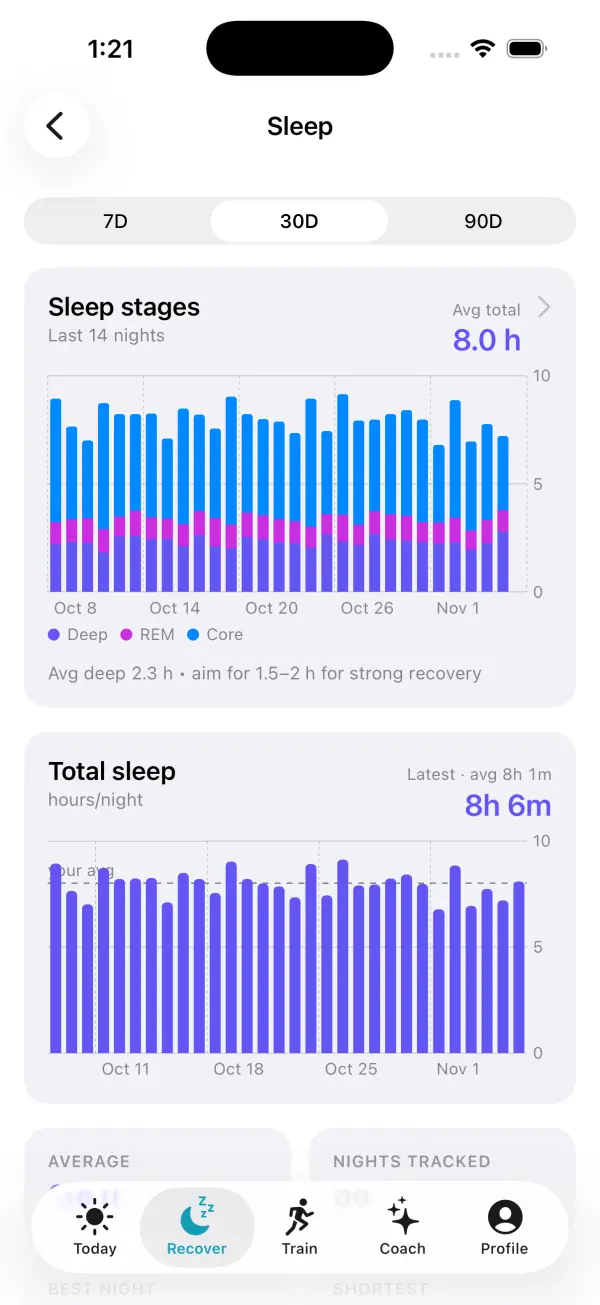
On the Recover tab, the Sleep screen shows your sleep stages and total sleep per night over 7, 30 or 90 days, with your average, best and shortest nights and a per-night breakdown. Sleep Bank keeps the two-week sleep-debt balance described above, learns your sleep need from nights you wake without an alarm, and suggests a bedtime that pays debt back by no more than 45 minutes a night. These are worked out on your iPhone and are free.
Sleep also feeds the rest of the app. Last night's sleep and deep sleep count toward your daily readiness score alongside HRV and resting heart rate, a Sleep streak counts nights of 6 hours or more, and with Pro you can turn on a "Sleep debt building" alert. It's a wellness tool, not a medical device: if you're regularly exhausted despite enough time in bed, snore loudly, or someone notices pauses in your breathing, talk to a doctor.
Frequently asked questions
Do I need a third-party app to track sleep on Apple Watch?
No. Turn on Track Sleep with Apple Watch and wear the Watch to bed with at least 30% charge. A third-party app only adds features such as a smart alarm, sleep-debt tracking or sound recording.
Can I use two sleep apps at once?
Usually yes, if only one of them runs overnight tracking or an alarm. Apps that read Apple Health, like VedaWatch, work alongside Apple's own tracking without conflict.
Is the Apple Watch sleep score the same as a third-party sleep score?
No. Each app weighs things differently, so a 75 in one app isn't comparable with a 75 in another. Compare a score only with your own history in the same app.
Can an Apple Watch sleep app detect sleep apnea?
No sleep app can diagnose sleep apnea. Sound recordings or restless nights can be worth showing a doctor, but only a clinician and a sleep study can diagnose it, so raise loud snoring, gasping or breathing pauses with a clinician.
Why does my Watch show sleep when I was lying awake?
Wrist trackers detect sleep more reliably than quiet wakefulness. In Apple's validation, about 75% of true wake time was correctly identified, so some still, awake time can be counted as sleep.
Related guides
- Apple Watch sleep tracking: how accurate is it, and what to do when it's wrong
- Apple Watch sleep stages: what Awake, REM, Core, and Deep mean
- Sleep debt calculator for Apple Watch: how VedaWatch's Sleep Bank works
- Apple Watch Sleep Score explained: what's good and how to raise it
- Sleep consistency: why a regular bedtime matters, and how much
- Apple Watch battery and sleep tracking: when to charge it
Sources & further reading
- Apple Support: Track your sleep on Apple Watch and use Sleep on iPhone
- Apple Watch User Guide: View your sleep score on Apple Watch
- Apple: Estimating Sleep Stages from Apple Watch (validation paper, September 2023)
- Apple: Apple Watch battery
- Apple Developer Documentation: Using extended runtime sessions
- Windred DP et al. Sleep regularity is a stronger predictor of mortality risk than sleep duration: a prospective cohort study. SLEEP, 2024
- Watson NF et al. Recommended Amount of Sleep for a Healthy Adult: a joint consensus statement of the AASM and SRS. Journal of Clinical Sleep Medicine, 2015
- Tassi P, Muzet A. Sleep inertia. Sleep Medicine Reviews, 2000
This guide is educational, not medical advice, and has not been clinically reviewed. VedaWatch is not a medical device. If you have symptoms or concerns about your heart or health, contact a qualified healthcare professional.
Put your trends in perspective.
Explore HRV, sleep, and recovery with VedaWatch on your iPhone.
Download VedaWatch on the App Store →