 VedaWatch
Recovery & Apple Watch
Apple Watch sleep stages: what Awake, REM, Core, and Deep mean
Apple Watch sorts each night into Awake, REM, Core, and Deep sleep. Here's how those four labels map onto the sleep stages researchers use, how much of each is typical, and what actually shifts your stage breakdown night to night.
By VedaWatch editorial team · · 7 min read
The short answer
Core is Apple's name for light sleep (N1 and N2), Deep is slow-wave sleep (N3), and REM is REM. Most of a normal night is Core, deep sleep clusters early, and REM grows toward morning. Total sleep and a consistent schedule matter more than hitting a stage percentage.
What sleep stages are
Sleep researchers split the night into wake, three stages of non-REM sleep (N1, N2, and N3), and REM sleep. N1 is the brief transition into sleep, N2 is a more settled light sleep, and N3, also called slow-wave sleep, is the deepest stage and the hardest to wake from. REM is the stage most associated with vivid dreaming, when the eyes move rapidly and most other muscles stay relaxed.
These stages repeat in cycles of roughly 90 minutes, about four to six times a night. In a typical cycle you move from N1 to N2 and N3, back up through N2, and then into REM. Around three quarters of sleep is non-REM, and most of that is N2.
How Apple's four labels map onto those stages
Apple Watch reports four categories: Awake, REM, Core, and Deep. Core covers N1 and N2 together, Deep is N3, and REM is REM.
A sleep lab stages sleep from brainwaves, eye movement, and muscle activity. Apple Watch has no brainwave sensor, so it estimates stages from wrist movement, including the small movements of breathing. That makes its stage breakdown a well-validated estimate rather than a lab measurement. Its most common mistake is confusing Core with Deep, which is worth remembering before you worry about a night with "too little" deep sleep.
How to see your sleep stages
You need a sleep schedule set up and your watch worn to bed. Labels can vary slightly between iOS and watchOS versions.
- On iPhone: open the Health app, go to Browse → Sleep, and pick a night. The Stages view shows time in Awake, REM, Core, and Deep, plus how they were spread across the night.
- Switch to the week or month view to see averages, which say more than any single night.
- On Apple Watch: open the Sleep app to see last night's total time asleep and its stage breakdown.
- If you see total sleep but no stages, the session may have been too short or the watch too loose. Check that Sleep Focus was on and the band was snug enough to stay in contact with your wrist.
How much deep and REM sleep is normal?
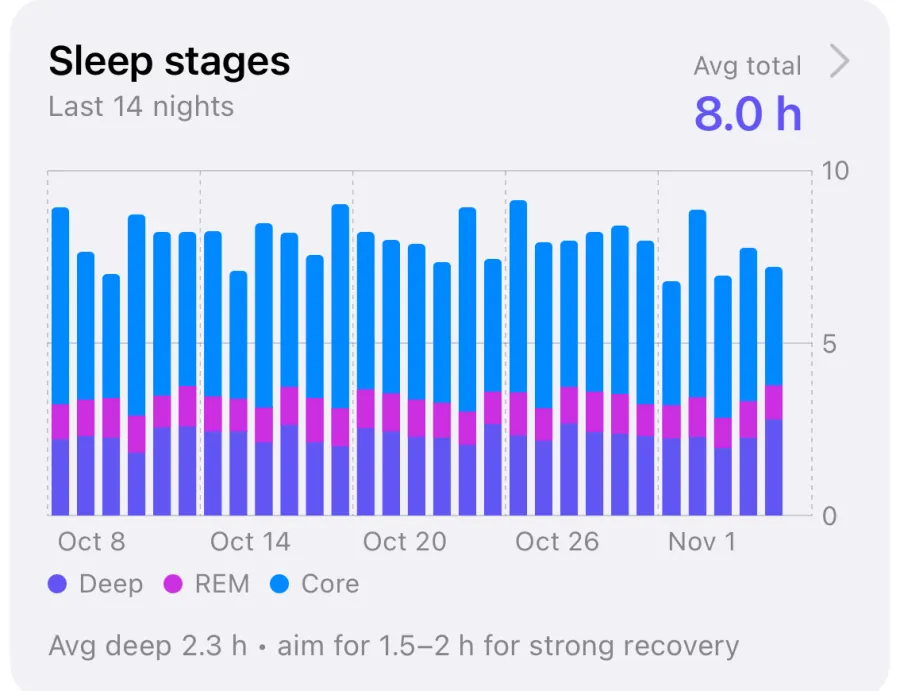
There's no single correct split, and Apple doesn't publish a target. As a rough guide from sleep research on healthy adults, most of the night is light (Core) sleep, REM usually makes up around a fifth to a quarter, and deep sleep a smaller share that typically shrinks with age. A 60-year-old with less deep sleep than they had at 25 is usually seeing normal aging, not a problem.
Timing matters too. Deep sleep is concentrated in the first few cycles, while REM periods get longer toward morning. If you cut a night short by waking early, REM usually takes most of the loss.
For adults, the American Academy of Sleep Medicine and Sleep Research Society recommend at least seven hours of sleep a night on a regular basis. Getting enough total sleep on a consistent schedule does more for your stage balance than any attempt to raise one stage in particular.
What changes your stage breakdown night to night
Total sleep time is the biggest lever. A short night leaves less time for later cycles, which hits REM hardest. After a stretch of poor sleep, the body tends to prioritize deep sleep at first, so one "deep-heavy" night after a bad week is common.
Alcohol close to bedtime tends to suppress REM in the first half of the night and fragment sleep later on. Caffeine late in the day, an irregular bedtime, a warm bedroom, and late intense exercise can all make sleep lighter or more broken for some people. Illness and stress can do the same.
Night-to-night noise is real, though, both in your physiology and in the watch's estimate. Look at a week or two of averages before you decide that something has changed.
Common questions about Apple Watch sleep stages
Is Core sleep bad sleep? No. Core is the light sleep that makes up most of a healthy night, and it isn't wasted time.
Why does my watch show so many awake periods? Brief awakenings between cycles are normal, and most people don't remember them. Apple Watch records them because it's watching all night. Frequent long awakenings, loud snoring, or daytime sleepiness are worth discussing with a clinician.
Can Apple Watch diagnose a sleep disorder? No. Apple says its sleep stages aren't intended for clinical use. Apple Watch does offer separate sleep apnea notifications on supported models, but the stage chart itself isn't a diagnostic tool.
Why does my sleep tracker disagree with my watch? Different devices use different sensors and algorithms, and even two lab technicians scoring the same night don't agree perfectly. Compare each device with itself over time rather than with the other.
See sleep stages next to your recovery in VedaWatch
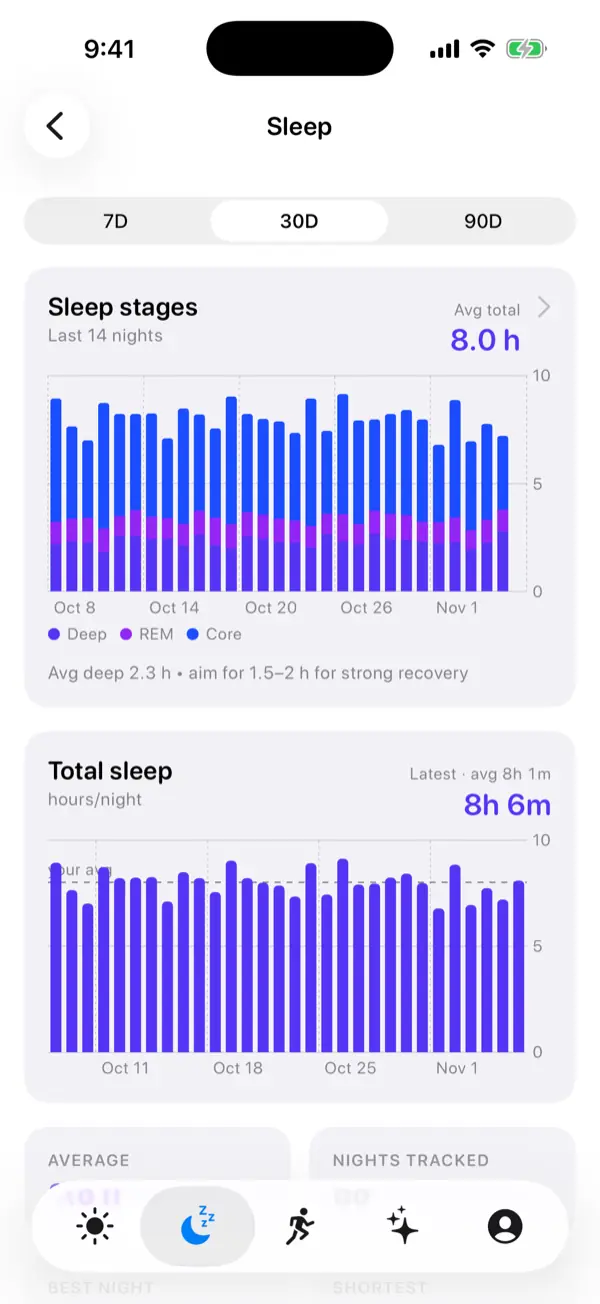
VedaWatch reads your sleep duration and deep sleep from Apple Health and shows them in its Recovery view alongside HRV, resting heart rate, and wrist temperature. That way one night with less deep sleep is weighed against everything else, not read as a verdict on its own.
With permission, it reads only what your watch already wrote to Apple Health. It can't add stage data for nights your watch didn't track.
Sources & further reading
- Apple Support: Track your sleep on Apple Watch and use Sleep on iPhone
- Apple: Estimating Sleep Stages from Apple Watch (white paper, updated October 2025)
- StatPearls: Physiology, Sleep Stages (Patel et al.)
- Journal of Clinical Sleep Medicine (2015): Recommended Amount of Sleep for a Healthy Adult (Watson et al.)
This guide is educational, not medical advice, and has not been clinically reviewed. VedaWatch is not a medical device. If you have symptoms or concerns about your heart or health, contact a qualified healthcare professional.
Put your trends in perspective.
Explore HRV, sleep, and recovery with VedaWatch on your iPhone.
Download VedaWatch on the App Store →