 VedaWatch
Comparisons
Best HRV app for Apple Watch: 6 options compared for 2026
The best HRV app for Apple Watch depends on how it handles your baseline, SDNN vs RMSSD, morning vs overnight readings, trends and tags. Six options compared.
By VedaWatch editorial team · · 11 min read
The short answer
There is no single best HRV app for Apple Watch. Pick by how you measure: overnight HRV against a long personal baseline suits Athlytic or Bevel, a deliberate 1-minute morning reading suits HRV4Training, and Apple's own Health and Vitals apps cost nothing. Whatever you choose, keep one method and read weekly trends, not single nights.
Which is the best HRV app for Apple Watch?
Most "best HRV app" lists rank apps by features or design. For HRV specifically, the things that change what you see are less visible: which HRV formula the app uses, which readings it picks (overnight, a morning spot check, or all day), how it builds your personal baseline, and whether it can tell you what moved your number. Two apps reading the same Apple Watch can show different values on the same morning for exactly these reasons.
Here is the short version, as of November 2026, based on each developer's own documentation. Details and sources follow in the sections below.
- Apple Health and the Vitals app: free and built in. Health stores Apple's HRV (SDNN) samples; Vitals shows your overnight HRV against a typical range. On Apple Watch Series 12 and Ultra 4, Apple adds a separate Recovery HRV.
- Athlytic: overnight-first recovery app with a rolling 60-day HRV baseline and a switch between SDNN and RMSSD. Good if you want a settings-level say in which HRV feeds your score.
- Bevel: uses RMSSD by default, compares you with a personal 60-day baseline, and says the app is still learning you for the first 2 to 6 weeks.
- HRV4Training: built around one deliberate morning reading (a 1-minute Breathe session on Apple Watch, the phone camera, or a chest strap), with tags and a 60-day normal range. The choice for people who want the most controlled measurement.
- Welltory: HRV-based stress and energy scores from Apple Watch beat-to-beat data. The free plan counts one Apple Watch measurement a day.
- VedaWatch: HRV trends against your own usual range, HRV as one input to a daily readiness score, and a tag journal that shows how next-morning HRV differs after tagged days.
What makes an HRV app good (not just pretty)
Before comparing apps, it helps to know which design choices actually matter for HRV. Use this as a checklist when you try any app, including the ones here.
- Metric: does it show SDNN (what Apple Health stores), compute RMSSD, or let you choose? And does it tell you which one you're looking at?
- Reading source: does it use overnight HRV, a morning spot reading, or every sample through the day? Daytime samples move with activity, caffeine and posture, so apps that mix them in tend to swing more.
- Baseline: how many days or nights it compares you against, how long it needs before it trusts that baseline, and whether it shows the range or only a single average.
- Trend view: can you see 7, 30 and 90 days, and is today's value shown against your own normal rather than a population chart?
- Context: can you tag days (alcohol, late training, travel, illness) and see how next-morning HRV differs after them?
- Honesty: does it say plainly that HRV is a wellness signal, not a diagnosis, and that one low night doesn't mean much on its own?
SDNN vs RMSSD: why your apps disagree
HRV is not one number but a family of measures. The two you'll meet on Apple Watch are SDNN, the standard deviation of the intervals between normal heartbeats, and RMSSD, the root mean square of successive differences between neighbouring beats. A widely cited review by Shaffer and Ginsberg describes RMSSD as the primary time-domain measure for estimating vagally mediated (rest-and-digest) changes in HRV, while both sympathetic and parasympathetic activity feed into SDNN. The same review warns that values from recordings of different lengths shouldn't be compared, and that short readings aren't interchangeable with 24-hour ones.
Apple Health has traditionally stored SDNN, and that is what Athlytic and Bevel describe as Apple's default. Both apps can instead compute RMSSD from the beat-to-beat data the Watch saves with its HRV readings. On Apple Watch Series 12 and Ultra 4, Apple introduced a second measurement it calls Recovery HRV, which it says is best for daily signals of stress and recovery, alongside overall HRV for broader health. Apple's announcement doesn't name the formula; Athlytic and Bevel both describe Recovery HRV as RMSSD-based.
Worked example: say Health shows 42 ms SDNN for last night, while an app set to RMSSD shows 55 ms. Neither is wrong; they're different calculations. The mistake is switching between them, or comparing your RMSSD number with a friend's SDNN number. Pick one metric, keep it for months, and judge yourself against your own history in that metric.
Morning readings vs overnight HRV
There are two sensible ways to get a daily HRV number from an Apple Watch, and the best app for you depends on which one you'll actually stick to.
Overnight HRV is passive: you wear the Watch to bed and the app uses the readings taken while you sleep. Apple's Vitals app uses this approach for its overnight metrics. The catch is sampling. Athlytic notes that, without AFib History turned on, Apple Watch records only about 3 to 5 HRV samples a night, so one disturbed sample can tug the average. Apple says Series 12 and Ultra 4 measure HRV up to 24 times more often than before.
A morning reading is deliberate: you sit or lie still right after waking and start a Breathe session in the Mindfulness app. HRV4Training asks for a 1-minute session and says 60 seconds is enough for a reliable rMSSD. Welltory asks for at least 3 minutes for a manual Breathe reading, and at least 5 for its frequency-domain scores. The upside is a controlled, repeatable moment; the downside is that you have to remember every day.
Don't mix the two. Athlytic, which uses a before-noon Mindfulness reading first if you take one, notes that Mindfulness HRV is usually higher than the sleep average and recommends choosing one method and keeping it. If you do mornings on weekdays and let the Watch fill in overnight on weekends, your trend will jump for reasons that have nothing to do with recovery.
How each app builds your HRV baseline
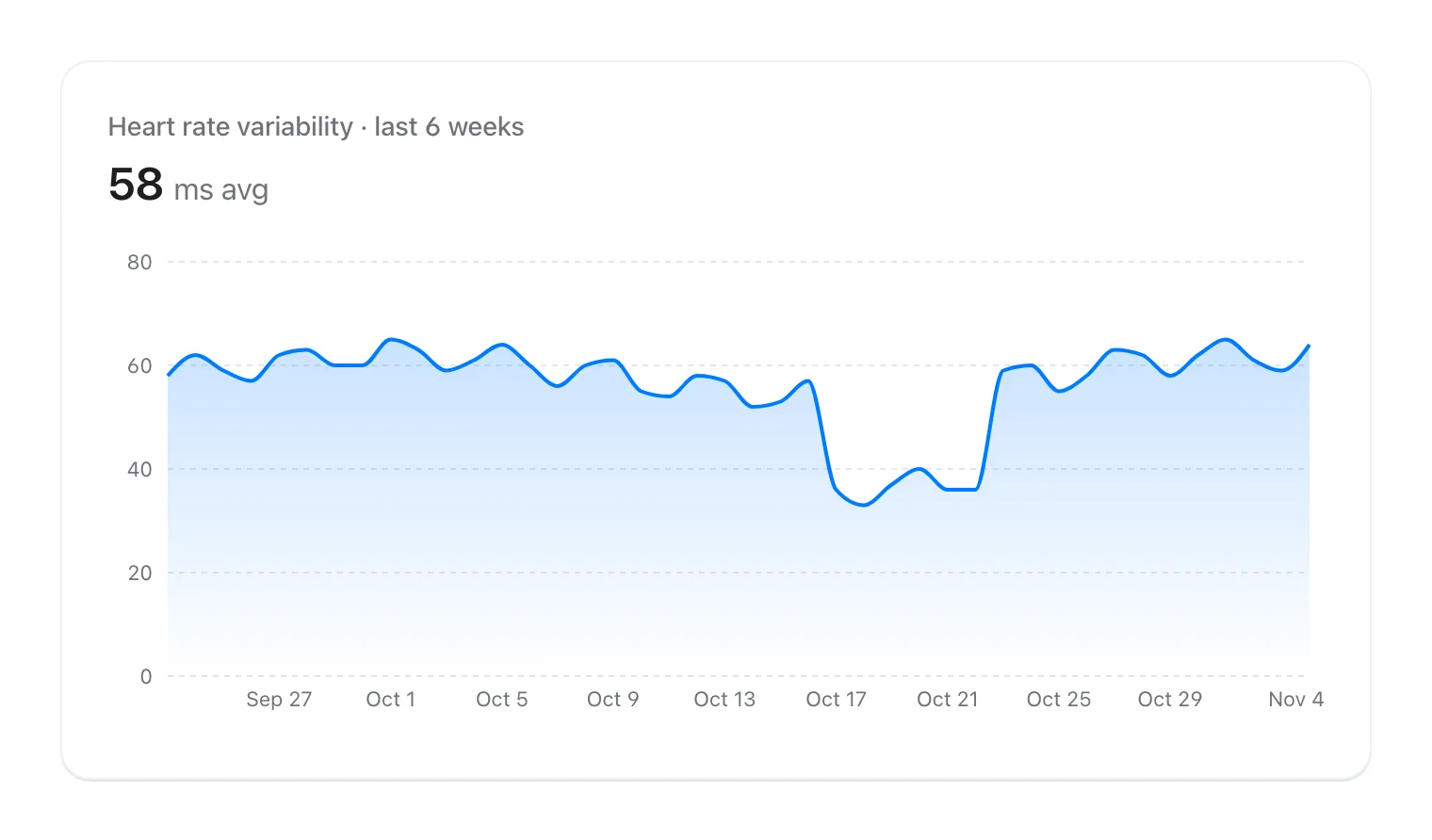
An HRV number only means something next to your own normal, so the baseline is the most important design choice an HRV app makes. Short windows react quickly but get pushed around by one rough week; long windows are steadier but slower to notice a real change. Here is what each option documents.
- Apple Vitals: wear the Watch to sleep for 7 days to establish a typical range for each metric; you're notified the next morning when several metrics fall outside it.
- Athlytic: compares HRV with a rolling 60-day baseline and recommends keeping the same HRV method for at least 60 days. Its help pages say it pulls your existing Apple Health history and keeps refining until it has a full 60 days, so long-time Watch wearers skip most of the wait.
- Bevel: labels like above or below normal compare you with a personal 60-day baseline, and Bevel says it is still learning your patterns during the first 2 to 6 weeks.
- HRV4Training: your normal range is the range typical for you over your last 60 days; its Pro advice compares your 7-day baseline against that normal range.
- Welltory: says its Stress and Energy scores are compared against your own baseline rather than a population average, without publishing how long that baseline is.
- VedaWatch: compares your last 7 days of HRV with your usual average and a normal range built from your earlier readings, and its readiness score compares HRV with your recent baseline.
Reading HRV trends: what a good chart shows
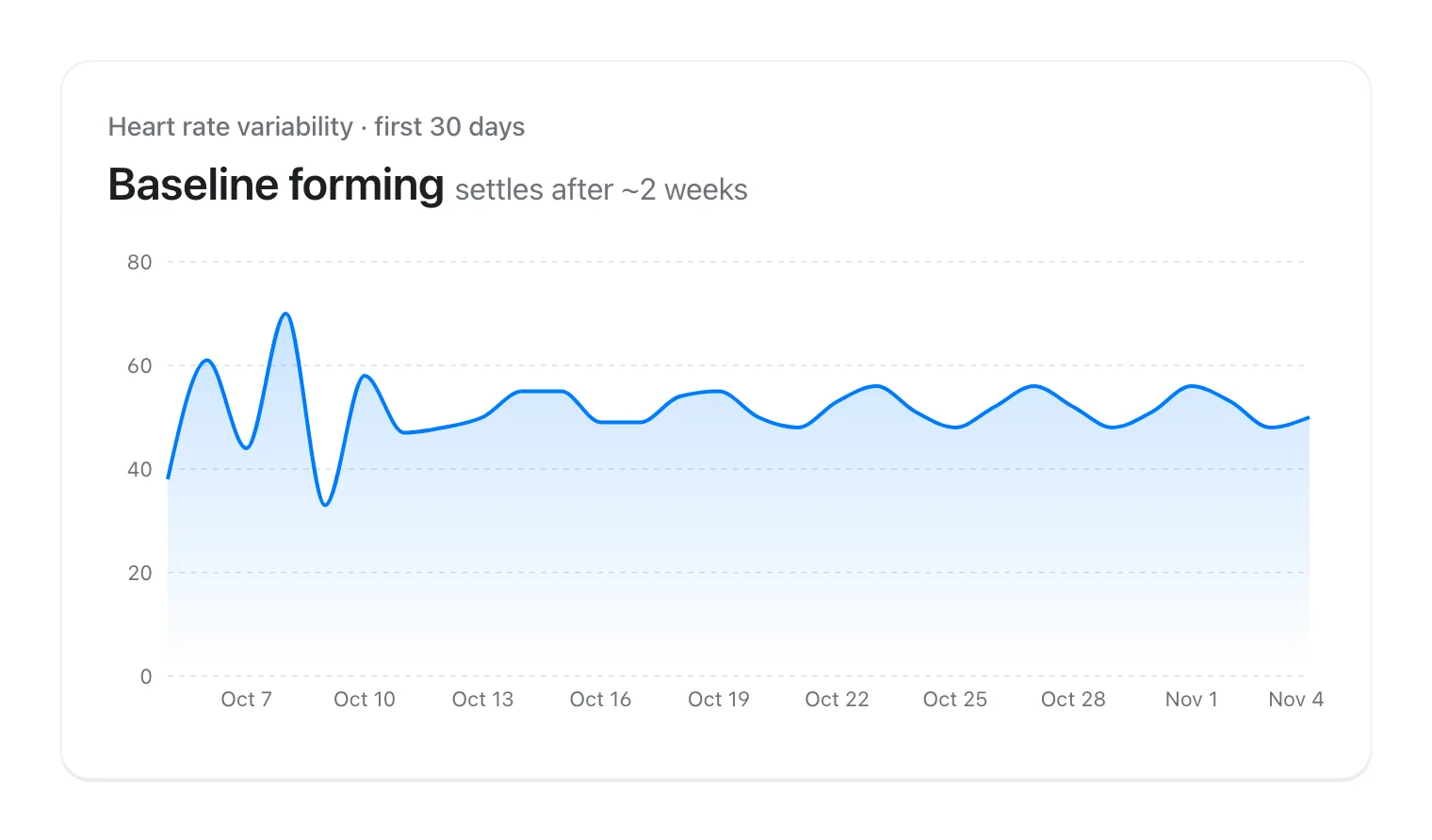
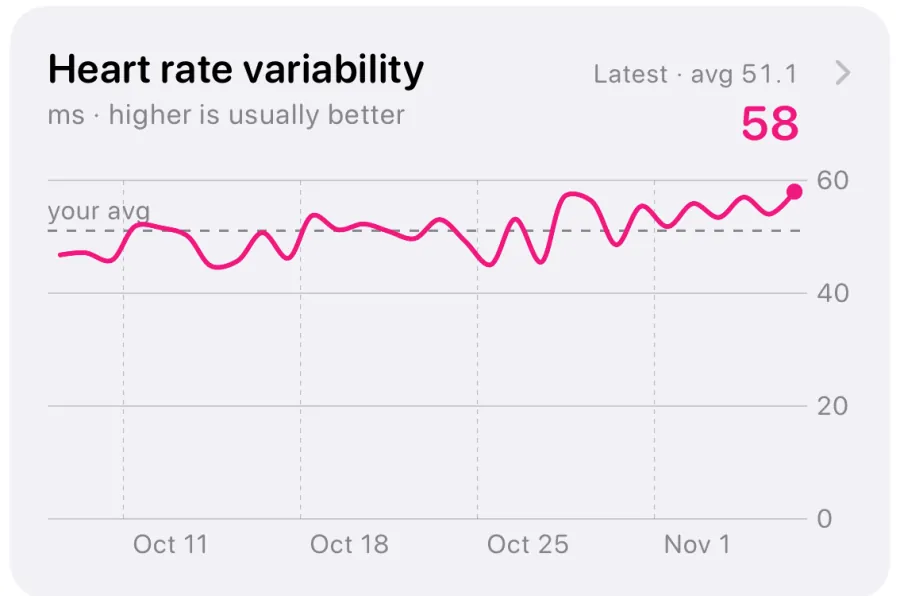
A good HRV trend view answers three questions at once: where am I now, what's normal for me, and is the difference bigger than my usual day-to-day noise? Look for a chart that draws your average or normal band behind the line, and that lets you zoom from 7 days to at least 90.
A practical way to read any of these charts: ignore a single low night. Look at the average of the last 5 to 7 days against your normal band. If it sits below the band for most of a week and your resting heart rate is also up or your sleep is short, that's worth acting on, for example with an easier training day. If one night is low and the rest of the week is ordinary, it's usually noise. HRV also tends to drift with age, the menstrual cycle, travel and illness, so compare like with like.
Higher isn't automatically better, either. Apple says higher variability is generally associated with better recovery, but a sudden jump well above your normal can also follow unusual conditions. The pattern over weeks matters more than any record high.
Tagging: finding out what moves your HRV
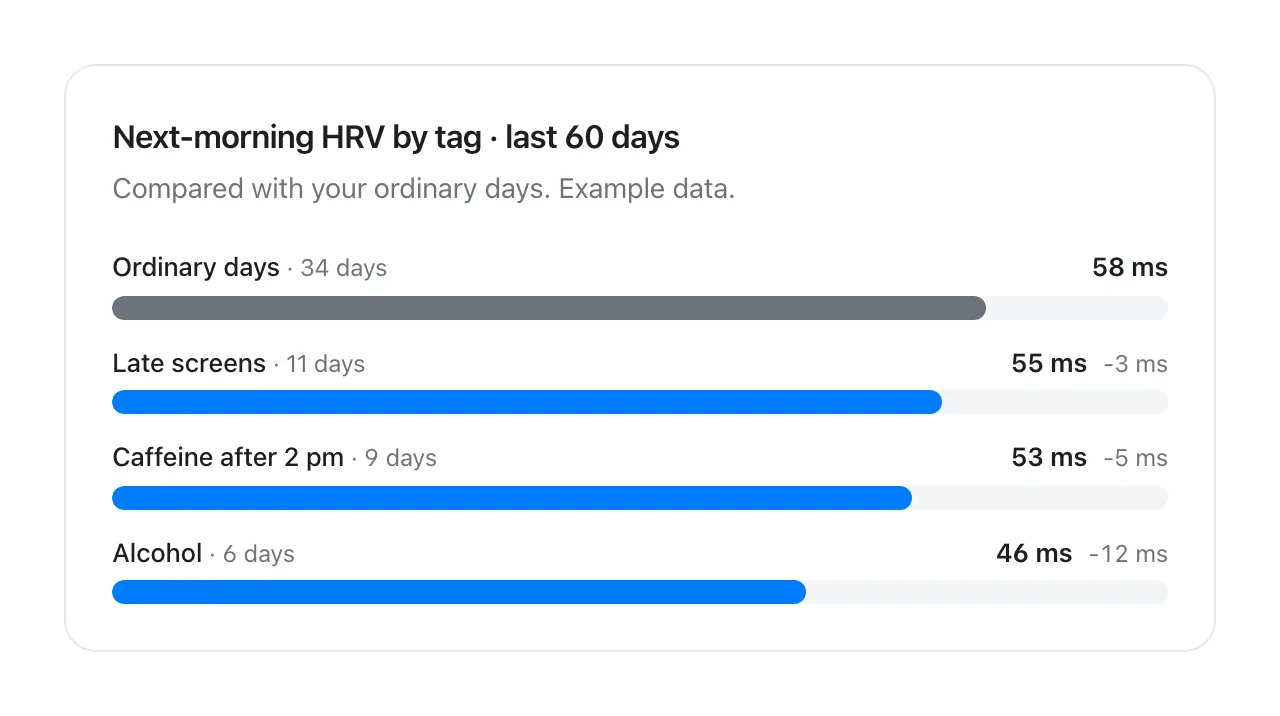
Your Watch can see that HRV dipped; it can't see the two glasses of wine or the late session that came before it. Tags close that gap. You mark what happened, and the app compares next-morning HRV after tagged days with ordinary days.
HRV4Training prompts you for tags after each morning reading and lets you add custom tags for up to three parameters of your own. Athlytic's journal lets you log items such as caffeine, alcohol, travel and illness and see how they relate to your recovery. VedaWatch's tag journal compares next-morning HRV after tagged days with logged days without that tag.
Whichever app you use, the method matters more than the feature. Log ordinary days too, not just the unusual ones, or there's nothing to compare against. Give each tag a few weeks. And remember that tags travel together: a travel day is often also a short-sleep, late-meal day, so a pattern is a lead to test, not proof of cause.
The apps, one by one
All details are from each developer's own help pages or Apple's announcements, as of November 2026. Features change often, so check the current version before you subscribe.
- Apple Health and Vitals (built in): Health keeps every HRV sample with day, week, month and longer views, and lets you see which device wrote each reading. Vitals flags nights when several overnight metrics fall outside your typical range. Series 12 and Ultra 4 add Recovery HRV and a daytime vitals view. What's missing: tagging, and any score that explains what changed.
- Athlytic: settings let you prioritise a before-noon Mindfulness reading or sleep HRV, ignore Mindfulness readings, and choose SDNN, Athlytic's own RMSSD with outlier filtering, or (on Series 12 and Ultra 4) Apple's Recovery HRV, which it switches to automatically after 14 days of that data. Best for people who like to control exactly which reading counts.
- Bevel: RMSSD by default with an option to switch to SDNN if you want its numbers to match Apple Health. Bevel says it filters out unusually high Apple Watch readings it treats as likely sensor noise, which is one reason its values differ from Health.
- HRV4Training: an iPhone app built around a short, standardised morning measurement. It shows a logarithmic transformation of rMSSD by default (a raw rMSSD view is in settings), which is why its number looks smaller than other apps'. Best for people who will measure at the same time every morning.
- Welltory: calculates HRV metrics from the beat-to-beat intervals the Watch records and turns them into stress and energy scores. Automatic Watch readings happen only when you're calm, and the free plan counts one Apple Watch measurement per day (5 am to 5 am).
- VedaWatch: covered in the next section.
How VedaWatch helps you read Apple Watch HRV
VedaWatch reads the HRV your Apple Watch saves to Apple Health, so it works with any Apple Watch that records HRV and needs no extra hardware. It shows Apple's SDNN values in milliseconds and doesn't compute RMSSD or take its own spot readings, so if you want a controlled morning measurement, a dedicated morning app is the better fit.
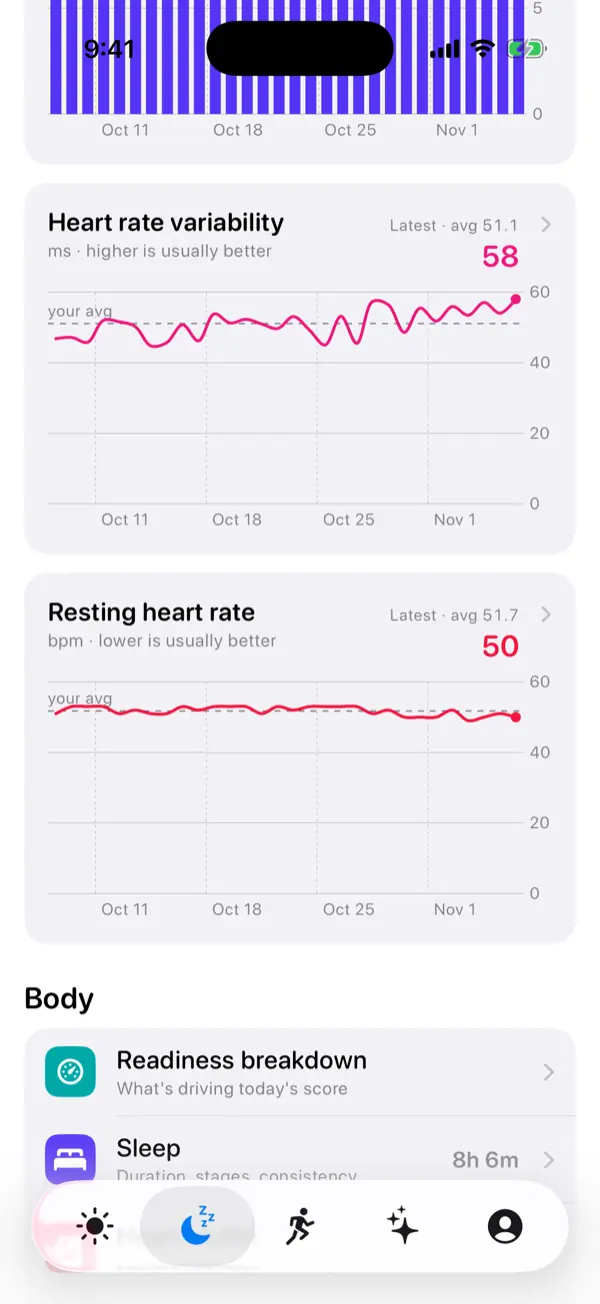
Where it helps is context. The HRV chart switches between 7, 30 and 90 days, draws your average behind the line, and compares your last 7 days with your usual average and normal range, saying whether the change is bigger than your normal day-to-day swing. HRV is also one of the inputs to the daily readiness score, next to resting heart rate and sleep, compared with your recent baseline and explained in plain sentences such as how far HRV sits above or below it.
The tag journal answers the "why" question. Tag a day, or mark it Nothing notable, and once a tag has at least 5 logged days with it, 5 without, and 30 mornings of HRV, VedaWatch shows how next-morning HRV differs after tagged days, or says there's no clear effect. With Pro ($6.99 a month or $59.99 a year), smart alerts can also nudge you when HRV drops well below your normal. The core app, including HRV trends and readiness, is free.
What no HRV app can tell you
Every app here is a wellness tool. HRV can reflect stress, sleep, training and illness, but a low reading doesn't diagnose anything, and a normal one doesn't rule anything out. Wrist sensors are good at tracking your own trend over time, not at producing a lab-grade value.
Talk to a doctor if you have symptoms such as chest pain, fainting, a racing or irregular heartbeat, or unusual breathlessness, whatever your HRV says. It's also worth asking a clinician about a large, lasting change in HRV or resting heart rate that you can't explain, or if a medication or heart condition might affect your readings.
Frequently asked questions
Is there a free HRV app for Apple Watch?
Yes. Apple Health and the Vitals app are built in and free, and several third-party apps, including VedaWatch, have free tiers that show HRV trends. Paid tiers usually add scores, alerts or deeper analysis.
Why is my HRV different in Athlytic or Bevel than in Apple Health?
Usually because the app is calculating RMSSD while Apple Health shows SDNN, or because it uses only sleep readings or filters outliers. Both Athlytic and Bevel let you switch to SDNN if you want the numbers to line up with Health.
Should I turn on AFib History to get more HRV readings?
Athlytic notes that Apple Watch records only about 3 to 5 HRV samples a night for people without AFib History on, and suggests a morning Mindfulness reading as an alternative source. AFib History is a health feature with its own eligibility rules, so read Apple's guidance rather than turning it on just for HRV.
Can I use two HRV apps at the same time?
Yes, they all read the same Apple Health data. Just don't compare their numbers with each other; judge each one against its own history, using the same metric and reading source.
How long before an HRV app is useful?
You'll see numbers on day one, but most apps need several weeks to learn what's normal for you; Bevel cites 2 to 6 weeks, and Athlytic and HRV4Training use 60-day windows. If you already have months of Apple Watch history in Health, apps that import it start with a fuller picture.
Related guides
- Best recovery app for Apple Watch: an honest 2026 roundup
- Athlytic alternative: how other Apple Watch recovery apps compare
- Bevel app alternative: what to compare before you switch
- What lowers your HRV? Use a tag journal to find out
- How to get more HRV readings on Apple Watch (and fix gaps)
- Is Apple Watch HRV accurate? What the validation studies actually show
Sources & further reading
- Apple Newsroom: Introducing Apple Watch Series 12, with the all-new Health Sensing System
- Apple Support: Track your overnight and daytime vitals
- Shaffer and Ginsberg, Frontiers in Public Health (2017): An Overview of Heart Rate Variability Metrics and Norms
- Athlytic Help: Setting Your Recovery Preferences
- Athlytic Help: Using the Mindfulness App for Recovery and How to Not Inflate your HRV
- Bevel Help: Common Questions
- HRV4Training: FAQ
- Welltory Help: Measuring HRV with Apple Watch
This guide is educational, not medical advice, and has not been clinically reviewed. VedaWatch is not a medical device. If you have symptoms or concerns about your heart or health, contact a qualified healthcare professional.
Put your trends in perspective.
Explore HRV, sleep, and recovery with VedaWatch on your iPhone.
Download VedaWatch on the App Store →