 VedaWatch
Comparisons
Best Apple Watch apps for fitness in 2026, picked by goal
The best Apple Watch apps for fitness in 2026, sorted by need: running, strength, recovery, sleep, nutrition and habits, with prices checked on the App Store.
By VedaWatch editorial team · · 10 min read
The short answer
There's no single best Apple Watch fitness app. Start with Apple's free Workout and Fitness apps, then add one app for the gap you care about: Runna or Nike Run Club for running plans, Hevy or Strong for lifting, Athlytic for recovery, Cronometer for nutrition and Streaks for habits. Most people need two or three apps, not ten.
What are the best Apple Watch apps for fitness?
The honest answer depends on what you're trying to do. A marathon plan, a lifting log and a sleep tracker are different jobs, and the apps that do one of them well rarely do all of them well. So instead of one ranked list, this roundup picks the strongest options for each need. Every app below was checked on its App Store listing or official site as of November 2026; prices are US prices and can change, so check the listing before you subscribe.
Here are the short picks. The sections that follow explain who each one suits, what it costs, and what it doesn't do.
- Built in: Apple's Workout app, Fitness app and Activity rings. Free, and the base every other app reads from.
- Running plans: Runna for a polished paid coach, Nike Run Club for the best free plans.
- Strength training: Hevy or Strong to log your own program, SmartGym or Fitbod if you want workouts planned for you.
- Recovery and HRV: Apple's Readiness on Series 12 and Ultra 4, Athlytic on any recent model, Gentler Streak if you want gentle guidance rather than a hard number.
- Sleep: Apple's Sleep app with sleep score, or AutoSleep if you want a sleep bank and smart alarm without a subscription.
- Nutrition: Cronometer for detailed nutrients with free barcode scanning, MyFitnessPal for the biggest food database.
- Habits and consistency: Streaks for any habit that Apple Health can tick off automatically.
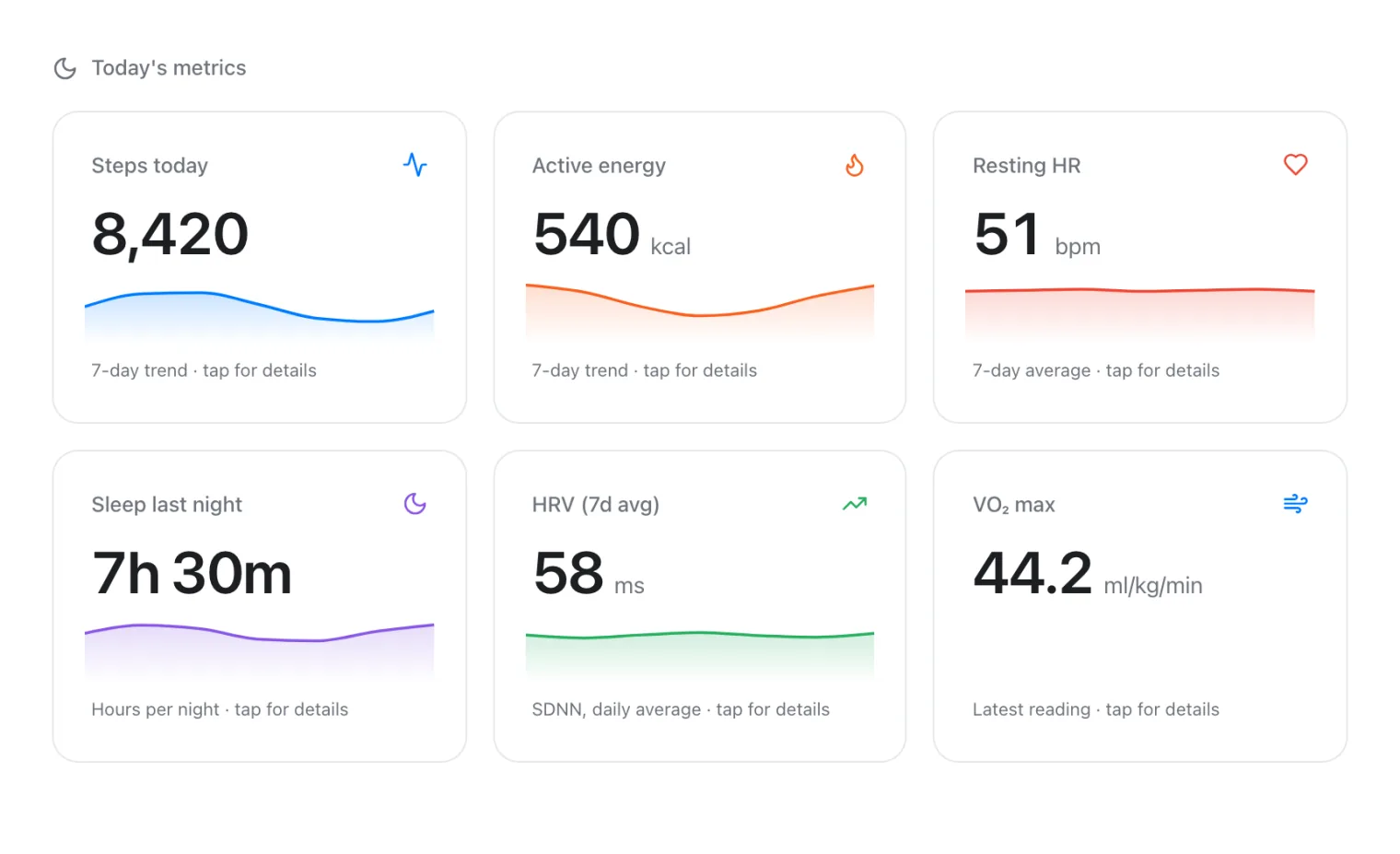
- All in one: VedaWatch, which reads your Apple Health data for readiness, sleep debt, guided workouts, training plans, nutrition targets and streaks.
Do you need a third-party app, or is Apple's enough?
Before you download anything, it's worth knowing how much the Watch already does. The Workout app records runs, rides, swims and strength sessions with heart rate, and the Fitness app on iPhone shows your history and Activity rings. Apple's training load view compares the intensity and duration of your recent workouts with your longer-term average, and labels it from well below to well above your usual.
On Apple Watch Series 12 and Ultra 4, Apple's Readiness app adds a daily score from 0 to 10, built from your activity and Training Load, overnight and daytime vitals, and last night's sleep score. Apple's support page says you need to wear the Watch overnight for at least 7 nights before it shows a score, and describes it as a general wellness feature.
Apple Fitness+ adds instructor-led classes across 12 activity types, from HIIT and strength to yoga, Pilates and meditation. In the US it's $9.99 a month or $79.99 a year after a one-month free trial, and it can be shared with up to five family members. It needs only an iPhone; the Watch adds live heart rate and ring progress on screen.
Where the built-in apps stop: they don't write a race plan around your recovery, keep a set-by-set lifting log with progress graphs, track a running sleep debt, set nutrition targets, or keep streaks for habits beyond the rings. Those gaps are where third-party apps earn their place.
Best Apple Watch apps for running plans
Runna is the most complete paid running coach on Apple Watch. Its pricing page lists plans for any distance, built by coaches and adjusted to your performance, with support for Apple Watch, Garmin, Fitbit, COROS and others. As of November 2026 it costs $19.99 a month or $119.99 a year in the US, with a 7-day free trial. Best for runners training for a specific race who want structured sessions and on-wrist pace guidance.
Nike Run Club is free and still has the best free plans from a big brand, from a short getting-started block to a full marathon plan, plus audio-guided runs. Its plans are a fixed schedule rather than one that reacts to your sleep or recovery, so you adjust them yourself after a bad night or a sick week.
ASICS Runkeeper sits in between: race plans built around your goal time and race date, available on Apple Watch, as part of its Runkeeper Go subscription.
If you only need to run intervals, Apple's Workout app can do that for free: custom workouts with a warmup, work and recovery intervals, pace targets and a cooldown. Our running plan roundup goes deeper on each option, including which plans adapt and how.
Best Apple Watch apps for strength training
Apple's Workout app records a strength session's time and heart rate, but not your exercises, sets, reps or weights. For progress you can actually see, you need a logging app.
Hevy is the best free lifting log. Its listing says you can log sets, start rest timers and finish a workout from the Watch without touching your phone, with heart rate during the session and watch-face complications. The core app is free with no ads; Hevy Pro is listed from $2.99 a month or $23.99 a year, with a $74.99 lifetime option.
Strong is a long-running alternative with a fully featured Watch app and detailed stats such as estimated one-rep max and volume graphs. Both Hevy and Strong suit people who already know what program they want to run.
If you'd rather be told what to lift, SmartGym builds workouts from your goals and equipment and runs fully on the Watch, and Fitbod plans gym sessions that adapt as you train. Either way, the progress rule is the same: add a little weight or a rep over time, and log every set so the graph means something. Our strength app roundup compares rep counting, rest timers and 1RM tracking in detail.
Best Apple Watch apps for recovery and HRV
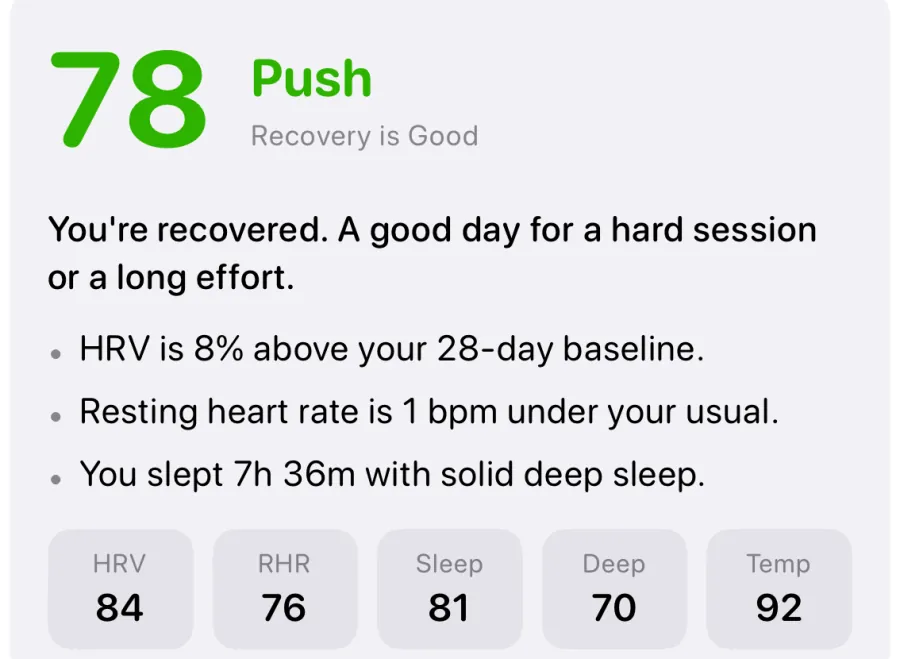
Recovery apps read your overnight heart rate variability (HRV), resting heart rate and sleep from Apple Health and turn them into a daily push-or-rest signal. They differ mainly in which inputs they use, how much they explain, and which Watch models they support.
Athlytic is the focused, low-cost pick. Each morning it compares overnight HRV and resting heart rate with your personal baseline for a Recovery score, and tracks Exertion from 0 to 10 against a daily target range based on that recovery. It's free to download; Athlytic Pro is $4.99 a month or $29.99 a year with a one-week free trial, and its privacy label says the developer collects no data.
Gentler Streak takes a softer approach, suggesting anything from rest to a hard day and letting streaks include rest days. HRV4Training suits athletes who prefer a deliberate one-minute morning measurement with tagging and coach-style analysis.
Whichever you choose, treat the score as a prompt to check in with how you feel, not a verdict. A single low morning often reflects a late meal, alcohol or a poor night. If your resting heart rate stays high for days, or you feel unwell, short of breath or dizzy, skip the app's advice and talk to a doctor. Our recovery and HRV roundups compare these apps side by side.
Best Apple Watch apps for sleep tracking
Apple's own Sleep app is now a strong baseline: sleep stages (Awake, REM, Core and Deep), a sleep score, and a sleep schedule with a wake-up alarm. For many people that's enough.
Third-party sleep apps add three things Apple doesn't. AutoSleep keeps a running sleep bank and offers a smart alarm on the Watch, as a one-time purchase with no subscription. Sleep Cycle and Pillow focus on smart wake-up windows and on recording snoring through the iPhone microphone. And a few apps, VedaWatch among them, track sleep debt against a target and feed sleep into a daily readiness score.
One thing to know before paying: these apps mostly read the same stage data your Watch already writes to Apple Health. What you're buying is the analysis, the alarm or the habit coaching, not more accurate staging. Our sleep app roundup covers battery use and smart alarms in more detail.
Best apps for nutrition tracking with Apple Watch
Apple Watch doesn't log food on its own, so nutrition comes from an app that writes to Apple Health. The best one is the one you'll actually use every day.
Cronometer is the pick for detail. Its listing says it tracks more than 95 vitamins and minerals, lets you scan barcodes for free, syncs with Apple Health, and can log food from the Apple Watch. The core app is free; Gold is listed at $10.99 a month or $59.99 a year.
MyFitnessPal has the biggest food database, including restaurant dishes, which makes logging faster if you eat out a lot. Barcode scanning, meal scanning and voice logging are part of Premium, and its listing shows several Premium plan prices, so compare them in the app before you subscribe.
Logged calories are estimates, and people tend to under-count what they eat, so use the numbers for trends and protein consistency rather than to-the-calorie accuracy. If you have a history of disordered eating, a food log may not be right for you; talk to a doctor or dietitian first.
Best Apple Watch apps for habits and consistency
Consistency matters more than any single workout. The CDC recommends that adults get 150 minutes of moderate-intensity activity a week, or 75 minutes of vigorous activity, plus at least 2 days of muscle-strengthening activity that works all major muscle groups. A habit app is one of the easiest ways to keep those weekly targets visible.
Streaks is the best general habit app for Apple Watch. It's a one-time $5.99 purchase, tracks up to 24 habits, and can complete habits automatically from more than 80 types of Apple Health data, such as steps, workouts, sleep, water and mindful minutes. It has a full Watch app and complications, needs no account and lists no tracking.
Apple's Activity rings are the simplest free option, but they reward daily movement rather than a weekly plan. If missed days put you off, an app that counts rest days (Gentler Streak) or weekly goals (Streaks) is kinder to real life.
How many fitness apps do you need? Three example setups
Most people do best with Apple's free apps plus one or two paid ones. More apps means more subscriptions and more notifications, and you'll only stick with a couple. Here are three realistic setups using the US prices above; all of them read the same Apple Health data, so they don't conflict.
- The budget starter. Workout and Fitness apps (free), Nike Run Club plans (free), Hevy for lifts (free tier) and Streaks ($5.99 once). First-year cost: $5.99.
- The race runner. Runna yearly ($119.99) for the plan, Athlytic Pro yearly ($29.99) for recovery, Apple's Sleep app for sleep. First-year cost: $149.98.
- The lifter who tracks food. Hevy Pro yearly ($23.99) and Cronometer Gold yearly ($59.99), with Apple's Readiness or Athlytic's free tier for recovery. First-year cost: $83.98.
- Rule of thumb: pay only for the app that fills your biggest gap, use the free trial for a full training week, and cancel anything you haven't opened in a fortnight.
Where VedaWatch fits: one app across several needs
VedaWatch, the app behind this guide, is built for people who'd rather not juggle five apps. It reads your Apple Watch data from Apple Health and brings several of the needs above into one place. It's not the deepest option in every category: it doesn't have a food database or barcode scanner, a smart alarm, or a class library, so a dedicated app is still better if one of those is what you want most.
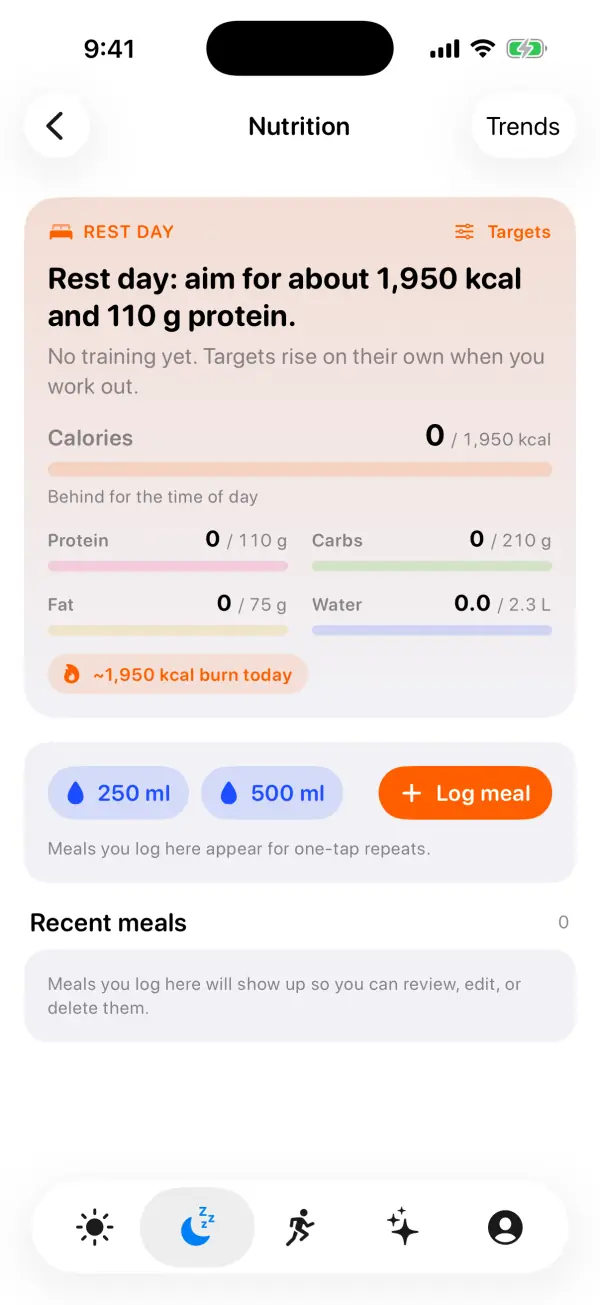
What's free: a daily 0-100 readiness score from overnight HRV, resting heart rate, sleep and wrist temperature against your recent baseline, with a Push, Hold or Rest call and the reasons; Sleep Bank sleep-debt tracking; a guided workout library whose Watch player walks you through sets, rests and timers and can count many strength reps from wrist motion; strength progress; daily calorie, carb and water targets that rise on training days alongside a steady protein target, with meals you log saved to Apple Health; and streaks for sleep, workouts, exercise, steps and mindfulness.
VedaWatch Pro, $6.99 a month or $59.99 a year on the US App Store, adds a running training plan built around your race date that can swap a hard session for an easy one when your readiness is low, and an AI Coach that answers questions about your own numbers using third-party AI models, only after you turn AI processing on.
It's a wellness app, not a medical device, and the scores are guides to how you feel, not a diagnosis.
Frequently asked questions
What is the best free fitness app for Apple Watch?
Apple's own Workout and Fitness apps are the best free starting point. For free running plans, Nike Run Club is the strongest option, and Hevy's free tier is a capable lifting log.
Do third-party fitness apps drain Apple Watch battery?
Apps that only read Apple Health data use little battery. Apps that run live workouts on the Watch or track sleep overnight use more, so if you track sleep, find a regular time to charge, such as while you shower or get ready in the morning.
Can I use several fitness apps at once?
Yes. They all read from and write to Apple Health, so a run recorded in one app can count toward your rings and your recovery score in another. Just avoid recording the same workout in two apps at the same time, which can double-count it.
Is Apple Fitness+ worth it if I already use other apps?
It's worth it if you enjoy instructor-led video classes. If you want a plan that adapts to your recovery or a detailed lifting log, a dedicated app fills that gap better.
Which fitness apps work on older Apple Watch models?
Most apps that read Apple Health data work on any recent model, but check each listing's minimum watchOS version. Apple's Readiness app is limited to Series 12 and Ultra 4, while apps like Athlytic and VedaWatch compute recovery from Health data on older models too.
Related guides
- Best running training plan apps for Apple Watch (2026)
- Best strength training app for Apple Watch: 2026 roundup
- Best recovery app for Apple Watch: an honest 2026 roundup
- Best sleep tracking app for Apple Watch (2026): 6 apps compared
- Best AI fitness coach apps for iPhone and Apple Watch (2026)
- Best HRV app for Apple Watch: 6 options compared for 2026
Sources & further reading
- Apple Support: Understand your readiness score on Apple Watch
- Apple: Apple Fitness+ (workout types, pricing, Family Sharing)
- Runna: Pricing (plans, prices and free trial)
- App Store: Hevy - Workout Tracker Gym Log
- App Store: Athlytic: Fitness & Recovery
- App Store: Cronometer: Calorie Counter
- App Store: Streaks (Habit Tracker & To-Do List)
- CDC: Adult Activity: An Overview (physical activity guidelines)
This guide is educational, not medical advice, and has not been clinically reviewed. VedaWatch is not a medical device. If you have symptoms or concerns about your heart or health, contact a qualified healthcare professional.
Put your trends in perspective.
Explore HRV, sleep, and recovery with VedaWatch on your iPhone.
Download VedaWatch on the App Store →