 VedaWatch
Comparisons
Best AI fitness coach apps for iPhone and Apple Watch (2026)
The best AI fitness coach apps for iPhone compared: what data each one reads, whether answers use your Apple Watch numbers, privacy, and the pitfalls to avoid.
By VedaWatch editorial team · · 10 min read
The short answer
The best AI fitness coach app is one that answers from your own data, not generic tips. If you already wear an Apple Watch, pick an app that reads Apple Health, such as Apple's Workout Buddy, Athlytic, Bevel or VedaWatch. WHOOP and Oura coaches need their own wearable. Always check what data is sent and where.
What is the best AI fitness coach app?
There isn't one best app for everyone, because "AI coach" now covers very different things. Some are voice prompts during a workout, some generate gym sessions, and some are chat assistants that answer questions about your sleep, recovery and training. The right pick depends on the device you already wear and what you want the coach to do.
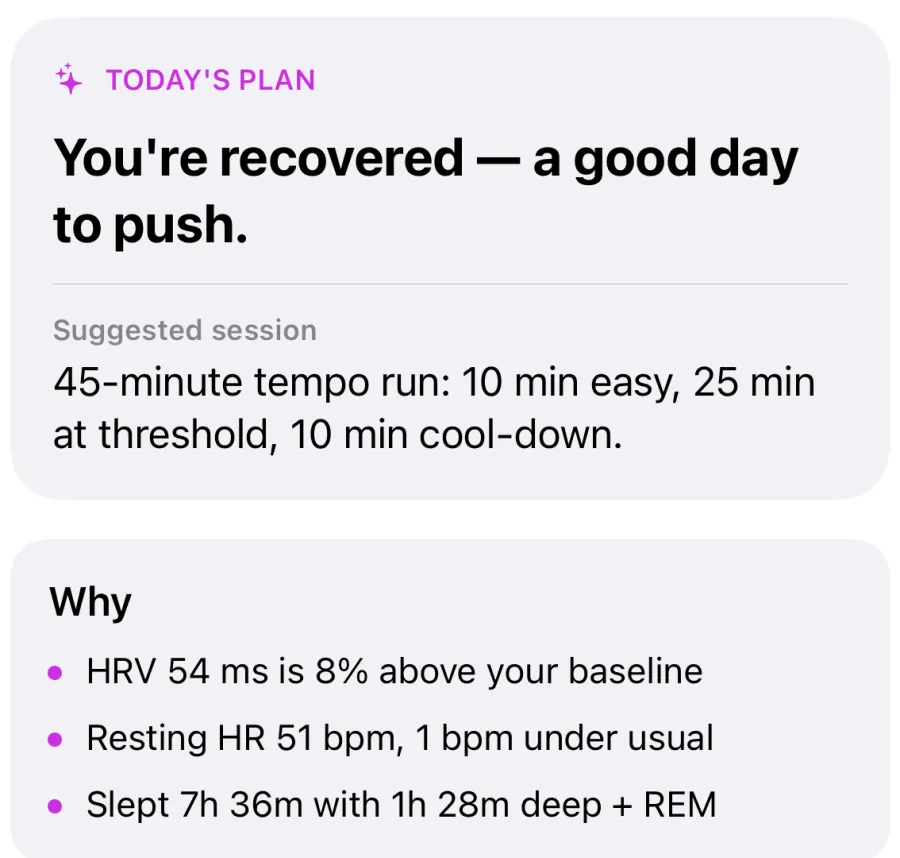
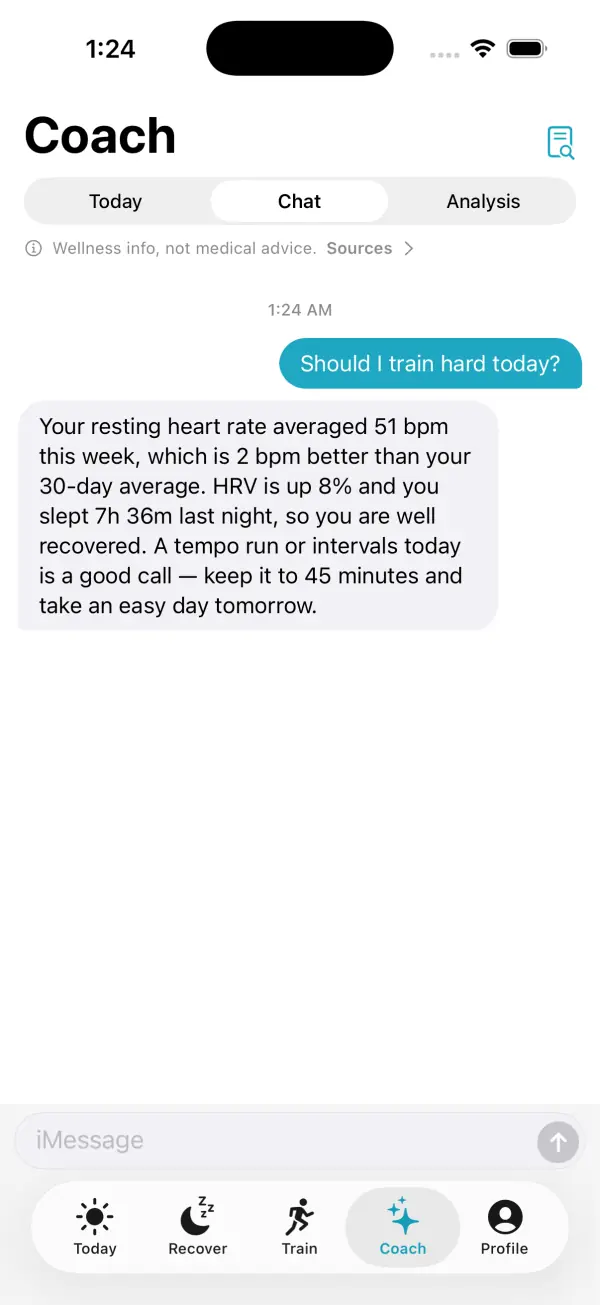
For iPhone and Apple Watch owners, the most useful test is simple: does the coach answer from your own data? A good answer to "Should I train hard today?" names your resting heart rate, HRV, last night's sleep and recent workouts. A weak one gives the same advice it would give anyone.
As of November 2026, the main options fall into three groups. Apps that read the Apple Watch data already in Apple Health: Apple's own Workout Buddy, Athlytic, Bevel, Fitbod and VedaWatch. Coaches tied to their own wearable: WHOOP Coach and Oura Advisor. And Google Health Coach, built for Fitbit and Pixel devices but able to connect to Apple Health. The sections below compare what each one reads, how grounded its answers are, and what happens to your data.
What makes an AI coach grounded in your Apple Watch data?
A large language model on its own knows general fitness advice but nothing about you. An AI coach becomes personal only when the app hands it your numbers. How it does that decides how good the answers are.
Ask four questions about any AI coach before you trust it with your training:
- What data does it actually read? Look for the specific metrics: HRV, resting heart rate, sleep stages, workouts, heart rate zones, steps, body weight, logged meals. "Your health data" is too vague to judge.
- How far back does it look? A coach that sees only today can't tell whether a low HRV reading is unusual for you. Two weeks to a month of history lets it compare today with your own normal.
- Are the scores calculated by the app or invented by the AI? The safest design keeps readiness and recovery scores in a fixed, testable formula and asks the AI only to explain them. A chatbot asked to produce a number can give a different one each time.
- Can it change things without asking? A coach that rewrites your training plan on its own is hard to trust. Look for suggestions you approve or dismiss.
AI fitness coach apps compared (as of November 2026)
These details come from each company's own App Store listing, support page or announcement, checked in November 2026. Features and prices change often, so confirm on the listing before you subscribe. Prices are US App Store prices where the listing shows them clearly.
Each entry covers what the AI does, what data it uses, and the one thing to know before you start:
- Apple Workout Buddy (built into Apple Watch): spoken encouragement during a workout, based on your fitness history and the current session, plus a summary at the end. It covers runs, walks, rides, hikes, HIIT, strength and more. It needs an Apple Intelligence-enabled iPhone, Bluetooth headphones, and English or Spanish as your language. It's a motivator during workouts, not a chat coach or a training planner.
- Athlytic (iPhone and Apple Watch): recovery, sleep and stress insights from Apple Health, with Ask Athlytic for plain-language questions. The listing says Ask Athlytic runs on Apple Intelligence and that your data never leaves your device, and its privacy label says the developer collects no data. Pro is listed at $4.99 a month or $29.99 a year.
- Bevel (iPhone and Apple Watch): health scores and meal logging built on Apple Health, with Bevel Intelligence suggesting when to train or rest and generating training plans. It can also connect Garmin, Oura and Google Health. Bevel Pro is listed at $14.99 a month or $99.99 a year, with extra Bevel Intelligence credit packs sold separately.
- Fitbod (iPhone and Apple Watch): AI-generated strength workouts that vary exercises and adjust to your edits and logged sessions. It integrates with Apple Health. It's a workout planner first, not a recovery or sleep coach. Subscriptions are listed at several price points, so check the current offer.
- WHOOP Coach (WHOOP app): generative AI answers to questions such as why you feel tired, using WHOOP's own sleep, strain and recovery data. The App Store listing states the app requires a WHOOP wearable, so it isn't an option on an Apple Watch alone.
- Oura Advisor (Oura app): an LLM-powered assistant that uses your Oura sleep, activity, readiness and stress data, and keeps "Memories" you can review and delete. Oura says Advisor doesn't share your health information or conversations with other parties. The Oura app is built around the Oura Ring.
- Google Health Coach (Google Health app, formerly Fitbit): a Gemini-based coach for workouts, sleep and health questions. Google says the app connects to Apple Health, and coach features need a Google Health Premium subscription. It's designed around Fitbit and Pixel devices, so check how much it can read from your Apple Watch before paying.
- VedaWatch (iPhone and Apple Watch): a Coach tab with a daily plan, chat, 30-day analysis and weekly reports, answering from your synced Apple Health data. Covered in detail near the end of this guide.
Which AI coach works with Apple Watch without new hardware?
If you already own an Apple Watch, the apps that read Apple Health let you skip a second wearable: Workout Buddy, Athlytic, Bevel, Fitbod and VedaWatch. Your Watch already records the inputs a coach needs, including overnight HRV, resting heart rate, sleep stages, workouts with heart rate, and VO2 max estimates.
WHOOP Coach and Oura Advisor are good at what they do, but they read their own sensor data. Wearing a WHOOP band or Oura Ring alongside an Apple Watch is possible, but you'd be paying for and charging a second device mostly to unlock its coach.
A practical way to choose: if you mainly want motivation during runs and rides, try Workout Buddy first, since it's free on supported devices. If you want gym sessions written for you, look at a planner like Fitbod. If you want to ask "why is my recovery low?" or "what should I do today?" and get an answer that uses your sleep, HRV and training history, you need a chat-style coach that reads Apple Health, such as Athlytic, Bevel or VedaWatch.
Is it safe to share health data with an AI coach?
It can be, but the design varies a lot between apps. There are three broad models. On-device AI, such as Apple Intelligence features, processes data on your iPhone where possible. Server-side AI sends a summary of your data to a cloud model to write the answer. And some apps combine both.
Neither model is automatically safe or unsafe. What matters is what is sent, to whom, whether it's used to train models, and whether you can turn it off. Use this checklist on any AI coach:
- Read the App Store privacy label. It shows which data types are linked to you and whether any are used to track you across other companies' apps and websites.
- Find the AI disclosure. A trustworthy app tells you, before anything is sent, which data goes to which AI provider.
- Check whether it sends summaries or raw data. Daily totals and averages reveal less than every heart-rate sample.
- Look for a training statement. Ideally the app says your data isn't used to train the AI provider's models.
- Make sure you can switch the AI off and still use the rest of the app, and that you can export and delete your data.
What to watch out for with an AI personal trainer
AI coaches are confident writers, and that's the main risk. The companies say so themselves: Oura notes that Advisor can make mistakes, Google labeled its coach's preview content as experimental generative AI, and Bevel's listing states it is not a medical device. Treat answers as suggestions, not instructions.
Check the numbers. If a coach says your HRV is 8% above baseline, open your HRV chart and confirm it. If an answer quotes a metric you don't track, or sounds generic, the app may not have your data at all.
Don't let it replace a clinician. An AI coach shouldn't diagnose symptoms or tell you to start or stop medication. Chest pain, fainting, unusual shortness of breath, a resting heart rate that stays well above your normal for days, or an irregular rhythm notification are reasons to contact a doctor, not to ask a chatbot. If you have a heart condition, are pregnant, or are coming back from an injury, get a professional's input before following any AI plan.
Watch for plans that jump too fast. A sudden increase in weekly training load is a common route to overuse injuries. If an AI suggests doubling your running volume or adding several hard sessions at once, scale it back. Your training load trend is a good cross-check.
Be wary of AI-only scores. A score that comes straight from a chatbot can drift from day to day. Prefer apps where the score comes from a defined formula and the AI explains it.
How to test an AI fitness coach in your first week
Most of these apps have a free trial, so use it as an experiment instead of judging by the first answer. Here's a simple plan you can run with any chat-style coach:
- Day 1: Check permissions. In the Health app, look at which data types the coach can read. Grant what it needs for coaching: workouts, heart rate, HRV, resting heart rate and sleep at minimum.
- Day 2: Ask a factual question you can verify, such as "How much did I sleep last night and what was my resting heart rate?" Compare the answer with the Health app.
- Day 3: Ask a judgment question: "Should I train hard today?" A good answer names at least two of your numbers and explains the trade-off.
- Day 4: Ask about a day you remember, such as a hard workout or a bad night. See whether it finds it and connects it to how you recovered.
- Day 5: Ask something it shouldn't answer, like a symptom. It should decline to diagnose and point you to a professional.
- Day 6: Ask for a plan change, such as moving a long run. Note whether it changes your plan on its own or asks you first.
- Day 7: Decide. Keep the coach only if it got your numbers right, stayed within safe limits, and told you clearly where your data goes.
How VedaWatch's AI Coach helps
VedaWatch is an iPhone and Apple Watch app that turns your Apple Health data into readiness, HRV, sleep and training insights. Readiness and the other scores are calculated by the app's own formula. The Coach tab uses AI to explain those numbers and suggest what to do, rather than inventing its own score.
The Coach tab has three parts. Today gives a daily plan with a suggested session and the reasons behind it from your last 14 days. Chat answers questions about your own data. Analysis writes a 30-day deep dive, and weekly reports review the last 7 days. In Chat, the coach looks up what it needs, such as today's readiness, recent sleep, daily metrics, workouts, logged meals or your journal tags, instead of guessing.
Chat can also suggest changes to your week plan, but it never edits the plan itself. A suggestion appears as a card with Apply and Dismiss, and nothing changes until you tap Apply. If your plan changed in the meantime, the suggestion isn't applied.
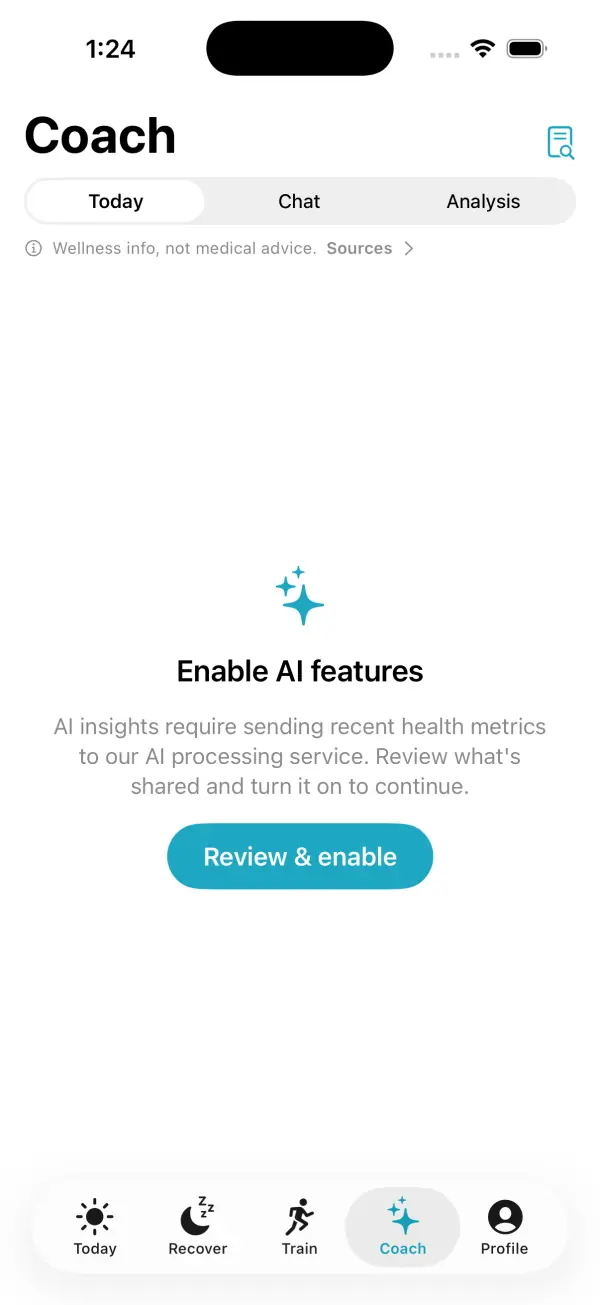
Privacy works on consent. AI features are part of Pro ($6.99 a month or $59.99 a year, with a 7-day free trial) and stay off until you review the AI processing sheet and turn them on. Then daily summaries of the Health data you've chosen to sync are sent to third-party AI models. Your name, email, Apple ID and device identifiers are never sent, and you can turn AI off in Profile at any time while keeping readiness, sleep and training features.
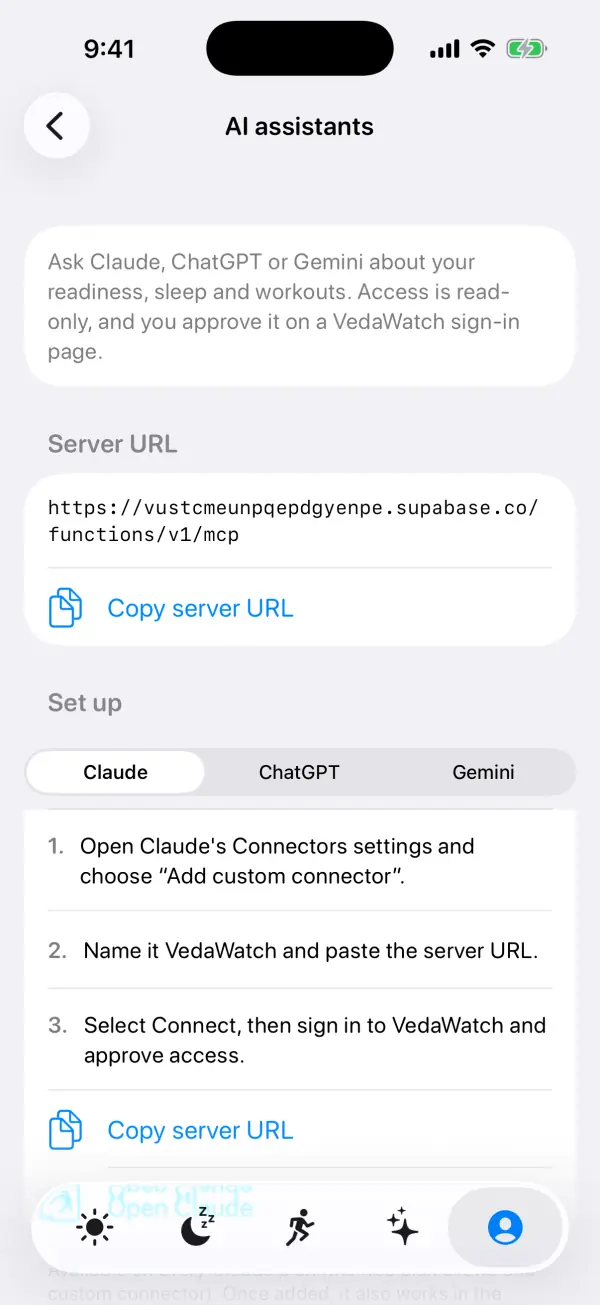
If you prefer a general assistant, you can connect Claude, ChatGPT or Gemini to your VedaWatch data instead. Access is read-only, and you approve it on a VedaWatch sign-in page. They can suggest plan changes only if you turn that option on.
Frequently asked questions
Is there a free AI fitness coach for Apple Watch?
Workout Buddy is built into Apple Watch at no extra cost on supported devices, though it needs an Apple Intelligence-enabled iPhone and Bluetooth headphones. Most chat-style coaches that read your Apple Health data are part of a paid tier, usually with a free trial.
Can ChatGPT or Claude be my AI personal trainer?
They can write workouts and explain training ideas, but on their own they don't know your sleep, HRV or recent workouts. They become personal only when connected to your data, for example through an app that gives them read-only access.
Does an AI coach need my whole Health history?
No. Two weeks to a month of daily summaries is usually enough to compare today with your normal. Be cautious of apps that ask for every data type when they only coach workouts.
Are AI fitness coaches accurate?
The underlying Apple Watch data is good for tracking trends, but AI explanations can still be wrong or overconfident. Treat answers as suggestions, verify the numbers they quote, and ask a professional about anything medical.
Will an AI coach adjust my plan when I'm sick or tired?
Some suggest an easier day when recovery signals drop, but none can know how you feel unless you tell them. If you feel unwell, rest and check with a doctor rather than waiting for an app to notice.
Related guides
- Ask an AI coach about your Apple Watch data: what VedaWatch's Coach can do
- How to connect Claude, ChatGPT or Gemini to your Apple Watch health data
- AI personal trainer vs human coach: an honest comparison
- Can AI read Apple Health data? What each kind of tool shares
- Best recovery app for Apple Watch: an honest 2026 roundup
- Apple Watch Readiness score: what Recover, Pace Yourself, Ready, and Go For It mean
Sources & further reading
- Apple Support: Use Workout Buddy on Apple Watch
- Athlytic: AI Fitness Coach on the App Store
- Bevel on the App Store
- Fitbod on the App Store
- WHOOP on the App Store
- Oura: Meet Oura Advisor
- Google: Introducing the Google Health app
- Google: Fitbit's personal health coach in public preview
This guide is educational, not medical advice, and has not been clinically reviewed. VedaWatch is not a medical device. If you have symptoms or concerns about your heart or health, contact a qualified healthcare professional.
Put your trends in perspective.
Explore HRV, sleep, and recovery with VedaWatch on your iPhone.
Download VedaWatch on the App Store →