 VedaWatch
Using VedaWatch
Ask an AI coach about your Apple Watch data: what VedaWatch's Coach can do
How VedaWatch's AI Coach turns your Apple Watch data into a daily plan, chat answers, 30-day analyses and weekly reports, exactly what data it sends, and how to turn it on or off.
By VedaWatch editorial team · · 8 min read
The short answer
The Coach tab gives you a daily plan (Today), short answers about your own numbers (Chat), a 30-day deep dive (Analysis) and weekly reports. It's part of Pro and stays off until you turn on AI processing, which sends daily summaries of your recent health data, never your name or email, to third-party AI models. It's wellness information, not medical advice.
What the AI Coach is
Coach is one of the five tabs in the VedaWatch iPhone app, next to Today, Recover, Train and Profile. It uses an AI model to explain the data your Apple Watch and iPhone already collect, in plain language, and to suggest what to do with it.
The tab has three parts, picked with the switch at the top: Today, Chat and Analysis. Weekly reports open from the small report icon in the top-right corner. Right under the switch is a one-line reminder: "Wellness info, not medical advice."
Coach doesn't invent a second readiness score. VedaWatch's readiness number lives on the Today and Recover tabs and is calculated by the app's own formula. Coach is given that number and explains what to do about it, so the two stay consistent.
How to turn on the AI Coach
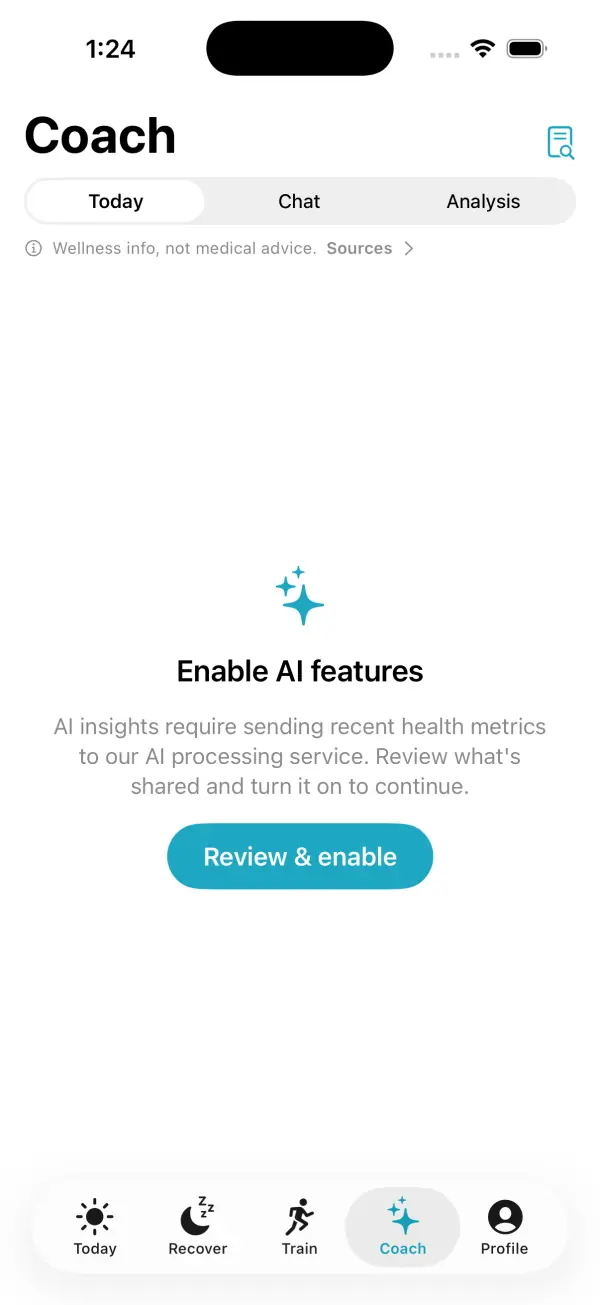
AI features are part of the Pro and Unlimited plans, and they need a free VedaWatch account first. Even on Pro, nothing is sent to an AI service until you agree to it. Until then, each part of the Coach tab shows "Enable AI features" with a Review & enable button.
- Open the Coach tab (the sparkles icon) in the VedaWatch app on your iPhone.
- If you see "Enable AI features", tap Review & enable.
- Read the AI processing sheet. It explains what is sent, what is never sent, and who processes it.
- Tap Enable AI features to agree, or Not now to leave it off.
- Chat, Analysis and weekly reports read the copy of your Health data in your VedaWatch account. If Health sync is off, you'll be asked to Turn on Health sync first.
- Pick Today, Chat or Analysis at the top of the tab to start.
Exactly what data is sent, and what isn't
Nothing is sent until you turn on AI processing, and only Health data you've chosen to sync to your account is ever used. Once you've agreed, each time you ask for a plan, an answer or a report, VedaWatch's server builds a summary from that synced data and sends it, with your request, through the Lovable AI Gateway to Google's Gemini models. If you turn Health sync off, the server stops reading your synced Health data for AI, even data you chose to keep. The summary is daily totals and averages plus a list of workouts, not every raw heart rate reading.
The summary covers whatever you have in Apple Health for the period: activity (steps, active and resting energy, exercise and stand minutes, flights climbed, distance), heart and recovery (resting and walking heart rate, HRV, heart rate recovery, blood oxygen, respiratory rate, wrist temperature, VO2 max, latest blood pressure), sleep stages per night, body measurements (weight, BMI, body fat, lean mass, height, waist), walking and mobility metrics, mindful minutes, environmental and headphone audio levels, nutrition you log (calories, water, protein, carbs, fat), menstrual flow entries, counts of high, low and irregular heart rhythm notifications, and your workouts with type, duration, distance, energy and heart rate.
Some parts add a little more. Today and Chat also send the findings the app already worked out on your iPhone, such as sleep debt or body strain, and your active goals. Chat sends your message and the earlier messages in that conversation. Weekly reports include your active goals too.
What is never sent: your name, email address, Apple ID, device identifiers or contacts. Your plans, chats, analyses and reports are saved to your VedaWatch account so they're there when you come back.
Today: your daily plan
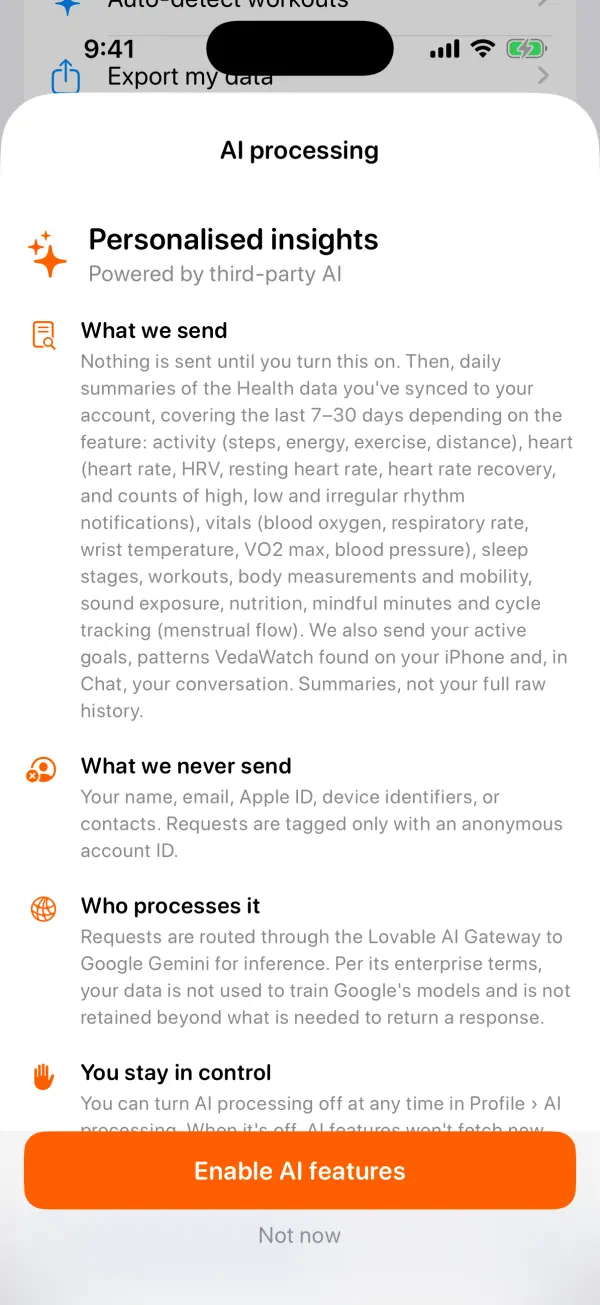
Tap Analyze now and Coach reviews your last 14 days of data, including heart rate, HRV, sleep and workouts, then shows TODAY'S PLAN: a one-line headline and a Suggested session, such as an easy walk or a harder workout.
Below that, Why lists up to four reasons drawn from your own numbers, followed by one to three focus areas (for example sleep or mobility) and the public guidance it drew on under Sources. Coach is told to skip any metric you have no data for rather than guess.
You get one new plan per day, counted in UTC. After that the button reads "Next read available tomorrow", and opening the tab again shows the saved plan without using another one. The same plan also feeds the Coach widget on your Home Screen. If there isn't enough history yet, you'll see "Not enough health data yet" instead.
Chat: ask questions about your own numbers
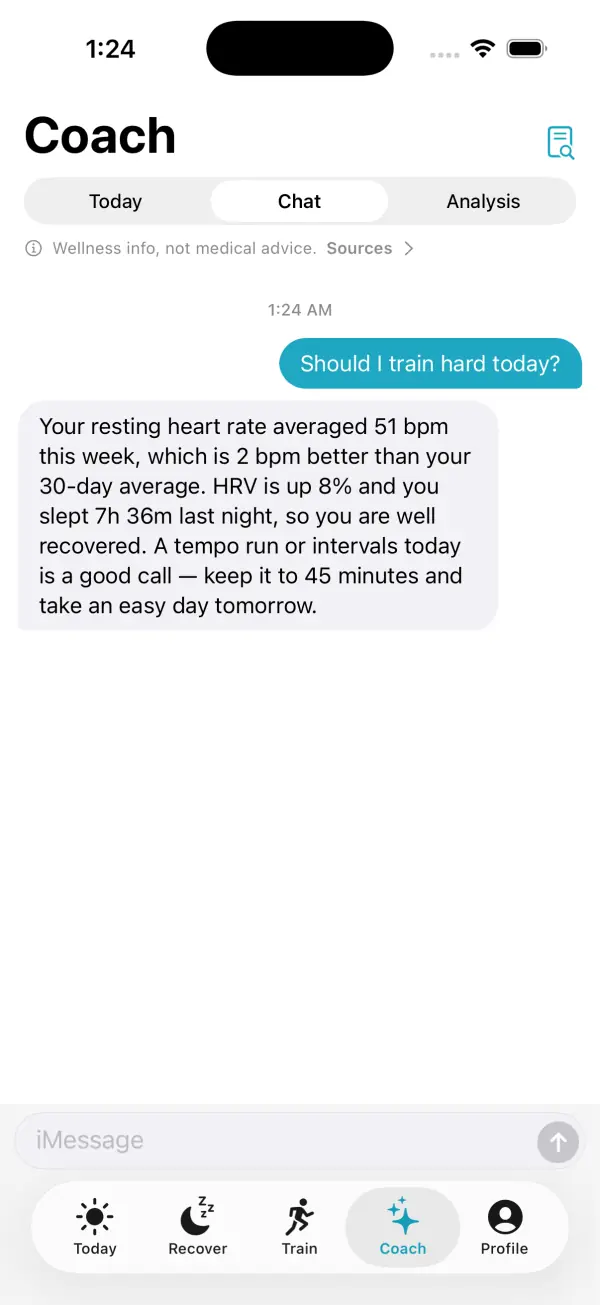
Chat works like a messaging thread. Type a question, or tap one of the suggestions such as "What does HRV actually mean?" or "Tips to lower my resting heart rate". Each answer is grounded in your last 14 days of data and the app's on-device findings, and it quotes your actual numbers when they're relevant.
Answers are kept short on purpose, usually one to three sentences, and you can ask for more detail. For general questions about sleep, training or nutrition, Chat shares well-established guidance and names where it comes from, such as the American Heart Association or sleep medicine guidelines.
Chat won't diagnose, suggest treatments, or recommend medication or supplements. If you describe a symptom, it will point you to a qualified healthcare professional.
Analysis and weekly reports
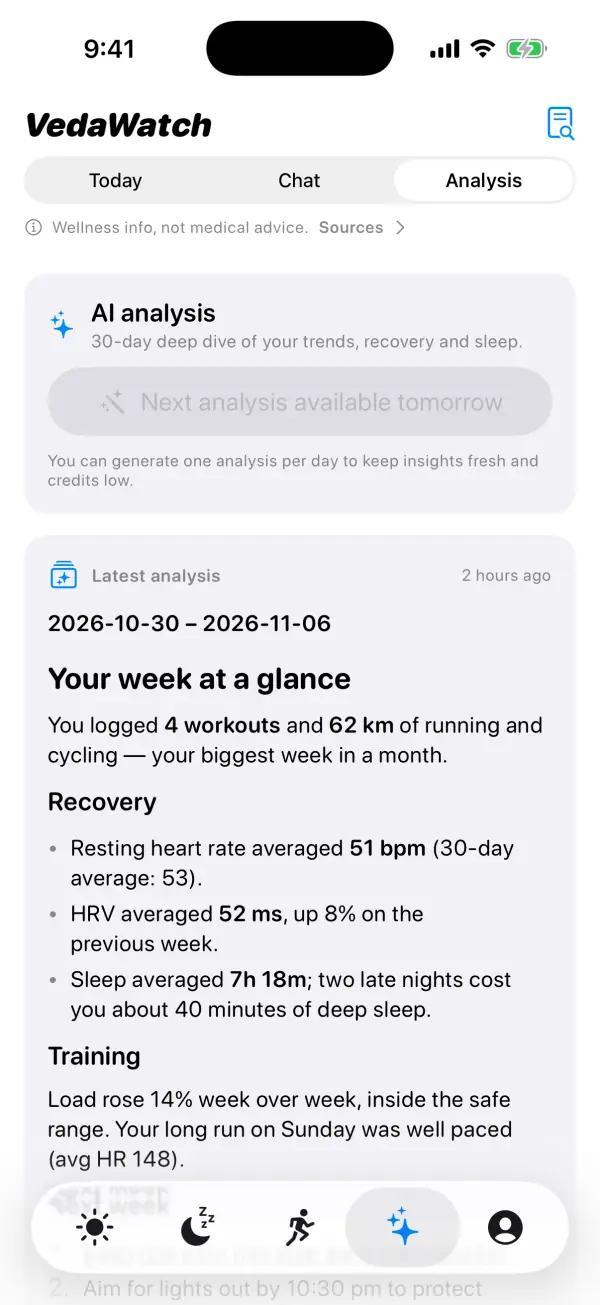
Analysis is a 30-day deep dive. Tap Generate today's analysis and Coach writes a report with stat cards, small charts and tables for the areas where you have data: activity, heart and recovery, sleep, body, mobility, nutrition and workouts. It ends with lifestyle recommendations and a list of sources. The newest one appears right in the tab as Latest analysis, with Open full screen for a closer look, and older ones are listed under Earlier analyses. You can create one analysis per UTC day.
Weekly reports cover the last 7 days. Tap the report icon at the top of the Coach tab, then Generate weekly report. Each report has Highlights, a Goal check-in for your active goals, Activity, Heart & Recovery, Sleep, Recommendations and Sources. Opening a report shows "Your week in numbers" compared with the previous report, buttons to copy or share the text, and Older and Newer to page through past weeks.
Plans and daily limits
The free plan doesn't include AI features. On Pro, you get one Today plan and one analysis per day, 10 chat messages per day, and up to 3 weekly reports per day. Unlimited raises chat to 200 messages and weekly reports to 30 per day. Days are counted in UTC.
Today's plan and Analysis are saved once per UTC day on every plan, so asking again the same day shows the saved one rather than writing a new one. If you hit a limit, the app tells you and points to the Unlimited plan.
VedaWatch's web app has the same Chat, Coach and Analysis sections under AI insights for Pro members.
Medical disclaimer and staying in control
Everything in the Coach tab is general wellness information. It isn't medical advice, a diagnosis or a treatment plan, and it doesn't know about conditions or medications you haven't told it about. Tap "Wellness info, not medical advice. Sources" to open Sources & Disclaimer, which links to the public guidance the coach draws on, from the American Heart Association, the American Academy of Sleep Medicine, ACSM, NIH, the CDC, WHO and US health agencies. If you think you may have a medical emergency, call your local emergency number. Don't rely on the app.
You can turn AI processing off at any time in Profile, under AI features. With it off, Coach, Chat, Analysis and lifestyle AI summaries stop fetching new insights and no health data is sent to AI providers. The choice is saved on your iPhone, so check it on each iPhone you use. What data is sent? in the same section reopens the full explanation.
Common questions about the AI Coach
Does the AI see my whole Health history? No. Today and Chat use the last 14 days, Analysis the last 30 days and weekly reports the last 7, sent as daily summaries plus your workouts.
Is my data used to train AI models? The AI processing sheet says that, under the providers' enterprise terms, your data isn't used to train their models and isn't kept beyond what's needed to return a response.
Why does Coach say there isn't enough data? It needs a few days of heart rate, HRV, sleep or workout data in your account. Check that Health access is allowed for VedaWatch and that Health sync is on, then try again.
Can the coach change my settings or log things for me? No. It only reads your summarised data and writes text: plans, answers and reports.
Sources & further reading
- Apple Support: Intro to Health data on iPhone
- Apple Developer: App Review Guidelines (5.1 Privacy)
- World Health Organization (2021): Ethics and governance of artificial intelligence for health
- U.S. Food and Drug Administration: General Wellness: Policy for Low Risk Devices
- VedaWatch privacy policy
This guide is educational, not medical advice, and has not been clinically reviewed. VedaWatch is not a medical device. If you have symptoms or concerns about your heart or health, contact a qualified healthcare professional.
Put your trends in perspective.
Explore HRV, sleep, and recovery with VedaWatch on your iPhone.
Download VedaWatch on the App Store →