 VedaWatch
Comparisons
Apple Watch vs Garmin Body Battery: recovery features compared
Apple Watch vs Garmin Body Battery, Training Readiness and HRV Status: what each Garmin metric does, what Apple Watch offers natively, and what an app adds.
By VedaWatch editorial team · · 9 min read
The short answer
Apple Watch has no built-in Body Battery. As of November 2026, Apple's closest native features are Readiness (0-10, Series 12 and Ultra 4 only), the Vitals app, Training Load and a nightly Sleep Score. Garmin adds an all-day energy gauge and a 7-day HRV Status. On any Apple Watch, third-party apps can fill those gaps from Apple Health data.
Does Apple Watch have a Body Battery like Garmin?
No. As of November 2026, Apple Watch has no all-day energy gauge that drains and refills like Garmin's Body Battery. What Apple does have is a set of separate pieces: a Readiness score on Apple Watch Series 12 and Ultra 4, the Vitals app with your overnight readings, Training Load for workouts, and a Sleep Score each morning.
Garmin's recovery picture rests on three features: Body Battery (your energy right now), Training Readiness (how ready you are for hard training today) and HRV Status (your heart rate variability trend over a week). Apple covers the second one natively on its newest watches, covers parts of the third, and leaves the first to third-party apps.
This guide maps each Garmin feature to its closest Apple Watch equivalent, shows where the gaps are, and explains how to read both without expecting the numbers to match. If you mainly want to know how an Apple Watch energy gauge works, the Daily Charge guide linked at the end covers that in detail.
How Garmin Body Battery works
Garmin describes Body Battery as a fuel gauge for your body. The watch estimates your reserve energy on a scale of 0 to 100 from heart rate variability, stress level, sleep quality and activity. Garmin's manuals group it into four bands: 0 to 25 is low reserve energy, 26 to 50 medium, 51 to 75 high, and 76 to 100 very high.
Good sleep charges it, while strenuous activity and high stress drain it faster. Garmin's manual also says food and stimulants such as caffeine have no direct effect on the score, and recommends wearing the watch while you sleep for more accurate results. Garmin doesn't publish the formula, so how many points a run or a stressful meeting costs is not something you can check.
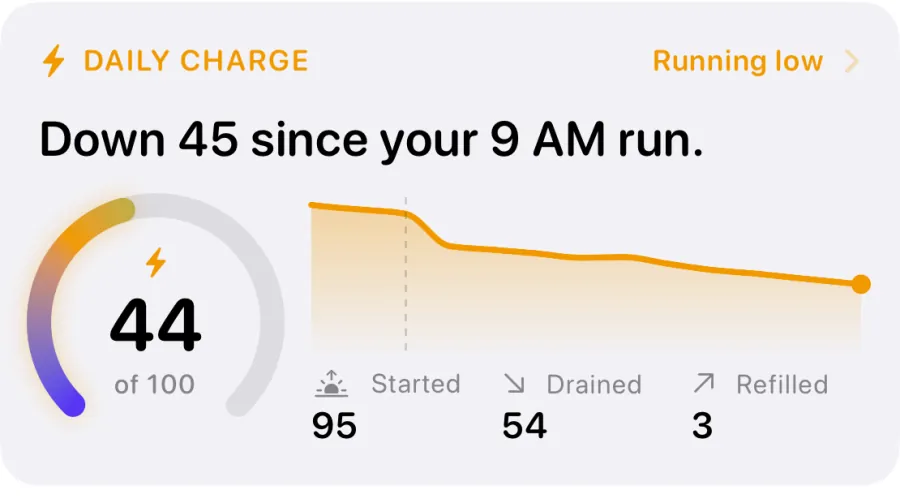
The point of Body Battery is timing within the day. A readiness score tells you how you woke up; an energy gauge tells you how much is left at 3 pm after a run and a long commute. That is the gap Apple Watch leaves open natively.
Garmin Training Readiness vs Apple Watch Readiness
These two are the closest match between the brands. Both are morning-to-evening scores that weigh sleep, recent training and overnight physiology against your own history, and both update during the day.
Garmin's Training Readiness runs from 1 to 100. Its manual lists six factors: last night's sleep score, recovery time, HRV status, acute load, sleep history from the last 3 nights, and stress history from the last 3 days. Apple's Readiness runs from 0 to 10 and, per Apple Support, combines activity (active calories, workout effort ratings and Training Load), daytime and overnight vitals from the Vitals app, and your sleep score and recent sleep history.
The bands line up roughly like this. Neither company says they are equivalent, so treat it as a reading aid, not a conversion table.
- Garmin Prime (95-100, "Best possible") and High (75-94) sit close to Apple's Go For It (8-10).
- Garmin Moderate (50-74, "Good to go") sits close to Apple's Ready (5-7).
- Garmin Low (25-49, "Time to slow down") sits close to Apple's Pace Yourself (2-4).
- Garmin Poor (1-24, "Let your body recover") sits close to Apple's Recover (0-1).
- Apple's score needs Apple Watch Series 12 or Ultra 4, your height, weight and age in Health Details, Activity set up, Sleep turned on, and overnight vitals from at least 7 nights of wearing the watch to bed.
Garmin HRV Status vs Apple Watch HRV
Garmin's HRV Status analyses your wrist heart rate while you sleep and compares your seven-day average HRV with your personal baseline range. It needs three weeks of consistent sleep data before it shows a status. The statuses are Balanced (the seven-day average is within your baseline range), Unbalanced (above or below it), Low (well below it), and Poor (averaging well below the normal range for your age).
Apple Watch records HRV too, and you can see every reading in the Health app on iPhone. As of November 2026, the Vitals app shows overnight heart rate, respiratory rate, wrist temperature, blood oxygen (where available) and sleep duration against a typical range for you. On Series 12 and Ultra 4, overnight HRV replaces sleep duration in Vitals, and daytime heart rate and HRV are added. By default, Vitals notifies you when at least two overnight metrics fall outside your typical range.
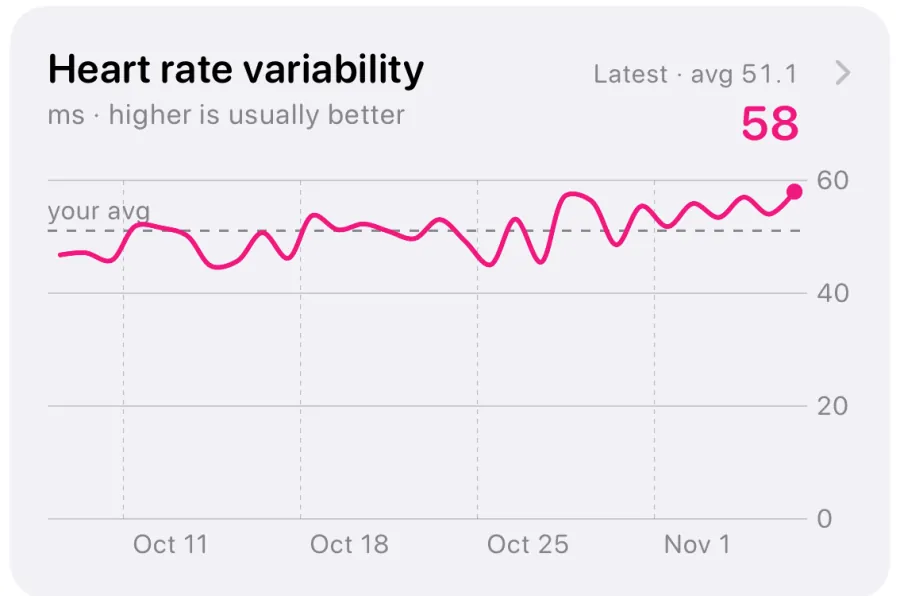
What Apple doesn't offer natively is a named weekly HRV trend like Balanced or Unbalanced. That matters, because single HRV readings jump around from night to night. A review of HRV monitoring in elite endurance athletes recommends judging training adaptation from weekly or rolling 7-day HRV averages rather than isolated single-day values. If you want that view on Apple Watch, you either eyeball the weekly chart in Health or use an app that charts HRV against your own average.
Feature by feature: Garmin, Apple Watch, and Apple Watch with an app
Here is how each Garmin recovery feature maps to Apple Watch as of November 2026. "Native" means built into watchOS and iOS with no extra app.
- All-day energy (Garmin Body Battery): no native Apple feature. Third-party apps can build one from Apple Health sleep, HRV, heart rate and workouts.
- Daily readiness (Garmin Training Readiness): native Apple Readiness, 0-10, on Series 12 and Ultra 4 only. On older Apple Watch models, a third-party recovery score is the only option.
- Weekly HRV trend (Garmin HRV Status): native HRV readings in Health, and overnight HRV in Vitals on Series 12 and Ultra 4, but no named weekly status. Apps can compare HRV with your baseline.
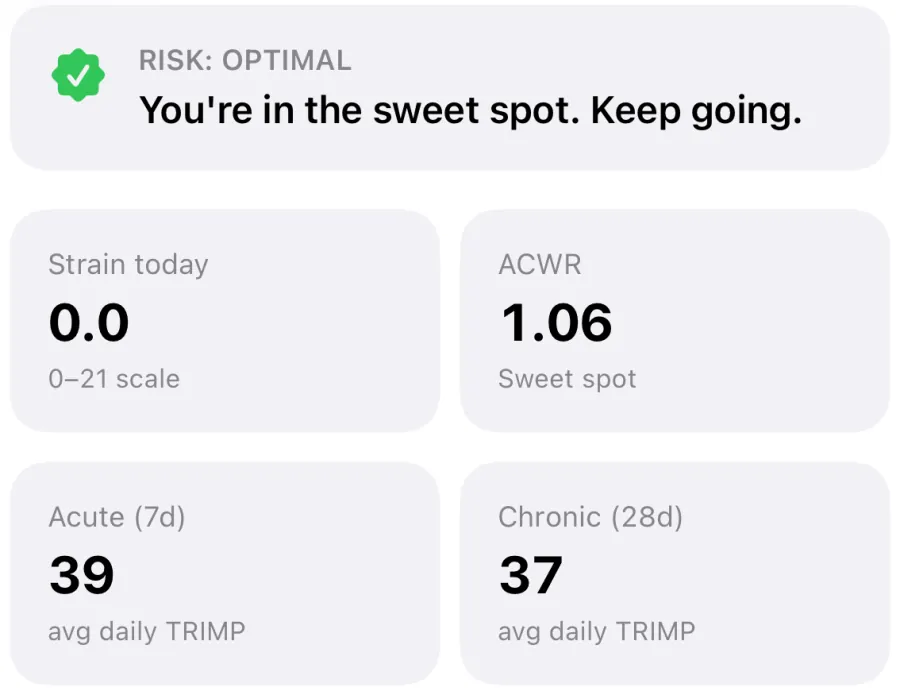
- Training load (Garmin acute load): native Training Load compares your last 7 days of workouts with the previous 28 and labels it from well below to well above, using an effort rating for each workout that you can edit.
- Sleep (Garmin sleep score): native Apple Sleep Score, 0-100, made of duration (50 points), bedtime consistency (30 points) and interruptions (20 points).
- Stress through the day (Garmin stress level): no native Apple stress score. Apps can flag hours when your heart rate runs well above resting while you're not exercising, but they can't tell stress from caffeine, heat or illness.
A worked example: the same hard day on both watches
Picture a Tuesday. You slept 6 hours after a late dinner, your overnight HRV came in well under your usual, and you ran intervals at 7 am. This is how each system would describe it, using only what each company documents.
On Garmin, Training Readiness would likely start lower than usual, since last night's sleep score and HRV status are two of its six factors, and after the intervals recovery time and acute load go up, so it can drop further. Body Battery would start the day with less charge after a short night and fall noticeably during the run. By afternoon, the gauge tells you how much is left for an evening session.
On an Apple Watch Series 12 or Ultra 4, Readiness would likely start lower too: a short night lowers the sleep score, and below-typical vitals lower Readiness. Apple says more activity can reduce the score, so it can slide again after the run. The Sleep Score explains the night, and Training Load shows the run's effort against your last 28 days. What you won't get natively is a single number for how much energy is left at 4 pm.
On an older Apple Watch, you get Training Load, Vitals and the Sleep Score, but no Readiness score. That's where a third-party app does the adding up for you.
In every case, the useful question is the same: is today unusual for you? Comparing a Garmin 62 with an Apple 6 tells you nothing, because the scales, inputs and weighting are different.
Is Garmin or Apple Watch better for recovery tracking?
Garmin has the more complete recovery set out of the box: an energy gauge, a readiness score, a named HRV trend and a stress level, on many watch models, with long battery life that makes overnight wear easy. If you train for endurance events and want every recovery metric on the watch itself, that is a real advantage.
Apple Watch's native set has narrowed the gap in 2026 with Readiness, Vitals, Training Load and Sleep Score, but Readiness is limited to Series 12 and Ultra 4. In exchange you get a full smartwatch and Apple Health as a shared data store that other apps can read with your permission. That openness is what lets an older Apple Watch get a recovery score, an energy gauge and HRV trends without new hardware.
Two things matter more than the brand. First, wear the watch to bed: all three Garmin features and Apple's Readiness lean on overnight data, and Garmin's HRV Status needs three weeks of it. Second, read the trend, not the day. A single low score after a late night is normal; several low days in a row with a higher resting heart rate deserve an easier week.
None of these scores is a medical device or a diagnosis. Apple says Readiness should not be solely relied on to decide whether it is safe to exercise. If you have chest pain, unusual breathlessness, dizziness, or readings that stay off for days alongside feeling unwell, stop training and talk to a doctor.
Getting Garmin-style recovery on any Apple Watch with VedaWatch
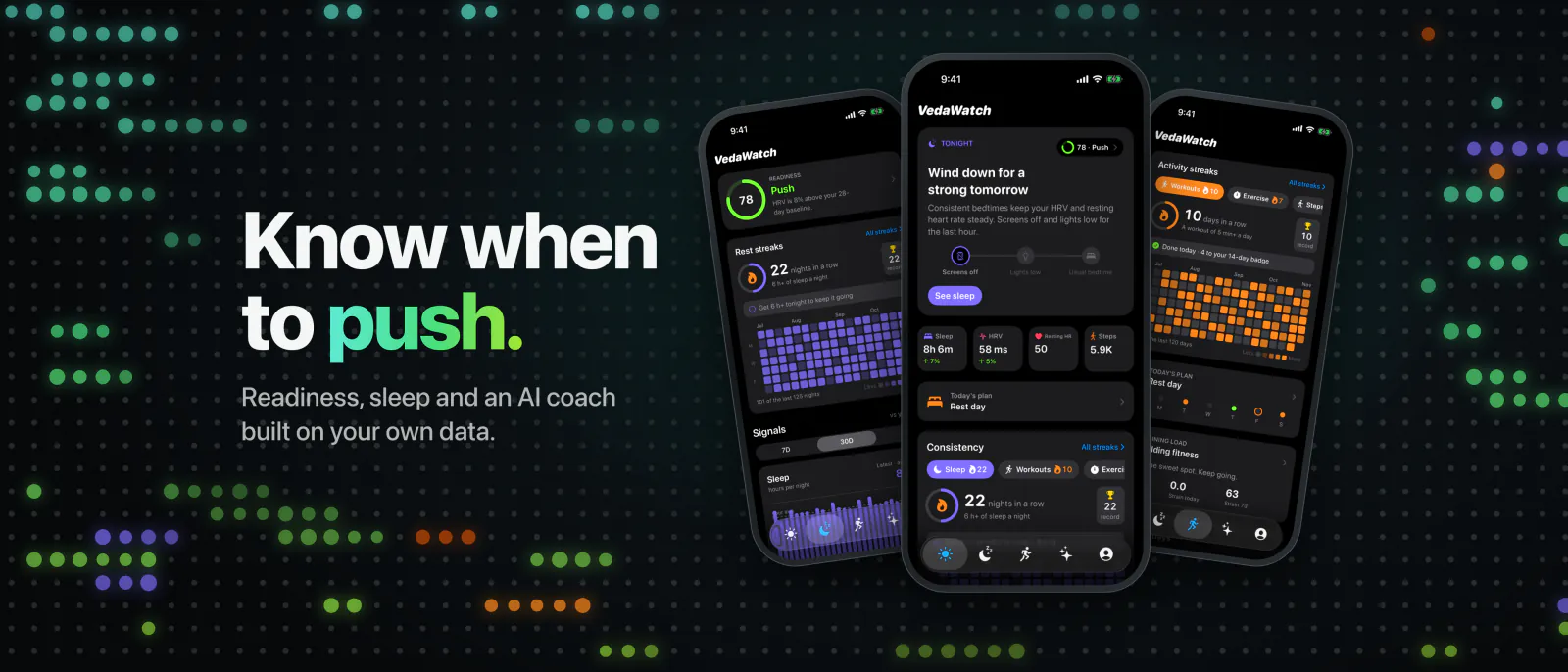
If you have an Apple Watch and miss Garmin's recovery features, VedaWatch reads the data your watch already saves to Apple Health and adds the missing pieces on your iPhone.
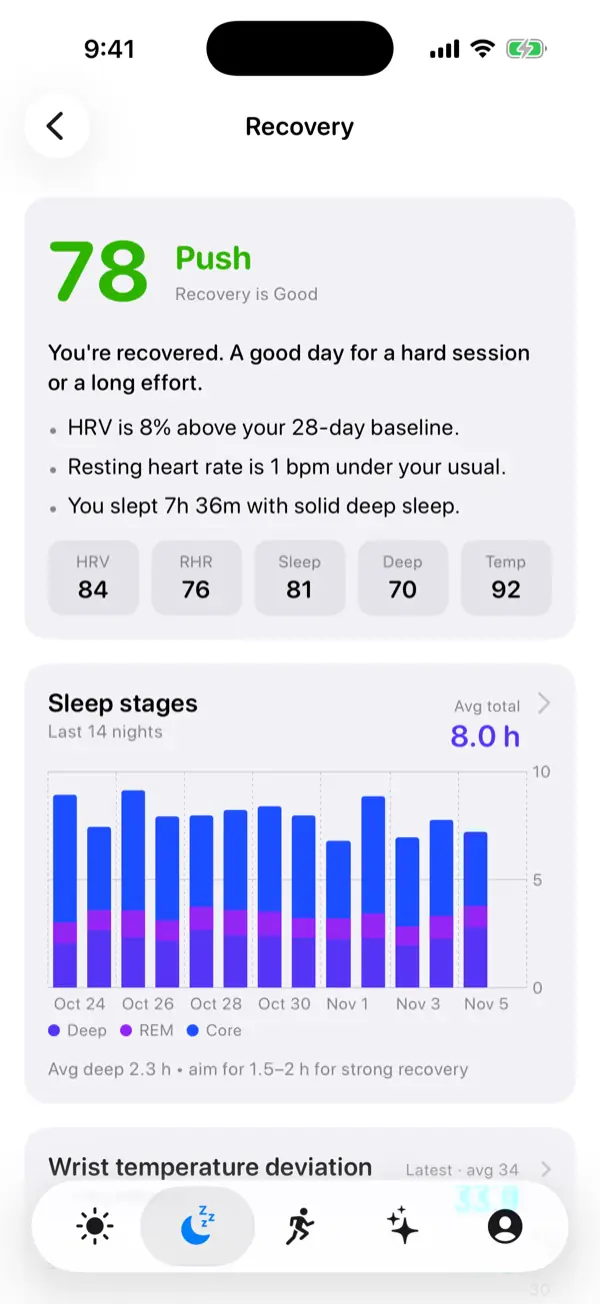
Readiness: a 0 to 100 recovery score built from HRV, resting heart rate, sleep and deep sleep compared with your own recent baseline, with a Push, Hold or Rest verdict and the plain reasons behind it, such as how far your HRV sits above or below your baseline. It works on any Apple Watch that records HRV, resting heart rate and sleep, not only the newest models.
Daily Charge: a 0 to 100 energy gauge, similar in idea to Body Battery, that starts from last night's sleep and HRV and drains with time awake, workouts and raised heart rate. Its formula is VedaWatch's own, so the number isn't comparable with Garmin's. The Daily Charge guide explains exactly what moves it.
HRV and training load: charts of your HRV against your own average, and a training load view that compares your last 7 days with the last 28. Like Garmin's and Apple's scores, all of these are wellness guides, not medical advice.
Frequently asked questions
Can I see Garmin Body Battery on an Apple Watch?
No. Body Battery is calculated by Garmin from its own watch sensors and shown in Garmin Connect. On Apple Watch you need a third-party energy gauge built from Apple Health data, and its numbers won't match Garmin's.
Is Apple Readiness the same as Garmin Training Readiness?
They answer the same question with different scales: Apple uses 0 to 10 in four bands, Garmin 1 to 100 in five. Inputs overlap (sleep, recent load, overnight physiology), but the weighting differs, so compare each with its own history.
Why doesn't my Apple Watch show a Readiness score?
As of November 2026, Apple's Readiness runs only on Apple Watch Series 12 and Ultra 4, and needs at least 7 nights of overnight vitals plus Sleep, Activity and Health Details set up. Older models don't get it.
Should I wear a Garmin and an Apple Watch together?
You can, but you'll get two sets of numbers that won't agree. Most people are better served by one device worn consistently, including overnight, so its baselines stay reliable.
How long before recovery scores are reliable on a new watch?
Give it a few weeks of overnight wear. Garmin's HRV Status needs three weeks of consistent sleep data, Apple's Readiness needs at least 7 nights, and any baseline gets steadier with more nights.
Related guides
- Body battery on Apple Watch: how VedaWatch's Daily Charge energy score works
- Apple Watch Readiness score: what Recover, Pace Yourself, Ready, and Go For It mean
- Apple Watch vs Whoop: do you need a separate recovery band?
- Apple Watch Training Load and ACWR, explained (and why sports scientists argue about it)
- Best recovery app for Apple Watch: an honest 2026 roundup
- How long it takes to establish your HRV baseline
Sources & further reading
- Garmin fenix 7 Series Owner's Manual: Body Battery
- Garmin Instinct 2 Series Owner's Manual: Training Readiness
- Garmin vivoactive 5 Owner's Manual: Heart Rate Variability Status
- Apple Support: Understand your readiness score on Apple Watch
- Apple Watch User Guide: Vitals
- Apple Watch User Guide: Track your training load
- Apple Watch User Guide: View your sleep score on Apple Watch
- Plews DJ, Laursen PB, Stanley J, Kilding AE, Buchheit M. Training adaptation and heart rate variability in elite endurance athletes. Sports Medicine, 2013
This guide is educational, not medical advice, and has not been clinically reviewed. VedaWatch is not a medical device. If you have symptoms or concerns about your heart or health, contact a qualified healthcare professional.
Put your trends in perspective.
Explore HRV, sleep, and recovery with VedaWatch on your iPhone.
Download VedaWatch on the App Store →