 VedaWatch
Sleep
Apple Watch sleep apnea notifications: what they mean
How Apple Watch sleep apnea notifications and the Breathing Disturbances metric work, how accurate they are, what they can't tell you, and what to do next.
By VedaWatch editorial team · · 10 min read
The short answer
Apple Watch uses its motion sensor to count breathing disturbances each night and labels nights Elevated or Not Elevated. Every 30 days, if at least half of 10 or more tracked nights were elevated, it notifies you of possible moderate to severe sleep apnea. It's a prompt to see a doctor, not a diagnosis.
What Apple Watch sleep apnea notifications are
Sleep apnea notifications are an Apple Watch feature that looks for signs of moderate to severe obstructive sleep apnea while you sleep. The Watch doesn't listen to you snore or measure your oxygen for this. It uses its accelerometer, the motion sensor, to pick up the tiny movements at the wrist that go with each breath, and counts how often that rhythm is interrupted. Apple calls the nightly result Breathing Disturbances.
The feature has two parts. The first is the nightly Breathing Disturbances measurement, which you can look at in the Health app on your iPhone. The second is the notification itself: every 30 days the Watch reviews the month and, if the pattern looks like moderate to severe sleep apnea, it tells you so you can talk to a doctor.
In the US it's an FDA-cleared medical feature. The FDA cleared Apple's Sleep Apnea Notification Feature through the 510(k) pathway on September 13, 2024, as an over-the-counter device to assess the risk of sleep apnea. Apple said at launch that it would be available in more than 150 countries and regions. Cleared is not the same as diagnostic, though: Apple's own support page says it isn't intended to diagnose, treat or help manage sleep apnea.
What the Breathing Disturbances metric measures
A breathing disturbance is a temporary interruption in your normal breathing pattern during sleep. Apple's algorithm turns the accelerometer signal into a count of these events per hour of sleep, so each night gets a number in events per hour, and the Health app sorts each night into Elevated or Not Elevated. Apple doesn't publish the exact cut-off, and it doesn't describe any number of events as normal for the Watch metric.
It looks a lot like the apnea-hypopnea index (AHI), the measure a sleep study uses, but Apple is explicit that Breathing Disturbances aren't the same as AHI. A sleep study counts apneas (breathing stops) and hypopneas (shallow breathing with a drop in blood oxygen) using sensors for airflow, breathing effort and blood oxygen. The Watch only has wrist movement to work with. For context, a sleep study calls fewer than 5 events an hour normal, 5 to under 15 mild, 15 to under 30 moderate, and 30 or more severe. The notification aims at the moderate and severe range, 15 or more events an hour.
Apple did check how close the nightly number gets. In its validation study, 1,193 of 1,305 participants (91.4%) had Breathing Disturbances values inside a pre-set accuracy zone around their home sleep test result, a zone that allows more error as the true AHI gets higher.
Night-to-night swings are expected. Apple lists alcohol, upper respiratory illnesses such as a cold, and some medications as things that can raise breathing disturbances, and its technical paper adds exercise and changes in body weight as factors that can shift the level over time. One Elevated night after a party or with a blocked nose isn't a signal on its own.
How the Watch decides to send a notification
Apple's technical paper spells out the rule. The analysis runs in fixed 30-day blocks, not a rolling window, starting 30 days after you set the feature up. Within each block it needs at least 10 nights with a Breathing Disturbances value. The nights don't have to be in a row. If at least half of those nights are elevated, you get a notification of possible sleep apnea. If not, it stays silent and starts again with the next block.
Fewer than 10 tracked nights in a block means no verdict at all, not an all-clear. That's the first thing to check if you wonder why you've never heard anything: Apple's support page says you need to wear the Watch to sleep on at least 10 nights in each 30-day period.
Here is how three different months would play out:
- Month A: you wear the Watch on 24 nights and 6 are elevated (25%). Fewer than half, so no notification.
- Month B: you wear the Watch on 14 nights and 8 are elevated (57%). At least half, so you get a Possible Sleep Apnea notification.
- Month C: you wear the Watch on only 8 nights, and all 8 are elevated. Under the 10-night minimum, so there's not enough data and no notification, even though every tracked night was elevated. In a case like this, look at the Breathing Disturbances chart yourself rather than waiting for an alert.
Which Apple Watch models support it, and how to turn it on
Apple's support page lists Apple Watch Series 9 or later, Apple Watch Ultra 2 or later, and Apple Watch SE 3, with the latest versions of watchOS and iOS. The feature is for people 18 or older who haven't been diagnosed with sleep apnea. You also need Sleep set up in the Health app with Track Sleep with Apple Watch turned on. Older models such as Series 8 or the earlier SE don't offer it.
To set it up on your iPhone:
- Open the Health app, tap Browse (or Search), then tap Respiratory.
- Under Sleep Apnea Notifications, tap Set Up, then Next.
- Confirm your date of birth and answer whether you've ever been diagnosed with sleep apnea, then tap Continue.
- Tap Next, then Done.
- Wear your Watch to bed with enough charge for the night. Charging it during your evening routine is the easiest way to reach 10 nights a month.
- To see your data, go to Health, then Browse, Respiratory, Breathing Disturbances. You can view the past month, 6 months or year, and Export PDF at the bottom of the screen creates a report you can share with a clinician.
How accurate are Apple Watch sleep apnea notifications?
Apple validated the finished feature in a study of 1,499 adults who wore an Apple Watch for up to 30 nights and did at least two nights of home sleep apnea testing, scored by certified technologists. The results are in Apple's technical paper and the FDA clearance summary.
Specificity was high. Among people with normal breathing, 543 of 543 (100%) got no notification. Among people with mild sleep apnea, 91.0% got none. Apple's weighted overall specificity was 98.5%. In plain terms, a notification is rarely a false alarm for someone whose breathing is truly normal; in the study, everyone who got one had at least mild sleep apnea.
Sensitivity was lower, and this is the part most people miss. The Watch caught 89.1% of people with severe sleep apnea, but only 43.4% of those with moderate sleep apnea, for a weighted overall sensitivity of 66.3%. So of 10 people with moderate sleep apnea, roughly 4 would get a notification and 6 wouldn't. Apple says it chose this trade-off on purpose, favouring fewer false positives because the feature checks you again every month.
Two caveats. The study used home sleep tests with a strict scoring rule for hypopneas, and real life adds things a study controls, such as how often you wear the Watch to bed. And the feature isn't tested or cleared for people who already have a diagnosis, so it can't tell you whether CPAP or another treatment is working.
What the notification can't tell you
It's worth being clear about the limits, because they shape what you should do next.
- It can't diagnose sleep apnea. Only a clinician with a sleep study can. The American Academy of Sleep Medicine recommends that questionnaires and prediction algorithms not be used to diagnose sleep apnea without a sleep study.
- No notification doesn't mean no sleep apnea. Apple says not everyone with sleep apnea will get one, and the study numbers show moderate cases are missed more often than caught.
- It isn't built to flag mild sleep apnea. It targets the moderate to severe range, so mild sleep apnea, which can still matter if you have symptoms, is outside its job.
- It doesn't consider symptoms. Apple's paper notes the feature doesn't take your symptoms into account. Loud snoring, gasping or daytime sleepiness matter even if the Watch is silent.
- It doesn't tell you what kind of sleep apnea you might have or how severe it is. Apple describes the notification only as signs of possible moderate to severe sleep apnea; type and severity come from a sleep study.
- It isn't for monitoring a known diagnosis. If you already have sleep apnea, neither the notification nor the Breathing Disturbances metric is intended or cleared for you, so follow your care team's way of tracking treatment.
What to do if you get a sleep apnea notification
Don't panic, and don't ignore it. The NHLBI describes sleep apnea as a common condition in which breathing repeatedly stops and starts during sleep, and it is treatable. Left untreated, Apple's paper notes, it can raise the risk of high blood pressure, heart attack and stroke. A 2019 analysis in The Lancet Respiratory Medicine estimated that 936 million adults aged 30 to 69 worldwide have obstructive sleep apnea, 425 million of them moderate to severe, so you'd be far from alone.
A practical plan for the next few weeks:
- Export the report: Health, Browse, Respiratory, Breathing Disturbances, then Export PDF. It shows your nightly values over the period.
- Book an appointment with your primary care doctor and say you'd like to be checked for sleep apnea. They may refer you to a sleep specialist.
- Keep a simple sleep diary for a week or two: bedtime, wake time, how rested you feel and how sleepy you get during the day. The NHLBI lists a sleep diary as something that helps with diagnosis.
- Ask a bed partner what they notice: loud snoring, gasping, choking or pauses in breathing. That's useful information the Watch can't collect.
- Write down your medicines and how much alcohol you usually drink in the evening. Your doctor will ask, because both can affect breathing at night.
- Expect a sleep study. AASM guidelines recommend either an in-lab sleep study (polysomnography) or a home sleep apnea test for most adults with signs of moderate to severe sleep apnea. If a home test is negative or inconclusive, the guideline recommends an in-lab study.
- If you feel very sleepy while driving, don't wait for the appointment to act: avoid driving drowsy and mention it to your doctor.
When to see a doctor even without a notification
Because the notification misses a lot of moderate cases and isn't designed for mild ones, your symptoms are just as important as the Watch. The NHLBI suggests talking to a provider if you have loud snoring, gasp for air during sleep, or are excessively sleepy during the day. Untreated sleep apnea can also affect concentration, memory and decision-making.
Also look at your Breathing Disturbances chart once in a while instead of waiting for an alert. A run of elevated nights you can't explain by alcohol, a cold or a new medicine is worth mentioning at your next check-up, along with the exported PDF, even if the 30-day rule never tipped over into a notification.
If you are under 18 or already diagnosed, the feature isn't meant for you at all, so rely on your clinician. And if a partner ever sees you stop breathing for long stretches, or you wake up choking, contact a doctor promptly rather than waiting for data.
How VedaWatch fits alongside Apple's feature
VedaWatch doesn't read Breathing Disturbances or sleep apnea notifications, and it doesn't screen for sleep apnea. Apple's Health app is the place for those. What VedaWatch adds is the context around your nights, read from Apple Health, which can help you and your doctor see the bigger picture.
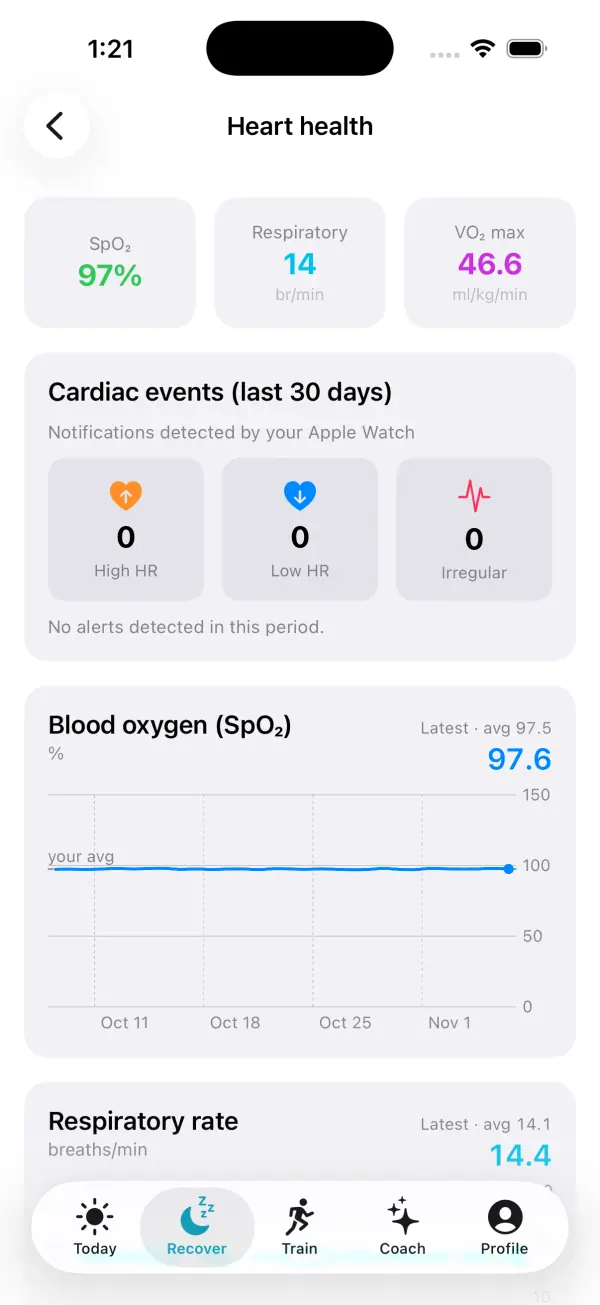
On the Recover tab, Heart health shows your respiratory rate and blood oxygen as trends against your own average, plus any high heart rate, low heart rate and irregular rhythm notifications your Watch recorded in the last 30 days. The Last night card shows sleep stages, when you went to bed compared with usual, and whether your breathing rate and wrist temperature were normal for you.
Daily tags let you log things Apple Health can't see, such as Alcohol, Feeling ill or a late meal, which are among the same factors that can push breathing disturbances up. If an Elevated night in Health lines up with a tagged night, that's a useful note for your appointment. Like everything in VedaWatch, these are patterns in your own data, not a diagnosis.
Frequently asked questions
Can Apple Watch detect sleep apnea?
It can flag signs of possible moderate to severe sleep apnea on supported models, but it can't diagnose it. A diagnosis needs a clinician and a sleep study at home or in a lab.
Why haven't I gotten a sleep apnea notification?
Most often because breathing disturbances weren't elevated on at least half of your tracked nights, or because you wore the Watch to sleep fewer than 10 nights in a 30-day block. It's also possible to have sleep apnea and get no notification, so symptoms still count.
Does a single Elevated night mean I have sleep apnea?
No. Alcohol, a cold or some medications can raise breathing disturbances for a night or two. The notification only looks at the pattern across a 30-day period.
Can I use breathing disturbances to check whether my CPAP is working?
No. Apple says the feature isn't intended or cleared for people already diagnosed with sleep apnea. Your CPAP device and your sleep team are the right way to track treatment.
Does Apple Watch sleep apnea detection use blood oxygen?
No. Apple's notification is based on accelerometer data, the wrist movements that go with breathing, not on blood oxygen readings.
Related guides
- Apple Watch sleep stages: what Awake, REM, Core, and Deep mean
- Normal respiratory rate during sleep, and what Apple Watch shows
- Apple Watch blood oxygen: normal SpO2, sleep and accuracy
- How alcohol affects sleep: REM, waking at 3 am and your heart
- Apple Watch sleep tracking: how accurate is it, and what to do when it's wrong
- Apple Watch Vitals app explained: typical range and outliers
Sources & further reading
- Apple Support: Sleep apnea notifications on your Apple Watch
- Apple: Estimating Breathing Disturbances and Sleep Apnea Risk from Apple Watch (September 2024)
- U.S. FDA 510(k) K240929: Sleep Apnea Notification Feature (Apple Inc.)
- Apple Newsroom: Apple introduces groundbreaking health features (September 2024)
- NHLBI (NIH): Sleep Apnea
- NHLBI (NIH): Sleep Apnea Diagnosis
- Kapur VK et al. Clinical Practice Guideline for Diagnostic Testing for Adult Obstructive Sleep Apnea (AASM). J Clin Sleep Med, 2017
- Benjafield AV et al. Estimation of the global prevalence and burden of obstructive sleep apnoea. Lancet Respir Med, 2019
This guide is educational, not medical advice, and has not been clinically reviewed. VedaWatch is not a medical device. If you have symptoms or concerns about your heart or health, contact a qualified healthcare professional.
Put your trends in perspective.
Explore HRV, sleep, and recovery with VedaWatch on your iPhone.
Download VedaWatch on the App Store →