 VedaWatch
Workouts & Training
Apple Watch running power explained: watts vs pace vs heart rate
Apple Watch running power explained: what the watts mean, which models show it, how to add the Power view, and when to pace by power, pace or heart rate.
By VedaWatch editorial team · · 8 min read
The short answer
Running power is Apple Watch's estimate of the work you're doing as you run, shown in watts during Outdoor Run workouts on Apple Watch SE and Series 6 or later. It reacts instantly to hills and changes in effort, while heart rate lags and pace ignores terrain. Use it to keep effort steady on rolling routes, but compare it only with your own past runs, not with other brands.
What is running power on Apple Watch?
Apple describes running power as the output of the work you're doing when you run, measured in watts. In practice it's a single number for how hard you're pushing right now, a bit like the power meter on a bike, except that on a run it's estimated from the Watch's sensors rather than measured by a strain gauge.
Apple added running power in watchOS 9 as an Outdoor Run metric. Apple calls it an instantaneous measure of how much power you generate during your run. Because it responds second by second, it moves the moment you start a climb or ease off, which is what makes it useful for pacing.
A higher number means more work per second. How many watts you produce depends on your speed, the gradient and your own size and running style, so there's no universal good number. A light runner and a heavy runner at the same pace will see different values, and that's expected.
Which Apple Watch models show running power?
According to Apple's watchOS 9 release notes, the Running Power view needs Apple Watch SE or Apple Watch Series 6 or later. The same models get the running form metrics added at the same time: stride length, ground contact time and vertical oscillation. Older models such as Series 4 and Series 5 can run watchOS 9 but don't get these metrics.
Apple's Workout app guide describes running power as part of the Outdoor Run workout. If you're on a treadmill using Indoor Run, don't expect to see it in the same way.
Apple doesn't publish the formula behind the number. It does say the Watch uses your height, weight, sex and age for estimates such as calories, so keep those details current in the Watch app (Health Details) on your iPhone. It's a sensible precaution for any estimate that depends on who is running.
How to show running power in the Workout app
The Outdoor Run workout has a dedicated Power view. Apple lists it as showing a power profile over the last 30 minutes, your current power and your running cadence. You choose which views appear before you start, and can reorder them.
- Open the Workout app on your Apple Watch.
- Turn the Digital Crown to Outdoor Run, then tap the Views button.
- Scroll through the workout views and tap Include next to Power. Add Elevation and Heart Rate Zones too if you want to compare them during the run.
- Start the run and turn the Digital Crown to move between views. The Power view shows the last 30 minutes as a profile, so you can see at a glance whether your effort has been steady.
- If you prefer a custom workout, Apple says alerts can include pace, power, heart rate and cadence, which is a way to get a tap on the wrist when your effort drifts.
Running power vs pace vs heart rate: what's the difference?
Each metric answers a different question. Pace tells you how fast you're covering ground. Heart rate tells you how hard your body is working to supply that effort. Power is an estimate of the mechanical work you're producing right now, before your heart has caught up.
Pace is honest about speed but blind to terrain. A minute per kilometre slower on a steep climb can be the same effort as flat running, or harder. Heart rate captures the total load on your body, including heat, tiredness and dehydration, but it responds slowly: it takes time to climb at the start of an effort and keeps rising after you've crested a hill.
Heart rate also drifts. During long steady exercise, heart rate tends to creep upward even when the workload stays the same, a pattern exercise physiologists call cardiovascular drift. That's useful information about fatigue and heat, but it means a fixed heart rate target can push you to slow down late in a long run even though your output hasn't changed.
Power sits between the two. It reacts as quickly as pace but, unlike pace, it's meant to reflect the extra work of going uphill. That makes it a good partner to heart rate rather than a replacement.
Running power on hills and in wind
Hills are where power earns its place. Lab measurements show that the energy cost of running rises steeply on uphill gradients and falls on gentle downhills. If you hold the same pace up a climb, your effort jumps; if you hold the same power, your pace drops and your effort stays roughly level. On a rolling route, steady power usually means a slower climb and a quicker, relaxed descent.
Steep descents are the exception. The same research found that once downhill slopes get steep, the cost of running starts to rise again as your legs work to brake. A power number may not reflect that braking load or the muscle soreness that follows, so ease off on long, steep descents whatever the watch says.
Wind is harder to judge. Classic treadmill and wind-tunnel work found that the oxygen cost of running against the wind rises with the square of wind speed, and that tucking in about a metre behind another runner almost removed air resistance at middle-distance speeds. Apple doesn't say whether its running power accounts for wind, so on a blustery day treat a headwind like a hill: let pace slow, and lean on heart rate and breathing to check the effort.
- On a climb, glance at power rather than pace, and aim to keep it close to your flat-ground number.
- Expect pace to drop on the way up. That's the point, not a failure.
- Over the top, let power settle back to its normal level rather than surging.
- On steep descents, relax and shorten your stride; don't chase a power target.
- Into a strong headwind, run by feel and heart rate as well as power.
How to use running power for training
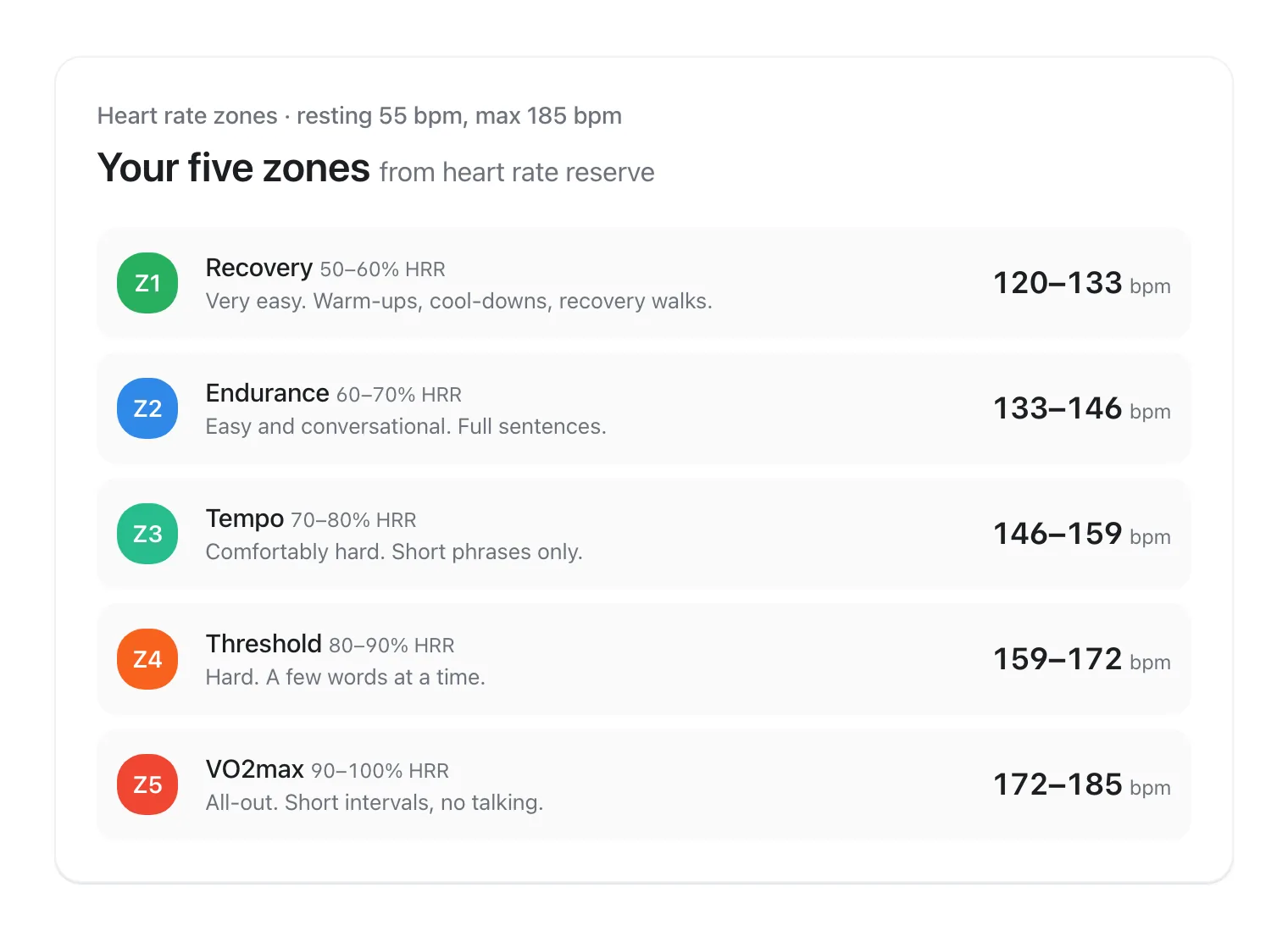
The simplest use is to keep easy runs genuinely easy on hilly routes. Run a few easy, flat runs at a comfortable, conversational effort and note your typical power. On hillier days, use that number as a ceiling on the climbs. Your easy run pace guide and heart rate zones still decide what easy means; power just stops a hill from turning an easy run into a hard one.
For steady efforts such as tempo runs or a parkrun on an undulating course, power helps you avoid going out too hard. Note your average power over a recent all-out 5K or a hard, even-paced 20 to 30 minutes, and use that as a reference for how hard harder sessions should feel. Keep the comparisons on similar routes and conditions.
Unlike cycling, Apple's Workout app doesn't document power zones for running. Apple's power zones, based on functional threshold power, are a cycling feature. For running, you'll be working from your own numbers, so a small notebook or a note on your phone with your typical easy and hard power on familiar routes goes a long way.
Use power together with heart rate, not instead of it. If your power is steady but your heart rate is much higher than usual, you may be tired, hot, dehydrated or getting ill. That's a signal to ease off, not to push through.
Limits of running power: why watts don't compare across brands
There's no agreed standard for running power. Apple, Garmin, Polar, Coros and Stryd each estimate it in their own way, so 250 W on one device isn't 250 W on another. Don't compare your Apple Watch numbers with a friend's Garmin, or with power targets from a plan written for a foot pod.
The devices also differ in how repeatable they are. A 2020 study in the European Journal of Sport Science tested five commercial running power technologies in 12 trained runners on a treadmill and a track. Stryd was the most repeatable and tracked oxygen uptake most closely; the Polar, Garmin and RunScribe estimates related to oxygen uptake to some degree, but their low repeatability questioned how suitable they were. Apple Watch wasn't included, and we're not aware of a comparable published validation of Apple's running power.
Because it's an estimate, treat small differences as noise. A change of a few watts between runs means little; a consistent shift over weeks on the same route means more. Switching watches, changing your weight in Health Details or a software update can all move your numbers, so reset your reference values after any of these.
How VedaWatch fits with running power
VedaWatch doesn't read or display running power at the moment. Use Apple's Workout app for live power, and VedaWatch for the heart rate side of the picture, which is the part power can't tell you.
The VedaWatch app on Apple Watch shows live heart rate zones, your current pace over roughly the last 30 seconds next to your average pace, and an elevation page with ascent, climb rate and grade on runs. During easy and long runs started from your plan, Zone 2 coaching nudges you to slow down or speed up when your heart rate stays outside the zone for about 20 seconds, after a 5-minute warm-up.
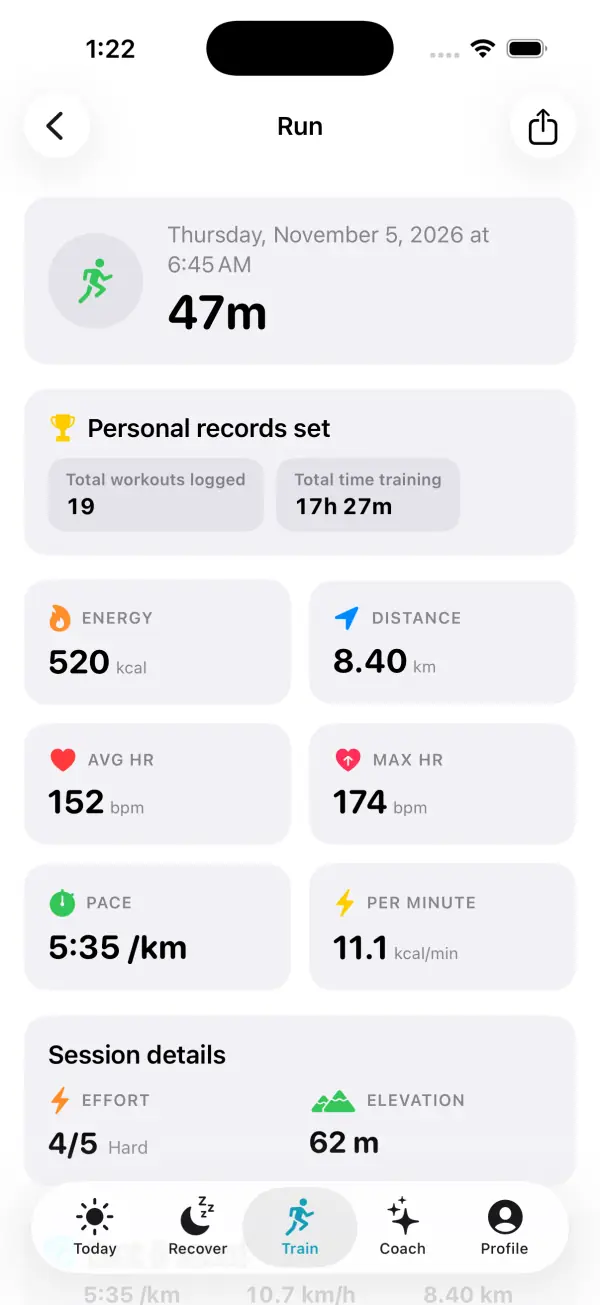
After the run, each workout in the iPhone app shows energy, distance, average and maximum heart rate, pace, a heart rate chart and time in each zone. If a hilly easy run shows a lot of time above Zone 2, that's the same story a power reading would tell during the run: the climbs were harder than they needed to be.
Frequently asked questions
What is a good running power on Apple Watch?
There's no universal good number, because watts depend on your body size, speed, terrain and the device. Compare your power only with your own past runs on similar routes.
Why doesn't my Apple Watch show running power?
Running power needs Apple Watch SE or Series 6 or later with watchOS 9 or later, and it's part of the Outdoor Run workout. Add the Power view by tapping Views on Outdoor Run in the Workout app and choosing Include.
Is running power better than heart rate for training?
Neither is better on its own. Power reacts instantly and suits hills and steady pacing, while heart rate reflects fatigue, heat and illness. Most runners do best using both.
Can I compare Apple Watch running power with Garmin or Stryd?
No. There's no standard method for estimating running power, and each brand calculates it differently, so the watts aren't interchangeable.
Does running power account for hills?
That's its main advantage over pace: power rises when you climb at the same speed. Apple doesn't publish its formula, so very steep descents and strong wind may not be reflected fully.
Does Apple Watch have running power zones?
Apple documents power zones based on functional threshold power for cycling, not running. For runs, you can add power alerts to a custom workout and use your own reference numbers.
Related guides
- Easy run pace: how slow should easy runs be?
- Apple Watch heart rate zones explained: what each zone means and how to set them
- How to run a faster 5K: an 8-week plan with Apple Watch
- Zone 2 training with Apple Watch: find your heart rate range and stick to it
- Apple Watch heart rate wrong? 9 fixes for accurate readings
- Training for a 5K, 10K or half marathon with Apple Watch: a plan that adapts to your recovery
Sources & further reading
- Apple Support: Workout views and running metrics on Apple Watch
- Apple Support: Run with Apple Watch
- Apple Support: About watchOS 9 updates
- Apple Newsroom: watchOS 9 delivers new ways to stay connected, active, and healthy (2022)
- Apple Support: Get the most accurate measurements using your Apple Watch
- Cerezuela-Espejo V, et al. Are we ready to measure running power? Repeatability and concurrent validity of five commercial technologies. European Journal of Sport Science, 2020
- Minetti AE, et al. Energy cost of walking and running at extreme uphill and downhill slopes. Journal of Applied Physiology, 2002
- Pugh LG. The influence of wind resistance in running and walking and the mechanical efficiency of work against horizontal or vertical forces. Journal of Physiology, 1971
- Coyle EF, González-Alonso J. Cardiovascular drift during prolonged exercise: new perspectives. Exercise and Sport Sciences Reviews, 2001
This guide is educational, not medical advice, and has not been clinically reviewed. VedaWatch is not a medical device. If you have symptoms or concerns about your heart or health, contact a qualified healthcare professional.
Put your trends in perspective.
Explore HRV, sleep, and recovery with VedaWatch on your iPhone.
Download VedaWatch on the App Store →