 VedaWatch
Workouts & Training
Training for a 5K, 10K or half marathon with Apple Watch: a plan that adapts to your recovery
How VedaWatch builds a race plan for your first 5K, a faster 5K, a 10K or a half marathon: base, build, peak and taper phases, realistic paces, and sessions that adjust to readiness.
By VedaWatch editorial team · · 8 min read
The short answer
Pick a race goal and a race day, and VedaWatch splits the weeks into base, build, peak, taper and race week, each with its own volume and session mix. Each morning your readiness and training load can swap a hard session for an easy one, and the hard session moves to a later day this week instead of disappearing.
What a race plan is, and why it has a date
Most running plans are a fixed calendar: Tuesday intervals, Sunday long run, whatever happens. VedaWatch's Training plan starts from the outcome instead. You pick what you're training for, such as Run my first 5K, Run a faster 5K, Run a 10K or Finish a half marathon, and the day you want to run it.
The race day gives the plan its shape. The weeks between today and the race are split into phases, the volume rises and falls on purpose, and the last weeks get lighter so you arrive fresh. If you don't have an official race, pick the day you'll run the distance yourself.
Then the plan meets your real life. Each morning it checks your readiness score and your training load and decides whether today's planned session still makes sense. Two non-race goals, Build Zone 2 base and Get stronger, use the same weekly engine without a race day.
How to set up a training plan in VedaWatch
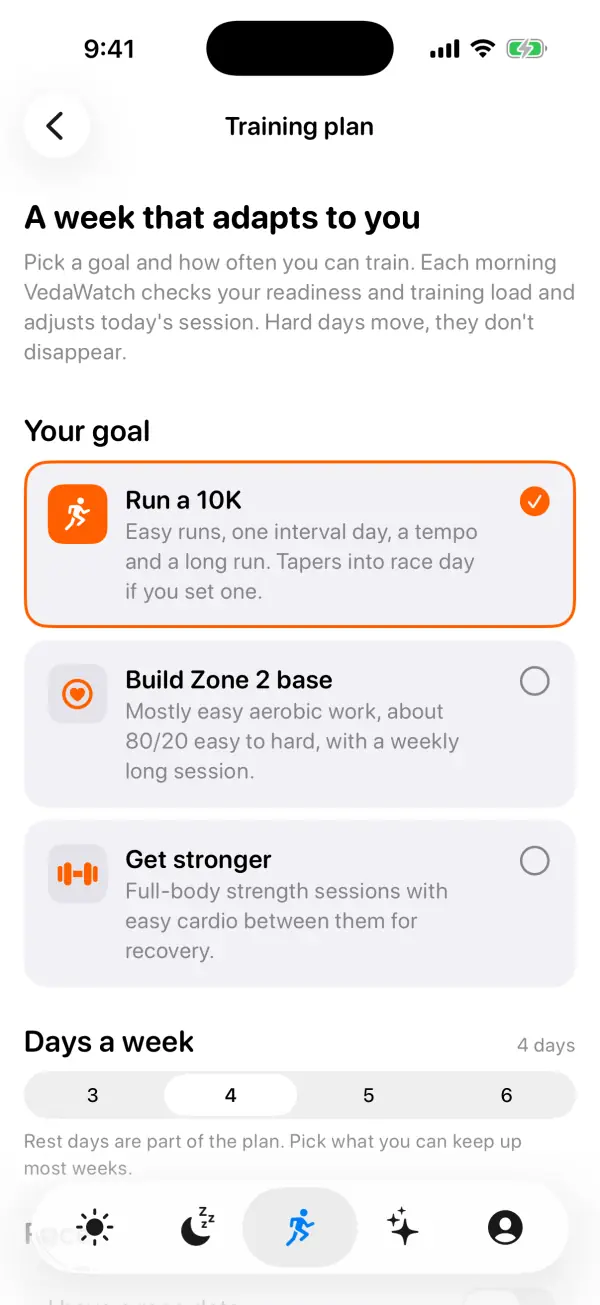
Setup is a short guided flow: goal, race day and target time, days a week, then a preview of your first week. Ongoing goals skip the race-day step. The Training plan is a Pro feature; on the free plan, the screen shows the upgrade page instead.
- Open the Train tab and tap the Training plan card.
- On What are you training for?, pick a race goal (first 5K, faster 5K, 10K or half marathon) or an ongoing one.
- On When's race day?, tap one of the week chips (one is marked Recommended) or pick a date with Race day. Training time shows how many weeks that gives you.
- Optionally, turn on Set a target time (I have a time in mind for a first 5K) and choose a finish time. If VedaWatch has an estimate from your runs, you can tap Use this as my target.
- On How many days a week?, choose 3 to 6 days. Each option shows a small strip of which weekdays carry a session, and one is marked Good fit.
- Check Here's your first week, including The road to race day, then tap Start my plan. You can change it later with Edit on the plan screen.
Base, build, peak, taper and race week
Every race plan ends with race week, and plans of four weeks or more have a taper week before it (two for a half marathon of 10 weeks or more). Peak, build and base fill the weeks that are left, with base being the first to shrink when time is short. VedaWatch recommends 8 weeks for a 5K, 10 for a 10K and 12 for a half marathon, and lays out at most 30 weeks.
With the recommended 12 weeks for a half marathon, that works out as 4 weeks of base, 3 of build, 2 of peak, 2 of taper and race week. The plan screen shows this as a phase timeline, along with a one-line purpose for the phase you're in.
Base is easy running to build your engine. In this phase, hard interval sessions are swapped for steadier tempo or easy runs, except in a faster 5K plan. Build adds faster sessions and a longer long run. Peak holds your biggest weeks with work at race pace. Taper steps volume down to about 82% and then 70% of your peak, and race week drops to 60%, with the long run and tempo turned into easy runs and two calm days before the race.
Within base and build, volume follows a simple 3:1 rhythm: three weeks that grow a little, then a lighter week at about three-quarters of the volume. Each new block starts slightly higher. If you pick a date shorter than recommended, the plan tells you so kindly. Below the minimum (4 weeks for a 5K, 6 for a 10K, 8 for a half), it focuses on getting you to the start line fresh rather than peaking.
Target times and realistic paces
A target finish time is optional. Without one, sessions use paces from your recent runs, or heart rate zones until you've logged a few. A first 5K plan doesn't need a time at all: finishing is the goal and sessions are guided by effort.
When you do set a time, VedaWatch converts it to an equivalent 5K using Riegel's formula and derives four paces from it, shown under Your paces: Easy & long (chatty, relaxed), Tempo (comfortably hard), Intervals (hard, short reps) and Race pace. For a 50-minute 10K target, that's roughly 5:55–6:35 per km for easy runs, 5:05–5:15 for tempo, 4:35–4:45 for intervals and 5:00 for race pace. Paces are rounded to 5 seconds so they don't look falsely precise, and show per mile if your region uses miles.
To keep the target honest, VedaWatch estimates what you could run on race day. It looks at running workouts from the last 8 weeks that cover at least a quarter of the race distance (and at least 2 km), and at your latest VO2 max from the past three months. Real runs weigh more than VO2 max when both are available, and the estimate adds a modest gain for the weeks of training ahead. If your target is far faster than that, you'll see a gentle note suggesting a more realistic time or a later race. You can still go for it.
Training paces work best as guardrails. In line with research on how endurance athletes spread their training, most of the week stays easy, and keeping easy days truly easy matters more than nailing every interval.
What a week looks like
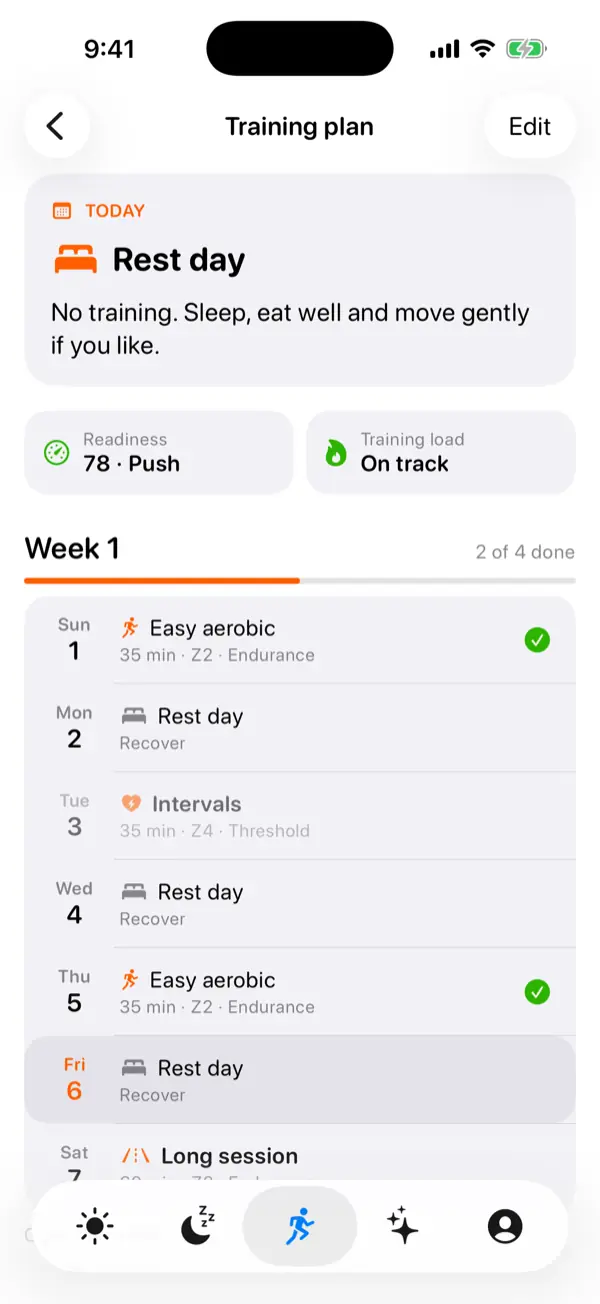
The plan screen leads with your race countdown, such as Week 5 of 12 with the days to go and your goal time, then today's session. Each session shows its length, a heart rate zone such as Z2 Endurance, a pace when one applies, and a plain description, for example warming up, then 3-minute hard reps in Zone 4 with 2 minutes easy between.
Below that are the two inputs behind today's decision, Readiness and Training load, then the week day by day with a progress bar such as 2 of 4 done. A session counts as done when Apple Health has workouts that day adding up to at least half its planned minutes.
Hard days are always spread apart and the long session sits at the end of the week. In the build phase, a 10K plan on four days is an easy run, intervals, another easy run and a long run, with rest days between. A first 5K starts with run–walk sessions, 2 minutes of easy running and 1 minute of walking, and adds gentle pickups from the build phase.
How sessions adapt to readiness and training load
Each morning VedaWatch compares today's planned session with your readiness verdict (Push, Hold or Rest) and your training load band. A Rest verdict turns any session into very easy recovery. A Hold verdict turns intervals or a tempo into an easy run, cuts a long session by a quarter, and lightens strength work. If yesterday was hard, a hard session today becomes easy, and if your load is spiking well above your usual, key sessions become easy whatever readiness says.
It works the other way too. On a Push day with load climbing, key sessions are about 15% shorter. On a Push day after your load has dropped, easy and long runs can be a little longer.
A hard session that's swapped out isn't lost. It moves to a later easy, recovery or rest day this week, avoiding days next to another hard session. In the week list it shows as planned versus now, with the reason, and today's card offers a Do the planned … instead button if you'd rather stick to the original. If there's no room left in the week, it's skipped, and that's fine.
Race day itself never moves. On a low-readiness race morning you just get a note to start easier and run by feel. While your readiness baseline is still calibrating, or before today's score arrives, the plan runs as written and suggests going by feel. Once today's decision is made with a real readiness score, it stays put for the day.
Using your plan on Apple Watch
The plan lives on your iPhone, which reads your runs, VO2 max, readiness and training load from Apple Health. Today's session is sent to your Apple Watch, where it appears at the top of the VedaWatch workout picker as a one-tap start. While it runs, the watch shows the duration target and taps your wrist when you reach it.
From today's card on iPhone you can also open a guided version of the session, with every step, timer and zone, and start it on Watch or iPhone. When you're signed in, the plan is saved to your account so it follows you to a new phone. The running snapshot used for estimates stays on each device.
Common questions about race plans
Can I change my race date or days a week mid-plan? Yes. Tap Edit on the plan screen. Your start week is kept, so week numbers don't reset. Edit also has End plan; your workouts stay in Health.
Why does my plan have no phases? Phases need a race goal with a race date. Ongoing goals instead grow a little each week, with a lighter week every fourth.
Why are there no pace targets on my sessions? Without a target time and without recent runs or VO2 max, sessions go by heart rate zone. Run with your Watch a few times and pace targets appear.
What happens after race day? The hero card congratulates you and offers Set your next goal. Until you set one, the week turns into easy running so you can recover.
Is this medical advice? No. The plan is general training guidance. Stop and rest if you feel pain or unwell, and talk to a doctor before starting hard training if you have a health condition.
How the plan fits with the rest of VedaWatch
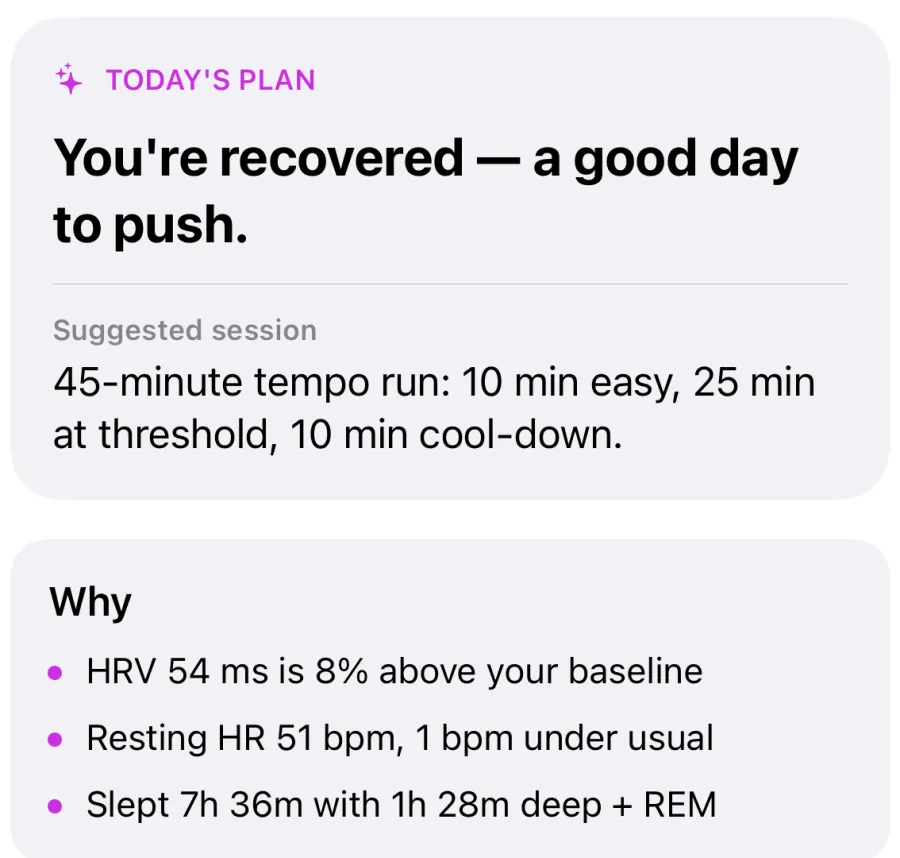
The plan doesn't guess how recovered you are. It uses the same readiness score as the rest of the app, built from your HRV, resting heart rate and sleep against your own baseline, and the same training load bands you see on the Train tab.
On the Today tab, your plan session shows up next to your readiness, so you see both in one place. The AI coach offers a second opinion with its reasons spelled out, which helps when you're deciding whether to trust a hard day.
If your plan keeps swapping hard sessions for easy ones, that's useful information too. Look at your sleep and training load trends before pushing the next block harder.
Sources & further reading
- International Journal of Sports Physiology and Performance (2010): What is best practice for training intensity and duration distribution in endurance athletes? (Seiler)
- Medicine & Science in Sports & Exercise (2007): Effects of tapering on performance: a meta-analysis (Bosquet et al.)
- Düking et al. 2020, Scandinavian Journal of Medicine & Science in Sports: Predefined vs. data-guided training prescription based on autonomic nervous system variation: A systematic review
- British Journal of Sports Medicine (2016): The training-injury prevention paradox: should athletes be training smarter and harder? (Gabbett)
- Apple Support: Track your cardio fitness levels
This guide is educational, not medical advice, and has not been clinically reviewed. VedaWatch is not a medical device. If you have symptoms or concerns about your heart or health, contact a qualified healthcare professional.
Put your trends in perspective.
Explore HRV, sleep, and recovery with VedaWatch on your iPhone.
Download VedaWatch on the App Store →