 VedaWatch
Workouts & Training
How to stay consistent with workouts: set a weekly training target
Set a weekly training target in VedaWatch: pick how many days a week you'll train, what counts, optional training days and reminders, and build a streak of weeks kept.
By VedaWatch editorial team · · 7 min read
The short answer
Consistency comes from a number you can actually keep. In VedaWatch, pick how many days a week you'll train (3 is a solid start), and any guided session or 20+ minute workout from Apple Health counts. Missing one day is forgiven, reminders stop once your week is done, and every week you hit adds to your streak.
Why a weekly target beats a daily one
Most people don't stop exercising because of one bad workout. They stop because a few busy days turn into a lost week, and a lost week makes it easy to give up. A target counted per week gives you room to move sessions around without feeling like you've failed.
Habit research points the same way. In a well-known study of people building new daily habits, the time it took for a behaviour to feel automatic varied widely, from a few weeks to several months, and missing a single day didn't meaningfully set people back. Repetition over time mattered more than a perfect record.
It also helps to decide in advance when you'll train. Psychologists call this an implementation intention: a simple "if it's Monday at 6 pm, I train" plan. Choosing training days and a reminder time does exactly that.
This guide is about building a routine, not medical advice. If you're new to exercise or have a health condition, check with a professional about what's right for you.
The This week card at a glance
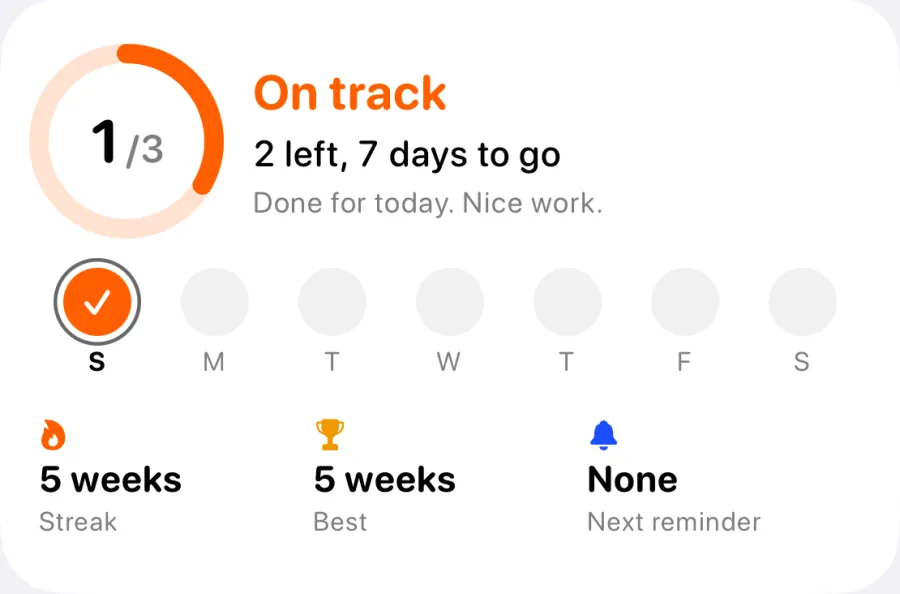
Your week lives on the This week card near the top of the Train tab. The ring shows days trained against your target, such as 1/3, and the status says where you stand in plain words.
There are four statuses. On track means you're keeping pace. Behind means you've slipped but can still finish the week. Week done means you hit your target, and anything more is a bonus. Fresh start soon means the target can no longer be reached this week, so the card simply tells you a new week is coming.
Below that you'll see a line like "2 left, 7 days to go", a dot for each day of the week with trained days filled in, your next reminder, and your weekly streak. Weeks follow your calendar's own week, so they start on Monday in most of Europe and on Sunday in the US.
Tap the card to open the Weekly target screen. If you haven't set one yet, the card reads Set a weekly target instead.
What counts as a training day
The target is "train on N days a week", so each day counts once, however many sessions you fit in. Two workouts on Tuesday still add one to your week.
A guided session counts when you complete at least one work step or it runs for 10 minutes or more, so an accidental start doesn't count. Guided sessions save their own workout to Apple Health.
Other workouts count too: runs, rides, classes and anything else in Apple Health, as long as that day has 20 minutes or more of workouts. If you'd rather only count guided sessions, turn off Count other workouts on the Weekly target screen.
Days are your local calendar days, based on when the workout started.
How to set your weekly training target
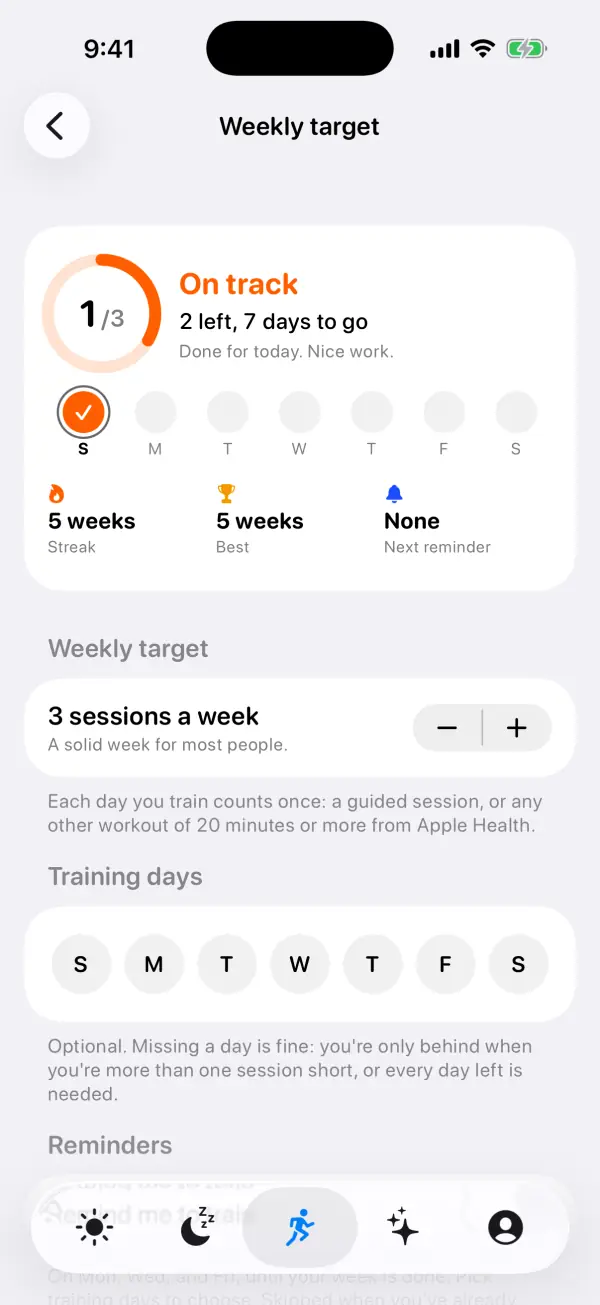
Everything is on one screen, and changes save as you make them. The default is 3 sessions a week, and you can pick anything from 1 to 7.
Once you plan your week or follow a training plan, your planned days are the target. There's no separate number to keep in step: a plan with 4 sessions plus one day of your own makes a target of 5 that week, and skipping or adding a day changes it. The number you pick here applies only to weeks with nothing planned.
- Open VedaWatch on your iPhone and go to the Train tab.
- Tap the This week card, or tap Weekly target under Guided training.
- Under Weekly target, use the − and + buttons to choose how many sessions a week you want (with days planned, this shows your planned days instead). The hint underneath changes with your choice, from "A steady start. Easy to keep." for 1–2 to "Every day. Make most of them easy." for 7.
- Under Training days, tap the days you plan to train. This is optional. If you follow a training plan, Use my plan's days fills them in for you.
- Under Reminders, turn on Remind me to train and pick a time. Allow notifications when iOS asks.
- Under What counts, leave Count other workouts on if your runs, rides and classes should count, or turn it off to count guided sessions only.
Training days and how forgiving it is
Training days are a plan, not a test. Missing one is fine. VedaWatch works out how many sessions you'd expect to have done by now from your chosen days, and the week only reads Behind when you're more than one session short of that, or when every day left in the week is needed to finish.
If you don't pick days, the expected pace is spread evenly across the week. With a target of 3, for example, you'd be expected to have about one session done by the end of the third day.
The week is never marked as failed while your target can still be reached. When it can't, the card says "Do what you can" and that a new week starts on the first day of your week.
How training reminders work
Reminders are off until you turn them on. The default time is 6 pm, and you get at most one a day. They go out on your training days or, if you haven't picked any, on an even spread that fits your target, such as Monday, Wednesday and Friday for 3 a week.
Reminders are skipped when you've already trained today, on rest days in an active training plan, when your readiness says rest, and for the rest of the week once your target is met. A reminder reads "Time to train", tells you how many are left this week, and has Start on Watch and Start on iPhone buttons that launch today's guided session.
Catch-up nudge, on by default once reminders are on, adds at most one extra reminder a week on a day that isn't already a reminder day. It's only sent when you're behind and there's still enough time to catch up, with a message like "A short one counts". If your week is already out of reach, no nudge is sent.
If notifications are off for VedaWatch, the Reminders section shows a Settings button to turn them on.
Your weekly streak
Your streak is the number of weeks in a row you met your target. The week in progress never breaks it: until it ends, your streak counts up to last week, and it adds this week as soon as you hit your target. Best shows your longest run.
Raising your target later doesn't rewrite the past. Each week is judged against the target that applied at the time.
After a guided session counts, a small banner shows your progress, such as "2 of 3 this week" or "Week done". Streak milestones at 2, 4, 8, 12, 26 and 52 weeks get their own message, once each.
Use Siri and Shortcuts
Two actions are available in Siri and the Shortcuts app on iPhone, so you can check your week or start a session hands-free.
- Say "How many sessions left this week in VedaWatch" or "Am I on track this week in VedaWatch". Siri tells you how many sessions are left, how many days you have, whether you're on track, and your streak once it's 2 weeks or more.
- Say "Start my guided session in VedaWatch" to start today's guided session. It uses your Apple Watch when it's paired, or you can add "on iPhone" or "on Apple Watch" by saying "Start my guided session on iPhone in VedaWatch".
- To find both in the Shortcuts app, search for VedaWatch and look for Sessions Left This Week and Start My Guided Session.
Common questions about the weekly target
How many sessions a week should I pick? Pick a number you're confident you can keep on a busy week. VedaWatch suggests 3, which it describes as a solid week for most people. You can raise it once keeping it feels easy.
Does a walk count? Yes, if it's recorded as a workout in Apple Health and that day has 20 minutes or more of workouts, as long as Count other workouts is on.
Why didn't my short guided session count? A guided session needs at least one completed work step or 10 minutes of time to count.
Why didn't I get a reminder? Reminders are skipped once you've trained that day, on plan rest days, when readiness says rest, and after your week is done. Also check that notifications are allowed for VedaWatch.
What happens if I change my target mid-week? This week is measured against the new number. Past weeks keep the target they had.
Sources & further reading
- European Journal of Social Psychology (2010): How are habits formed: Modelling habit formation in the real world (Lally et al.)
- American Psychologist (1999): Implementation intentions: Strong effects of simple plans (Gollwitzer)
- World Health Organization: Guidelines on physical activity and sedentary behaviour (2020)
- Apple Support: Shortcuts User Guide for iPhone
This guide is educational, not medical advice, and has not been clinically reviewed. VedaWatch is not a medical device. If you have symptoms or concerns about your heart or health, contact a qualified healthcare professional.
Put your trends in perspective.
Explore HRV, sleep, and recovery with VedaWatch on your iPhone.
Download VedaWatch on the App Store →