 VedaWatch
Body & Mobility
iPhone Walking Steadiness explained: what OK, Low, and Very Low actually mean
Walking Steadiness is an iPhone feature, not an Apple Watch one—it uses your iPhone's motion sensors to assess gait and flag a higher risk of falling. Here's exactly how it works, what the research says about the gait measurements behind it, and what's still not fully public about the score itself.
By VedaWatch editorial team · · 6 min read
The short answer
Walking Steadiness is measured by your iPhone (carried in a pocket or holster near your waist), not your Apple Watch, and sorts your gait into OK, Low, or Very Low. The four underlying gait measurements have been independently validated with mixed results—walking speed and step length agree well with lab equipment, double support time less so—but Apple hasn't published the exact algorithm that turns those measurements into a fall-risk classification. Treat a Low or Very Low result as a prompt to pay attention and talk to a clinician, not a precise diagnosis.
What Walking Steadiness actually is—and isn't
Apple's own description: when you carry your iPhone in a pocket or holster near your waist, the Health app uses custom algorithms that assess your balance, strength, and gait. It's available on iPhone 8 or later and works passively during normal walking—no dedicated test or app session required.
It's worth being precise about the device here: this is an iPhone feature, driven by the phone's own motion sensors as you carry it, not something your Apple Watch measures. The score still appears in Apple Health and in VedaWatch's Body & Mobility view like any other metric, regardless of which device originally recorded it.
The three levels, and what they're meant to signal
Health classifies your walking steadiness into one of three levels: OK, Low, or Very Low. Apple's broader framing, repeated across its developer and support materials, ties these to fall risk over an extended window—OK suggesting no particular increased risk, Low an increased risk, and Very Low a high risk, each over roughly the next 12 months rather than any single moment.
Apple doesn't require you to do anything to generate a reading beyond carrying your phone normally. You can turn on notifications for when steadiness becomes or stays Low, view your history, and see watch Apple-suggested balance exercises, all from Health → Browse → Mobility.
What independent research says about the inputs
Walking Steadiness is calculated from four gait measurements: walking speed, step length, double support time, and walking asymmetry. Apple's own technical paper, "Measuring Walking Quality Through iPhone Mobility Metrics," describes how those four signals were developed and validated, and links shorter double support time in particular to better walking stability and lower fall risk.
Independent, peer-reviewed validation exists for the underlying gait metrics themselves: a 2023 Scientific Reports study (Werner et al.) compared the iPhone's gait measurements against a reference inertial sensor system (APDM Mobility Lab) in children, adults, and older adults. In adults and seniors, agreement was good for walking speed across all age groups and for step length in adults and seniors specifically—but agreement for double support time was poor to moderate across every age group tested.
That matters because double support time is one of the four inputs Apple's own paper singles out as closely tied to stability. If that specific measurement is the least reliably validated of the four, it's a reasonable basis for some caution about edge cases in the final score, even though the other three inputs validated well.
What Apple hasn't published
The four gait inputs are documented, and the OK/Low/Very Low category meanings are described in Apple's support materials. What isn't public is the exact algorithm that combines those four measurements into a single continuous score, or exactly how that score was calibrated against real fall outcomes to produce a 12-month risk classification.
Reporting at the time of the feature's 2021 launch noted this gap directly, and Apple has said the work draws on data from its own large-scale Apple Heart and Movement Study. That's a reasonable evidence base, but it's not the same as a fully published, independently reproducible algorithm—worth knowing if you're relying on the score for more than general awareness.
Common questions
Do I need an Apple Watch for this? No—Walking Steadiness comes from the iPhone's own motion sensors as you carry it near your waist. An Apple Watch isn't required.
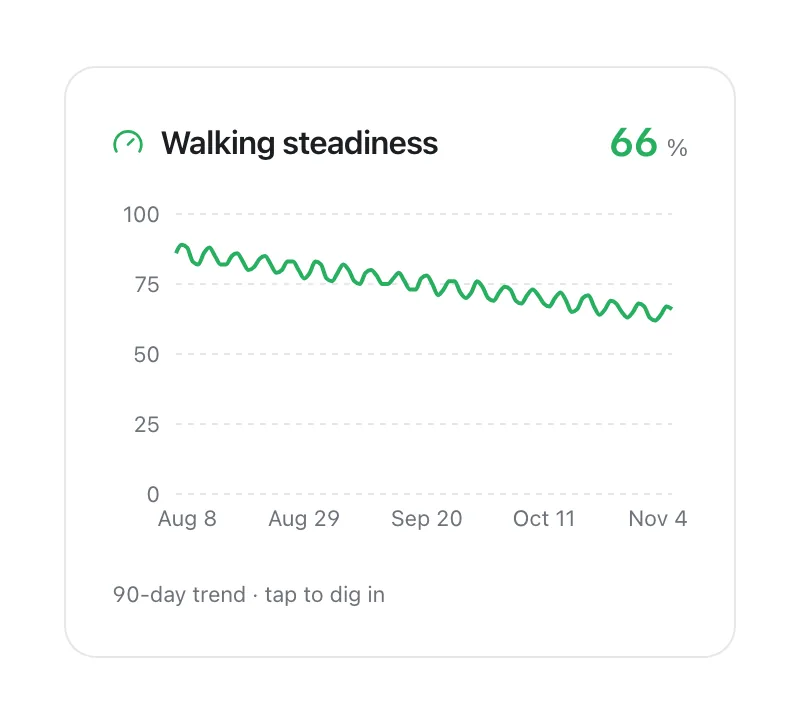
I got one Low reading—should I worry? Apple's own framing is about a 12-month risk window, not a single-moment prediction, and the score updates over time as you keep carrying your phone normally. A persistent Low or Very Low pattern, or a clear downward trend, is worth mentioning to a clinician; one reading in isolation is less informative.
Can I improve my score? Apple's Health app links out to balance and strength exercises aimed at improving walking steadiness, consistent with general fall-prevention guidance (strength, balance, and gait training).
See Walking Steadiness alongside the rest of your mobility data
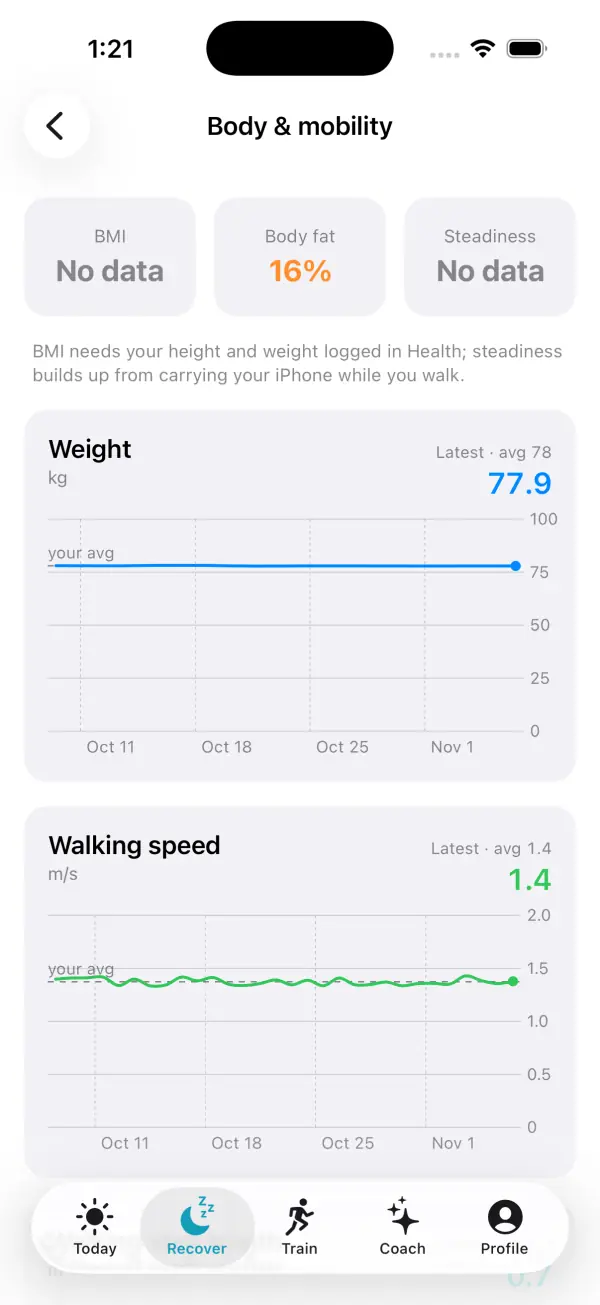
VedaWatch's Body & Mobility view reads your Walking Steadiness trend from Apple Health over the last 90 days, next to walking speed and body weight, so a gradual decline shows up as a trend rather than a single alert.
With permission, VedaWatch displays the same iPhone-generated score Apple Health already has—it doesn't compute its own steadiness estimate or add inputs beyond what the Health app already provides.
Sources & further reading
- Apple Support: Monitor your walking steadiness in Health on iPhone
- Apple: Measuring Walking Quality Through iPhone Mobility Metrics (white paper)
- Scientific Reports (2023): Validity and reliability of the Apple Health app on iPhone for measuring gait parameters in children, adults, and seniors (Werner et al.)
This guide is educational, not medical advice, and has not been clinically reviewed. VedaWatch is not a medical device. If you have symptoms or concerns about your heart or health, contact a qualified healthcare professional.
Put your trends in perspective.
Explore HRV, sleep, and recovery with VedaWatch on your iPhone.
Download VedaWatch on the App Store →