 VedaWatch
Using VedaWatch
How to set step, sleep and exercise goals with Apple Watch and track your progress
Set daily or weekly step, sleep, exercise, energy and distance goals in VedaWatch, see live progress from Apple Health, and get a concrete nudge when you fall behind pace.
By VedaWatch editorial team · · 8 min read
The short answer
In VedaWatch, a metric goal is a daily or weekly target for steps, sleep, exercise minutes, active energy or distance. It tracks itself from Apple Health, tells you whether you're on pace, and suggests one concrete step when you're behind. Pick a target close to what you already do most days, then raise it.
What goals are in VedaWatch
Goals are the things you're working toward. VedaWatch has two kinds. A metric target is a number with a period, such as 10,000 steps a day or 30 km a week, and it tracks itself from Apple Health. An AI coach goal is something you describe in your own words, such as getting ready for a half-marathon, and the AI coach reads it every time it answers you.
Metric targets work with five measures: Steps, Active energy (kcal), Exercise minutes, Sleep (hours) and Distance (km). Each can be daily or weekly. Steps, energy, exercise minutes and distance add up over the day or week. Sleep is counted per night, so a weekly sleep goal is an average per night rather than a weekly total.
Progress is worked out on your iPhone from your Apple Health data. You don't log anything by hand. If your Apple Watch records it in Apple Health, your goal sees it.
How to create a goal on iPhone
You can reach your goals from the Train tab, or from the Goals card on Today by tapping All goals. The Goals row on Train shows how many of today's daily goals you've met, such as 2/3.
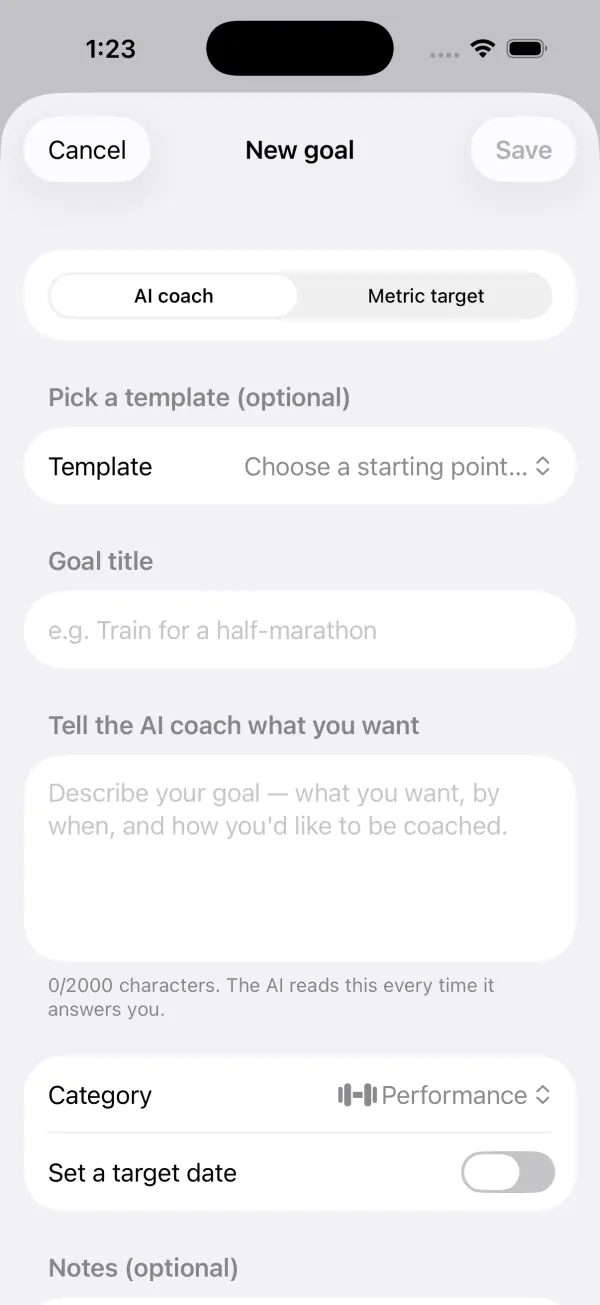
- Open the Train tab and tap Goals.
- Tap the + button in the top corner. If you have no goals yet, tap Add a goal instead.
- At the top of the New goal sheet, choose Metric target.
- Under Metric, pick Steps, Active energy, Exercise minutes, Sleep or Distance, then choose Daily or Weekly.
- Set the number under Target with the + and − buttons. Read the hint below it to see how often you'd have hit that number recently.
- Optionally add a title, such as "Hit 10,000 steps every day", and notes for the AI coach.
- Leave Active switched on and tap Save.
Choosing a target you can actually hit
Each measure starts with a default: 10,000 steps, 500 kcal of active energy, 30 exercise minutes, 8 hours of sleep or 5 km of distance a day. Treat those as starting points, not recommendations for you.
When you switch a step, energy, exercise or distance goal from Daily to Weekly, the target is multiplied by 7 so the effort stays the same: 10,000 steps a day becomes 70,000 a week. Switching back divides it by 7. Sleep stays a per-night number either way.
The most useful part of the editor is the hint under the target. Once VedaWatch has at least five days (or weeks) of your data, it shows a line like "Your average over the last 30 days: 7,850 steps. You'd have hit this target 40% of the time." Research on goal setting suggests that specific, challenging goals tend to work better than vague ones, but a target you'd almost never have hit is more likely to discourage you than motivate you. A good first target is one you'd have hit somewhere around half the time, which you can raise later.
Once a goal is saved, you can edit its metric, period and target, but not its type. To turn a metric target into an AI coach goal, delete it and create a new one.
How live progress and pace work
Every active metric goal shows a ring and one status line. The status is one of five states: met, on pace, behind, missed or waiting.
For a daily steps, energy, exercise or distance goal, VedaWatch compares how far you are with how much of a typical active day has passed. It treats the day as 7:00 to 21:00, so at 14:00 you're half way through. You count as on pace if you've done at least 85% of what a straight line would expect by now. That small allowance stops a slightly slow morning from reading as falling behind. Early in the morning, before anything is recorded, the goal just says "Fresh day".
Weekly totals work the same way across the week, and they also tell you what each remaining day needs, for example "42,000 steps of 70,000 · 7,000 steps a day to finish". The week follows your iPhone's calendar settings.
Sleep goals are different, because sleep happens once a night. A daily sleep goal is either met or missed based on last night, such as "6h 50m last night · 1h 10m short", and shows "Waiting for last night's sleep" until the night has synced. A weekly sleep goal shows your average per night so far this week.
When you're behind, the status line adds a concrete way to close the gap. For steps it estimates a walk at about 100 steps a minute, rounded up to the next 5 minutes, as in "3,800 steps to go · about a 40-min walk". For a daily distance goal it assumes about 12 minutes per km of walking. For exercise minutes it says something like "a brisk 15-min session does it". The first time a goal is met in a day or week, your iPhone gives a short success haptic.
The Goals card on Today
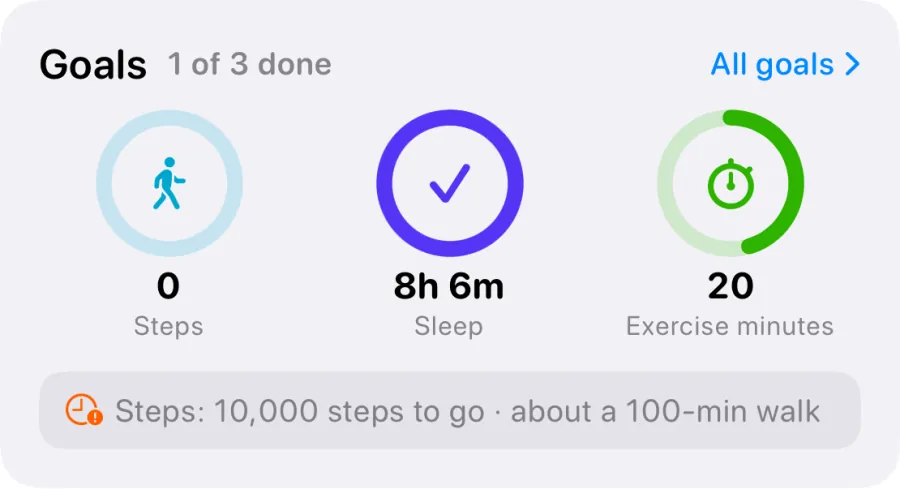
The Today tab shows a Goals card with a ring for up to three active metric goals. Daily goals come first, because they're about today. Weekly goals carry a small "this week" label under the number.
The header counts your daily goals, such as "1 of 3 done", and changes to "All done" once they're all met. Below the rings, one line picks out the goal that most needs attention: the one furthest behind pace, or otherwise the first one that isn't finished yet. If everything is met or still waiting for data, that line disappears.
Tap a ring to open that goal, or tap All goals to see the full list. The card only appears when you have at least one active metric goal and VedaWatch has asked for Apple Health access, so Today never shows an empty goals card.
The Goals list and goal detail
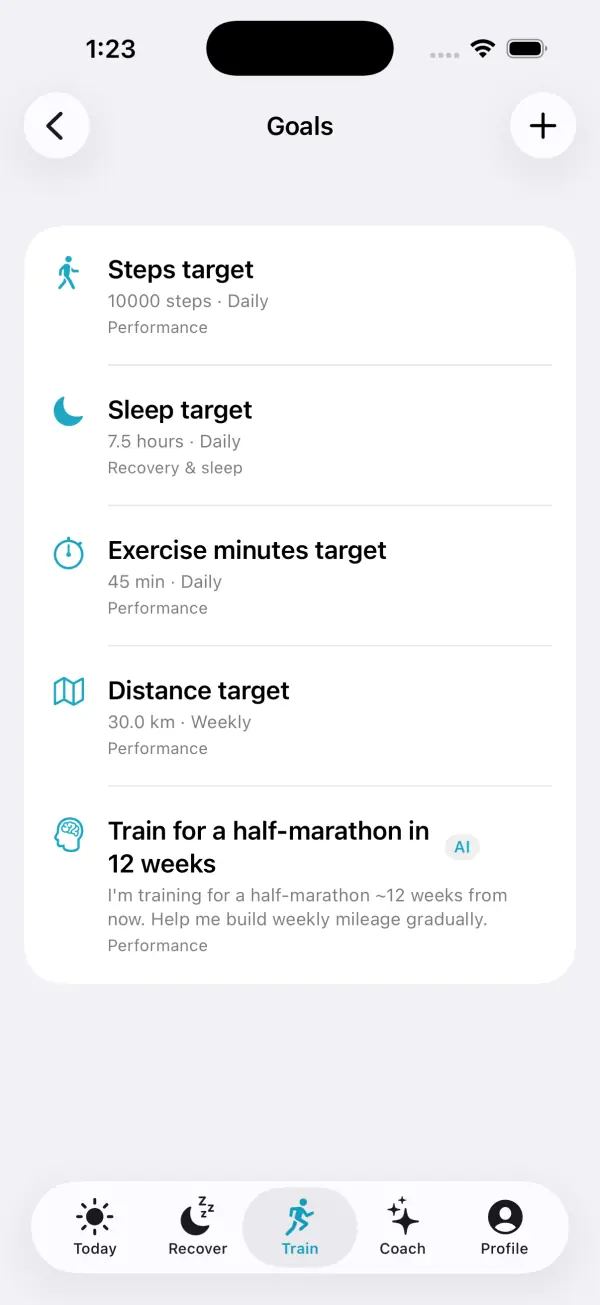
The Goals list starts with a summary such as "2 of 3 done today" and how many goals are behind pace. Below it, Targets shows each metric goal with today's or this week's value, its status line, the last seven days and a short record like "Hit 18 of 26 days · 4-day streak". AI coach goals sit under With your coach, and paused goals at the bottom under Paused, each with a Resume button.
Tap a goal to open its detail page. A metric goal shows a large ring with your current value against the target, then four tiles: Streak (periods in a row you've met it), Best run, Hit rate and Average. The hit rate covers the last 30 days for daily goals and the last 12 weeks for weekly goals. Today, or this week, only counts once it's met, so an unfinished morning never drags your rate down. Below that, a chart shows each day or week as a bar against a dashed goal line.
Use the ••• menu on the detail page to Edit, Pause or Delete a goal, or long-press a goal in the list for Pause and Delete. A paused goal is hidden from Today and the coach ignores it until you resume it. Deleting can't be undone.
How goals feed the AI coach
Your active goals are part of what the AI coach reads before it answers. That includes each goal's title, target and period, the notes you added, and, for AI coach goals, your own description of what you want and any target date. The coach is told to tie its advice to your goals and never to invent goals you didn't set.
For metric goals, the iPhone app also sends the progress you see in the app for up to six active goals: today's or this week's value, whether you're on pace, your recent hit rate and your streak. The coach is told to quote those numbers rather than work out its own, and to suggest one concrete step when a goal is behind. So what the coach says should match the ring on your screen.
Every goal's detail page has an Ask Coach about this goal button. It opens a chat with a question already filled in, including your target, current status and record, so you can just send it. Ask Coach shows a Pro badge if you're not on Pro.
AI coach goals for running or strength can also link to a matching training plan, shown as Turn this into a plan, which schedules the sessions for you. When a plan is running, Pro members see it in the Goals list under Training plan. Training plans have their own guide.
Managing goals on the web
Your goals are saved to your VedaWatch account, so the same list appears on iPhone and in the web app. On the web, open Goals from the sidebar and click New goal. The dialog has the same two tabs, AI coach goal and Metric target, with the same metrics, Daily or Weekly period, target, optional title and notes for the AI coach.
Each goal on the web shows its target, category and notes, with an Active switch to pause it, a pencil to edit it and a bin to delete it. Live progress rings, pace and streaks are worked out from Apple Health on your iPhone, so check the iPhone app to see how you're doing today.
Common questions about goals
Why does my goal say 0 or "Fresh day"? Early in the day there may be nothing in Apple Health yet, or your watch hasn't synced to your iPhone. Open the Goals list and pull down to refresh. If you see "Connect Apple Health so your goals can track themselves", tap Connect and allow access.
Why does my sleep goal say it's waiting? Sleep is scored per night, and the goal waits until last night's sleep appears in Apple Health. That usually happens after you wake and your watch syncs.
Why was I "behind" at lunchtime even though I'm active in the evenings? Pace assumes activity is spread evenly from 7:00 to 21:00. If you usually exercise late, being behind at noon just means you haven't done it yet. The status updates as soon as your numbers do.
How many steps or how much sleep should I aim for? There's no single right number. Large studies link more daily steps with lower risk of early death, with benefits levelling off around 6,000 to 10,000 steps depending on age, and sleep experts recommend at least 7 hours a night for most adults. Use the hint in the editor to set a target that stretches your own normal. This guide is general information, not medical advice.
Sources & further reading
- The Lancet Public Health (2022): Daily steps and all-cause mortality: a meta-analysis of 15 international cohorts (Paluch et al.)
- Journal of Clinical Sleep Medicine (2015): Recommended amount of sleep for a healthy adult (Watson et al.)
- World Health Organization: Guidelines on physical activity and sedentary behaviour (2020)
- American Psychologist (2002): Building a practically useful theory of goal setting and task motivation (Locke & Latham)
This guide is educational, not medical advice, and has not been clinically reviewed. VedaWatch is not a medical device. If you have symptoms or concerns about your heart or health, contact a qualified healthcare professional.
Put your trends in perspective.
Explore HRV, sleep, and recovery with VedaWatch on your iPhone.
Download VedaWatch on the App Store →