 VedaWatch
Hearing & Audio
Apple Watch & iPhone audio exposure: is 80 dB actually risky?
Apple tracks two separate things under 'Hearing': how loud your headphones have been, and how loud your surroundings are. Both use the same OK/Loud line at 80 decibels—but 'risky' is really about dose, not one number. Here's Apple's own exposure-time table, and what its own hearing-health study found.
By VedaWatch editorial team · · 6 min read
The short answer
Apple draws the line between 'OK' and 'Loud' at 80 decibels, for both headphone audio and ambient environmental sound. But loudness alone isn't the risk—duration is. Apple's own table shows roughly 5.5 hours a day at 80dB, or about 1h45m a day at 85dB, before temporary hearing loss becomes a concern. Check your real exposure in Health → Hearing before assuming a single number tells the whole story.
Two separate things, one 80dB line
Apple Health's Hearing category tracks two distinct measurements. Headphone Audio Levels estimates how loud your media audio has been through headphones, tallied over a rolling 7-day window (phone calls don't count). Environmental Sound Levels, from the Noise app on Apple Watch, periodically measures the ambient sound around you using the watch's microphone—it doesn't record or save any audio, just the level.
Both features use the same classification line: sounds measured below 80 decibels are shown as OK; sounds at or above 80 decibels are shown as Loud, since repeated long-term exposure above that level can lead to permanent damage.
Why 80dB isn't a strict cutoff—it's about dose
Apple publishes an explicit exposure-time table that makes clear this is about how long you're exposed, not just how loud:
- 80 decibels: around 5 hours 30 minutes a day can cause temporary hearing loss; the weekly limit at this level is 40 hours.
- 85 decibels: around 1 hour 45 minutes a day; weekly limit around 12 hours 30 minutes.
- 90 decibels: around 30 minutes a day; weekly limit 4 hours.
- 95 decibels: just 10 minutes a day; weekly limit around 1 hour 15 minutes.
- 100 decibels: even a few minutes a day; weekly limit around 20 minutes.
Headphone measurements have real caveats
Apple notes that headphone measurements are most accurate with Apple or Beats headphones; audio through other headphones or wired speakers is estimated from your device's own volume setting rather than measured directly at the ear.
Your iPhone, iPad, or Apple Watch can alert you once you've exceeded 100% of the 7-day exposure limit while wearing headphones, at which point your volume is automatically lowered the next time you connect them—though you can always turn it back up.
What Apple's own Hearing Study found
Apple ran a large-scale Hearing Study with the University of Michigan School of Public Health, sharing results with the World Health Organization's Make Listening Safe initiative. Reported 2021 findings: about 10% of participants had average weekly headphone exposure above the WHO-recommended limit, while 25% experienced daily environmental sound exposure above that same WHO limit.
Perhaps more notable: 20% of participants showed signs of hearing loss by WHO-standard criteria, compared with only about 10% who had a professional diagnosis—suggesting under-diagnosis is common. About 25% reported experiencing tinnitus (ringing in the ears) at least a few times a week.
Common questions
Is one loud concert going to damage my hearing? Apple's table is about repeated, long-term exposure, not a single event—though very loud single events (gunfire, fireworks at close range) carry their own, different risk that this kind of average-exposure tracking isn't designed to capture.
Does Reduce Loud Sounds fix the problem automatically? It caps your headphone volume at a level you choose, which helps, but it's a setting you have to turn on and configure—it isn't on by default for everyone.
Why does my Apple Watch Noise reading differ from what I'd expect? Water and wind can affect accuracy, and measurements pause during Water Lock or while the microphone or speaker is otherwise in use.
See your audio exposure trend in VedaWatch
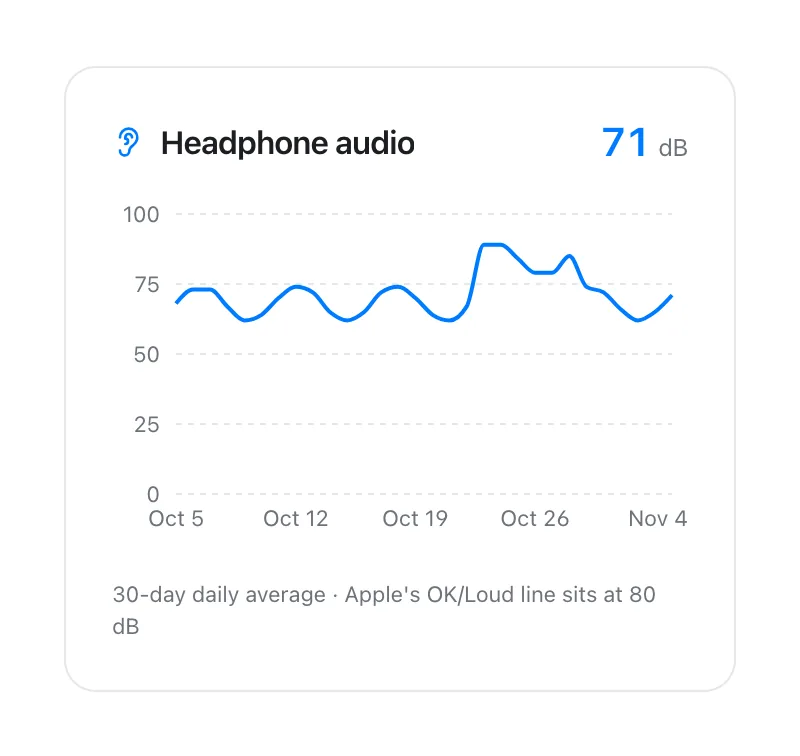
VedaWatch's Audio exposure view reads your headphone audio data from Apple Health as a daily trend, so a loud stretch shows up as a pattern rather than a single average that's easy to shrug off.
One thing worth knowing: VedaWatch's own in-app copy currently describes Apple's risk threshold as "above 85 dB"—worth updating, since Apple's actual documented OK/Loud boundary for both headphone and environmental sound is 80 dB; 85 dB is simply one specific point further down Apple's own exposure-time table, not the line itself.
Sources & further reading
- Apple Support: Headphone notifications on your iPhone, iPad, or Apple Watch
- Apple Support: Use the Noise app on your Apple Watch
- 9to5Mac: Apple Hearing Study reveals headphone and environmental exposure findings (reporting on Apple/University of Michigan results)
This guide is educational, not medical advice, and has not been clinically reviewed. VedaWatch is not a medical device. If you have symptoms or concerns about your heart or health, contact a qualified healthcare professional.
Put your trends in perspective.
Explore HRV, sleep, and recovery with VedaWatch on your iPhone.
Download VedaWatch on the App Store →