 VedaWatch
Using VedaWatch
Your Apple Health data in VedaWatch: privacy, backup sync, export and deletion
What VedaWatch keeps on your iPhone and what it saves to your account, how the opt-in Health backup works, and how to check Health access, export your data or delete your account.
By VedaWatch editorial team · · 8 min read
The short answer
Your Apple Health data stays on your iPhone unless you turn on Back up Health data, a Pro option that is off by default and can be switched off at any time. What you create in the app, like your journal, training plan and workout notes, is saved to your account on every plan. You can export everything as JSON or CSV, and deleting your account removes it from VedaWatch's servers.
Two kinds of data: Health data and what you create
VedaWatch works with two different kinds of data, and it treats them differently.
The first is your Apple Health and Apple Watch data: heart rate, HRV, sleep, activity and workouts. VedaWatch reads it from Apple Health on your iPhone. By default it stays there, and nothing from it is copied to your VedaWatch account.
The second is what you create inside the app: your daily tags journal, guided sessions, meals you log, your training plan, workout notes and a few saved settings. If you're signed in, this is saved to your account on every plan, free or Pro, so it survives a new phone or a reinstall.
If you use VedaWatch without an account, nothing is saved to the cloud at all. The app shows Journal, plan & notes as This iPhone only, and you can create a free account later to save them.
Health access: why VedaWatch can't tell what you denied
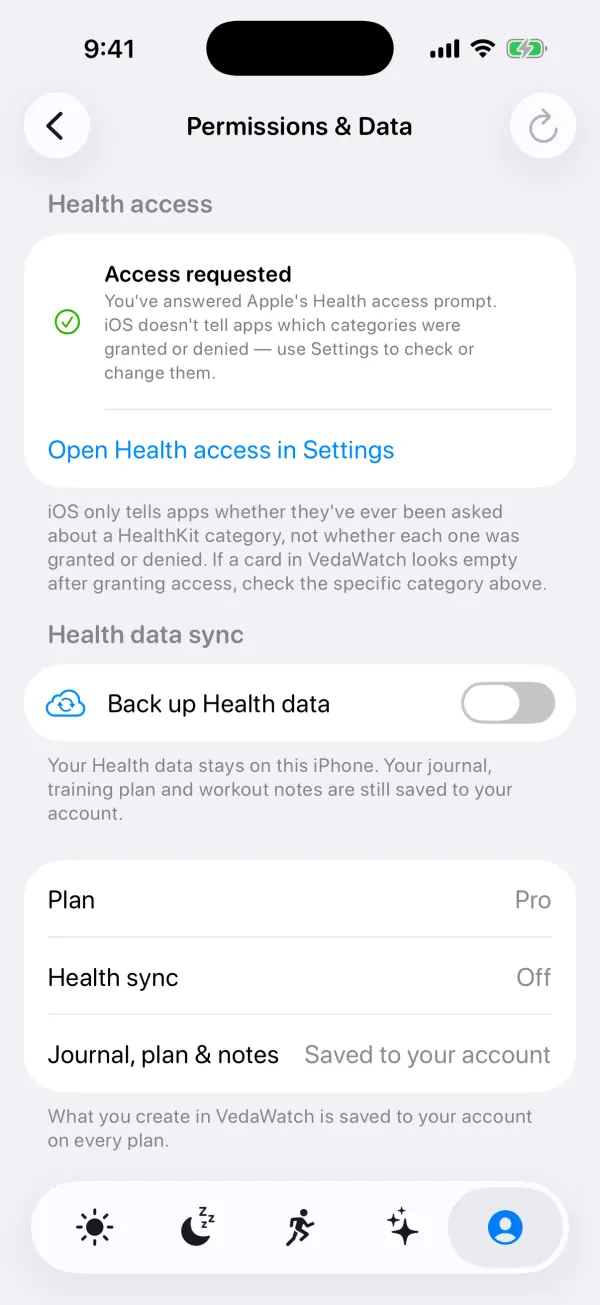
When you first set up VedaWatch, iOS shows Apple's own Health access prompt, where you turn each category on or off. VedaWatch never sees that screen or your choices.
This is a deliberate Apple privacy rule. iOS only tells an app whether it has asked about a Health category, not whether you said yes or no. That way an app can't learn anything from what you chose to hide. So after you answer, VedaWatch's Permissions & Data screen shows Access requested, not a list of what was granted.
The practical effect: if a card in VedaWatch stays empty even though your watch is recording the data, the most likely reason is that the category is switched off for VedaWatch. Check it in the Settings app. VedaWatch also has a shortcut button, Open Health access in Settings.
You can change these choices at any time on your iPhone in Settings › Health › Data Access & Devices › VedaWatch. Turning a category off stops VedaWatch reading it. It doesn't delete anything from Apple Health.
Back up Health data: the opt-in cloud sync
Back up Health data copies your Apple Health and Apple Watch data (heart rate, HRV, sleep, activity, workouts) to your VedaWatch account. That copy powers the features that run on VedaWatch's servers rather than on your phone: the web dashboard at vedawatch.com, Chat, Analysis and weekly reports.
It's off by default for everyone, and it's a Pro feature. On the free plan the switch shows a PRO badge. Even on Pro, nothing is uploaded until you turn it on yourself and confirm Turn on Health sync. The server enforces the same rule: health sync can only be switched on for a Pro account, and every sync request checks that it's on.
While it's on, VedaWatch syncs when you open the app and about every 12 hours in the background. The Permissions & Data screen then lists each data type with its sample count and when it last synced, and a Re-sync all health data button appears in the Profile tab if you ever need a full re-import.
If you open Chat, Analysis or reports while backup is off, VedaWatch shows Turn on Health sync instead, with the same explanation of what will be copied. Everything else, like readiness, sleep and workout screens, works from the Health data on your iPhone.
Turning backup off, and deleting what was synced
Switching Back up Health data off asks how you want to do it. Turn off, keep what's synced stops new uploads but leaves the copy already in your account. Turn off and delete synced Health data also removes it.
Deleting synced Health data removes the uploaded samples, workouts and the daily and hourly summaries built from them. It turns sync off first, so an upload can't slip in while the delete runs. Your journal, plan, meals, guided sessions and notes are kept, and Apple Health on your iPhone isn't touched.
If your Pro subscription ends, sync stops on the app side. What was already synced stays in your account until you delete it or delete your account.
How to find your privacy and data settings
All of VedaWatch's data controls live in the Profile tab, the last icon in the tab bar.
- Open VedaWatch on your iPhone and tap the Profile tab.
- Under Data, tap Permissions & data to see your Health access status, the Back up Health data switch, your plan, whether Health sync is on, and where your journal, plan and notes are saved.
- To change which Health categories VedaWatch can read, tap Open Health access in Settings, or go to Settings › Health › Data Access & Devices › VedaWatch.
- Back in Profile, under Data, tap Export my data to download a copy of your account.
- Under AI features, use the AI processing switch to allow or stop sending health summaries to the AI service. Tap What data is sent? to read exactly what's included.
- At the bottom of Profile, tap Delete account if you want to remove your account and its data.
Exporting your data as JSON or CSV
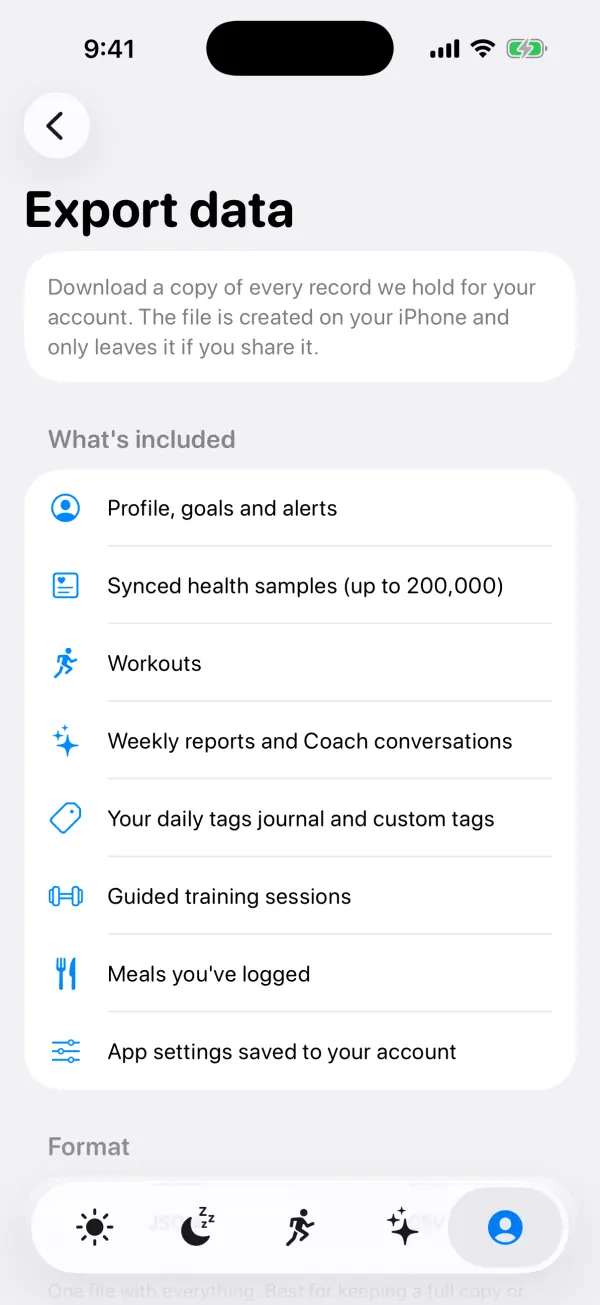
Export data downloads a copy of every record VedaWatch holds for your account. The file is created on your iPhone and only leaves it if you share it. You need an account to export, since the data comes from your account.
The file includes your profile, goals and alerts, synced health samples (up to 200,000), workouts, weekly reports and Coach conversations, and the journal, guided sessions, meals and saved settings stored in your account. VedaWatch also adds the daily tags journal from your iPhone. If you never turned on Health backup, the health samples and workouts sections will simply be empty.
Pick a format before you start. JSON is one file with everything, best for keeping a full copy or moving to another app. CSV makes one spreadsheet file per section, such as workouts or health samples, which opens in Numbers or Excel.
Large accounts can take up to a minute to gather. When it's done, VedaWatch shows the file size and a record count for each section, then a button to share or save to Files. The copy on your iPhone is temporary, so save it to Files if you want to keep it.
Deleting your VedaWatch account
Delete account permanently removes your profile data, health samples, workouts, goals, alerts and AI history from VedaWatch's servers, along with your journal, guided sessions, meals, plan and other app data. It can't be undone, so to confirm you type DELETE and tap Permanently delete my account.
VedaWatch also erases the journal stored on your iPhone and signs you out. It doesn't change Apple Health: your watch's heart rate, sleep and workout history stay in the Health app, which you manage separately.
If you have a Pro subscription, cancel it in your Apple ID subscriptions as well. Deleting the account doesn't cancel App Store billing. The VedaWatch privacy policy says deleted data is removed from production systems immediately and from encrypted backups within 30 days, except where the law requires keeping limited records.
If you only want the health copy gone but want to keep your account, journal and plan, use Turn off and delete synced Health data instead.
AI processing is a separate opt-in
Coach, Chat, Analysis and lifestyle AI summaries need a second, separate permission: the AI processing switch under AI features in Profile. It's off until you agree to it, and VedaWatch shows a disclosure first explaining what is sent and who processes it.
Nothing is sent until you turn it on. When it's on, daily summaries of the Health data you've synced to your account (activity, heart, vitals, sleep, workouts, body and mobility, sound exposure, nutrition, mindful minutes and cycle tracking), plus your active goals, are sent when you use an AI feature, not your full raw history. They go through the Lovable AI Gateway to Google Gemini. With Health sync off, synced Health data isn't used for AI at all. Your name, email, Apple ID, device identifiers and contacts are never sent.
Turning AI processing off stops new health data going to AI providers, and the AI features stop fetching new insights. Health backup and AI processing are independent, so you can have one on without the other.
Common questions about your data
Does VedaWatch upload my Health data if I'm on the free plan? No. Back up Health data is Pro only and off by default, and the server refuses to turn it on for accounts without Pro. Free accounts still save what you create, like your journal and training plan.
Why does Permissions & Data say Access requested when I turned some categories off? Because iOS doesn't tell apps which categories were granted or denied. Access requested only means you've answered Apple's prompt. Check the individual categories in Settings.
If I turn backup off, is my Health data deleted? Only if you choose Turn off and delete synced Health data. Turn off, keep what's synced just stops new uploads.
Does VedaWatch sell my health data? The privacy policy says VedaWatch never sells health data, never uses it for advertising, and never uses it to train public AI models. Cloud data is encrypted in transit and at rest, and access is limited to your signed-in account.
Can AI assistants like Claude or ChatGPT see my data? Only if you connect one under AI assistants in Profile and approve it. Connected assistants can read, but not change, what VedaWatch shows you.
Sources & further reading
- VedaWatch Privacy Policy
- Apple Developer: Protecting user privacy (HealthKit)
- Apple Developer: HKHealthStore authorizationStatus(for:)
- Apple: Health app and privacy
- Apple App Store Review Guidelines: 5.1 Privacy
This guide is educational, not medical advice, and has not been clinically reviewed. VedaWatch is not a medical device. If you have symptoms or concerns about your heart or health, contact a qualified healthcare professional.
Put your trends in perspective.
Explore HRV, sleep, and recovery with VedaWatch on your iPhone.
Download VedaWatch on the App Store →